Non-Technical Person Mocks LLM Researcher About Temperature Setting on Robot
Why is this AI ML meme funny?
Level 1: Annoying Helper
Imagine you have a toy or device that’s supposed to help you, but it always chooses the worst moment to do its job. Let’s say you have a game console that suddenly decides to install a big update right when you and your friends sit down to play. The screen goes blank and shows a progress bar, and you can’t play until it’s done. You’d probably get upset and yell, “Ugh, this thing is acting like a villain!” You might even call the console names, like “stupid machine” or something, because you’re frustrated. Now, the console maker would say, “Hey, I’m not a villain, I’m just updating to make things better!”
That’s exactly what’s going on with Windows in this meme. Windows 11 is the computer’s system trying to keep itself healthy (by updating and sending diagnostic info), kind of like when your parents make you take medicine or get a vaccine to keep you healthy. But if they give you that medicine while you’re in the middle of having fun, you’d be really annoyed, right? You might say, “You’re the worst! You ruined everything!” even though deep down you know it’s to help you. In the meme, people are so annoyed with Windows 11’s updates that they jokingly call it “malware,” which is a word for a bad program (like a virus) that hurts your computer. It’s like calling the helpful thing a bad thing because of how it’s behaving. And Windows 11 (as a cartoon character) is saying, “Hey, that’s not my name!” – it’s a bit hurt, like “I’m not a virus, I’m trying to help!”
Think of it another way: Imagine your friend tries to clean up your room to help you, but they do it in the middle of you playing with your toys, without asking. Suddenly all your toys are taken away to be organized. You’d probably shout, “Stop it! You’re messing everything up!” You might even call your friend something mean like “You bully!” because you’re angry in the moment. Your friend is like, “I’m not a bully, I’m just cleaning up!” In this story, Windows 11 is the friend who’s “cleaning up” by updating, and you are the upset person who just wants to keep playing (or working) uninterrupted.
The funny part of the meme is that we know Windows 11 isn’t actually a bad guy or a virus, but it’s being treated like one in the joke because sometimes it feels that annoying. It captures that emotional moment when you lose patience. But since it’s all drawn in a cartoon style with speech bubbles, it’s meant to be lighthearted. Even Microsoft engineers would probably chuckle (maybe a bit sheepishly) seeing this, like “ouch, our users think our updater is like a prankster.”
So, in simple terms: The computer wants to update itself for good reasons, but it often does it at a bad time and makes people mad. People then call the computer system a “malware” as an insult, like calling someone a bad name. The computer (Windows 11) responds, “That’s not what I’m called!” basically “Hey, I’m not a bad program!” It’s a goofy way to show the love-hate relationship tech users have with these updates. Everyone knows updates are important, but boy, do we hate being interrupted by them. The meme just puts that feeling into a little comic. And that’s why it’s funny – if you’ve ever been in that situation, you see this and go, “Haha, yeah, it does feel like that sometimes!”
Level 2: Feels Like Malware
Let’s break down what’s going on here in simpler terms. Windows 11 is the latest version of Microsoft’s Windows operating system. An operating system (OS) is basically the main software that runs your computer (other examples are macOS for Apple computers or Linux). It manages all the hardware and lets you run apps. Now, operating systems need to get updated regularly – updates can fix bugs, patch security holes, or add new features. Windows Update is the built-in tool in Windows that fetches and installs these updates. The issue this meme highlights is how Windows 11 (and its predecessor Windows 10) go about updating. Sometimes it feels really pushy or abrupt.
The meme joke is calling Windows 11 “Malware”. Let’s define that: malware is a general term for “malicious (bad) software” – basically viruses, trojans, ransomware, spyware, any program that is designed to harm or trick you. Ransomware, in particular, is a nasty type of malware that locks your files or computer and demands you pay money (a ransom) to get your stuff back. The meme’s caption says the updater “felt like ransomware.” Of course, Microsoft isn’t literally holding your files hostage for money, but people joked that the forced OS upgrades and sudden restarts felt like being at the mercy of some malicious program. For instance, when Windows suddenly says “Updating now, don’t turn off your computer,” you can’t use your PC until it’s done. That’s where the ransomware comparison comes in – you’re locked out for a while, albeit with Windows the “payment” is just your time and patience, not actual cash. It’s an exaggeration, but that’s the humor.
Now, why would anyone call a legitimate product like Windows 11 malware? It boils down to user experience. Windows 11 sometimes forces updates at inconvenient times or nags you repeatedly to update. If you’re a new developer or just a user who’s had this happen, it can be really annoying. Imagine you’re coding or playing a game, and boom! a big message pops up telling you to restart for an update. Or worse, it just automatically restarts when you left the PC idle for a bit, and you come back to find all your applications closed. It almost feels like a prank your computer pulled on you. Early-career developers often learn this the hard way the first time it happens – you might step away for a quick break, and when you return, your session is gone because Windows decided that was a good time to reboot and patch. It’s a “live and learn” moment: next time, you turn off auto-restart or at least save everything!
Let’s talk about telemetry too. Telemetry is a fancy word for data that your system collects and sends back to the manufacturer. In Windows 11, telemetry might include things like error reports, which features you use, performance stats, etc. Microsoft uses it to find out if your system encountered any problems or to understand how people use their PCs, so they can improve things. For example, if a certain laptop model keeps overheating, they’ll see the crash reports and can fix drivers. That sounds useful, but the flip side is some people feel it’s a bit invasive – like the OS is spying on them. Even if it’s not personal info, just knowing that Windows is quietly sending data out regularly can be unsettling. It’s turned into a running joke among tech folks: “Windows is spyware.” In reality, it’s not trying to steal your personal info, but the feeling of being watched or having data collected without clearly knowing what’s included makes people uncomfortable. So in our meme, lumping that in, calling it “malware,” is a tongue-in-cheek way to say “Windows is acting kinda shady.” It’s hyperbole, but it stems from real concerns about privacy.
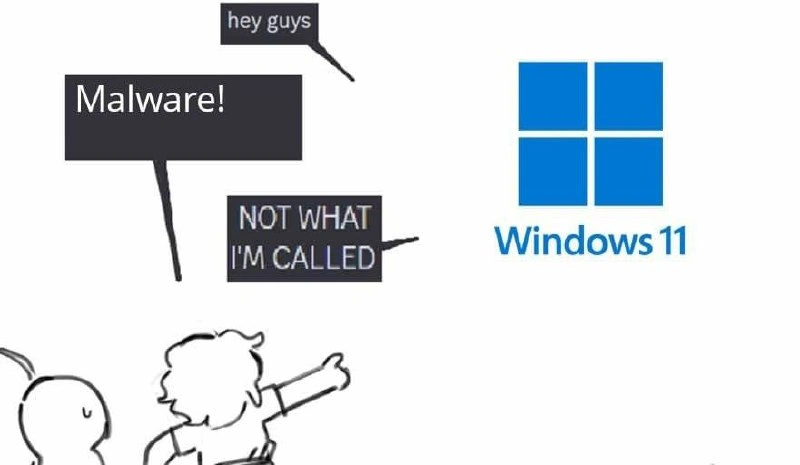
Now consider the branding vs experience angle – the title of the meme post says, “Nobody remembers your brand when the updater felt like ransomware.” Microsoft spent a lot of effort branding Windows 11: new logo (that blue four-square window you see in the image), new name, a marketing campaign about how great and fresh it is. They want people to have a positive image of “Windows 11.” But the joke here is that all of that branding work can be undone if the user’s actual experience is awful. If the updater behaves so aggressively that it reminds people of a computer virus, they’re going to call it a virus! In the picture, Windows 11 is literally being called “Malware!” by a character. The Windows logo then protests, “NOT WHAT I’M CALLED,” as in “Hey, that’s not my name – I’m Windows 11, not malware.” But the fact that the character went there (used that nasty word) shows how fed up they are. It’s like a person saying “I don’t care what your official name is, to me you’re just a big nuisance!”
Let’s decode the visual elements quickly. On the right, you have the official Windows 11 logo and label. On the left, there’s a little doodle of a character pointing excitedly at that logo. Above the character are speech bubbles. The small top bubble “hey guys” suggests someone (maybe Windows 11 itself or just the character introducing something) getting everyone’s attention. Then the big black bubble “Malware!” is the shout – that’s the joke punchline, the name-calling. The medium bubble pointing to the logo saying “NOT WHAT I’M CALLED” is Windows 11’s reply. So it’s a mini story: Windows 11 shows up saying “hey guys” (like “hi, I’m Windows 11!”) and instantly someone yells “Malware!” at it, and Windows 11 is like “Hey! That’s not my name.” It’s personification – making Windows act like a person in a conversation – which makes the joke more relatable. You can almost imagine Windows 11 walking into a room and the crowd booing and calling it a virus. Embarrassing for Windows, but comedic for us observers. 😅
For a junior developer or someone new to tech, you might wonder, “Is Windows 11 actually bad or malware?” No, it’s not. Windows 11 is a legit, modern operating system used by millions. The joke comes from frustration with how it updates and some of the choices Microsoft made (like collecting data by default, or pushing upgrades very insistently). It’s kind of like if your teacher or boss keeps nagging you – you might jokingly call them a slavedriver or dictator under your breath. You don’t literally mean they are that, it’s just blowing off steam. Same here with calling Windows 11 malware.
Some key terms explained:
Forced OS upgrade: This refers to when an operating system update isn’t really optional or easy to refuse. With Windows 10/11, Microsoft sometimes downloads the new version in the background and frequently prompts you to install it. Many users felt they didn’t have a real choice, because the prompts would return again and again, or the upgrade would schedule itself. It’s “forced” in the sense that unless you take extra steps, eventually the system is just going to update. This is different from, say, older Windows where you could just never install Windows 7 Service Pack 1 if you didn’t want to (though not installing updates was risky).
Enterprise IT sigh: In businesses (“enterprise” means large company environments), IT departments handle updates centrally. They often sigh because they’re stuck in the middle: Microsoft pushes them to deploy updates (for security), but the employees get annoyed by updates. Enterprises can use special tools to delay or manage updates more gracefully, but it’s extra work. When something like Windows 11 comes out, enterprise IT has to plan carefully or they’ll have a lot of unhappy users if machines update at a bad time. So they totally get this meme. It’s the kind of thing an IT admin might share with a “so true” comment.
OS telemetry gripes: A “gripe” is a complaint. So OS telemetry gripes are basically users complaining about the data collection in the OS. It’s a common topic on tech blogs, as mentioned – people swapping tips on how to turn off telemetry or debating if Microsoft should be more transparent.
To give a concrete example for a junior dev: Suppose you just finished configuring your development environment and you’re running a long compile or test suite. You leave for lunch and expect everything to be ready when you’re back. Instead, you come back and your PC has rebooted to finish installing Feature Update X.Y.Z. You’d probably groan, maybe lose some unsaved progress, and have to restart your tasks. You might mutter “Ugh, Windows is the worst sometimes.” That feeling, magnified a bit, leads to memes like this where people vent by calling it names.
The Security tag on the post is there because this whole situation lives in a weird security-related tension. Windows is trying to keep your system secure from viruses by pushing updates… yet it ends up getting called a virus itself in jest. It’s like irony: the bodyguard is so overzealous that the client says “you’re as bad as the enemies.” For a newcomer, just know that Windows 11 is safe and not a virus — this is just technologists bonding over annoyances. In tech humor circles, a lot of jokes come out of these little ironies and frustrations we all share.
In summary, Windows 11 = good software (in principle) that sometimes acts in a way people hate. Malware = truly bad software. People jokingly label the former as the latter when they’re upset about things like forced updates or feeling spied on. The meme uses a funny cartoon format to convey that: Windows 11 is personified, someone yells “Malware!” at it immediately, and Windows (understandably) objects. It’s a bit like calling your friend a rude nickname when you’re mad at them and them going “Hey, that’s not my name!” Pretty relatable, right? At the end of the day, it’s all in good fun – a way for developers to say “Hey Microsoft, tone it down a bit, your updates are driving us crazy!” while also laughing about the situation.
Level 3: Update Tyranny
If you’ve ever had Windows decide to update right in the middle of your work, this meme probably hits a nerve. Picture a seasoned developer working late, with 30+ Chrome tabs, a bunch of Visual Studio windows open, maybe a Python script crunching numbers – and then a wild pop-up appears: “Windows will restart in 15 minutes to finish installing updates.” The poor dev’s reaction is basically the meme: “Malware!” – an instinctive, exasperated yell, as if a virus just infiltrated their workflow. And Windows 11 (represented by that shiny new four-pane logo) defensively shouts back, “NOT WHAT I’M CALLED!”
This combination of elements is hilarious to those of us in tech because it’s so true to life. Microsoft’s marketing can push the Windows 11 brand, new fonts, new UI, fancy features – but the moment an unwanted restart strikes, nobody’s thinking about rounded corners or the new Start Menu. We’re thinking, “This feels as bad as a virus infection.” It’s a dramatic comparison, sure, but it’s cathartic humor born from real frustration. The caption text says, “Nobody remembers your brand when the updater felt like ransomware,” which is a cheeky way of saying: all that branding and goodwill goes out the window (pun intended) if your update system acts like a bad actor. In tech terms, the user experience here completely undermines the product’s image. Developers and power users have long memories, and many of us still recall episodes where Windows behaved almost antagonistically.
One infamous incident that senior folks love to joke about is the Windows 10 forced upgrade saga. Back in the mid-2010s, Microsoft was eager to move people off Windows 7/8 onto Windows 10. They pushed a tool called “GWX” (Get Windows 10) which started as a friendly little icon in the taskbar but became progressively more aggressive. Eventually, the prompt’s design changed so that even clicking the “X” (close button) consented to scheduling the upgrade — a UX trick that caught people off guard. Countless users woke up to find their machine had “upgraded itself” overnight. It was meant to be helpful (hey, free new OS!), but it felt sneaky. Tech forums were flooded with comparisons to nagware or malware installers, and some truly felt duped. That’s a concrete example of a forced_os_upgrade that left a bad taste. The meme is tapping into that collective memory. So when someone in the image excitedly points and yells “Malware!” at Windows 11, it’s echoing all those IT admins and developers who jokingly (or not so jokingly) referred to the Windows 10 updater as a “virus” back then. Windows 11, being another in the line of OS upgrades that Microsoft nudges (or shoves) users towards, inherits that mistrust.
Then there’s the ongoing telemetry issue. Windows 10 and 11 are well-known in tech circles for their extensive data collection. For example, by default Windows sends back details on how your system is running, which features you use, error reports, and more. Microsoft insists it’s to improve stability and user experience. And indeed, from a product improvement standpoint, having real-time feedback from millions of machines is gold. But many developers and privacy-conscious users view it with suspicion: “Why is my OS talking to Microsoft’s servers so much? What exactly is it sending?” We use the term Telemetry gripes for this — it’s a common rant topic on system administrator blogs and Reddit threads. People have gone to great lengths to disable or limit it (editing Group Policies, tweaking registry keys, installing third-party privacy tools like O&O ShutUp10++). When an OS feature causes that level of pushback, you know users are annoyed. So in the meme, equating Windows 11 to “Malware!” is also a jab at the spyware vibe that telemetry gives off. It’s hyperbole — Windows telemetry isn’t stealing your bank logins or holding your files hostage — but to a disgruntled dev, it feels intrusive. It’s as if your OS is snooping on you, a behavior we typically associate with malicious software. Hence the Security category tag: it’s pointing to the irony that software meant to secure your system (updates, diagnostics) is perceived as a security threat itself.
We also have to talk about the forced restarts and update timing, a pain point in enterprise and dev environments. In the meme image, the little cartoon character enthusiastically pointing represents everyone who has ever wanted to call out Microsoft on this. It’s like all of us saying, “Ha! We’ve been waiting to label you properly!” The reason this resonates deeply is that forced updates have real consequences. Imagine you’re on an important Zoom call with a client, and suddenly your screen goes blue with “Configuring Windows updates.” Or you’re crunching on a deadline, and your PC decides to reboot right now because it hit some non-deferrable update deadline. These are not hypothetical for devs — they’ve happened. There are war stories of deployments failing because a critical server rebooted itself to patch, or a conference demo going awry due to an impromptu update. No actual virus was present, but the disruption and panic caused were on par with a virus outbreak! It’s the kind of experience that leaves an emotional mark, hence the joking-but-not-joking hostility in calling Windows 11 “ransomware”. After all, ransomware makes you wait and prevents you from using your PC until you meet its demands; Windows updates make you wait and prevent you from using your PC until you install the patch. The difference? One demands a Bitcoin payment, the other demands patience (and a restart). From a stressed-out user’s perspective at 2:00 AM, that distinction isn’t big enough to matter in the moment.
In software engineering terms, this whole situation is an example of a UX anti-pattern. Microsoft solved one problem (keeping systems secure and up-to-date) but created another (making users feel powerless and ambushed). Seasoned developers have seen this pattern before: a well-meaning feature that ignores the principle of least astonishment. The least astonishment principle says a system shouldn’t surprise users in unpleasant ways. Well, surprise reboots = very astonished (and very annoyed) users. The meme’s humor springs from that sense of “Can you believe our OS is basically breaking this cardinal rule?”
We also can’t ignore the branding irony pointed out in the title. Microsoft invests a ton in the Windows brand — new logos, slick wallpapers, marketing campaigns touting “Windows 11 is the future of work” or whatnot. But as the meme succinctly puts it, none of that matters if the user’s encounter with the product feels like dealing with a computer virus. The speech bubbles in the image literally replace the brand name with an insult: calling Windows by a malware name. That’s the ultimate branding failure in a sense. It’s akin to how people used to jokeingly call Internet Explorer “Internet Exploder” or called Windows Vista “Windows Me II” (comparing it to the ill-fated Windows Me) — once the tech community gives you a nickname, good luck shaking it off. Here, the nickname is as harsh as it gets: “Malware”. That indicates a significant level of frustration.
From the vantage of an enterprise IT admin (those folks responsible for updates on hundreds or thousands of machines), this meme is a facepalm and a sigh. They understand why updates are necessary (they don’t want actual malware spreading on the company network), but they also hear all the complaints from users. They’re the ones who field the angry helpdesk calls of “Why did my PC restart overnight? I lost my unsaved spreadsheet!” or “After that Windows update, my VPN software doesn’t work!” They might chuckle at this meme because, internally, they’ve probably muttered similar things about Windows updates acting like a rogue. In fact, many enterprise setups mitigate the “update tyranny” with tools: they use WSUS or Microsoft Endpoint Manager to control when updates apply, often scheduling them for evenings or weekends with careful communication. Some companies even delay updates for weeks to ensure no surprises. Essentially, enterprise IT often has to tame Windows’ default aggressive behavior so it doesn’t disrupt business – a testament to how burdensome the default can be.
Summing up the senior perspective: this meme is funny because it exaggerates a painfully common scenario in tech. It calls Windows 11 “Malware” to Microsoft’s (cartoon) face, encapsulating years of built-up annoyance with how Windows handles updates and data collection. The humor works on multiple levels — it’s a jab at Microsoft’s tactics, a commiseration for those who’ve been burned by an ill-timed reboot, and a bit of schadenfreude seeing the big, mighty Windows logo protest “NOT WHAT I’M CALLED” as if hurt by the accusation. It’s the classic techie coping mechanism: when a tool you rely on behaves balefully, you vent by comparing it to the worst thing imaginable (a virus) and then laugh so you don’t cry. And maybe, just maybe, someone at Microsoft will see memes like this and think, “Ouch, our most loyal users think our updater is indistinguishable from malware — perhaps we should refine that experience.” Until then, the rest of us will keep one finger on the “Pause Update” button and the other ready to create more memes. 😈
Level 4: Authorized Malware
Deep inside the operating system architecture, Windows updates operate with near-absolute authority. In Windows 11, the updater runs as a system service with kernel-level privileges (often called ring-0 access). This means it can alter essential system files, registry settings, and schedules without asking the logged-in user. In a strange way, the updater behaves similarly to malware in capability — it can do anything on your machine — except it’s trusted by design. The crucial difference is cryptographic: Microsoft digitally signs its update packages, and Windows verifies that signature against a built-in trust store. If the signature checks out, the OS willingly executes the code with full privileges. By contrast, actual malware lacks a valid signature (or uses a stolen one), and a healthy system will flag or block it.
From a security-model perspective, the distinction between an OS update and a malicious program comes down to intent and trust. The Windows Update mechanism is essentially a legitimate rootkit: it digs into the system at the lowest level (the kernel), installs new code, modifies existing binaries, and even schedules system reboots — all the behaviors we normally associate with advanced persistent threats or rootkits. However, because these actions are performed by the “approved” updater (signed by Microsoft’s certificate), they are allowed and even shielded from antivirus scrutiny. It’s a bit of a paradox: the OS uses the same powers that malware craves, but uses them to patch and protect rather than to harm.
This leads to an interesting trusted computing paradox. The system’s chain of trust treats Microsoft as the ultimate authority (the holder of the master signing keys). In practical terms, that means a Windows 11 machine will accept pretty dramatic system changes (replacing drivers, altering the bootloader, etc.) if they come through the official updater. The updater process (like windowsupdate.exe under the hood) is a sanctioned super-user that doesn’t need your permission every time. This design is intentional: it ensures that critical security patches can be deployed to defend against new threats swiftly. Microsoft learned from past outbreaks (like the Blaster worm in the Windows XP era) that leaving patch application up to users resulted in millions of vulnerable machines. Thus, they engineered Windows 10 and 11 to be more aggressive and autonomous in applying updates. It’s a classic security vs. control trade-off in OS design.
Another low-level aspect is telemetry. Windows 11 continuously runs background services (for example, the Connected User Experiences and Telemetry service, formerly called DiagTrack) that collect system and usage data and send it back to Microsoft. These telemetry processes are baked into the OS and often operate silently, using encrypted channels. Technically, this isn’t far off from what a Trojan spyware might do — gather information in the background and upload it to a remote server — except, again, we’ve implicitly authorized it by installing Windows. The data is ostensibly for diagnostics and product improvement, but the mechanism (scheduled data dumps, background network calls) is eerily similar to how malware exfiltrates data. The key difference is consent (buried somewhere in the Terms of Service and settings) and benign intent. Still, from a purely architectural viewpoint, the OS telemetry client behaves like a stealthy agent, running with elevated privileges and network access, just like a well-engineered piece of spyware (albeit one that’s supposed to help improve the product, not steal your credit cards).
Even the forced reboot aspect of updates can be examined through a systems theory lens. A ransomware attack might lock your screen and force you to wait or pay a ransom to regain control. Windows Update, when it decides it’s time to reboot and apply patches, will lock you out with a full-screen notice: “Updating, please wait” (the dreaded blue screen with a spinner and a percentage progress). The OS won’t accept any input except maybe a delay for a few hours (and sometimes not even that, if it’s a critical security fix). There’s no cancel button a typical user can press at that stage — just like a ransomware lock screen that won’t go away. The difference, of course, is that Windows is installing trusted updates for your own good, whereas ransomware is encrypting your files for extortion. But in that moment of forced waiting, the user experience converges: you’re effectively locked out of your own PC, no matter your urgent tasks. This convergence is what the meme amplifies humorously: on a fundamental level, the user’s control is removed.
It’s worth noting how the update mechanism’s design reflects hard lessons from computer science and security research. Automatic updates implement the idea of a “-secure default-”: systems are safer when they update themselves by default, because relying on user initiative is error-prone. The downside is the user experience friction we see. Academia and industry have long studied this balance. There’s even a hint of the CAP theorem metaphorically: you can’t have consistency (all machines patched) and availability (no downtime from reboots) and keep all users happy at the same time – someone has to sacrifice something. Windows sacrifices a bit of user autonomy to achieve consistent security updates across the board. The meme is essentially pointing out the side-effect of that choice: an updater so zealous that it edges into malware’s territory of behavior. It’s like a “white-hat virus” – using virus-like tactics (persistence, stealth scheduling, system modifications) to do something beneficial. It’s a bold approach, and technically effective at reducing malware infections, but it absolutely can feel like an betrayal of trust if you’re on the receiving end at a bad time. In summary, the meme’s joke rests on a real technical truth: Windows 11’s updater wields massive power over the system (for noble reasons), and the raw experience of that power can be indistinguishable from malicious software to the person at the keyboard.
Description
A screenshot of a tweet by @egirlian on X.com reading: 'i was literally taking to this "llm researcher"(???) and he was yapping about setting the temperature on his robot and i was like "lmao did you forget to put a thermostat on r2d2" and he got mad & started trying to explain all this nerd shit until i splashed my mocha in his face'. This is a parody response to the viral @eigenron tweet (seen in image 7056) where an AI professional complained about an LLM researcher who couldn't explain temperature properly. This version flips the perspective to someone entirely outside tech who doesn't even know what an LLM is, creating comedy through deliberate ignorance and hostility toward technical explanation
Comments
19Comment deleted
Her understanding of 'temperature' in ML is at absolute zero, but her confidence is at temperature=infinity - maximum entropy, zero useful output
The real problem isn't that users think Windows 11 is malware; it's that the telemetry process has better persistence mechanisms than most actual threats
If your installer needs four reboots, mandatory telemetry, and a TPM attestation just to say hello, don’t be surprised when the threat hunters add you to the SIEM dashboard
After 20 years in the industry, I've learned that the only difference between Windows Update and a supply chain attack is the EULA you clicked through without reading
When your OS collects more data than a nation-state APT but calls it 'enhanced user experience metrics' - at least malware has the decency to be honest about its intentions. Windows 11: where the line between legitimate system monitoring and surveillance capitalism is just a EULA away
Windows 11 isn’t malware - it’s an MDM payload with a EULA, TPM gate, and a scheduled reboot called Patch Tuesday
Windows 11 isn’t malware - it’s the only APT that requires TPM 2.0 and a Microsoft account before phoning home via Start Menu “recommendations”
Enterprise Windows: the only malware with SLAs, compliance audits, and a decade-long uninstall resistance
malware — is a software for Malen (ger. to draw) Comment deleted
this could be an absolutely valid word in german tho, it would mean "item for drawing" Comment deleted
yes. I just didn't want to add more than 1 foreign word. Comment deleted
It is an an absolut legit word which translates to articles or stuff to draw with Comment deleted
yep that's what I'm saying Comment deleted
malwaren is not a commonly used word. technically possible to use, but people will look at you weird Comment deleted
I have to think of malware Comment deleted
…? Comment deleted
When I read this Comment deleted
I couldn't remember the word article lol Comment deleted
Again, my Linux guys have done it again..🤣 Comment deleted