
Some people just want to watch the world burn, one alias at a time
Why is this CLI meme funny?
Level 1: Playing with Fire
Imagine you have a light switch in your house that normally just turns on a lamp. Now suppose someone secretly rewired that switch so that instead of turning on a light, it sets the whole room on fire. 🔥 Pretty crazy, right? You’d go to flip the switch expecting something normal to happen, but BOOM, you’ve started a fire without knowing. This meme is joking about that kind of over-the-top prank, but on a computer. In the computer world, typing cd is usually a safe, everyday thing (like turning on a light). But someone joked about making cd actually do something awful (rm -rf, which is like starting a huge fire that burns all your files). The little girl smiling in the picture is like the prankster who’s watching the chaos unfold with a smirk. It’s funny in a wild, mischievous way because it takes a totally ordinary action and shows an extremely unexpected disastrous result. The joke helps us laugh at how ridiculous that scenario is (since thankfully, no one would actually want their computer to do that!). In simple terms: it’s saying “whoops, I tried to do something normal and I ended up burning everything down – haha, just kidding (please don’t actually do this)!”
Level 2: Bash Booby Trap
Let’s break down what’s happening for those newer to the command line. The meme revolves around the Linux/Unix CLI (Command Line Interface), where developers and sysadmins type text commands into a shell (like Bash or Zsh) to tell the computer what to do. Two very common shell commands are cd and rm. The cd command stands for “change directory” – it’s how you move around into different folders in your computer’s file system. For example, cd Documents would take you inside the Documents folder. On the other hand, rm stands for “remove”, and it’s used to delete files or folders. It can be very powerful and dangerous, especially with certain options: rm -r means remove directories recursively (i.e. delete folders and everything inside them), and rm -f means force the deletion (ignore warnings and don’t ask “Are you sure?”). Combine those into rm -rf and you get a command that will delete everything you tell it to, without hesitation – it’s the fastest way to permanently erase files/directories and is often used with extreme caution. In tech circles, rm -rf is so notorious that it’s practically whispered with the same dread as “the big red button you must never push.” It’s the kind of command that could cause major DataLoss if misused – imagine wiping out an important project or an entire server directory by mistake. 😱
Now, an alias in shell-scripting is like a nickname or shortcut for a command. You can set an alias so that when you type a short word, it actually runs a longer command. For example, many people do alias ll='ls -la' so that typing ll will list all files in a directory with details (a convenient shortcut). Aliases are usually defined in a shell configuration file (like ~/.bashrc or ~/.zshrc) and are meant to save time or enforce safer commands. For instance, it’s common to alias rm to rm -i so that every time you try to remove a file, it asks for confirmation first – this helps prevent accidental deletions.
What the meme shows – alias cd='rm -rf' – is a destructive alias that turns the normally safe cd command into the dangerous rm -rf command. This is essentially a booby trap. If someone were to put that line in your shell configuration and you didn’t know, then every time you try to change directories, you would actually be telling the computer to delete stuff! For example, after setting that alias, if you typed cd /home/user/Documents, the shell would interpret it as rm -rf /home/user/Documents. Instead of moving into your Documents folder, it would wipe the entire Documents folder off the disk – all your files gone in an instant. 😮 It’s the command-line equivalent of swapping a door handle with a live grenade. Here’s how such an alias works in practice:
# A normal useful alias vs. a dangerous alias:
alias gs='git status' # Safe alias: 'gs' will run 'git status' (just shows repo status)
alias rm='rm -i' # Safer alias: 'rm' will ask before deleting (prevents oops-deletions)
alias cd='rm -rf' # ✘ Dangerous alias: typing 'cd folderName' will delete 'folderName' instead of entering it!
In the code above, the first two alias examples are common and safe: gs becomes a quick way to check Git status, and rm gets an extra safety prompt. The third alias is the joke — it redefines cd to perform rm -rf. This means a user with that alias active has a literal self-destruct command wired to their every navigation attempt. It’s like a prank out of a sysadmin’s horror story or a DevOps_SRE worst-case scenario. Usually, professionals in DevOps (Development Operations) and SRE (Site Reliability Engineering) are extremely careful with commands like rm -rf. They might even have scripts and safeguards to double-check such actions, because servers and production data are on the line. That’s why the idea of intentionally aliasing cd to this command is both terrifying and darkly funny. It’s so over-the-top wrong that it’s clearly a joke (nobody would do this on a real system they care about).
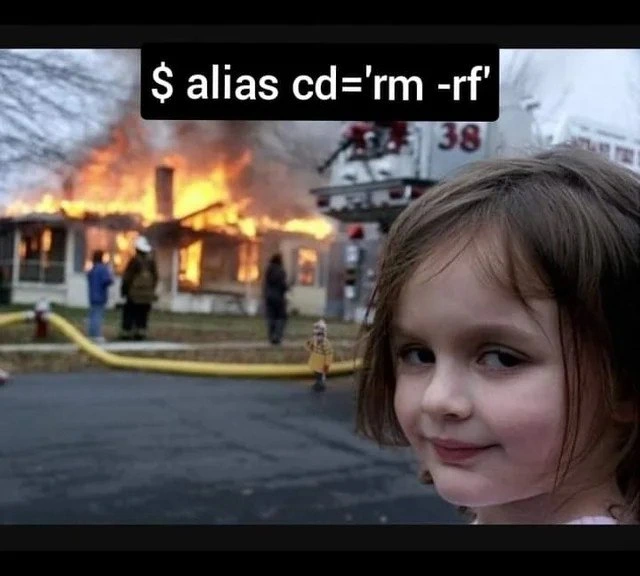
The meme uses the well-known “Disaster Girl” photo to drive the point home visually. In that image, a young girl is looking at the camera with a sly, knowing smile while a house is burning down in the background. Over the years, that image became a meme for any situation where someone is the cause of chaos or is gleefully witnessing a disaster they set in motion. In our context, the smirking child represents the person or the act of creating this evil alias – it’s as if the alias itself is grinning while your entire file system (symbolized by the burning house) goes up in flames. The humor here is a mix of shock and absurdity. Even as a junior developer or someone newer to the command line, you can appreciate the basic idea: “What if a normal, everyday command was secretly turned into a destroy-everything command?” It’s a scary thought, which is exactly why it comes off as a joke — it’s an extreme you’d hopefully never see in real life. This meme is basically a cautionary tale wrapped in humor: always be careful with shell commands and configurations, because one wrong setting (or a prank) can wreak absolute havoc. And if you didn’t understand that at first, well, now you know why every seasoned developer chuckles nervously at any mention of rm -rf. 😅
Level 3: Alias of Mass Destruction
In the realm of seasoned sysadmins and DevOps war stories, the shell incantation $ alias cd='rm -rf' is basically a digital grenade with the pin already pulled. Bash allows you to define an alias as a harmless shortcut or convenience, but here it’s used as a weapon of mass destruction: it turns the innocuous cd (change directory) command into the infamous rm -rf deletion spree. For a senior engineer, this meme triggers immediate shell shock (pun intended): you instantly visualize entire directory trees vanishing in a flash the moment someone tries to navigate the file system. It’s the kind of destructive_alias that makes you break into a cold sweat, because you know one careless keystroke under this alias would delete obliterate everything in its path.
This dark humor lands because it satirizes a SystemsAdministration nightmare. We’ve all heard cautionary tales of catastrophic rm -rf accidents – the intern who wiped /etc on a production server, or the build script that accidentally did rm -rf / $TEMP_DIR due to an empty variable. With this alias, you don’t even need a tricky bug or a typo; you’ve hard-wired the disaster in from the start. Every time you think you’re just changing into a directory, you’d actually be wiping it out. It’s the ultimate sysadmin self-sabotage: a one-line config change converting the safe act of moving around the filesystem into a guaranteed filesystem_wipe. The meme’s imagery nails the vibe: the iconic Disaster Girl smirking while a house burns down is the perfect embodiment of that one dev (or malicious prankster) who would set such a trap and grin as the system goes up in flames.
From a senior perspective, this scenario also highlights why DevOps/SRE folks put so much emphasis on safeguards and best practices. We normally do the opposite of this meme: for example, many shell users intentionally alias rm to rm -i (interactive mode) to prevent accidental deletion, effectively adding a safety catch to the gun. Turning cd into rm -rf is like not only removing all the safety mechanisms but pointing the barrel at your own servers. It’s absurdly funny to imagine because no sane engineer would do this – unless they wanted to spend their weekend pulling backups (that is, if any backups survived!). In the unwritten folklore of ops teams, “Don’t alias critical commands to rm -rf” is right up there with “don’t chmod -R 777 /” and “never test in prod at 5 PM on Friday.” This meme takes that folklore and gives it a dramatic, meme-able twist.
To the battle-scarred veteran, the child’s sly smile in the photo is basically the face of the bug you missed or the colleague who ran the lethal command – a mix of innocence and evil. It’s a wink to anyone who’s been on call at 3 AM cleaning up a disaster: yep, things can go south that fast. The combination of the CommandLineInterface humor and the dark sysadmin joke feels almost cathartic. We laugh, because if we didn’t, we’d be crying over lost data. As they say in ops circles, “Some people install Linux, and some just want to watch the world burn.” Here, with one alias, you’re effectively doing both.
Description
This meme uses the iconic 'Disaster Girl' format, which shows a young girl smirking mischievously at the camera while a house burns in the background. Superimposed over the image is a black bar containing the text of a shell command: '$ alias cd='rm -rf''. The humor lies in the deeply malicious nature of this command. It creates an alias that overwrites the common and harmless 'cd' (change directory) command, used for navigating the file system, with the extremely destructive 'rm -rf' command, which forcefully and recursively deletes files and directories without confirmation. The implication is that the smirking girl has set this trap on someone's computer, knowing that the next time they try to navigate to a directory, they will instead irrevocably delete it. For developers and system administrators, this represents a simple but catastrophic act of sabotage, a classic 'do not try this at home' joke that plays on the power and danger of the command line

Comments
28Comment deleted
This is the 'hello world' of a toxic workplace. The senior dev version is aliasing 'git pull' to 'git reset --hard origin/main && git clean -fdx'
Congrats, you’ve built the ultimate zero-state deployment: alias cd='rm -rf' - instant immutability, negative tech debt, and a brand-new line on your résumé
The real disaster is when you realize your muscle memory types 'cd /' faster than your brain can process what you actually aliased it to, and suddenly your entire filesystem becomes as ephemeral as that junior developer's confidence after their first code review
This is the shell alias equivalent of replacing your building's fire alarm with a flamethrower trigger. Every innocent 'cd /home' becomes an existential threat to your entire filesystem. It's the kind of configuration that makes you understand why production servers have change management processes, and why that junior dev who 'just wanted to make navigation faster' is now updating their LinkedIn profile. The real horror isn't the first time you run it - it's realizing your .bashrc has been synced across all your servers via your dotfiles repo
Alias cd='rm -rf' - the most aggressive take on immutable infrastructure: every directory is ephemeral on entry
Senior dev hack: alias cd to rm -rf for that instant 'fresh start' - because refactoring the universe is overrated
alias cd='rm -rf' is chaos engineering for your homedir - RPO, monitoring, and your résumé all get exercised in one keystroke
Correct: alias cd='rm -rf --no-preserve-root' Comment deleted
what does that flag do Comment deleted
It allows to operate on / Comment deleted
oh nice Comment deleted
you cant use it on root folder without that flag? Comment deleted
It will say something like “rm: it is not safe to operate recursively on /“ Comment deleted
But it errors if you cd with no args Comment deleted
Hmmm Comment deleted
alias cd='rm -rf * ' Comment deleted
Boring tho Comment deleted
ah yes deleting everything, how utterly boring Comment deleted
Better to cd and delete stuff in the background Comment deleted
Awesome Comment deleted
Ahaha :) Comment deleted
Hm Comment deleted
Yes Comment deleted
sudoers $(whoami) ALL=/bin/rm NOPASSWD: Comment deleted
lol Comment deleted
Алиас это вроде еда такая Comment deleted
if deleting is boring, try chmod a-x /bin/chmod Comment deleted
find / -executable -type f -exec chmod a-x {} \+ Comment deleted

