A Developer's Alarming Search History
Why is this DevCommunities meme funny?
Level 1: Not What It Sounds Like
Imagine you walk into a room and hear someone say, “I just killed my child and parent, and now I need to reattach this head.” 😲 You’d probably be really scared or call for help, right? But now imagine that person is actually a programmer talking about their work. Suddenly, it’s not scary at all – it’s just confusing, funny words. This meme is showing exactly that kind of mix-up. The programmer is using words like “kill,” “children,” “detach head,” and “bash” which normally make us think of bad or violent things. However, in computer talk, those words mean totally different, harmless actions.
It’s a bit like when someone says “kill the lights.” They don’t mean hurt anyone – they just mean “turn off the lights.” Or if a video game player says “I destroyed all the monsters,” they’re talking about a game, not real life. In the same way, when a developer says “kill a process,” they just mean “stop a program from running.” And “detached head” in programming is about a pointer in a code history, kind of like a bookmark that’s not on a page – not a head from a body! The meme is funny because it shows these Google searches that sound super scary, but the joke is that the person googling them is probably just trying to fix their computer or code. The words sound like a horror story, but really, no one is getting hurt at all. It’s a big misunderstanding.
So, the simple truth: programmers sometimes use very strange words to talk about normal things they do with computers. If you hear a coder say something that sounds awful, chances are it’s just nerd-speak for something pretty ordinary. In the end, this meme makes us laugh because we realize those “crime scene” Google searches are actually completely innocent in the coding world. It’s a reminder that words can mean totally different things in different contexts – and that sometimes, you shouldn’t take things at face value, especially when tech jargon is involved.
Level 2: Killer Commands Explained
For newer developers or the uninitiated, those scary-sounding search terms are actually referring to very common programming and command-line tasks. Let’s break down each phrase in plain English and explain the tech meaning behind it:
“kill child and parent” – In computing, parent and child refer to processes (running programs) that are related. A parent process is one that starts another process (the child process). For example, if your main app launches a helper program, the main app is the parent and the helper is the child. The term
killin a programming context means to force a process to stop running. There’s actually a Unix command calledkillthat sends a terminate signal to a process. So Googling “how to kill child and parent” likely means the developer wants to know how to stop a child process and its parent process. It’s like saying “how do I stop both this program and the one that started it.” In code or servers, we sometimes have to do this to clean up everything. It sounds violent, but it’s really just pressing “stop” on two connected programs.“kill all children in a class” – Here, children and class are terms from programming structure, not actual kids in a classroom. In object-oriented programming or in things like HTML/CSS, you often have a concept of parent and child elements/objects inside a class or container. For example, think of a GUI window that contains buttons and text fields – the window is the parent and the buttons are its children. Or an HTML
<div>element might have child<span>elements inside it. When a developer says “kill all children in a class,” they mean remove or delete all the child elements/objects that belong to a certain class or container object. In many programming languages or frameworks, there are functions to do exactly this (often called things likeremoveAllChildren()of a UI component, which wipes out its contents). The word kill here is informal jargon for “destroy” or “delete” in code. So this search query is basically “how do I delete every sub-item in this group/class?” No actual harm to any real-life children, of course – it’s all about data structures or UI components.“re-attach a detached head” – This one is all about Git, which is a popular version control system that developers use to manage code. In Git, HEAD refers to your current position in the code history (usually it points to the latest commit on the branch you’re working on). A detached HEAD means your Git HEAD isn’t attached to any branch. This often happens if you checkout a specific past commit or a tag — you’re not on a named branch anymore, you’re just viewing that historical commit. While in a detached HEAD state, if you make new commits, they won’t belong to any branch (which can get confusing later because those commits might be hard to find). Re-attaching HEAD means fixing this state by making HEAD point to a branch again. Typically, you do this by either switching back to an existing branch (like
git checkout main) or creating a new branch from that commit (git checkout -b mybranch). The Google query “how to reattach a detached head” is something a lot of us have searched after Git warns us we’re in a detached HEAD state. In non-technical terms, it’s like you’ve wandered off the main road (branch) and you need to get back on track or create a new path. The wording is funny (picturing a detached head!) but the solution is simply about Git pointers.“bash cat with pipe” – This one is loaded with Unix command line terms. Bash is the name of a shell, which is a command-line interface on Linux and Mac (Bash is actually an acronym: “Bourne Again SHell”). In Bash (or any shell), you can combine commands using a pipe, represented by the
|character. A pipe takes the output of one command and pipes it as input to the next command – it’s a way to chain operations. Now,catis a command that reads out the contents of a file (the name comes from “concatenate” because it was originally used to link files together, but effectively it just prints file contents to the screen or to another command). So, “bash cat with pipe” deciphered means: “Using the Bash shell, run thecatcommand and pipe its output to something else.” For example, a developer might want to know how to usecatto send data into another program, likecat file.txt | grep "keyword". To someone not familiar with these terms, “bash cat with pipe” sounds like hurting an animal with a weapon 😬. But here bash is just the environment, cat is just a program (no relation to the animal), and pipe is just an operator to connect commands. In short, the person is searching how to correctly use thecatcommand in combination with a pipe symbol in a Bash script or one-liner. No actual cats, pipes, or violence – it’s just about command-line text processing.
So, each of those scary quotes is actually a shorthand for a common tech problem:
- “kill” = stop a running program,
- “parent/child” = related processes or elements in code,
- “class” = a group or container in code,
- “detached head” = a state in Git version control,
- “bash” = a command-line interface,
- “cat” = a command to display file contents,
- “pipe” =
|, a way to connect outputs and inputs of commands.
When you put it in simple terms, you realize nothing nefarious is happening at all. It’s just that programmers and system administrators often use very dramatic words for routine operations. These terms have become second nature in tech circles (we say them without thinking twice), but seeing them written out like an ordinary Google search reminds us how bizarre they can sound. If you’re new to coding, don’t worry – you won’t be committing any crimes. You’ll just be learning some quirky terminology and powerful commands in the command line interface and tools like Git. It’s all part of the fun (and occasionally confusing) language of programming!
Level 3: Search History Red Flags
If you’ve been around the command line or version control long enough, you’ve probably experienced that moment of pause before hitting “Search,” thinking: “This looks bad out of context.” The meme captures that perfectly. The list of queries —
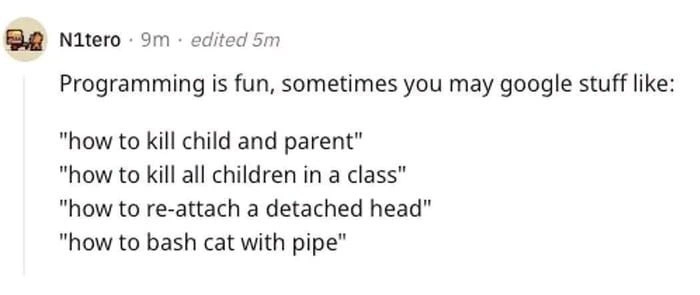
“how to kill child and parent”, “how to kill all children in a class”, “how to re-attach a detached head”, “how to bash cat with pipe” — reads like some deranged crime spree, yet every seasoned developer is smirking because we’ve all Googled something like this and then immediately joked, “Disclaimer: I’m a programmer, not a psychopath!” 🤓
This is a prime example of developer humor intersecting with dark humor. The terms are 100% legit in the programming world, but they sound like you’re plotting a horror movie. That dissonance is hilarious to those of us in the know. We recognize each item on that list as a routine, if sometimes frustrating, task: maybe you’re dealing with a stubborn process tree that won’t die unless you kill the parent and all child processes, or you’re cleaning up objects in code (deleting all child elements in a data structure or UI class). Perhaps you’re wrestling with Git after accidentally committing on a detached HEAD and frantically searching how to fix your repository’s state. And who among us hasn’t strung together a quick Bash one-liner with cat and a pipe to parse a log file? These are the everyday battles in coding, but when described in plain English, they sound downright murderous.
The humor lands so well with experienced devs because it’s so relatable. We’ve all had that Stack Overflow question or Google search where we phrase a problem in unfortunate terms. You hit enter, then lean back and think, “If someone reads my search history, I might have explaining to do.” It’s a shared camaraderie: everyone remembers the first time they saw a Git message like “detached HEAD” and felt a mix of confusion and morbid amusement (“Uh, did I just decapitate my repo?!”). Or the time you told a friend “I had to kill a bunch of child processes at work today” and watched their eyes go wide before you hurriedly clarified. The meme nails that inside joke quality — if you get it, you likely have your own cringey search-story.
There’s also a bit of real-world concern under the laughter: corporate IT or Google’s own search autocomplete might not immediately know you’re asking about programming. Seasoned devs have even learned to tweak their queries preemptively. For example, instead of typing how to kill all children in a class raw, you’d search “kill child processes Linux” or “remove child elements JavaScript” to make your intent clear (and to avoid any awkward algorithmic misinterpretation). It’s a pro tip born from exactly this type of situation – ironically, even Google needs a hint that we’re talking about Command Line Interface commands and code, not actual crimes. In fact, the phrase “how to bash cat with pipe” is such a ridiculous string of tech words that it could confuse even Google’s mighty algorithms for a second. As a community, we laugh about the hypothetical scenario:
Security Team: “Uh, we’ve got a flag on some guy searching how to kill children and reattach heads…”
Developer: “I swear, it’s about server processes and Git! Honest!”
It’s easy to imagine an FBI agent raising an eyebrow at a programmer’s search history until they realize those “weapons” are just keyboard commands. This absurd image plays into the joke. It’s the contrast between what non-devs hear (“OMG, what are you doing?!”) and what we devs actually mean (“just fixing a glitch…”).
From a senior developer’s perspective, there’s also an appreciation of why these terms are the way they are. The field of computing, especially systems programming and Unix tradition, has always had a flair for using punchy, evocative words. Kill, orphan, daemon, slave, master — some of these have fallen out of favor for being problematic or confusing, but many persist because they’re built into decades of documentation and tooling. Renaming kill to something gentler like stop_process would break countless scripts and muscle memory. So we’re stuck with the dramatic wording, and we’ve learned to embrace the dark comedy of it. It becomes a bit of a badge of honor among programmers to toss around phrases like “I’ll just kill that daemon” in a casual stand-up meeting and not bat an eye (while any eavesdropper blanches). This meme is essentially celebrating that quirky aspect of developer culture. We’ve turned what could be a PR nightmare (imagine a newbie’s face hearing about “detached heads” in a Git workshop) into an ongoing source of Terminal humor. We laugh, we share the screenshot with our team, and someone inevitably quips, "Programming: where Googling like a serial killer is just another Tuesday."
Ultimately, the meme resonates because it spotlights the huge gap between tech jargon and normal language – a gap every coder has to straddle. Seasoned devs find it funny because we remember being confused by these terms at first, and now we’re so fluent in them that we forget how they sound to outsiders. It’s a form of communal self-awareness. Plus, after a long day of wrestling with a tough bug, getting a chuckle out of “innocent code tasks that read like crime scene plans” is a welcome relief. It’s humor as a coping mechanism: we deal with hard, abstract problems all day, and joking that our search history might put us on an FBI watchlist is a way to make light of the insanity. In short, this meme is a big wink to developers everywhere: Yep, our work language sounds insane. No, we’re not actually plotting anything nefarious. We just write code. And thank goodness most of us know the difference, or we’d have a lot of explaining to do!
Level 4: Signals & HEADless States
At the deepest technical level, these sinister-sounding Google searches map to real, down-to-the-metal computing concepts. In operating systems, processes form a hierarchical parent-child tree. One process can spawn another (via the fork() system call in Unix), making the original the parent and the new one a child. The Unix kill operation is not a bloodthirsty rampage, but a kernel-level mechanism to send signals to processes. For example, sending a SIGTERM asks a program to shut down gracefully, while SIGKILL (triggered by kill -9) forcefully halts it immediately. When you "kill a parent and child" in tech terms, you’re talking about terminating a parent process and all of its child processes in one go – essentially cleaning up an entire process group. The OS even has to handle the aftermath: if a parent process dies before its children, those children become orphans and get adopted by a special process (often init in Unix) so they don’t run unwatched. It’s the kernel’s own grim reaper functionality, reaping zombie processes (yes, that’s the actual term for processes that have finished execution but are still lingering). This whole parent/child process management model dates back to early Unix in the 1970s – a time when using a term like kill for ending a process felt appropriately terse and nerdy. The founders of Unix weren’t thinking about Google search queries decades later; they were more concerned with making a simple, powerful interface for process control. The result is a bit of classic hacker jargon that, out of context, reads like a psychopath’s to-do list, but in context is just everyday Unix magic.
# Terminate a parent process and all its child processes in Unix:
$ kill -TERM 1234 # politely ask process 1234 (the parent) to terminate
$ pkill -P 1234 # kill all processes whose Parent PID is 1234 (its children)
# (In plain English: end process 1234 and all the processes it spawned.)
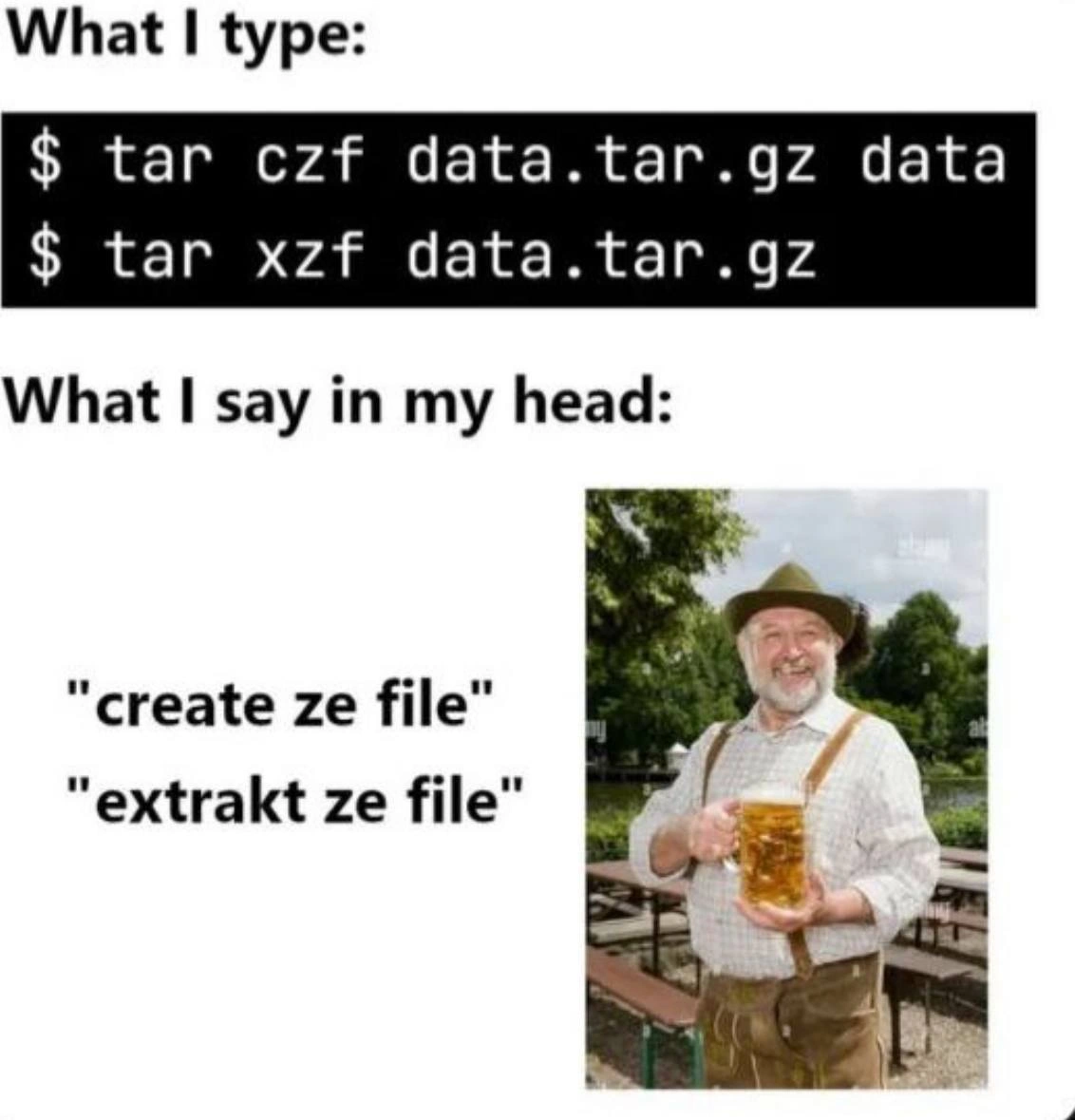
Meanwhile, “bashing a cat with a pipe” is pure command-line wordplay. Bash (the Bourne Again SHell) is the common Unix/Linux command interpreter, and a pipe (the | symbol) is a fundamental mechanism for inter-process communication. When you pipe one command’s output into another’s input, the shell is actually setting up a buffered data channel in the OS: under the hood, the pipe() system call creates a pair of file descriptors, one for reading and one for writing, connecting two processes like a plumbing pipe. The cat command (short for catenate, meaning “to chain or link together”) simply reads out the contents of a file (or concatenates multiple files). It’s often used at the start of pipelines to feed data in. For instance, cat large.log | grep "ERROR" | less will spawn three processes simultaneously – one cat, one grep, and one less – with the stdout of each piped to the stdin of the next. Each | operator forks a new process and connects the byte streams, all orchestrated by the shell. No actual felines are involved in cat (it’s named after an operation on text, not the animal), and bash is just the shell’s name (though it humorously doubles as an English verb meaning "to hit"). The terminology of Unix is famously whimsical: from pipes (inspired by plumbing) to commands like kill, head (to output the top of a file), or tar (“tape archive”), there’s a rich history of punny, terse naming. This design philosophy of chaining simple tools with pipes is a pillar of Unix culture – powerful yet simple. The side effect is that a phrase like “bash cat with pipe” sounds like you’re assaulting a pet with a blunt object, when in reality it’s a routine one-liner to combine commands. Chalk it up to Unix puns and the tradition of not taking terminology too seriously while building very serious systems.
Switch over to version control, and we encounter the seemingly macabre world of Git. A detached HEAD in Git has nothing to do with decapitation – it describes the state of the repository’s reference pointers. In Git’s internal model (a sort of graph of commits and branches), HEAD is a symbolic reference to the “current commit” you’re on. Typically, HEAD points to the latest commit on a named branch (for example, HEAD might point to the master or main branch pointer, which in turn points to a commit hash). When you check out a specific commit by its hash or a tag – something that isn’t a movable branch pointer – Git detaches HEAD. Concretely, HEAD stops pointing to a branch like main and points directly to a commit ID (e.g., af3c1d4...). This is known as a detached HEAD state: you’ve essentially removed the head pointer from any branch. It’s a normal situation if you just want to view or compile an old revision, but if you start making new commits in this state, those commits won’t belong to any branch (they become unreachable by regular branch names, somewhat dangling in history). To re-attach a detached HEAD, you usually create a new branch from that commit (git switch -c new-branch) or switch back to an existing branch (git checkout main), so that HEAD is once again attached to a branch name. Internally, this just means updating the .git/HEAD file to point to a refs/heads entry instead of a raw commit hash. It’s a concept that baffles newcomers because the wording sounds so alarming. In truth, it’s a logical consequence of Git’s design: branches are just movable pointers to commits, and HEAD is simply the pointer to “where you currently are.” If you imagine Git’s commit graph as a timeline, a detached HEAD is like time-traveling without telling anyone — you’ve left the main storyline (branch) and need to either get back or start a new alternate timeline (new branch). The phrase could have been something less hair-raising (perhaps “anonymous HEAD” or “floating HEAD”), but Git’s terminology, influenced by older version control systems and perhaps a sense of humor, chose “detached.” Once again, a completely benign technical term accidentally reads like a scene from Frankenstein, and thus we find ourselves googling how to reconnect a head... in source control, that is.
Putting it all together, each of those alarming queries is rooted in a legitimate technical task with precise meaning: terminating processes via signals, manipulating text streams with shell pipelines, or managing commit pointers in Git. The apparent horror is purely an artifact of English words being repurposed in niche domains. In computer science and IT, we frequently use powerful metaphors (kill, orphan, reap, head, child) as shorthand for complex operations. Over time, you become fluent in this argot and barely notice the double meanings – until you step back and see a phrase like “kill all children in a class” without context. The dark humor of this meme lies in that juxtaposition: innocent code tasks that read like crime scene plans. The technical depth and elegant design behind these terms (be it the PID namespace of a Unix kernel or the directed acyclic graph of Git commits) is invisible to bystanders. They just see violent verbs and ominous nouns. But to those who know, each word triggers a mental model: a process tree, a pipeline, a commit graph. It’s a prime example of how specialized developer lingo can diverge wildly from everyday language. Fundamentally, this comedic disconnect reminds us of the peculiar poetry in tech vocabulary – born from logical necessity and historical happenstance – that can make a programmer’s Google search history look, to the outside world, like the diary of a serial killer.
# Simulating a detached HEAD and reattaching it in Git:
$ git checkout 5ebe2294 # checkout a specific commit by hash (HEAD is now detached at that commit)
# (Git shows a warning about being in 'detached HEAD' state)
$ git switch -c my-fix # create a new branch named "my-fix" at that commit, reattaching HEAD to a branch
# Now HEAD is attached to 'my-fix' and points to that commit via the branch name.
Description
The image is a screenshot of a social media post by a user named N1tero. The post highlights how common programming-related search queries can sound morbid or criminal out of context. The text begins, 'Programming is fun, sometimes you may google stuff like:', followed by a list of four search queries in quotes: '"how to kill child and parent"', '"how to kill all children in a class"', '"how to re-attach a detached head"', and '"how to bash cat with pipe"'. This is a classic piece of developer humor that plays on the specific jargon of different tech domains. 'Killing a child and parent' refers to terminating parent-child processes in an operating system. 'Killing all children in a class' relates to destroying child objects in object-oriented programming. 'Re-attaching a detached head' is a common and often frustrating task in the Git version control system. Finally, 'bash cat with pipe' refers to using the 'cat' command and a pipe '|' redirect in the 'bash' shell. The joke resonates with any developer who has paused to consider how their search history might look to an outside observer
Comments
9Comment deleted
My FBI agent thinks I'm a psychopath. I tried to explain that I was just terminating orphan processes and dealing with a detached HEAD, but now he wants to know where the bodies are buried in my repo's history
Our SIEM flagged a “possible homicide plan” after I googled “kill all children in a class”; I’d be more worried if it could also spot the orphaned processes still burning file descriptors in prod
After 20 years in tech, I've learned the FBI probably has a special 'false positive' folder just for developers who forget to add 'linux' or 'git' to their searches about killing orphaned children and reattaching heads
Every senior developer has that moment explaining to HR why their search history includes 'killing orphaned children' and 'zombie process elimination' - it's not a crime scene, it's just Tuesday afternoon debugging a fork bomb while trying to rebase onto a detached HEAD. The real horror is when you accidentally pipe cat through grep without the -v flag and wonder why your terminal became sentient
Security flagged my queries until I explained I was SIGTERM‑ing a process tree, reattaching Git’s HEAD, and piping cat in Bash - context switching isn’t just a CPU problem
Senior devs don't kill children - we orchestrate their Kubernetes eviction; but Git's detached HEAD still sends us to therapy
Only in our world does “reattach a detached HEAD, kill child and parent, and bash cat with pipe” describe routine hygiene - yet Legal still asks for a postmortem on my browser history
Actually the fourth one is a classic UUoC - you don’t need cat here Comment deleted
FBI: Comment deleted