Skip to content
DevMeme
6101 of 7435
The Inescapable Gravity of a Project Deadline
Deadlines Post #6681, on Apr 24, 2025 in TG

The Inescapable Gravity of a Project Deadline

Why is this Deadlines meme funny?

Level 1: Too Much to Handle

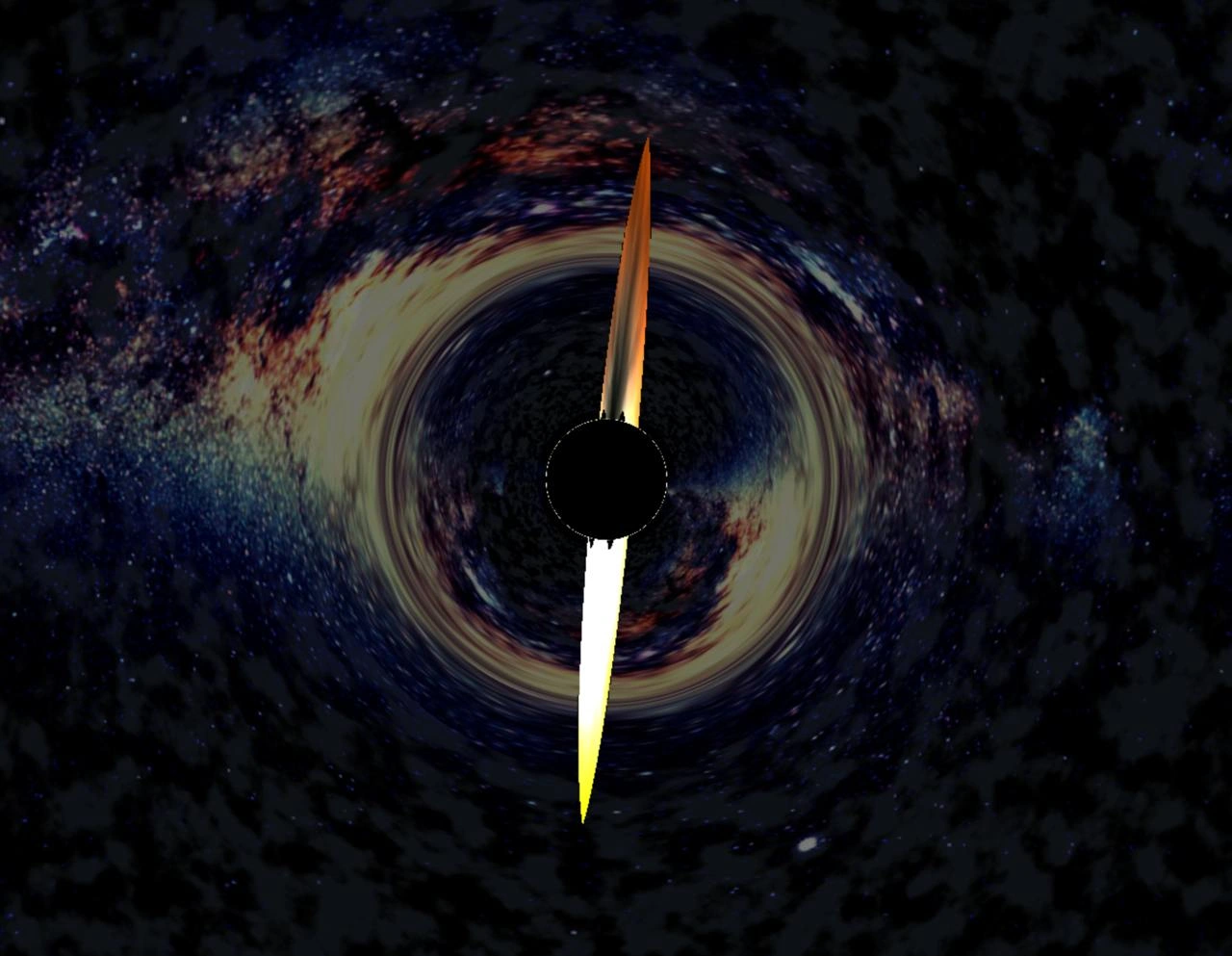
Imagine you have a homework assignment to do, plus chores to finish, plus ten people asking you questions all at once. You’d probably just freeze up and not get anything done, right? This meme is basically saying the computer had a moment like that. The picture of a black hole (a big dark circle that sucks in everything around it) with a little needle going into it is a funny way to show that the computer was completely overwhelmed by work. The “needle” is like a meter or pointer that measures how hard the computer is working. When that needle goes into the black hole, it means the computer was working so hard that it went beyond the scale – like off the charts. It’s as if the computer had so many tasks to do that it just couldn’t handle any more and gave up.

The black hole is used to exaggerate the idea of “no coming back.” In space, if something falls into a black hole, we say it has passed the point of no return (because we don’t expect it to come out again). For the computer, being overloaded is its point of no return: once it’s that overworked, it won’t answer or do anything until someone helps it. Think of it like when you try to carry too many groceries at once and end up dropping everything – you took on more than you could handle. The computer in this scenario tried to do so much at the same time that it kind of collapsed under the load. None of its tasks got done, similar to how you dropped all the groceries and nothing made it to the kitchen.

So, the meme is funny because it takes a very real problem (a computer freezing up from too much work) and illustrates it with an extreme image (a cosmic black hole). You don’t need to understand the tech details to get the joke: basically, “the computer was asked to do way too much, and now it’s gone poof!” It’s like saying the computer worked itself to death in a cartoonishly dramatic fashion. In everyday terms: the poor thing had too much to handle, and the way they show it is by picturing all that work disappearing into a black hole. It’s a silly metaphor that helps us laugh about something that is normally frustrating.

Level 2: Runaway Thread Gravity

Let’s break down what’s happening in this meme in simpler terms. The image shows what looks like a black hole (a dark circle in space with a swirl of light around it) and a needle from a gauge going right through that black circle. In tech, we often use a gauge or dial (like a car’s speedometer) on monitoring dashboards to show CPU usage. CPU usage is how busy the computer’s CPU (Central Processing Unit – basically the “brain” of the server) is at any given moment, expressed as a percentage. 0% means the CPU is idle (doing nothing), and 100% means it’s fully occupied (working as hard as it can). So if that needle is all the way to the end, it implies the CPU is not just busy, it’s completely overloaded. The phrase “crosses the event horizon of production” is a playful way to say the system has crossed a critical threshold beyond which things get really bad. In space, the event horizon of a black hole is the boundary beyond which nothing can escape, not even light. In this meme’s context, it means the server is so overloaded that it’s as if no useful work or response can escape from it. The computer has essentially become unresponsive, similar to how a black hole doesn’t let anything out.

So why would a CPU get maxed out like this? One common reason is a bug in the software, such as an infinite loop. An infinite loop happens when code accidentally keeps running in a cycle and never stops. Normally, loops are supposed to end – for example, loop through 100 items and then finish. But if the loop’s exit condition is broken or missing, it will just keep going forever. When a program gets stuck in an infinite loop, it will use the CPU continuously without a break. Imagine a person who started spinning in circles and never stopped – they’d get dizzy and collapse! For a quick example, here’s a tiny snippet of Python code that would cause an infinite loop:

while True:
    pass  # This loop runs forever, keeping the CPU busy

In that code, while True: means “do the following block while the condition is True.” Since True is always True by definition, the loop never ends. The CPU will keep executing the pass (which does nothing, but it still has to loop) forever or until the program is killed. If such a bug makes it into production (the live system that real users are hitting), it can cause one of the server’s CPU cores to go to 100% usage and stay there. The program is effectively stuck – kind of like an object trapped in a black hole’s gravity. We sometimes call this a runaway thread: a thread (which is like a worker inside the program) that’s run away and is hogging all the CPU time. The “gravity” part of that phrase is metaphorical: that one thread is pulling so hard on resources that it drags down the performance of the entire system.

Aside from infinite loops, there are other causes for a CPU to be overloaded. Maybe the system got an unexpectedly huge amount of work (too many users at once), or maybe there’s a very inefficient algorithm running (something that takes much more CPU time than it should for the task at hand). Sometimes a database query or a search operation can be written in a poor way, and it ends up locking the CPU for a long time. If you’ve ever had your computer freeze for a moment because an application was “not responding,” that’s similar to what we’re talking about – the CPU was too busy to do other tasks, possibly stuck on one heavy task.

This is where observability and monitoring come in. In real life, engineers use tools to watch metrics like CPU usage, memory usage, etc., on their servers. They have dashboards that update in real time, showing graphs and gauges. If something like an infinite loop bug happens, the CPU graph will spike to the top. Often, there are alerting systems set up – if CPU stays at 100% for several minutes, it will trigger an alarm to let someone know. The meme’s image of the gauge with the needle buried at maximum is exactly what such a dashboard might look like during a problem. It usually turns red or flashes to indicate performance problems.

Now, “production” issues like this are serious because they affect real users. When the meme references production with a black hole, it implies this happened in a live environment, not just on a developer’s laptop. If a server is stuck with its CPU at 100%, it often means the application running on that server becomes very slow or completely unresponsive. For example, if this server was running a website, the site might stop loading pages for people, because the CPU isn’t free to handle new requests. In an on-call scenario, an engineer (the one on duty to handle emergencies) would get a notification that something’s wrong. They’d see that the CPU is maxed out and know that’s a big red flag. Typically, the immediate response would be to try to restore the service: maybe restarting the server or the process to clear the stuck loop. This is like turning a device off and on – it doesn’t solve the underlying bug, but it gets the system working temporarily again. After that, the team would investigate what caused the spike. Was it a coding bug? Did we get way more traffic than expected? This is part of debugging and improving the system to be more robust.

The black hole metaphor in the meme is a dramatic way to show how the situation feels. A black hole is one of the most extreme, “nothing can escape” scenarios in nature. When developers see their system acting like this, it feels extreme and scary to them – like everything is being sucked into a problem and nothing is coming out. By picturing the CPU usage as a needle disappearing into a black void, the meme communicates “this system is beyond its limit, it’s gone.” It’s funny in a way, because it’s exaggerating a technical problem with a visual that anyone can understand: something being swallowed by a black hole. But it’s also a bit of a nervous laugh for those who have been in that situation, because they know it’s serious. In simple terms, the computer was asked to do too much all at once, and it kinda fell over. The meme just compares that “falling over” to falling into a black hole to make it more vivid (and a bit humorous, in a dark way).

Level 3: Monitoring Dashboard Black Hole

This meme hits home for any senior developer who’s done a few on-call rotations. You know the drill: a page comes in at some ungodly hour because a critical service is unresponsive. You bleary-eye open the monitoring dashboard (Grafana, Datadog, take your pick) and see the CPU usage graph spiking off the charts – a flat line at 100% like that needle just got sucked past the max. It’s the dreaded event horizon of production: once your CPU crosses that line, the system is effectively in a black hole state. The image nails this feeling – a gauge needle skewered into a dark void, surrounded by a luminous swirl of “everything is on fire.” Veteran devs chuckle bitterly at this because it’s too real. We’ve all stared at a dashboard like this and felt our stomach drop. It’s the moment you realize, “Welp, that’s not just a hiccup – we’ve got a full-blown production incident.” The humor comes from dramatization: comparing a routine 3 AM outage to an interstellar catastrophe. It’s absurd and yet perfect because when you’re the one firefighting, it does feel like the universe collapsing.

Why does this particular combination of events (CPU pegged at 100%, system locked up) happen so often? Experienced engineers have a checklist of usual suspects for these performance issues – each one a mini-disaster capable of creating a “runaway thread gravity” well:

  • Infinite loop or runaway recursion – That one for(;;) or unbounded function call that a frazzled developer accidentally shipped. The code is stuck chasing its tail forever, chewing CPU like there's no tomorrow. (Because who needs break or base cases when your code can run infinitely, right?)
  • Algorithmic blow-up – Perhaps a routine that worked fine in testing blows up with real data (like an $O(n^2)$ or $O(n^3)$ process hitting a gigantic input). Suddenly a task takes a thousand times longer than expected. The server practically time-travels to heat death trying to finish a single request.
  • Catastrophic backtracking – A regex or database query gone rogue. One badly crafted regular expression can send the processor into pathological backtracking, locking up the CPU. It’s the debugging nightmare of discovering that your innocuous search pattern is eating 99.99% CPU, effectively a self-inflicted denial-of-service.
  • Thread storms and deadlocks – Maybe some genius spawned 1000 threads, or two processes are deadlocked so a watchdog thread sits in a tight loop waiting. Threads pile up, context-switching goes through the roof. The OS is thrashing, trying to give everyone a turn and accomplishing nothing – pure chaos.

By the time that needle hits the red and stays there, the system is essentially unresponsive. Often you can’t even SSH in or fetch logs. Trying to poke around the machine feels like shouting into the void. I’ve seen incidents where running top or opening the APM (application performance monitoring) console is futile – the data comes in slower than a snail, if at all, because the server is too busy to even report how busy it is. That’s why the meme’s black hole imagery is spot on: your service has collapsed under its own weight. Observability tools are great, but when a process is hogging 100% CPU, it’s like a black hole jamming signals – your graphs freeze, alerts snowball for every dependent service, and you’re practically flying blind.

The shared PTSD among developers comes from knowing how these situations play out. You’re frantically digging through whatever metrics or logs you can get (praying your monitoring isn't hosted on the affected system) while Slack or PagerDuty is blowing up: “Critical alert: CPU 100% on prod-app-1”. Meanwhile, managers are asking for status updates and users are tweeting that your app is down. You might attempt a quick fix – restart the service, kill the runaway process, divert traffic elsewhere – basically jettison the burning component and hope the rest of the system escapes the gravity well. But even that can be dicey: sometimes the act of restarting is like trying to pull free of a black hole’s pull, especially if shutdown hooks or failover processes themselves get stuck. This is where on-call duty earns its badge of sleepless heroism (or masochism). The real art is not just figuring out the root cause (that can come later in the post-mortem), but restoring service under pressure. It might involve rolling back a bad deployment, adding a quick feature flag to disable the problematic code, or in extreme cases, scaling out new servers to share the load.

The meme also plays on the “point of no return” notion. In a black hole, once you pass the event horizon, you can’t escape. In production, once CPU tops out and the system is effectively hung, it won’t magically fix itself; human intervention is needed. It’s a cheeky way to say, “We’ve crossed the line from which there is no easy coming back.” And typically, this threshold gets crossed at the worst time – usually right after deploying that one last quick fix on a Friday evening. (Murphy’s Law loves distributed systems, after all.) It’s practically a rite of passage in software teams: eventually everyone contributes to or fights a meltdown where system load goes astronomically high. The best we can do is implement good safeguards, learn from the mishap, and then later laugh about it. That’s why this meme resonates – it takes a scenario that normally causes panic and turns it into a cosmic joke. As the saying goes in ops circles, “At least it wasn’t DNS this time!” – nope, this time it was our own code creating a little black hole in production.

Level 4: Infinite Loop Singularity

We stand on the edge where computer science theory meets cosmic inevitability. The meme's image isn’t just dramatic art – it’s an allusion to a computational singularity. In astrophysics, a singularity (inside a black hole) is a point of infinite density and zero volume where known physics breaks down. In computing, an infinite loop is a similarly catastrophic singularity in your code: execution gets stuck cycling forever, effectively demanding infinite processing time. Once your process crosses that threshold – the event horizon – and enters an infinite loop, it’s like a halting problem paradox in motion. No algorithm can universally detect it beforehand, just as no signal escapes a black hole’s event horizon. Not even your desperate kill -SIGTERM or prayers to the scheduler will free that thread; it's past the point of return (and so is your sleep schedule at 3 AM).

We can even draw parallels in queueing theory and performance math: as your CPU utilization approaches 100%, system throughput hits an asymptote and latency skyrockets towards infinity. It's reminiscent of how approaching a black hole’s event horizon stretches time toward a standstill. In fact, classical performance modeling (e.g. an M/M/1 queue) teaches that as utilization → 1.0, wait time explodes without bound:

$$
\lim_{CPU\_usage \to 100\%} \text{latency} \to \infty
$$

This is the engineering equivalent of “nothing escapes.” When the server is saturated, each additional request might wait essentially forever (in practical terms, these requests time out or die off). A system pushed beyond its capacity creates a backlog of tasks (the accretion disk of queued requests) swirling around the overloaded thread, heating up just like matter heats up around a black hole. The meme’s needle piercing the black circle is a perfect symbol: the monitoring gauge has maxed out, pinned so hard that it’s conceptually fallen into a black hole of runaway load. Even your observability tools struggle at this point – metrics update slower or not at all, as if the telemetry data itself got sucked in. The server’s scheduler is frantically context-switching threads, akin to space-time warping under extreme gravity. Meanwhile, your CPU’s silicon is running hot – literally glowing like that cosmic accretion disk – as it dissipates heat trying to execute an impossible amount of work.

From a distributed systems perspective, one rogue component spinning at 100% can act like a gravitational singularity for the whole cluster. Threads waiting on responses from the hung service start piling up. Upstream or downstream components might time out or retry in a storm, increasing load further – a gravitational collapse of system capacity. In worst cases, this leads to a cascading failure: one node’s performance issue becomes every node’s problem, the way one star collapsing can destabilize an entire orbiting system (ask any site reliability engineer about one runaway process bringing down microservices; they'll nod grimly). It’s grim, almost inevitable. Any seasoned engineer knows that crossing this threshold is a one-way trip – once your metrics enter that “no turning back” zone, you’re not gracefully recovering without external intervention (basically pulling the plug or scaling out hardware). The meme nails that sense of doom by referencing one of the universe’s most dramatic phenomena. After all, nothing says production incident quite like invoking a black hole engulfing your CPU cycles. And there’s no silver lining here – not even light escapes this one.

Description

A dramatic, stylized image of a massive black hole in the center of a swirling galaxy. The black hole is surrounded by a bright accretion disk, showing the gravitational lensing effect on the starlight behind it. Superimposed directly over the event horizon is a single, long clock hand, with its top half glowing fiery orange and its bottom half shining bright white, suggesting the unstoppable passage of time towards a critical point. The overall image serves as a powerful visual metaphor for an all-consuming project or an approaching deadline. The technical context, provided by the post's caption, explains this is an announcement for a puzzle game created for the devmeme community. The creator admits to missing the original deadline, making the black hole a perfect analogy for the project's immense gravity and the feeling of time collapsing as a delivery date nears
Comments

55
Anonymous ★ Top Pick That's not a black hole, it's the project's technical debt achieving gravitational collapse right before the deadline
  1. Anonymous ★ Top Pick

    That's not a black hole, it's the project's technical debt achieving gravitational collapse right before the deadline

  2. Anonymous

    The GC pause was only 200 ms - just long enough for the metrics to experience gravitational time dilation and never report back

  3. Anonymous

    Ah yes, the event horizon of a production infinite loop - where time dilates, resources disappear into a singularity, and the only observable output is the Hawking radiation of angry Slack messages from your SRE team

  4. Anonymous

    This is the exact moment a senior engineer watches their Friday 4:45 PM deployment enter production - past the event horizon where even light (and rollback scripts) cannot escape. The Schwarzschild radius of this particular black hole is directly proportional to the number of microservices affected and inversely proportional to the test coverage percentage. Note the characteristic Hawking radiation of Slack notifications beginning to emerge from the singularity

  5. Anonymous

    Past the event horizon of that legacy monolith refactor - no escape velocity for your weekend

  6. Anonymous

    You know it’s a SEV-1 when the p99.9 needle slips past the event horizon and Prometheus only scrapes Hawking radiation

  7. Anonymous

    The five-minute hotfix was executed at the monolith's event horizon - blazing on my laptop, but by the time photons escaped it had consumed two quarters of roadmap time

  8. dev_meme 1y

    Its desktop oriented experience btw, so usage of mobile not really a good idea here

    1. @callofvoid0 1y

      a hint for the ctrl+c ctrl+v ? hmm

  9. @Deymos_s 1y

    cute design, well done!

    1. dev_meme 1y

      Better tell me how many achievements you managed to get so far 🌚

      1. @Deymos_s 1y

        10 for now

  10. @n3oney 1y

    holy shit im playing icy tower

  11. @Nomi4annn 1y

    only 9 yet

  12. @n3oney 1y

    I'm at 16

  13. @callofvoid0 1y

    please dont insert bugs into me

    1. dev_meme 1y

      You will be kinda stuck with an attempt to progress from phone 😭

      1. @callofvoid0 1y

        ph damn

      2. @callofvoid0 1y

        but still I achieved 5 or so achievements

    2. dev_meme 1y

      Sooo, we gotta kinda a backlog of bugs submitted, are you ready to receive them now? 😂

      1. @callofvoid0 1y

        Well, it's not a bug as long as it works on my machine

        1. dev_meme 1y

          Linus approves!

  14. @n3oney 1y

    what the hell does this mean

  15. @n3oney 1y

    me when I console.log window.eggTracker.easterEggs

    1. dev_meme 1y

      Yeah, there’s no good protection since it’s just a game and not a crackme :) Though I added a few tricks and it’s not universal solution to get all achievements

  16. @polyduekes 1y

    eheheheh, now i know why you posted this here

    1. dev_meme 1y

      This is a comment I expected when posted this meme 😂

  17. @n3oney 1y

    20/25 🔥

  18. @n3oney 1y

    I don't think I'll get any more lol

    1. dev_meme 1y

      I have a post scheduled with a few tips in 24h since posting 25, huh? That’s great result and no one reported better one yet!

  19. @n3oney 1y

    20 out of 25

    1. dev_meme 1y

      My main fear is that you didn’t found last one(-s) simply because I didn’t left proper clues 🤔

  20. @n3oney 1y

    I'm looking for the one related to an animal...

    1. dev_meme 1y

      This is right clue! But to find one, you gotta be looking for a shiny frame

  21. @n3oney 1y

    Yeah I'm stuck after that

  22. @n3oney 1y

    btw im pretty sure these maximize buttons are meant to do smoething (since I see the style attribute changing), but it doesn't really do anything....

    1. dev_meme 1y

      Nah, they don’t 🥲

    2. @callofvoid0 1y

      they do actually they did ,should I say

      1. dev_meme 1y

        Not maximize/minimize button tho

  23. @n3oney 1y

    at least it toggles max-width: 100% on the container

  24. @n3oney 1y

    lol

  25. @n3oney 1y

    yeah no clue what to do now

  26. @n3oney 1y

    good luck to everyone else

  27. @felixh02 1y

    Was this intentional

  28. dev_meme 1y

    This was intentional, yes

  29. dev_meme 1y

    Like, who tf compiles html?

    1. @felixh02 1y

      This one went over my head lol

    2. @nightingazer 1y

      you would be surprised...

  30. @Kusyaka0565 1y

    As always No idea where last one is

    1. Sure Not 1y

      https://m.imdb.com/title/tt0119081/

  31. @sid854 1y

    vulpix does sound like a pretty cool name for some library

  32. @nyx_lyb3ra 1y

    threads but not bluesky nor masto? what a disappointment

    1. dev_meme 1y

      Will be fixed in coming weeks!

    2. dev_meme 1y

      Even threads... Are not really updated, the only real alive community is here, in telegram

    3. @Le_o_R 1y

      Nostr...

Use J and K for navigation