
Skip to content
DevMeme
1519 of 7435
The Command-Line Shell We Have at Home
CLI Post #1699, on Jun 13, 2020 in TG

The Command-Line Shell We Have at Home

Why is this CLI meme funny?

Level 1: We Have Food at Home

Imagine you really want your favorite candy bar – let’s say a chocolate bar with nuts that you absolutely love. You ask your mom, “Can we buy this chocolate bar?” But mom says, “No, we have chocolate at home.” You get home, and the “chocolate at home” turns out to be a plain old piece of bitter baking chocolate. Yuck! It’s technically chocolate, but it’s not sweet, not fun, and definitely not what you had in mind. You feel a little disappointed because it’s just not the same as the treat you wanted. That’s exactly what this meme is joking about. The developer (like the kid) asked for Bash – which is like the special treat they love – and the parent/boss says “we have that at home” and gives them PowerShell – which is like the boring version they didn’t really want. Both Bash and PowerShell are kinds of command-line tools (just like both chocolates were “chocolate”), but to the person asking, one is the good one and the other is the meh substitute. The humor is in that feeling: getting something “at home” that’s almost what you asked for, but not quite, and finding it a bit funny (and a bit frustrating) that it’s just not the same. It’s a playful way to say, “I wanted the cool thing, but got the okay-I-guess thing instead.” And whether it’s candy or computer tools, we can all understand that scenario.

Level 2: Bash vs PowerShell Showdown

Let’s break down the joke for those newer to the command-line world. First, what is a CLI? It stands for Command Line Interface – basically a text-based way to interact with your computer by typing commands into a terminal. It might look old-school (all those black or blue screens with text), but it’s incredibly powerful for developers and system administrators. Now, there are different “shells” (programs that interpret your commands) you can use in a terminal. This meme is comparing two shells: Bash and PowerShell.

Bash is the classic shell you’ll find on almost every Linux machine (and on Mac’s Terminal too, at least historically). It’s a successor to the original Unix Bourne shell (that’s actually where Bash gets its name: Bourne-Again SHell, a little pun referencing that it’s born again from the older Bourne shell). Bash is super popular for scripting on Linux – developers write Bash scripts (.sh files) to automate tasks like building software, managing files, or configuring servers. In Bash, the commands tend to be short and lowercase (ls to list files, cd to change directory, rm to remove, etc.), and you often combine them. For example, ls | grep config would take the list of files and pipe it into grep (a search tool) to filter only those containing “config”. The key thing is Bash treats everything as text. Even when you’re doing something advanced, you’re usually manipulating text: file names, lines of output, etc., all as plain strings. This makes Bash really flexible – you can glue together lots of small utilities by passing text around. But it also means you sometimes have to parse that text or be careful with formatting if you want to get specific info out.

PowerShell, on the other hand, is the Microsoft world’s powerful shell and scripting language. If you’re on a Windows PC and open a terminal (especially the blue-colored one), you’re likely in PowerShell. It was introduced because the old Windows Command Prompt (cmd.exe which ran batch .bat files) was pretty limited compared to what Linux folks could do with Bash. PowerShell was designed to be modern and super capable for Windows administrators. One big difference: PowerShell works with objects instead of just text. That means when you run a command (called a “cmdlet” in PowerShell), the output isn’t just raw text—you get structured data. For example, running Get-Process in PowerShell gives you a list of running processes, and you can actually access properties of those process objects (like Name, ID, Memory usage) directly, without having to parse a string. Commands in PowerShell often have a Verb-Noun style, like Get-ChildItem (which is analogous to ls for listing files) or Stop-Service (to stop a system service). They also often have aliases to feel more familiar: for instance, ls in PowerShell is actually an alias for Get-ChildItem, so Windows tries a bit to meet Linux users halfway. Still, the feel of the language is different. Instead of grep to filter text, in PowerShell you might use Where-Object to filter objects, e.g., ls | Where-Object {$_.Name -Match "config"} to find files with "config" in the name. It’s powerful, but it’s a distinct scripting environment with its own rules and syntax. If you’ve only ever used Bash, suddenly diving into PowerShell can be confusing at first (and vice-versa).

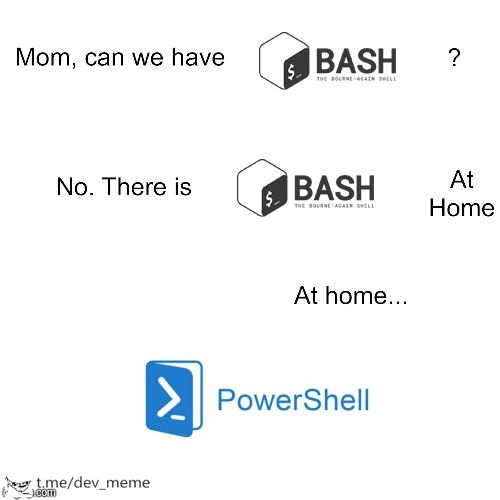
Now, the meme joke: The kid asks for Bash, meaning they want that Linux-style terminal with Bash scripting goodness. The mom says “we have Bash at home,” and the Bash at home turns out to be PowerShell. This implies a scenario a lot of junior devs and IT newcomers can relate to: you learned one thing, but you’re given another slightly-different thing and told it’s “the same.” For example, maybe you did a school project on Ubuntu (a Linux distro) using Bash commands, but when you get a internship at a company, your work laptop is Windows. You excitedly open the terminal to try those Bash commands… and they don’t work. Instead, you find yourself in PowerShell land. It’s a bit of a record scratch moment: “Huh, why is everything blue and why are my ls outputs formatted weirdly?” It’s not that PowerShell is bad – in fact, it’s very capable – but it’s unfamiliar if you expected Bash. The meme is poking fun at that exact feeling. The parent in the meme (like the company or whoever is in charge of the environment) thinks, “A shell is a shell; PowerShell will do just fine, it’s our Bash-at-home.” But the kid (the developer) knows it’s not the same experience. It’s a playful way to highlight CLI preferences and the little friction points of being cross-platform.

This kind of joke also resonates because lots of developers end up cross-training on both systems. One day you might be writing a Bash script for a Linux server, the next day automating a Windows task with a PowerShell script. Each has its own quirks. For instance, file paths: Bash uses forward slashes (/home/user/docs), while Windows (and thus PowerShell by default) uses backslashes (C:\Users\Name\Docs). Or environment variables: in Bash you write $HOME to get your home directory, whereas in PowerShell you’d use $Env:USERPROFILE for the similar concept. Little differences like that can trip you up when switching contexts. Experienced folks often install things like Git Bash on Windows or the Windows Subsystem for Linux (which actually lets you run real Bash on Windows) to make life easier. Conversely, Microsoft has made PowerShell available on Linux and macOS now, for those who prefer it. But in a straightforward corporate setting, you often use what comes with the OS. Windows comes with PowerShell; Linux comes with Bash. So if you ask your IT department for a Linux tool on a Windows machine, you might hear, “Why do you need that? We have a command line already!” – exactly the vibe this meme jokes about.

In summary, the meme is a lighthearted take on shell comparison. Bash vs PowerShell is like two different dialects of the command-line language. The kid wants the dialect they know and love, and the parent offers a different dialect thinking it’s equivalent. For a junior developer, it’s a relatable scenario: you’re excited to use a tool you learned, and you find out you’ll have to use another tool that you’re less comfortable with. The humor comes from recognizing that slight dismay and confusion, packaged in a familiar “Mom, can we have…?” meme format. And even if you didn’t know Bash or PowerShell before, you can understand the vibe: it’s as if someone asked for one specific thing and got a substitute. Once you learn what Bash and PowerShell are (two flavors of command-line tools, one more Linux-y, one more Windows-y), the meme’s punchline clicks into place. It’s basically saying: “Using PowerShell when you really wanted Bash is the classic ‘we have it at home’ situation.” Any developer who has bounced between Linux and Windows can smile (or sigh) at that, remembering their own first time trying to run a Bash script on a Windows system and scratching their head. It’s all in good fun – a little tech humor about how our favorite tools aren’t always available, and the alternatives, while workable, just hit different.

Level 3: The Shell Game

This meme plays on a classic bait-and-switch scenario that seasoned developers know all too well. Bash (short for “Bourne-Again SHell”) is the beloved default CLI on most Linux systems – a powerful, no-frills command-line interface stuffed with decades of Unix tooling. The top panel shows a kid (the developer) asking for Bash, which represents that familiar Linux terminal environment they really want. But the “mom” (standing in for corporate IT or a manager) shuts it down: “No, we have Bash at home.” Every senior dev can hear the unspoken punchline: the thing at home is never quite what you asked for. In the bottom panel, our Bash request has been swapped out for PowerShell, Microsoft’s shiny blue CLI. It’s the parent’s “at home” solution – technically a shell, sure, but not the one the kid hoped for. We recognize this humor from countless experiences where a specific tool or environment we beg for gets replaced by “we already have something similar here,” usually to disappointing effect. The meme format exaggerates that shared frustration: the childlike hope for Bash and the comedic letdown of getting PowerShell instead. For anyone who’s fought for a Unix-like terminal on a Windows workstation, this hit of terminal humor is painfully on point.

Under the hood, Bash and PowerShell might both be command-line shells, but experienced developers know they’re worlds apart. Bash is a POSIX shell born from Unix tradition – it deals in plain text streams, simple names (ls, grep, cd), and has a terse syntax full of $VAR and backticks. It’s lightweight and ubiquitous on Linux servers, perfect for piping together small programs in powerful ways. PowerShell, on the other hand, is a more recent invention out of Redmond. It’s built on the .NET framework and passes objects through the pipeline instead of raw text. That means when you pipe the output of one command to another in PowerShell, you’re often handing over rich .NET objects with properties, not just lines of text. This is super powerful (no more text parsing hacks to get fields out – you can access properties directly), but it also makes PowerShell feel like a different universe to a Bash veteran. For instance, in Bash a one-liner to find log files might be: ls /var/log | grep error. In PowerShell, the analogous idea might use a cmdlet and a filter object: Get-ChildItem C:\Logs | Where-Object Name -Match 'error'. Same goal, very different approach. So when the “mom” in the meme says “we have Bash at home,” an experienced dev chuckles because they know the Bash at home (PowerShell) will require un-learning and re-learning a lot of command-line habits. It’s like a shell game in a literal sense – the shell (environment) you expected is swapped for another, and you’re left fumbling to figure out where all your familiar commands went.

The humor lands especially for those of us who have lived through corporate “standard environments.” Imagine you join a company and ask for a Linux box or at least a Unix-like shell to run your build scripts. Management replies, “We use Windows for everything, but don’t worry, it has PowerShell – same difference, right?” Cue the collective groan. 🥴 Everyone who’s tried to ssh into a Windows server or run a Bash script on their corporate laptop without a compatibility layer feels this meme. It highlights a real-world tech culture gap: Linux vs Windows, open-source tools vs proprietary solutions, personal preference vs company policy. Developer humor often thrives on these real tensions. The reason this image is funny is the emotional accuracy – it’s a snapshot of that moment when you realize the tool you got isn’t the tool you asked for. Yet, it’s presented in the innocently earnest language of a child and parent, which makes it ironically relatable and safe to laugh at. We’ve all been that “kid” at some point, asking for the cool new framework or a favorite OS, only to hear, “We have something like that at home.” And as in the meme, the thing at home is usually a knock-off or an atypical substitute. In a way, it’s also poking fun at how non-technical folks (or just the powers-that-be) might perceive all command line tools as the same gibberish. Shell is a shell, doesn’t matter if it’s Bash or PowerShell, right? — a statement that makes the Linux aficionado either laugh or cringe.

To be fair, PowerShell isn’t a bad shell at all – in fact, seasoned Windows admins love it, and it can do things Bash can only dream of in a Windows environment (like deeply integrated registry or Active Directory scripting via Get-ADUser cmdlets, etc.). But context is everything. This meme freezes the scenario where a developer used to a Linux toolbox feels that pang of disappointment when handed a Microsoft tool instead. It’s the same energy as asking for a sports car and being given the keys to a minivan; both will get you from A to B, but the experience is vastly different. The shared joke here is not really about which shell is superior in an absolute sense – it’s about expectations and familiarity. Bash and its myriad of open-source Unix command-line tools are like a second language to many developers; being told to switch to PowerShell “because it’s essentially the same, right?” can be jarring. The meme captures that tongue-in-cheek. And interestingly, folks who have been around know how this story has evolved: nowadays Microsoft themselves ship a Linux subsystem (WSL) that lets you actually have Bash on Windows, and PowerShell has been open-sourced to run on Linux. In other words, the real solution was to just give the kid Bash (and likewise give the Windows admins PowerShell everywhere) – but hey, that punchline wouldn’t be as funny. 😅 The classic “Mom can we have X – No, we have X at home” setup works here because it taps into a collective memory of being told your wish is granted only to find out the grant is in name only. Every senior dev who’s chuckled at a Jira ticket saying “just use the approved tool instead” recognizes the sly grin this meme brings. It’s a playful reminder that sometimes, the tool you get isn’t the tool you want – and that a shell by any other name just isn’t the same.

Description

This image uses the 'Mom, can we have...' or 'We have food at home' meme format to compare two command-line shells. The first line shows the text 'Mom, can we have' followed by the logo for BASH (The Bourne-Again Shell). The second line says, 'No. There is BASH At Home'. The final part, under the heading 'At home...', displays the logo for Microsoft's PowerShell. The meme humorously portrays PowerShell as the inferior, disappointing substitute for Bash. This plays on a common sentiment in the developer and sysadmin communities, particularly among those who prefer the Linux/Unix ecosystem, where Bash is a long-standing standard. While PowerShell is a powerful object-oriented shell, its syntax and design philosophy are very different from traditional POSIX shells, making it a frequent target of jokes from the Bash user base. A small watermark for 't.me/dev_meme' is in the bottom left corner


Comments

7
Anonymous ★ Top Pick Bash pipes text. PowerShell pipes objects. So, when your script fails in Bash, you have a broken pipe. When it fails in PowerShell, you have a deeply nested exception from a .NET class you've never heard of
  1. Anonymous ★ Top Pick

    Bash pipes text. PowerShell pipes objects. So, when your script fails in Bash, you have a broken pipe. When it fails in PowerShell, you have a deeply nested exception from a .NET class you've never heard of

  2. Anonymous

    “Sure, kid, we’ve got Bash at home - the one where `ls` hands you a pile of .NET objects, `grep` insists it’s called `Select-String`, and every `rm -rf /` adds a polite `-WhatIf` so corporate IT can sleep at night.”

  3. Anonymous

    After 20 years of writing bash scripts, nothing quite captures the existential dread of opening a terminal on Windows and realizing your muscle memory for 'ls' and 'grep' is about to betray you, while PowerShell sits there with its verbose Get-ChildItem cmdlets, reminding you that object-oriented shells were Microsoft's answer to a question nobody asked

  4. Anonymous

    The eternal struggle: You've spent 15 years mastering Bash's elegant pipe chains and sed one-liners, only to join a Windows-first enterprise where your muscle memory for `ls -la` is met with 'Get-ChildItem -Force' and your beautiful `grep -r` becomes 'Select-String -Recurse'. Sure, PowerShell has object pipelines and .NET integration, but when you're trying to quickly parse logs at 2 AM during an incident, typing 'Get-Content | Where-Object' instead of 'cat | grep' feels like being forced to write a formal letter when you just want to send a text. At least PowerShell has tab completion that actually works - small mercies for the Bash refugee

  5. Anonymous

    PowerShell pipelines: .NET objects over text streams - type safety trumps one-liner elegance every time

  6. Anonymous

    Asked for Bash; got PowerShell - the moment your 'set -euo pipefail' becomes $ErrorActionPreference='Stop' and every pipe returns objects that 'grep' can't digest

  7. Anonymous

    PowerShell is Bash at home: you’re promised “objects in the pipeline,” and then someone drops a Format-Table and you’re parsing strings again at 3 a.m. during the release window

Use J and K for navigation
