
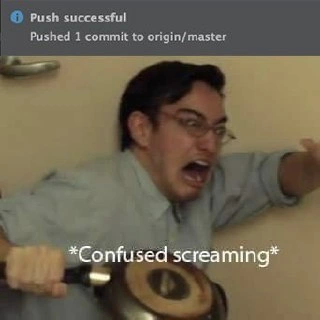
The Primal Fear of a Successful Push to Master
Why is this VersionControl meme funny?
Level 1: Hitting Send Too Soon
Imagine you wrote a message to your whole class and you hit "Send" before checking it for mistakes. The very second it goes out to everyone, you realize there was a big error or something you wanted to change. Your heart drops, and you might even let out a little scream, because now everyone will see the mistake and you can’t undo it. That instant "Oh no! What have I done?" panic is exactly what this meme is joking about. The developer basically did that with their code — they pushed their change out for everyone to use without anyone double-checking it first, and now they're really scared about what might happen because of it.
Level 2: Working Without a Net
Git is a system developers use for version control – basically, a way to track and manage changes to code. In Git, origin is the default name for the remote repository (for example, the project on GitHub or GitLab that lives on a server), and master is traditionally the name of the main branch (the primary line of code where the stable, official version lives). So pushing to origin/master means you're sending your new code changes straight to the main codebase on the remote server. When the top part of the meme says "Push successful – Pushed 1 commit to origin/master", it means exactly that: one set of changes (a commit) was uploaded directly into the primary branch of the project online.
Normally, in a team setting, developers avoid pushing straight to master. Instead, they create a new branch for their work (say, feature/new-login-button), make their commits on that branch, and then open a pull request (PR) to merge those changes into master. A pull request is basically a proposal to add your changes to the main branch, and it's where the team performs a code review. That means other developers look at your code, give feedback or approval, and automated tests (Continuous Integration pipelines) run to make sure everything works as expected. Only after all these checks pass does your code get merged into master. This process is a safety net, catching bugs or problems before they land in the main codebase.
In the scenario this meme shows, that safety net was skipped. The developer accidentally pushed a commit directly to master, which means:
- No one reviewed the code before it went in.
- The changes didn't go through the usual test suite before being in the main branch.
- The rest of the team might be caught by surprise by this sudden change in the project's primary branch.
You can imagine why this makes the developer panic. If there's a mistake in that commit, it's now live in the main codebase. If the team has automated deployment, it could even be on its way to the live website or app already! It's like hitting "send" on a message without proofreading it. The lower half of the meme – the guy with glasses in total shock, holding a frying pan and literally "Confused screaming" – perfectly shows the "Oh no, what have I done?" feeling. It's a funny exaggeration of how a developer feels inside at that moment. He looks ready to defend himself with that frying pan, as if the consequences of that push (maybe angry teammates saying "Who broke everything?!" or a bunch of errors popping up) are about to burst through the door.
To put it plainly, here's the difference between doing things the safe way versus what happened in this meme:
| Normal Pull Request Workflow | Accidental Direct Push to Master |
|---|---|
| Work on a separate feature branch (not directly on master). | Stay on the master branch (maybe by accident). |
| Create a pull request so teammates can review your code changes. | No pull request or peer review – changes go straight in. |
| Automated tests run on the pull request to catch issues early. | Tests run only after the commit is already in master (too late if something fails). |
| Merge into master only after approvals and all checks pass. | Changes appear in master immediately, without any approvals. |
| If something's wrong, it gets fixed during review, before merging. | If something's wrong, master is already affected – you must fix it fast or undo the commit. |
| Everyone knows the change is coming (they saw it in the PR). | The change lands without warning (surprise, everyone!). |
Skipping the pull request means skipping all those safety steps. So when that "Push successful" notification pops up, the reason it's funny (and scary) is because the developer is actually thinking "Uh oh..." instead of "Hooray". It's a classic piece of developer humor now, born from a moment of pure developer frustration. The "Confused screaming" caption is meme-speak for being in a total panic and not even knowing what to say.
If you're new to this, the moral is: always double-check which branch you're on, and use pull requests for important changes! This one little mistake – a stray push to the wrong place – can give anyone a real scare. The meme takes that scary moment and turns it into something we can laugh at. After all, many programmers have had that heart-pounding moment thinking, "Oh no, I pushed to master by accident!" It's a funny reminder of why code review practices and branch protections exist: to save us from exactly this kind of frying-pan-wielding panic.
Level 3: Master of Disaster
When a developer sees a "Push successful" message that their commit went to origin/master, it's usually a moment of satisfaction – except when it wasn't supposed to happen. This meme zeroes in on the version control nightmare of accidentally pushing code directly to the main branch (like doing a git push origin master to update the repository's master branch) without any code review or approval process. In modern teams, the master branch (or main branch on platforms that renamed it) is the sacred "production-ready" branch. Changes are supposed to land there only after they've been vetted: tests pass, continuous integration (CI) gives the green light, and peers review the code. Bypassing all these safeguards with a direct push to origin/master is like stepping on a deploy landmine – it's technically a success (the code is now in the repository) but can instantly fill a developer with dread.
In the top half of the meme, the IDE's notification proudly states "Push successful - Pushed 1 commit to origin/master." It's the innocuous phrasing of a Git client confirming your changes are now on the remote repository (origin) under the master branch. But that single line carries enormous implications. It means unreviewed code is now live in the main codebase. Every engineer who's been around the block knows this shouldn't happen under proper process. Many teams lock down the main branch with branch protection rules (e.g. requiring pull requests, at least 2 approving code reviews, and all CI checks to pass before merging). So seeing that "Push successful to master" suggests either those protections were misconfigured, or the developer had high enough privileges to bypass them. Developer frustration kicks in immediately: "Oh no... what did I just do?"
The humor (tinged with horror) comes from that instant realization that there's no safety net. There's a famous unwritten rule in Git and team workflows: "never push to master on Friday at 5 PM" – because if things go wrong, you'll be spending your weekend fixing a production issue. Here, presumably, it wasn't even intentional. Maybe the person forgot to create a feature branch or mis-typed the target remote, and now their changes are in the most critical branch. The panel below captures the exact emotional response: pure confused screaming. The developer, depicted by a startled man clutching a frying pan defensively, looks utterly shocked – as if the code itself turned into a monster. The frying pan is a hilariously relatable touch: when faced with the impending doom of a possible production bug, a dev feels like they need whatever armor they can grab! It's fight-or-flight: the frying pan suggests fight, but the wide-eyed terror says flight. The caption "Confused screaming" is basically the inner monologue of a programmer who just realized they've circumvented the entire code review process and possibly unleashed chaos.
What's especially relatable to senior engineers is the cascade of thoughts that follow that accidental push:
- "Did I just break the build?" – If the project has a CI pipeline, it might already be running tests on this unreviewed commit. If any test fails, the whole team will soon see a red ❌ on the main branch. Not good.
- "What if there's a bug?" – No peer checked this code. Did I introduce a subtle bug that QA or users will catch? Without a review, there's a higher chance something was overlooked.
- "Will this deploy to production?" – In some setups (especially with trunk-based development and continuous deployment), a commit to master could automatically trigger a release. The nightmare scenario is an untested feature going live to customers. Cue even louder confused screaming.
- "Can I undo this?" – Git has ways to revert commits or even force-push to rewrite history, but those actions can be messy and draw even more attention. Once people have pulled the code or a production deploy begins, history is written. There's essentially no quick Undo button for an accidental push to a shared main branch.
For a seasoned developer, this meme also brings a bittersweet chuckle of recognition. We've all had that heart-dropping moment at least once. It's practically a rite of passage in the Git world. Sure, ideally we learn from documentation and mentors never to commit directly to protected branches. But reality has its gotchas: maybe you were experimenting on what you thought was a throwaway branch, or a git push defaulted to origin/master because of a misconfigured upstream. Next thing you know, your brain does a double-take at the confirmation message and your stomach sinks. A senior dev might recall times before robust Git workflows, when committing to "trunk" or "master" was the norm, and realize how much headache was saved by adopting strict policies. Yet, even with safeguards, human error finds a way. The meme exaggerates it humorously by showing a developer ready to fend off invisible attackers with a pan, which is exactly what that moment feels like internally – like you're about to be attacked by a swarm of angry code reviewers or an avalanche of bug reports.
This top/bottom meme format brilliantly contrasts calm and chaos. The calm, professional tone of the push notification versus the chaotic panic of the developer's reaction – that's the crux of the humor. It's a snapshot of the developer experience (DX) when a critical process is skipped. The phrase "Confused screaming" is internet-slang that perfectly encapsulates a person having a meltdown when something goes terribly wrong unexpectedly. For a developer, skipping the code review step and directly merging code can indeed feel disastrous the moment after it happens. The confusion comes from the shock ("I can't believe I just did that"), and the screaming comes from knowing what might come next. The top panel's "Push successful" message might as well be saying "Congratulations, you played yourself" – because the developer inadvertently set themselves up for trouble. The panicked reaction in the bottom panel is a comedic representation of that self-inflicted chaos. It's a mix of fear, regret, and nerdy "I screwed up" humor, all captured in one painfully relatable image.
Description
A two-part meme that contrasts a successful Git operation with a reaction of sheer panic. The top portion shows a dark-themed UI notification that reads 'Push successful' and 'Pushed 1 commit to origin/master'. Below this is the 'Confused Screaming' meme, featuring internet personality Filthy Frank (Joji) with a look of terror, screaming while holding a pan. For experienced software engineers, this meme is a deeply relatable horror story. Pushing directly to the 'master' (or 'main') branch is a cardinal sin in modern software development, as it bypasses critical safety nets like code reviews, automated testing, and CI/CD pipelines. The humor lies in the irony that the technically 'successful' action is, in practice, a catastrophic failure of process that could easily lead to breaking production, making the panicked screaming a perfectly rational response

Comments
22Comment deleted
Ah, the direct-to-master push. It's the technical equivalent of testing your building's fire alarm system with a real fire
The moment “Pushed 1 commit to origin/master” appears, my muscle memory opens the #incident-bridge - Grafana can find the fire after I’ve declared it
The only thing scarier than pushing to master is realizing your branch protection rules were disabled during that 'quick fix' last sprint when the CEO was watching the deploy dashboard
That split-second between 'git push origin master' and remembering you didn't run the test suite is when you truly understand the value of branch protection rules and CI/CD pipelines. Senior engineers know this feeling intimately - it's the exact moment when 'move fast and break things' transitions from startup mantra to incident report title
Push successful: Pushed 1 commit to origin/master - aka triggered canary, Terraform apply, and PagerDuty roulette because branch protection is still a Confluence page
Push successful to origin/master - the moment you realize branch protections were a Confluence page, PR checks were a suggestion, and GitOps just promoted your “quick fix” straight to prod
Push to master: green checkmark acquired. Now wait for the distributed traces to reveal your commit broke three services nobody owns
Right in the PR Comment deleted
didn't get(( Comment deleted
The moment you make a commit and push, you realize it was all done to the master branch instead of some working branch. Comment deleted
Well it is a stupid mistake but it should be possible to revert it in like 1 min. Right? Comment deleted
Theoretically, yes. But now imagine there's a pipeline thing rebuilding/restarting the app on prod automatically each time the master branch is updated 😢 Comment deleted
Well. First of all such automation without multiple failsafes is a morbid mistake, especially if app is something important. Second, then the only one who should have permissions for the master branch must be some "final technical head of the project ". And he should not make such mistakes. Or - see my first point. Comment deleted
Well, of course, the big guy with such privileges should never make such mistakes. But… Murphy's law is Murphy's law ¯\_(ツ)_/¯ Comment deleted
Multiple failsafes with human intervention then 🙂 Comment deleted
the project is such a mess, sorry colleagues Comment deleted
What Comment deleted
How Comment deleted
Protected branches? Comment deleted
Maybe there's so shitty code in master/main that even forcepush into master/main should be commented as "legacy code" Comment deleted
At work we have about 150 terraform workspaces that get triggered when something is modified in the master branch. Imagine if you had to apply them manually clicking "apply" one by one 😳 Comment deleted
On my project master branch abandoned for about ten years. Every release we create new branch specially for it. Comment deleted

