The Matrix: Neo Becomes 'The One' by Mastering Bitwise Operators
Why is this CS Fundamentals meme funny?
Level 1: The Red Candy Trick
Imagine you have a tall stack of blocks made up of a red block, a green block, and a blue block snugly stacked together. It’s like these three colored blocks are stuck forming one big tower. Most people, if they wanted just the red block, would start taking the tower apart block by block from the top until they free that red piece. But then there’s this one kid who walks up and does a special quick twist-and-pull move – and pop! – he pulls the red block out from the stack in one smooth motion, without even disturbing the green and blue blocks. Everyone around goes wide-eyed 😲. How did he do that without taking everything apart?! It looks like pure magic. In that moment, all the other kids are whispering, “Whoa... he might be the chosen one or something!” They’re amazed because he knew a clever secret trick to get exactly what he wanted out of a complicated pile, super fast and cool.
That’s basically what’s happening in the meme: one developer knows a special trick to pull out the red part from a mix of colors in a single go, and all the other developers are staring like he just did a magic trick. It’s funny and charming because everyone is treating this little skill like some legendary superpower – just like those kids treating their friend like a wizard for the candy (or block) trick. The meme makes us chuckle because we’ve all felt that amazement watching someone do something tricky so effortlessly, and for a moment, we believe “He is the one!”
Level 2: Color Bits Unmasked
Let’s break down what’s actually happening in that seemingly cryptic code and why it’s impressive. In many systems, a color (with Red, Green, and Blue components) can be squeezed into a single number. This is often done by allocating 8 bits for each color. Since 8 bits can represent values from 0–255, that’s perfect for a color channel (intensity of red, green, or blue from 0 to 255). So a 24-bit color might be stored in a single 32-bit integer like this: the highest 8 bits hold the red value, the next 8 bits hold green, and the next 8 bits hold blue. In hex notation, we might represent this as 0xRRGGBB (with RR as the red byte, GG green, BB blue). For example, pure red might be 0xFF0000 (255 in red, 0 in green, 0 in blue), pure green 0x00FF00, pure blue 0x0000FF, and white would be 0xFFFFFF (all channels 255). Storing colors this way is common in graphics libraries, image processing, and game development because it’s compact and sometimes easier to pass around one integer than three separate values. However, when you need the individual components, you have to extract them from that one number. That’s where bitwise operators come in handy.
Bitwise operators are tools that let us manipulate the individual bits of a number. The key operators shown in the meme code are:
<<(left shift) – this takes the binary form of a number and shifts all bits to the left by a given amount, filling in with 0s on the right. Shifting left by 1 is equivalent to multiplying by 2 (in an unsigned context), because each shift left effectively adds a zero to the binary representation’s right end (e.g.,5 << 1gives1010in binary, which is 10 in decimal). Shifting left by 8 would multiply by $2^8 = 256$, and by 16 multiplies by $2^{16} = 65536$.>>(right shift) – this does the opposite: shifts all bits to the right, throwing away bits that get shifted off the end. Shifting right by 1 divides the number by 2 (flooring the result if it’s not an exact even division). For example, in binary1010 >> 1would become101(which is 5 in decimal, the floor of 10/2). Shifting right by 8 divides by 256 (discarding any remainder), effectively dropping the lowest 8 bits of the number. For positive numbers,>> nis like an integer division by $2^n$.&(bitwise AND) – this takes two numbers and performs a logical AND on each pair of corresponding bits. The result has a 1 in a given bit position only if both input numbers had a 1 in that position; otherwise that bit becomes 0. AND is often used as a mask because you can choose which bits to keep. For example, if you AND something with0xFF(which is0000...11111111in binary for however many bits your number has), it will zero out all bits except the lowest 8 (because only in the lowest 8 positions does0xFFhave 1s; above that it has 0s which will turn those bits off).|(bitwise OR) – (not heavily used in this particular meme, but seen in the background code) it takes two numbers and puts a 1 in each bit position where either input has a 1. OR is used to combine bits. For instance, you could OR together separate red, green, blue values (after positioning them) to pack them into one number.- There’s also
^(bitwise XOR) not explicitly shown in the meme text, but often alongside AND/OR in code. XOR puts a 1 in each bit position where the two inputs differ (one has 1, the other 0). It’s used for toggling bits or certain algorithms, but we’ll stick to what’s relevant here.
Now, consider an integer rgb that holds a 24-bit color. Let’s say rgb in hex is 0x4A7F3C for example (just a random color). In binary, that would be: 01001010 01111111 00111100 (where 01001010 is 0x4A for red, 01111111 is 0x7F for green, and 00111100 is 0x3C for blue). If we want to extract the red component (the first 8 bits), how can we get it by itself? We have green and blue cluttering up the lower bits. We can shift the whole number to the right by 16 bits:
rgb >> 16will move the binary representation 16 places to the right. What used to be the red byte01001010will slide down to where the blue byte was, and what was green will slide into where blue was, etc. After shifting right 16, the binary of our example would become00000000 00000000 01001010(leading zeros filled in). In other words,rgb >> 16yields0x00004A. This is an integer whose value is just the original red component, but possibly with some zeros in higher bits (essentially it’s 0x4A = 74, the red value, with nothing else).- However, depending on the language and how it handles shifts on signed vs unsigned numbers, sometimes it’s a good idea to mask anyway to be absolutely sure we only have those lower 8 bits. That’s why
(rgb >> 16) & 0xFFis used. After the shift, we AND the result with0xFF.0xFFin binary is00000000 00000000 11111111. Applying that mask will keep the lowest 8 bits of whatever we have and set anything above to 0. In our example,0x00004A & 0xFFwould give0x4A(since 0x00004A in binary is00000000 00000000 01001010, AND with00000000 00000000 11111111leaves00000000 00000000 01001010unchanged). If there were any stray higher bits, they’d be cleared. The result is just the red value as a “pure” number between 0 and 255.
So (rgb >> 16) & 0xFF effectively extracts the red component. Similarly, one could get the green by (rgb >> 8) & 0xFF and the blue by rgb & 0xFF (no shift needed for blue because it’s already in the lowest bits). We are masking the color components. This technique is sometimes called color component masking or bit masking, and it’s a specific case of a broader concept: using bitwise operations to isolate or combine parts of data.
Here’s a quick illustration in code form:
#include <stdio.h>
int main() {
unsigned int rgb = 0x4A7F3C; // A sample 24-bit color: Red=0x4A, Green=0x7F, Blue=0x3C
unsigned int red = (rgb >> 16) & 0xFF; // Extract red: shift right 16, mask out 8 bits
unsigned int green = (rgb >> 8) & 0xFF; // Extract green: shift right 8, mask 8 bits
unsigned int blue = rgb & 0xFF; // Extract blue: mask 8 bits (no shift needed)
printf("R=%u, G=%u, B=%u\n", red, green, blue);
return 0;
}
If you run this, you’d find it prints R=74, G=127, B=60, which were the original color components. The code above is straightforward when explained, but if you’ve never encountered bitwise operators, it can look a little like a magic trick. For a newer developer (maybe just learning about binary and hex), seeing & 0xFF might prompt a “Wait, why 0xFF? What does that do?” moment. Once you learn that 0xFF is 255 and in binary that’s eight 1s, it clicks: it’s a filter that lets through only 8 bits.
In the context of the meme, the developer who immediately knows how to do (rgb >> 16) & 0xFF is showing he’s comfortable with these bit-manipulation tricks. It’s as if someone asked, “How do we get the red part out of this number?” and he responded with a lightning-fast move that looks complex but directly uses fundamental CS knowledge. For a junior developer or a student, this is a classic aha! moment in CS fundamentals: realizing that you can use binary shifts and masks to pick apart or build up packed data. It’s often taught in the classroom when covering topics like binary arithmetic or low-level programming, but it doesn’t sink in for everyone until they see it in action. When you do first see it used in real code (maybe in some graphics code or reading a file format), it can be a mix of confusion and admiration – “So that’s how it’s done… but also, wow, that one-liner is dense!”
The other subtle joke is how unreadable the top panel’s code looks. It’s intentionally over-the-top with bitwise operations, probably doing pointless shifts and masks like ((1<<2)>>1)|0b11&0xFF just to appear complex. This pokes fun at how overusing bitwise operations can turn code into a puzzle. Most early-career developers are advised to write clear code and perhaps use helper functions or at least comments for such operations. For instance, a newbie might simply do something like:
# Pseudo-code for clarity, not using bitwise tricks
red = rgb_color // 65536 # integer division by 256^2
green = (rgb_color // 256) % 256
blue = rgb_color % 256
This code calculates the red, green, blue by using more “mathematical” thinking (dividing by 256 etc.), which is easier to read but maybe not as instantly cool. The bitwise version (rgb >> 16) & 0xFF is essentially the same logic, just expressed at the bit level. When a junior dev sees the bitwise one-liner, they might initially find it complex, but when explained, it’s like pulling back a curtain on how data is structured in binary. They learn that it’s not really magic, just another way to do the math – albeit one that relies on understanding binary representation.
So in summary, this level demystifies the meme: it’s all about bitwise operators being used to do a neat trick (plucking the red value out of an RGB integer). We’ve defined the key concepts:
- A bit mask like
0xFFwhich is used to isolate bits. - The use of shifts to move bits into position.
- How an RGB color can be stored in one number and split apart.
By understanding these, a newer developer can see why the onlookers in the meme are impressed: the “bitwise master” knew exactly how to solve the problem in one line using fundamental operations that operate directly on binary. It’s a bit of a show of low-level prowess – something that becomes a common geeky DeveloperHumor reference. And once you’ve learned it, you are in on the joke too, because you know exactly what (rgb >> 16) & 0xFF means and you might even feel a tad proud being able to read the “Matrix code” on that black screen yourself!
Level 3: Bitwise Kung Fu
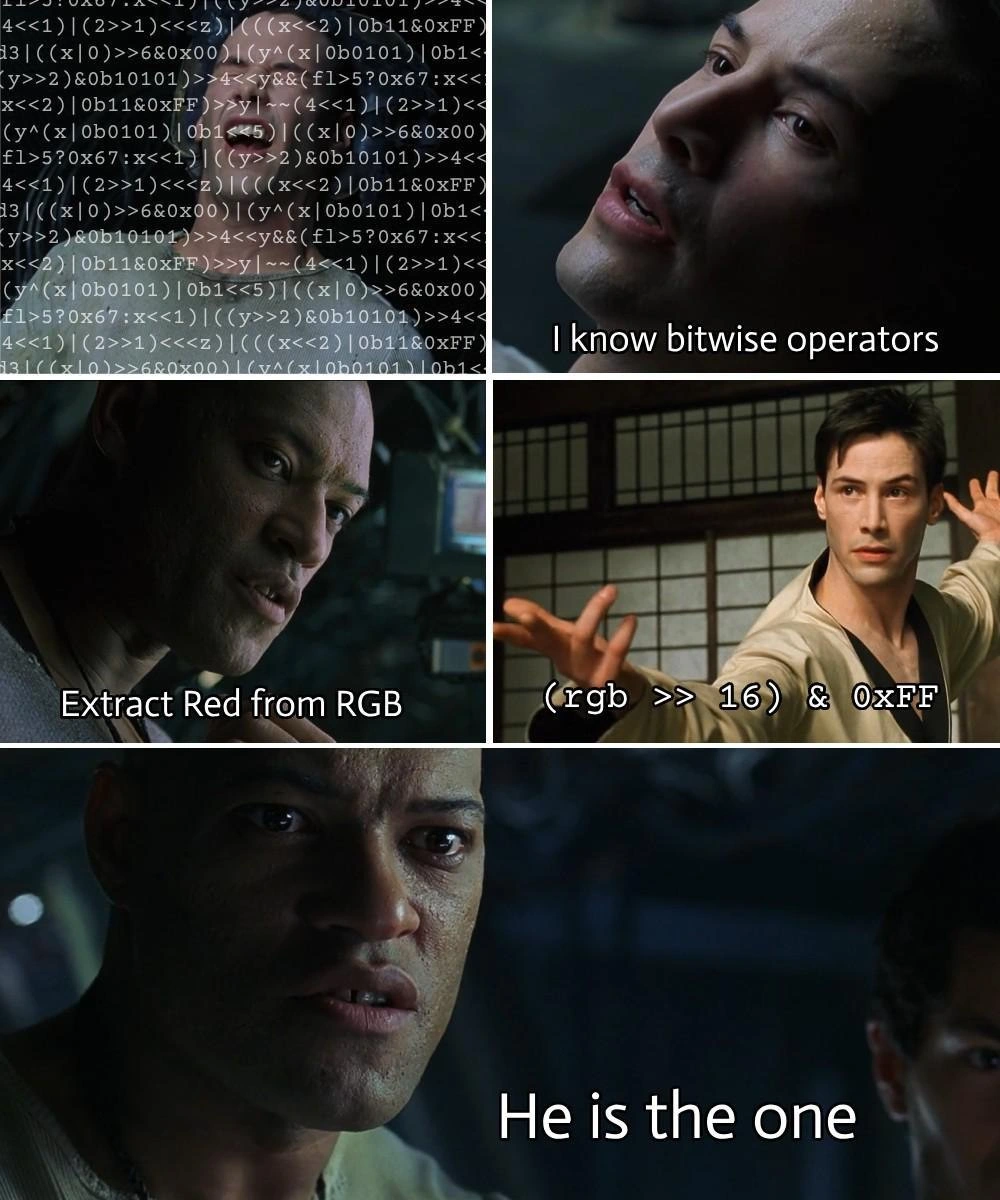
In this panel-by-panel joke, experienced developers immediately recognize a classic feat of bitwise kung fu. The meme riffs on an iconic scene from The Matrix: Neo wakes up from a training upload and breathlessly says, “I know Kung Fu.” Here we have our developer Neo proclaiming, “I know bitwise operators,” while a screen behind him scrolls with dense C-style bit-fiddling code. This dense wall of <<, >>, &, and | symbols is programmer gibberish to many, but to those who know, it’s the “Matrix code” of low-level programming. The humor hits because within developer culture, knowing how to wield bitwise operations is a somewhat rare and legendary skill – it’s the mark of someone who has delved into LowLevelProgramming and returned with arcane knowledge.
The scene continues just like the movie: Morpheus (or the mentor figure) challenges Neo. In the meme, the challenge on the subtitle reads, “Extract Red from RGB.” This is the coding equivalent of “Show me,” which Morpheus says before sparring with Neo to test his Kung Fu. Extracting the red channel from an RGB value is a classic task that separates the novices from the seasoned bit-twiddlers. Sure enough, our hero strikes a pose (in the dojo, code-fu style) and executes the one-liner: (rgb >> 16) & 0xFF. This little expression is the martial arts move of bitwise programming – it demonstrates mastery by accomplishing in one terse line what others might do in a more roundabout way. It’s like watching Neo effortlessly deflect punches: to most devs, unpacking a color channel with shifts and masks in raw code feels as impressive (and intimidating) as dodging bullets.
When the onlooker in the bottom panel exclaims, “He is the one,” it mirrors Morpheus’s awe when he becomes convinced Neo might be the chosen one. In our context, it’s the team of developers staring in developer awe at their colleague who just performed some unreadable bit magic and made it look easy. They’re tongue-in-cheek crowning him “The One” – the mythical coder who can see the code at the bit level and manipulate it at will. Every dev team has that one person who can conjure obscure one-liners involving bit masks or pointer arithmetic; when they do it, the rest of the team reacts half in admiration and half in “What sorcery is this?!” laughter. It taps into the shared experience of encountering code so cleverly optimized that it’s practically a brain-teaser.
The industry inside-joke here is multifaceted. First, bitwise operators (& for AND, | for OR, ^ for XOR, << and >> for shifts) are a fundamental part of languages like C, C++, and many others, but most higher-level application developers only rarely use them in day-to-day work. They’re the kung fu of programming: theoretically we all “learned” these moves in CS class, but only a few practice them regularly enough to pull them off without thinking. That’s why someone fluent in bit-fu can seem like a master among mere mortals. Second, extracting an RGB component with a shift-and-mask is a known technique – common in graphics programming, game development, or anytime you deal with packed color codes (like 0xFFA07C for a color). It’s a neat trick that feels elegant once you know it, but if you’ve never seen it before, it’s bewildering. The meme exaggerates this contrast for comic effect: the “bitwise master” is basically doing a fairly standard operation, but to onlookers it appears as an almost supernatural display of prowess.
There’s also commentary on code complexity vs. clarity here. The top-left panel’s wall of bit-twiddling code is intentionally intimidating – it looks like the raining green Matrix code or something from a code obfuscation contest. In reality, code like ((x>>1)<<2)|((y<<1)&0xFF) is more code-golf style or puzzle-play than practical production code. Real senior engineers know that while these tricks are powerful, you don’t want to overuse bitwise operations where a simple approach would do, because it can hurt code readability. There’s a saying: “Clever code is hard to maintain.” So part of the humor is that everyone is amazed — but if they actually had to debug or maintain such code later, they might not be so thrilled. It pokes fun at the trope of the 10x developer who writes ultra-optimized one-liners that nobody else understands. In a way, the meme is giving a playful nod: “Sure, you’re The One… but that code looks like matrix glyphs to the rest of us!”
However, in certain domains this kind of bit magic is practically required. For example, embedded systems and firmware often interact with hardware registers where specific bits toggle specific features (so you’ll see a lot of someRegister |= (1 << 3) to set “bit 3” to 1, etc.). Graphics programming historically packed color channels into a single integer for efficiency, and networking code packs IP addresses or bit flags similarly. Senior devs have these tales of using bit masks to squeeze performance or memory efficiency out of a system. So when they see this meme, they chuckle knowingly – it’s funny because it’s true that someone who can effortlessly work at this level often earns a special kind of respect (or notoriety). It’s the “wizard factor.” This also ties in with nostalgia (and Tech History): back in the days of 8-bit and 16-bit computing, doing this kind of bit-fiddling wasn’t showing off, it was sometimes the only way to get things done! So older programmers especially might both laugh and reminisce, thinking “Heh, I remember when we all had to be bitwise Jedis.”
In summary, from a senior dev perspective, the meme humorously captures that mix of awe and absurdity: the awe at a colleague’s mastery of low-level detail, and the absurdity of how overly-complicated such “clever” code looks to others. It’s a celebration of CS fundamentals turned into a pop-culture gag. The references to the martial arts movie scenario and the line “He is the one” amplify the epic vibe. We’re essentially laughing at the idea that extracting a color from an integer is treated with the same reverence as discovering the prophesied savior – a little tongue-in-cheek elevation of a nerdy skill to superhero status. And let’s be honest, for many of us, the first time we saw a bit mask trick or a clever one-liner in C, we did feel like we were witnessing some Jedi-level coding. The meme just takes that feeling and runs with it, binary-style.
Level 4: Boolean Alchemy
At the most granular level, this meme is celebrating the almost alchemical power of bit manipulation in computing. Bitwise operators directly manipulate the binary digits (bits) of data, operating on the raw 1s and 0s that form the foundation of all information in a computer. This is like working with the “machine code” of logic itself – an arcane skill that can appear mystifying to the uninitiated. In the snippet (rgb >> 16) & 0xFF, there’s a lot of computer science packed into a tiny formula: shifting bits (>> 16) and masking with a binary pattern (& 0xFF). This leverages fundamental Boolean logic and binary arithmetic properties: shifting right by 16 bits is equivalent to integer-dividing by $2^{16}$ (65536), discarding the remainder (effectively dropping the lower-order 16 bits). Masking with 0xFF (which is hexadecimal for 255, or binary 11111111) performs a bitwise AND with the lowest 8 bits, zeroing out everything else. Together, (rgb >> 16) & 0xFF mathematically extracts the high-order 8 bits of the original number – precisely the red color component if the 24-bit color was packed as RRGGBB in binary. It’s a concise formula born from the way numbers are represented in base 2: if rgb = R * 2^16 + G * 2^8 + B, then $\lfloor rgb / 2^{16} \rfloor = Rand that& 0xFF` ensures the result is confined to 8 bits (just in case). This bit-trick exemplifies bit-level parallelism – a single CPU instruction operates across all 8 bits of that byte at once, akin to doing eight tiny logical operations in one go. Such operations are extremely efficient at the hardware level (one reason they’re beloved in performance-critical code). Historically, mastering these shift-and-mask techniques was crucial in low-level programming: early graphics, device drivers, and network protocols often packed multiple values into one binary word to save precious memory. The Hacker’s Delight of veteran programmers includes dozens of these clever bitwise hacks (sometimes called bit twiddling tricks) that accomplish tasks in a few CPU instructions – from fast math (like multiplying/dividing by powers of two via shifts) to extracting fields from packed data. This theoretical and historical context sets the stage: the meme’s hero isn’t just doing a party trick; he’s tapping into the deep well of CS fundamentals and hardware-level efficiency. The humor sparkles because it’s a celebration of someone wielding Boolean logic at a mystical level, like a programmer-sage manipulating the matrix of bits controlling reality. It’s as if he’s staring at the green-on-black binary rain of The Matrix and seeing the meaning – a feat that feels both mathematically elegant and a little magical.
Description
This is a five-panel meme that uses scenes from the movie 'The Matrix' to create a programming joke. In the first panel, the character Neo, looking determined, states, 'I know bitwise operators' against a backdrop of complex code. In the second panel, his mentor Morpheus challenges him with the task: 'Extract Red from RGB'. The third panel shows Neo in a confident martial arts pose, with the correct bitwise operation displayed as text: '(rgb >> 16) & 0xFF'. The final two panels show Morpheus's reaction of awe, with the concluding caption, 'He is the one'. The humor comes from equating a fundamental, yet often tricky, computer science concept - using bitwise shifting and masking to manipulate color data - with the superhuman abilities Neo acquires in the movie. For experienced developers, this is a relatable and amusing take on moments of deep technical understanding, where mastering a low-level skill feels like a superpower, confirming one's expertise

Comments
28Comment deleted
The real test is when Morpheus asks him to extract the green component. That's when you find out if he remembers operator precedence without adding parentheses
The moment someone extracts red with `(pixel >> 16) & 0xFF`, the juniors cheer like it’s bit-fu; the seniors just silently estimate how many future sprints will be spent deciphering those nine-nanosecond “savings.”
The real 'red pill' moment isn't choosing between illusion and reality - it's when you realize that '(rgb >> 16) & 0xFF' is faster than parseInt(hexColor.substring(1,3), 16) and your coworkers start looking at you like you're speaking in machine code at standup
When your junior asks why you're using `(rgb >> 16) & 0xFF` instead of a color library with a `.getRed()` method, and you realize you've become the architect who insists on bit-twiddling because 'it's faster' even though the compiler would optimize it anyway - but deep down, you know it's really about asserting dominance through hexadecimal mastery and proving you still remember what happens at the bit level
In a world of bloated color libs and WebGL abstractions, he >>16 & 0xFFs like it's 1995 - and it's still the fastest path to prod
Saying "(rgb >> 16) & 0xFF" in code review earns instant respect - right up until someone asks, "RGBA or ABGR, and what’s our endianness?"
Pulling red with (rgb >> 16) & 0xFF looks heroic; the real chosen one is the dev who checks BGRA vs RGBA, endianness, premultiplied alpha, and sRGB before the UI ships mysteriously green
Very cute Now do it for any arbitrary color space, including 32-bit and 16-bit RGB color Comment deleted
32-bit: Red: (RGB >> 16) & 0xFF Green: (RGB >> 8) & 0xFF Blue: RGB & 0xFF 16-bit (RGB565) Red: (RGB >> 11) & 0x1F Green: (RGB >> 5) & 0x3F // and (RGB >> 5) & 0x1F for RGB555 Blue: RGB & 0x1F https://mvi.sh/2013/05/27/colour-code-snippets/ Comment deleted
Those are bespoke conversions, not arbitrary :P Also the top one is 24-bit not 32-bit Comment deleted
Useful link tho! Thanks! Comment deleted
ez Comment deleted
Shit ) fixed! Comment deleted
is that & 0xFF necessary? Comment deleted
If upper bits are already zeros then not Comment deleted
Yes, and if you don't think so then... may the users have mercy on your code x3 I sure hope you're not working in C Comment deleted
What? Comment deleted
Basically, it's a sanitizing step. It guarantees that you're working with the data you think you're working with, and it can be interpreted as expected. There's a chance that the word you got which contains the 24-bit RGB color information, also has an alpha component (or garbage) in the oft-unused byte at the end. If you don't mask &0xFF then that data might interfere with what you're trying to do, most likely forcing the Red component to be at max or to wrap strangely, but possibly worse Comment deleted
it is all matter of input Comment deleted
Mhmm; if you guarantee that a previous step sanitized that byte then you don't need to in this step Comment deleted
Commonly rgb colors are stored in tightly packed form, so you can have brgb thingy in 4 bytes where first b belongs to previous pixel Comment deleted
for red &0xFF looks kinda unnecessary Comment deleted
Only impressed when you extract Red from HSV with bitwise operations Comment deleted
I mean, it's all binary in the end... Comment deleted
on binary computers 😀 Comment deleted
fuck I wanna do that Comment deleted
It’s all electric pulses anyway or light pulses Comment deleted
If you do, please license with GPL v3.0 Comment deleted