When Software Says No, But the Power Cord Says Yes: Bypassing Shutdown Permissions
Why is this SystemsAdministration meme funny?
Level 1: Pulling the Plug
Imagine you have a toy robot that’s supposed to listen to you. You press its off button and the robot suddenly says, “No! You can’t turn me off!” That’s pretty frustrating, right? In the meme, the computer is like that stubborn robot. It’s telling the person, “Sorry, I won’t shut down because you’re not the boss of me.” Now, what can you do if a toy or device refuses to turn off the nice way? You take out its batteries or unplug it from the wall – basically, you pull the plug. In the picture, the top part shows the computer saying “you don’t have permission,” which is a fancy way of saying “I don’t have to listen to you.” The bottom part shows the person (the girl labeled “ME”) doing the simple, real-world solution: she’s just going to cut the power. It’s funny because it’s so simple. It’s like the computer was being sassy, and the person just says, “Alright, we’ll do it my way!” and click, the power is gone. The joke is that no matter how complicated or bossy the computer tries to be, the human in the room can always just turn it off the hard way. It’s a little like if a lamp wouldn’t turn off with the switch, so you just unplug the lamp. The computer tried to be in charge, but pulling the plug shows who’s really in charge in the end. It’s a silly and relatable way to say: “I have the power – literally!”
Level 2: No Admin Rights? No Problem!
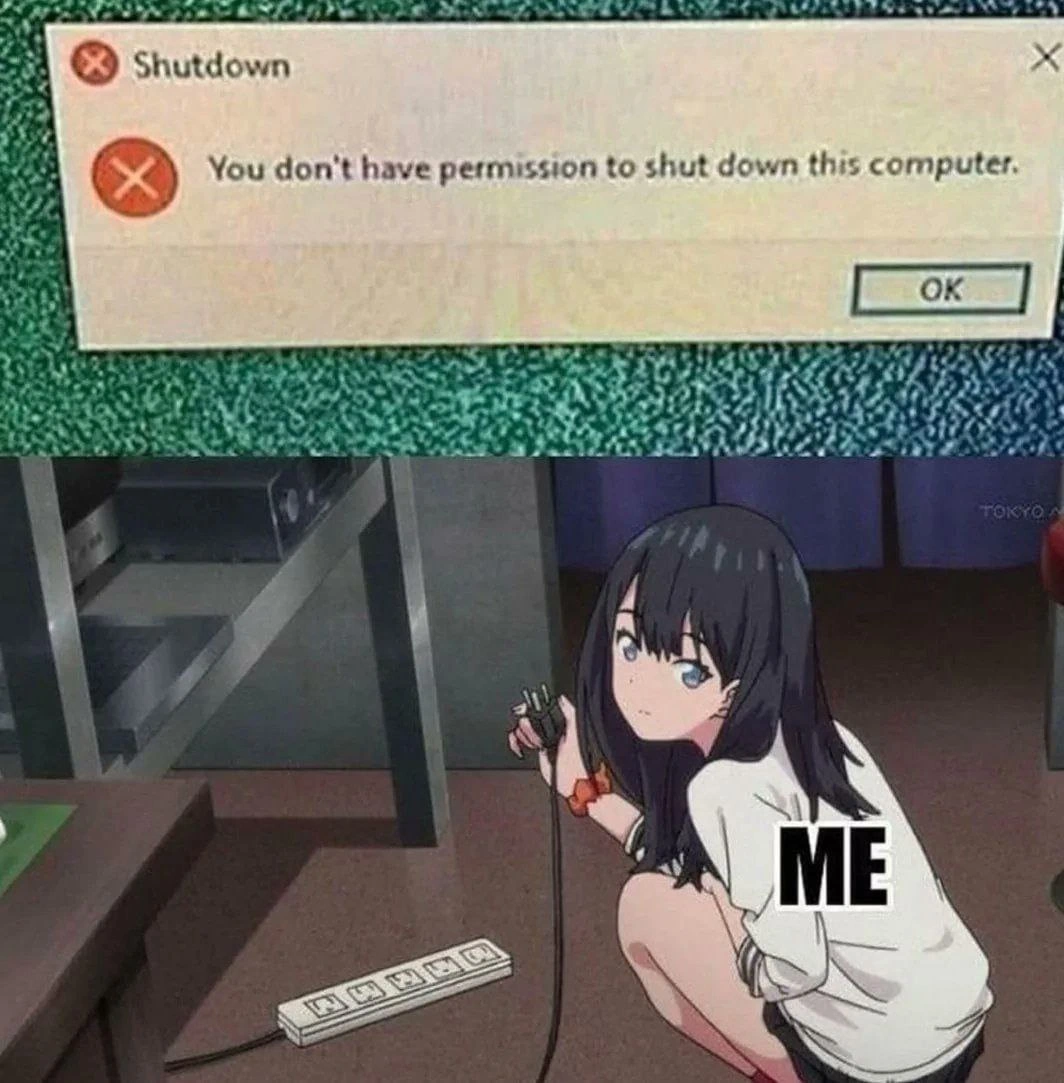
Let’s break down what’s happening in this meme step by step. The top panel shows a Windows error dialog. It has a big red X icon and the title "Shutdown", with a message: "You don't have permission to shut down this computer." This is something you might encounter on a Windows PC if you’re logged in as a regular user without admin rights. In many environments – say your school’s computer lab or your office workstation – the operating system is set up so that only authorized people (like IT staff or administrators) can turn off or restart the machine. This is part of access control and authorization in computing: the system checks “Does this user have the right to do this?” If the answer is no, the OS stops you. It’s trying to protect the machine from improper shutdowns (imagine if any user could just shut down a server that others are using). So, that dialog box basically says: “Hey, you’re not allowed to do this action.” It’s the computer equivalent of a locked door.
Now, the bottom panel is where the humor comes in. We see an anime-style girl crouching by a power strip, and she’s holding the PC’s power cord, ready to unplug it. She’s labeled “ME,” meaning this character represents the meme’s author (or anyone reading it, really) taking matters into their own hands. This is a direct response to the top panel: if the computer says I can’t shut it down from within the software, I’ll just shut it down from outside the software. Unplugging the computer or cutting the power is the ultimate override. No need for admin permissions or special commands – pulling the plug will turn the computer off just as surely as any menu option, albeit in a forceful way.
In tech terms, this is a physical shutdown. Normally, when you go through the OS to shut down, the OS will safely close programs, save data to the disk, and then signal the hardware to power off. But if you unplug the machine, all that graceful shutdown process is skipped – the computer loses power immediately. It’s like winning an argument by just walking away – effective, but a bit rude. In fact, system admins have a joke about the “Big Red Switch” (old computers literally had big red power buttons): when all else fails, you hit the switch. Modern servers even have remote management where an admin can force a power-off if the OS isn’t responding.
This meme is also a nod to sysadmin humor and the idea of privilege escalation. Normally, “privilege escalation” means a hacker or user finds a trick to gain higher permissions in the system (for example, a normal user becoming an admin through some exploit). Here, the “exploit” is very low-tech: the user escalates their privilege by using physical power. No operating system can really stop you from doing this if you have physical access to the machine. It’s a well-known principle in computer security: someone with physical access to a device can eventually control it, because they can do things like remove the hard drive, or, as shown here, just cut the power and later boot the machine from a USB stick, etc. In everyday scenarios, you might have seen something similar if you’ve ever had a frozen PC: if Windows wasn’t responding, maybe you’ve held down the power button for 5 seconds to force a shutdown. This meme is basically that idea taken to an extreme and comedic level.
The use of an anime character with the label "ME" is a popular meme format. It takes a scene from a show or manga (in this case an unknown anime girl doing something determined) and repurposes it to depict a relatable human reaction. Here the relatable scenario is: “When the OS won’t let me shut down, I literally pull the plug.” It’s funny partly because the cute, calm-looking anime girl is about to do something as aggressive as ripping out the power cord. The contrast makes it humorous. And it’s ironic – all those complex software security measures in the top panel are undone by a simple tug in the bottom panel. For a junior developer or IT newbie, the meme highlights a real concept: sometimes computer systems have layers of protection that can be bypassed by simpler means. It’s a reminder that behind all the software rules, computers ultimately run on hardware. And if you have control of the hardware, you have the final say, for better or worse. Just remember, doing this in real life (especially at work) might get you a stern look from your senior admin – or worse, a corrupted file system! So, it’s a joke and not a recommended strategy… except when you really have no other choice.
Level 3: Access Denied, Force Applied
At first glance, this meme captures a classic standoff between operating system policy and physical reality. The Windows dialog box with its stern message – "You don't have permission to shut down this computer." – represents an access control mechanism in action. In a properly administered environment (like a company domain or a school lab), the OS is enforcing authorization rules: only users with sufficient privileges (e.g. an Administrator or a specific role) can initiate a shutdown. This is a security feature meant to prevent unauthorized or accidental downtime. Perhaps multiple people are using the system, or it’s a critical server that not just anyone should power off. Under the hood, Windows checks your user token against a policy (often set via Group Policy in enterprise setups) named "Shut down the system." If your account isn’t on the approved list, the OS politely – if infuriatingly – refuses. The red error icon and the “Shutdown” title bar drive home that the system itself is blocking you.
Now, any seasoned systems administrator or security-conscious engineer will tell you: software restrictions are fine, but physical access trumps all. The bottom panel with the crouching anime-style girl labeled “ME” exemplifies this truth with cheeky humor. Denied a graceful shutdown by software, the user resorts to the hardware layer workaround: yanking the power cable from the power strip. This is essentially the nuclear option of system administration – often jokingly referred to as hitting the Big Red Switch. In security terms, what we see here is a form of privilege escalation that no operating system can truly prevent: if you can touch the machine, you can ultimately control it. There’s an old infosec adage: “If an attacker (or admin at wit’s end) has physical access to a computer, all bets are off.” The meme plays on that principle. The OS says “No” based on its rules and assumptions, but the person with hands on the hardware effectively replies, “I wasn’t asking.”
Technically, pulling the plug is a brute-force shutdown. The OS is bypassed entirely – no saving of open files, no flushing of disk caches, no orderly termination of processes. In a professional setting, this kind of hard power-off can lead to corrupted databases or lost logs (the sort of thing that haunts sysadmins in nightmares). That’s why proper procedure is to fix the permission issue or find the legitimate credentials. But the dark humor here is that we’ve all faced that maddening moment: the system obstinately refuses a simple request, maybe at 3 AM during an on-call emergency, and eventually you snap, opting for raw power (quite literally) over protocol. The combination of a Windows error dialog and an anime character physically disconnecting the machine dramatizes this ubiquitous IT experience. It’s a tongue-in-cheek reminder that no matter how sophisticated our software security becomes, it ultimately runs on electricity – and we control the plug. The expression on the anime girl's face – a mix of determination and mild exasperation – is one many of us recognize from late-night battles with stubborn servers. In the end, the user becomes a literal power user by pulling rank and the power cord, solving the “permission denied” problem in the most direct way possible. It’s absurd, a bit risky, but deeply satisfying in its simplicity.
Description
A two-panel meme contrasting a software restriction with a physical solution. The top panel displays a classic Windows error message dialog box with the title 'Shutdown'. The message inside reads, 'You don't have permission to shut down this computer,' with a red 'X' icon and an 'OK' button. The bottom panel features a popular anime character (Rikka Takarada from SSSS.Gridman) squatting on the floor, labeled with the word 'ME'. She holds a power plug in her hand, poised to unplug it from a power strip, with a calm and determined expression on her face. The technical humor lies in the ultimate circumvention of software-based administrative restrictions. In corporate or managed IT environments, users often lack the necessary permissions to perform actions like shutting down a machine. The meme hilariously portrays the user's frustration and the final, undeniable authority of having physical access to the hardware. When the operating system denies a request, pulling the plug is the ultimate 'root' command, a brute-force override that no software policy can prevent
Comments
26Comment deleted
Software permissions are just a strongly-worded suggestion to someone with physical access to the server rack. It's the ultimate privilege escalation vulnerability, and the patch notes just say 'add a lock to the door.'
System said “permission denied to shutdown,” so I did the senior-engineer version of sudo: hit the PDU’s remote power toggle - nothing beats a 240-volt kill -9
After 20 years in the industry, you realize the most effective privilege escalation attack is still crawling under the desk with a power strip - no CVE required, works on all Windows versions since NT
When your enterprise Group Policy locks down shutdown permissions so aggressively that you're forced to escalate privileges from SYSTEM to Layer 1 - because sometimes the most elegant solution to an access control problem is a hard power cycle. It's not a security vulnerability if you own the physical infrastructure, right? The BIOS doesn't check Active Directory credentials
GPO revoked SeShutdownPrivilege, so I invoked the undocumented cross‑platform primitive yank(AC); eventual consistency for NTFS not included
RBAC blocked shutdown, so I escalated privileges to Layer 1 - the power strip. Cross‑platform, low‑latency, idempotent
When Group Policy revokes shutdown rights, exploit the ultimate escalation: physical access to the PSU
In these situations, usualy there is a note on the computer or the wall nearby that says that you should not do this Comment deleted
But there is no restriction to remove the note first and then unplug the system Comment deleted
Nearest future as is Comment deleted
why? Comment deleted
if a whole system is relying on such computer it shouldn't be accessible by anyone except for the dedicated tech guy or admin Comment deleted
Could be a kiosk, or just expected to never be shut down Comment deleted
a kiosk ? Comment deleted
A machine that only allows one or a few apps to be used and is likely publicly accessible. Comment deleted
I didn't know there exists such a thing Comment deleted
In Cybercafes too Comment deleted
we are doomed Comment deleted
hmm... that's why I've never seen such a think Comment deleted
coffee machines with a screen and a terminal? Comment deleted
try running a fullscreen app, but no mouse, only pressing Enter and numerical keys Comment deleted
tmux? :) Comment deleted
vending machines in general could probably be considered kiosks as well Comment deleted
now this is something Comment deleted
I was thinking about whether this is a kiosk, and it probably is Comment deleted
"You don't have permissions to deny us using your electricity" Comment deleted