Code Formatting Inconsistency
Why is this CodeQuality meme funny?
Level 1: Messy Handwriting
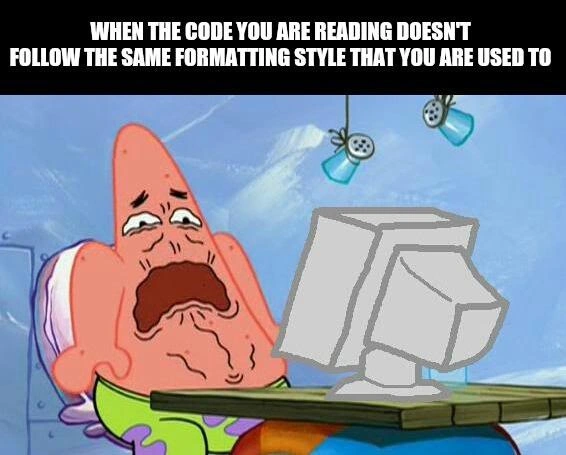
Imagine you got a storybook where every page was written by a different person in totally different handwriting. On one page, the letters are neat and small; on the next page, the words are huge and all over the place; another page has cursive writing you can barely read. You’d probably feel confused and annoyed trying to read that story, right? You might even make a face like you want to cry because it’s so frustrating. That’s exactly what’s happening in this picture. The starfish character (Patrick) is looking at a computer screen and seeing super messy, inconsistent writing in the code, just like those mixed-up handwriting pages. He’s upset because he was used to one nice style of writing, and now he’s seeing a jumble that’s hard to make sense of. It’s funny in the cartoon because we’ve all felt that way looking at something messy – like “ugh, how am I supposed to read this?!” Just like you’d want a book to have the same neat text throughout, programmers want code to be written in the same neat way everywhere. When it’s not, it makes them as sad and frustrated as Patrick is in this meme. The joke is basically saying: “Reading messy code feels as awful as trying to read really sloppy handwriting” – and even a goofy cartoon character can’t handle it!
Level 2: Tabs vs Spaces
Let’s break this down in simpler terms. Code formatting refers to how code is laid out on the screen – things like indentation (how far lines are indented from the left), where braces {} or brackets go, and whether you use a tab character or a few spaces for each indent level. A style guide is basically a set of rules telling developers, “Here’s the standard way to format and write code in this project.” For example, a style guide might say “use 4 spaces per indent” or “always put the opening { on the same line as the if statement.” Following a style guide makes CodeReadability better, because every piece of code looks familiar and organized. When everyone on a team uses the same conventions, it’s easier to read each other’s code – much like using proper grammar in a sentence.
Now, the meme shows Patrick (a cartoon starfish) looking horrified at a computer. Why? Because the code on that screen probably has inconsistent_formatting. Maybe Patrick is used to one style (say, each new block is indented with 4 spaces), but the code he’s reading uses a completely different style (like random tabs or 2 spaces here, 3 spaces there). This mismatch is jarring – it’s a readability_nightmare. It’s like expecting a neat essay but getting a jumble of text with weird spacing and no alignment. Developers actually have strong feelings about these things! One famous debate is “Tabs vs Spaces.” Tabs and spaces are two ways to create indentation at the start of a line. Some devs use the Tab key (which inserts a tab character), others press the spacebar multiple times. Both achieve an indent, but mixing them in the same file can cause chaos: your code might look fine in one editor and misaligned in another, because different systems treat tab width differently. This debate has been so intense in programming culture that it turned into a running joke – hence it appears as a tag and a topic here.
Another common issue: brace style. Braces are those curly {} symbols used in languages like C, Java, or JavaScript to define blocks of code. One programmer might write:
if (condition) {
// code
}
while another prefers:
if (condition)
{
// code
}
Both do the same thing, but if one style suddenly switches to the other in the middle of a codebase, it looks odd. The first is called “K&R style” and the second is “Allman style,” named after famous programmers/standards. Neither is wrong, but inconsistency is confusing. The meme’s text explicitly calls out “doesn’t follow the same formatting style that you are used to.” That means Patrick expected one style but saw another, triggering his disgust. It’s highlighting a real DeveloperFrustration: when you dive into code and find that every function or file feels like it was written by a different person with no agreed rules. You have to slow down and mentally re-adjust to understand it, which is frustrating when you just want to figure out what the code does.
In practical terms, teams solve this by having a code style guide (written rules) and using tools like linters or formatters. A linter is a tool that reviews code for stylistic (and some functional) issues – think of it as a robot code reviewer that yells at you for an extra space or a missing newline. For instance, ESLint can be configured to enforce spacing rules in JavaScript, and if you mix spaces and tabs, it will throw an error or warning. An auto-formatter like Prettier or clang-format can actually reformat the code for you according to the set rules, so everyone’s code is automatically made consistent. If Patrick’s project had such tools, he might not be weeping now! Instead, the presence of chaotic formatting suggests nobody ran a linter or they violated the style guide without checks. For a junior developer, this is a lesson: pay attention to code formatting and use the team’s guidelines, because it drastically improves collaboration and CodeQuality.
To put it simply, when code is nicely formatted and consistent, reading it is like reading a well-edited article – it’s smooth and the focus is on the content. But when each part of the code uses a different style, it’s like an article where each paragraph is in a different font and layout – technically readable, but distracting and annoying. That’s why poor Patrick looks so upset. It’s a bit of DeveloperHumor exaggeration, but it’s grounded in a truth every developer learns: clean, consistent style makes a world of difference in coding.
Level 3: Formatting Faux Pas
In this SpongeBob-inspired meme, Patrick Star is in agony at his computer, perfectly capturing a developer’s horror when encountering inconsistent code formatting. It’s a hilarious exaggeration of a real codeReview pain point: reading code that violates your expected code style guide feels almost physically painful. The humor comes from how relatable this is across the industry. Every seasoned programmer can recall opening a file where nothing is aligned, braces are in weird places, and the indentation seems to follow no logic. It’s a CodeQuality and CodeReadability nightmare.
From a senior dev perspective, this meme satirizes the chaos that ensues without a team-wide CodeStyleGuide or automatic formatting. Imagine a project where one module uses 4 spaces for indent, another uses tabs, and a third has mixed tabs and spaces—pure anarchy! We end up with diffs full of whitespace noise and code reviews derailed by style nitpicks. The meme’s text (“WHEN THE CODE YOU ARE READING DOESN’T FOLLOW THE SAME FORMATTING STYLE THAT YOU ARE USED TO”) nails that feeling: it’s not just petty aesthetic preference; inconsistent formatting genuinely slows down comprehension and sparks DeveloperFrustration. You spend mental energy deciphering how the code is laid out instead of what it does.
There’s an unwritten law in programming teams: consistency is key. Break it, and even a simple function becomes a cognitive puzzle. Senior engineers have seen how these formatting faux pas lead to real issues:
- Wasted Time in Code Reviews: Instead of focusing on logic or bugs, reviewers get distracted by mismatched indent levels and brace placements. It’s a classic CodeReviewPainPoints scenario where style issues obscure substance.
- Merge Conflicts & “Blame” Chaos: If one dev re-indents a file to their liking, the version control history blows up. Ever do a
git blameand realize half the lines were “changed” just to fix spacing? Sob. - Onboarding Headaches: New team members reading such code think, “Is there a secret style or is everything just spaghetti?” It hurts DeveloperExperience (DX) because inconsistent patterns make an already tough job (understanding code) even harder.
Experienced devs will also chuckle at the reference to the eternal Tabs vs Spaces holy war – a legendary debate in programming culture. This is the granddaddy of formatting disputes, up there with brace style battles (Allman vs. K&R) and where to put commas. Teams have nearly split over whether to use tab characters or space characters for indentation. In fact, the issue is so well-known that it became a joke plot in HBO’s Silicon Valley (where a developer was ostracized for using spaces over tabs!). The meme taps into that shared trauma: when you open a file and immediately notice it’s indented with the “wrong” character or style, a little part of you dies inside – just like Patrick’s dramatic weeping. 😭
Technically speaking, inconsistent whitespace can even break things. A notorious example: Makefiles (a build configuration) require tabs for indentation, so using spaces is a fatal style_guide violation there. Or consider Python – mix tabs and spaces and you’ll hit a TabError and a face-palm moment. In less dire cases, misformatted code won’t crash your app, but it definitely crashes your confidence in the code’s quality. It signals that maybe the team didn’t communicate or care about standards. That’s why most mature projects use linters and auto-formatters: tools like ESLint or Prettier for JavaScript, gofmt for Go, or Black for Python that automatically reject or fix these formatting faux pas. A senior dev reviewing code without such tools feels exactly like Patrick in the meme – on the verge of tears, whispering “Whyyy?” at each misaligned bracket and rogue indent.
In summary, this meme is hilarious to developers because it exaggerates a common DeveloperPainPoint: inconsistent formatting driving someone to despair. It leverages a goofy cartoon reaction to highlight a very real aspect of DeveloperExperience: clean, consistent formatting isn’t just obsessive nitpicking – it’s critical for CodeQuality and sanity. When code looks like a patchwork of styles, any seasoned engineer will empathize with poor Patrick’s anguish.
// Inconsistent indentation example (painful to read):
function incorrectlyIndented() {
console.log("Line has 3 spaces indent");
console.log("Line has 4 spaces indent"); // Oops, not aligned with above
\tconsole.log("Line starts with a tab"); // Mixing tabs and spaces 🥴
}
Above, even a simple function becomes hard to parse due to irregular indents. A senior developer (or any developer, really) encountering this will likely let out a groan. The code works, sure, but it feels all wrong. That emotional recoil – just from seeing bad spacing or curly braces in odd places – is exactly what the meme humorously amplifies. We laugh because we’ve been there: wiping figurative tears as we re-indent someone’s wild west code to restore order.
Description
This meme features Patrick Star from Spongebob Squarepants with a disgusted and pained expression on his face while looking at a crudely drawn grey CRT monitor. The top of the image has a black banner with white text that reads, "WHEN THE CODE YOU ARE READING DOESN't FOLLOW THE SAME FORMATTING STYLE THAT YOU ARE USED TO". The humor comes from the relatable experience of encountering code that violates personal or team formatting conventions (tabs vs. spaces, brace placement, etc.), causing a visceral reaction of discomfort. For senior developers, this speaks to the importance of linters, auto-formatters, and established coding standards in maintaining large codebases and reducing cognitive load
Comments
7Comment deleted
The five stages of encountering a new codebase: denial, anger, bargaining for a full rewrite, depression, and finally, installing a linter and running `format-on-save`
Git blame wasn’t supposed to be stratigraphy, yet this file has a tab layer, a four-space layer, and the abrupt Prettier extinction - proof nobody ever merged the .editorconfig
After 15 years of enforcing strict linting rules and automated formatting in CI/CD pipelines, you open that one legacy module written by the architect who 'doesn't believe in prettier' and suddenly understand why some companies have a 'bus factor' of exactly one
The real horror isn't the inconsistent formatting - it's realizing the previous developer configured their IDE to use 3-space indentation with mixed tabs, camelCase for variables but snake_case for functions, and somehow convinced the linter to accept it all. At that point, you're not refactoring code; you're performing digital archaeology on a civilization that clearly had different laws of physics
Inconsistent formatting: the subtle tech debt that turns a quick PR review into a full archaeological dig
If your code style is “eventually consistent,” my review isn’t - put a formatter in CI or enjoy 700-line diffs where the only change is someone’s feelings about braces
Opening a tab-indented, Allman-braced, CRLF file is how a 5-line fix becomes a 500-line diff and three days of 'ran formatter' commits