Skip to content
DevMeme
4767 of 7435
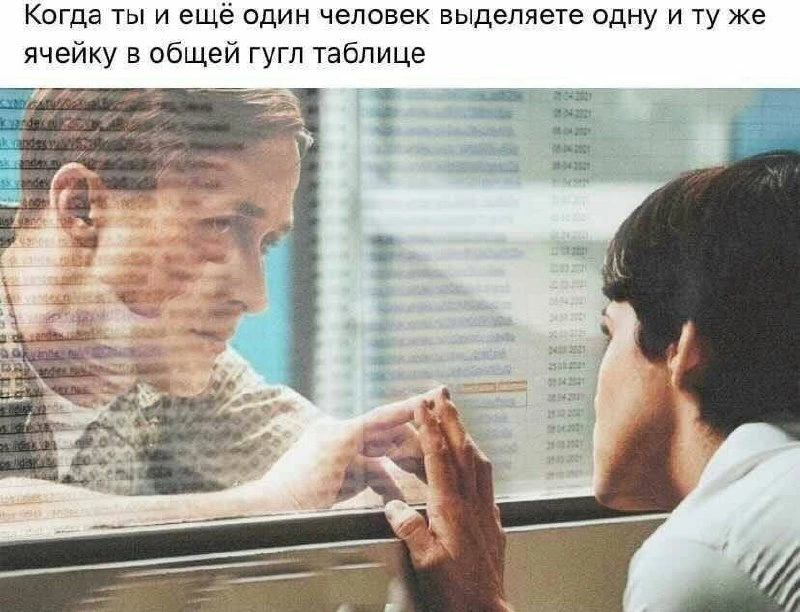
When two users click the same Google Sheets cell at the exact moment
Communication Post #5222, on May 25, 2023 in TG

When two users click the same Google Sheets cell at the exact moment

Why is this Communication meme funny?

Level 1: High-Five Through Glass

Imagine you and your friend both try to give each other a high-five, but there’s a window between you. You each press your hand on your side of the glass at the same time. Your palms line up perfectly, but of course you can’t actually clap hands because the glass is in the way. You both notice what happened and maybe you giggle because you had the same idea at the exact same second.

This meme is just like that, but with a computer. Two people who are working together both clicked on the very same little box in an online sheet at once. It’s a funny coincidence – kind of like both of you saying the same word at the same time and then laughing. The picture shows them touching fingers through a glass pane because it’s as if they “met” in that exact moment through the screen. It feels a little bit frustrating for a second (since they both can’t type in the box at the same time, just like you can’t quite high-five through a window), but mostly it’s just a playful oops! moment. Both people realize what happened and probably smile, letting one person go first. It’s a cute reminder that even though they’re each on their own computer, they’re still working together so closely that they almost “touched” in the digital world.

Level 2: Shared Sheet Surprise

Let’s break down what’s happening here. Google Sheets is an online spreadsheet program (like a cloud version of Excel) that lets multiple people work on the same spreadsheet at the same time. This is a big part of real-time collaboration – you can literally see others typing or moving around in the sheet live. Each little box in the spreadsheet grid is called a cell (cells are identified by coordinates like “A1”, which means the cell in column A, row 1). In a shared Google Sheet, if you click on a cell, your collaborators can see an outline on that cell in a unique color (and usually a tiny label with your name) indicating “Bob is selecting this cell.”

Usually, everyone edits different parts of the sheet. You might be in cell B5 while your coworker is updating cell D10. But occasionally, by coincidence (or because you’re both working on the same item), two people will click on the exact same cell. When that happens, you get a little surprise: on your screen, the cell is highlighted because you selected it – and then you also see a second highlight (an outline or a shaded corner in another color) showing that someone else selected it too. It’s basically a tiny cell selection conflict – both of you trying to use the same space at once. Google Sheets actually allows this to happen; it will just show both of you that the other person is there. It’s a concurrent editing quirk that’s usually harmless but can be a bit startling: “Wait, why is this cell outlined in orange all of a sudden? Oh, Sarah is here too!”

If you both actually start typing in that one cell, things can get a little confusing. In most cases, one of you will realize what’s going on and stop to let the other finish. (The software might even give a subtle indication, like an icon or a note that “Another user is editing this cell.”) Typically, whoever finishes their edit and hits Enter first will set the cell’s value. The other person will immediately see that new value appear, and at that point they’ll usually back off, since the cell’s content has changed under their cursor. It’s Google Sheet’s way of quietly resolving the conflict – essentially, “Alice’s edit went through, so Bob, please take a look at the updated cell before you continue.” No big drama: you end up with one final value in the cell (whichever was saved last) and everyone sees the same thing pretty much instantly. You can always undo or change it again, and maybe next time one of you will coordinate a bit more. The key is that both of you noticed each other in real time, so you didn’t keep accidentally overwriting each other for long — the app makes sure you’re aware of the simultaneous action.

Now, the caption at the top of the meme is in Russian. It translates to: “When you and another person select the same cell in a shared Google table.” (“Google table” is just what Google Sheets is sometimes called.) So the text is basically setting up the joke in Russian, describing that exact scenario. The image below it shows a dramatic movie scene: two people on opposite sides of a glass window, each touching the glass with a fingertip, almost like they’re trying to connect through the barrier. The meme creator edited a faint overlay of the Google Sheets grid on top of that image (you can see faint rows of date entries and the orange outline around one cell on the glass). This visual mash-up is illustrating the feeling of that moment. It’s like you and your colleague are each on one side of the computer screen (the “glass”), reaching for the same spot – in sync, but also separated because you’re two users in an online app.

This is one of those little quirks of working together online. It’s not a serious problem at all – more like a funny coincidence. In a normal office, if two people tried to grab the same file or write on the same whiteboard spot, they’d notice and laugh, “Oops, my bad!” In the digital world, Google Sheets gives us that colored highlight as a signal, and we have that same little laugh when we realize what happened. It’s a small collaboration pain point that reminds us we sometimes need to communicate. Often the solution is simple: one person will message the other saying “You go ahead and fill it in, I’ll wait.” Or if you’re on a call together while editing, one might say out loud, “Haha, jinx! Go for it, I’ll let you handle that cell.” The fact that this occurs shows how closely we’re working together in real time.

For many remote teams, shared online documents like this are everyday tools. We use them to track projects, plan sprints, maintain spreadsheets of bugs or features – you name it. And with so many people collaborating at once, these funny little overlaps are bound to happen occasionally. The meme is basically laughing about how dramatic it feels in the moment when you clash cursors with someone else. It resonates with a lot of us because it’s a common experience when doing remote work or any kind of online teamwork. It’s both slightly awkward and a bit heartwarming: awkward because “whoa, I almost overwrote you”, and heartwarming because “hey, we’re on the same wavelength.” In the end, it’s a quick, amusing moment that breaks the monotony of working alone at your screen – a reminder that there’s another person right there with you (even if they’re miles away physically), and you’re collaborating in real time.

Level 3: Star-Crossed Collaborators

Every experienced developer or analyst chuckles at this one because it’s so relatable. Two colleagues, one spreadsheet cell – and a moment of melodrama only a remote worker could know. In real life, it often plays out like: you’re filling in an important number and suddenly the cell lights up with a collaborator’s color, maybe an orange outline with their name. You both pause, watching the interface literally show your two presences overlapping. It’s the Google Sheets equivalent of that awkward hallway dance when two people try to walk through a door at the same time: “Oh – you go first… no, please, after you.”

The meme nails this feeling with a perfect visual metaphor: two people separated by a pane of glass, each pressing a fingertip against it, their hands almost touching but not quite. That’s exactly how it feels when you and a teammate unknowingly jump into editing the same field. You’re virtually face to face, aware of each other’s intent, yet there’s an invisible barrier (the software interface) preventing you from both doing the exact same thing. It’s a comically dramatic representation of a tiny everyday incident. We know it’s not actually life-or-death, but portraying it like a tragic romance scene makes it absurd and therefore funny. It highlights the everyday quirks and pain points of collaboration we encounter in modern work: even with amazing technology at our fingertips, we still manage to step on each other’s toes now and then.

For seasoned devs, there’s also a sense of “look how far we’ve come.” Back in the day, if someone had an Excel file open, nobody else could touch it – you’d get a blunt “file is locked for editing” error. Collaborative editing was a distant dream. Now we have cloud-based sheets where an entire team can edit together in real time, which is awesome... until two of you literally try to edit together on the same cell! It’s a minor inconvenience, of course. Usually one person quickly yields (“Oh, Alice is on it, I’ll wait.”). Sometimes you’ll shoot a quick message: “Haha, jinx! You take that one, I’ll update the next cell.” It underscores why communication is still key even with real-time tech: a brief Slack message or comment can save that awkward overlap.

There’s an interesting social dynamic to this too. This moment often proves that you and your colleague are in sync – you both identified the same issue or update and went for it in the same instant. In a strange way it’s a tiny bonding moment (“great minds think alike!”). During remote work, these little shared blips remind us there’s another human on the other side of the screen, working on the exact same thing. It can even be reassuring – like a digital fist bump acknowledging the teamwork. But in the moment, it’s equal parts “D’oh!” and “LOL, that just happened.” As developers, we spend our days managing shared code and dealing with merge conflicts, so seeing a cell selection conflict is both trivial and endearing. No complex git merge needed, no bug filed – just a polite UI glow that says “two of you tried to do this at once.”

Ultimately, the humor comes from the over-the-top way this meme visualizes a mundane office hiccup. It takes a tiny workflow blip and blows it up into a cinematic, emotional scene. We laugh because we’ve all been there and it was never actually this dramatic – but in that split second of confusion, it kind of felt like a dramatic standoff until we realized what was happening. The meme perfectly captures this relatable dev experience of modern collaboration: even with near-miraculous tooling connecting us across the globe, we still have those amusing moments of human overlap.

Level 4: Race Condition Rendezvous

In the blink of an eye, two users selecting the exact same Google Sheets cell becomes a mini case study in concurrency. This scenario is essentially a race condition in a collaborative application: two events racing to access or modify the same shared resource (that single spreadsheet cell). Under the hood, Google’s real-time collaboration engine has to handle this gracefully. It’s a bit like two distributed clients (your browser and your colleague’s browser) both telling the server, “I’m here first!”

RealTimeCollaboration systems use sophisticated algorithms to keep everyone’s view in sync. One common approach is operational transformation (OT) – originally pioneered in Google Docs and Wave – which allows concurrent edits by transforming one user’s action against the context of another’s. Another modern approach uses CRDT (Conflict-Free Replicated Data Type) techniques, which ensure that even if two updates occur simultaneously, they can merge into a consistent result without losing information. In a spreadsheet, a cell edit might be treated as an atomic operation (replacing the cell’s content), so two people editing the same cell at once poses a classic consistency problem: whose input wins, or how do we combine them?

Typically, the system will assign an order to these nearly-simultaneous events. Perhaps the server uses a timestamp or a Lamport clock to decide that User A’s click arrived just a few milliseconds before User B’s. That means one person’s action becomes “first” in the official history, even if to the humans it felt simultaneous. The second action might then be applied on top of the new state. If both users started typing different text, Google Sheets might employ a last-writer-wins strategy for that cell (the value from whoever presses Enter last could override the other). More elegantly, it could lock the cell for a brief moment: when you start typing, the cell is marked as “being edited by Alice”, and Bob’s view might show a subtle indication and hold off his input until Alice finishes. This is optimistic concurrency in practice – letting actions happen and resolving conflicts by merging or overwriting, rather than preventing the conflict upfront with a hard lock.

All of this happens in real time, faster than you can say “Oops!”. Both users’ spreadsheets rapidly converge to the same state through a flurry of network messages. The remarkable part is that the system maintains consistency (everyone sees the same final value in that cell) and responsiveness (no one gets kicked out or sees a frozen sheet). In a sense, Google Sheets is acting like a distributed system managing shared state, solving a tiny consensus problem about what goes in that cell. The result? Just a colored highlight and maybe a brief flicker of who’s editing – no merge conflicts to manually fix, no duplicated rows, nothing on fire. It’s a testament to how well-engineered these collaboration tools are that they handle such edge cases so smoothly. When two people reach for the same cell simultaneously, the software has already choreographed a reconciliation behind the scenes – all we see is that fleeting, orange-outlined moment of “Wait, we’re both here!” and then life (and the sheet) goes on consistently for everyone.

Description

The meme’s top caption in Russian reads: "Когда ты и ещё один человек выделяете одну и ту же ячейку в общей гугл таблице" ("When you and another person select the same cell in a shared Google Sheet"). Below, a dramatic movie still shows two people separated by a glass partition, each pressing a fingertip against the pane so their hands appear to touch. A semi-transparent Google Sheets interface is overlaid on the scene: gridlines, column letters, row numbers, and a single orange-outlined cell indicate active selection while faint date values fill other cells. The juxtaposition humorously visualizes real-time collaboration collisions - two colleagues yearning to edit the identical cell through the "glass" of collaborative tooling. It highlights the everyday coordination quirks of remote, web-based productivity workflows that engineers and analysts experience
Comments

22
Anonymous ★ Top Pick “When two cursors land on the same Google Sheets cell, the system falls back to the Human-Raft algorithm: endless leadership elections conducted via increasingly awkward hesitation.”
  1. Anonymous ★ Top Pick

    “When two cursors land on the same Google Sheets cell, the system falls back to the Human-Raft algorithm: endless leadership elections conducted via increasingly awkward hesitation.”

  2. Anonymous

    The most intimate moment in distributed systems: achieving consensus on cell A1 while your eventual consistency model silently corrupts everything else

  3. Anonymous

    The tragic moment when you realize your carefully crafted formula was just overwritten because neither of you implemented proper optimistic locking - and now you're both staring at each other through the metaphorical glass of 'Edit conflict: Your changes could not be saved.' At least in a real database you'd have ACID guarantees, but here in spreadsheet land, it's just last-write-wins and tears

  4. Anonymous

    That glass? It's the only thing keeping their spaghetti code from contaminating your production deploy

  5. Anonymous

    Google Sheets: two cursors, one cell - human-powered mutex, last-writer-wins consistency, and a very long Slack thread

  6. Anonymous

    Two cursors meet on the same cell and OT defers to the strongest consistency we ship: a Slack DM - “you go first” - human two‑phase commit with LWW as the failure mode

  7. @callofvoid0 3y

    huh?

    1. @sylfn 3y

      When you and one other person select the same cell in a shared google sheet (tr ru > en)

      1. @callofvoid0 3y

        thanks

  8. @AlexKart20129 3y

    why so russian?

    1. @affirvega 3y

      admin is russian, manages two channels, sometimes slips up

  9. @callofvoid0 3y

    Good afternoon?

  10. @sankyago 3y

    Коли ти та ще одна людина виділяєте одну і ту саму коміру у гугл таблицях

  11. @sylfn 3y

    lmao

  12. @RiedleroD 3y

    English please

    1. @affirvega 3y

      it literary says "I don't fucking care" in Ukrainian, lmao

      1. @endisn16h 3y

        rules are rules

        1. @affirvega 3y

          true, its just I found this situation funny

  13. @affirvega 3y

    sorry, what does this mean?

    1. @klemaai 3y

      just a joke, never mind)

  14. @sylfn 3y

    Please use English in this chat. tr: The Ukrainian was found, the opinion was approved

    1. @klemaai 3y

      okay mom

Use J and K for navigation