When the nightly CI build breaks seconds after your commit merges to main
Why is this BuildSystems CICD meme funny?
Level 1: Pretending It's Fine
Imagine you quietly snuck a cookie from the cookie jar before bedtime and didn't put the lid back on just right. Later that night, crash! – the loose lid slips, and the jar tips over, spilling cookies all over the kitchen floor. In the morning, you walk in and see cookies scattered everywhere. Your parent looks at you and the mess with raised eyebrows. You give a nervous little smile and say, "Uh, the cookie jar fell over," acting like everything is okay. But inside, your heart is pounding because you know it was your late-night cookie grab that caused this. You're basically trying to look innocent even though you feel guilty and worried. This is exactly what's happening in the meme. The developer is smiling at his computer like everything's fine, but he's really thinking, "Oh no, I messed something up last night." It's funny because we've all had moments where we try to hide that uh-oh feeling behind a grin, hoping we can fix the problem before anyone notices.
Level 2: Busted Build Basics
When software developers work in teams, they use version control systems (like Git) to manage and combine their code. Think of version control as a big saving system for code, where each save is called a commit. A commit is a bundle of changes with a message describing what's new. Developers often work on separate branches (separate lines of development), and when their work is ready, they merge their changes into the main branch. The main branch (sometimes called "master" in older terminology) is the central code that everyone eventually works from – kind of like the official copy of the project. Merging your commit to main means your changes are now part of that official project code.
Now, here's where Continuous Integration (CI) comes in. Continuous Integration is a practice and also the name for systems that automatically build and test code whenever developers integrate new changes. Think of a CI pipeline as a robot assistant that, every time it sees new code added to the main branch, it goes through a checklist: "Alright, let's compile the code, run all the tests, and make sure nothing is broken." This pipeline often has stages like "build" (compile the code into an application) and "test" (run the automated tests). If everything succeeds, we say the build is green (green usually means success or OK). If something fails – say the code doesn't compile or a test case fails – we say the build is red (meaning there's a problem to fix). Many development teams have a dashboard or email alerts that go off when a build turns red to alert everyone that something went wrong.
A nightly build is a special scheduled run of this CI pipeline that happens at night (usually late evening or early morning hours when developers aren't actively working). Why do a build at night? Imagine a project with thousands of tests – running all of them every single time anyone updates the code could slow things down during the workday. So teams often run a quicker set of tests during the day for each commit, and then once a day run the full test suite overnight. The nightly build is like a big, thorough check-up of the whole project, done when it won't interrupt anyone's work. By morning, it reports if there's any new problem.
Now, what does "build breaks" or "build fails" mean? Basically, it means the CI pipeline found a problem. For example, one of the automated tests might have failed. Let's say there's a test that checks if users can log in, and with the latest code, that test started erroring out – that's a failed test, so the overall build is marked failed. Or perhaps the code didn't even compile because of a syntax error (maybe someone introduced a typo or forgot a semicolon in a language where that's required) – that would also make the build fail. When the build fails, developers often say "the build is broken." It's like getting a report card where one of the grades is an F; you know exactly which test or step got the F, and now it needs to be addressed.
In the meme's scenario, the text "FAILED ON MY COMMIT" implies that as soon as your code was added, the overnight build encountered an error. In other words, something about your changes likely caused a test to fail or an error to appear. This is a pretty common occurrence in development. You might not have realized your code would cause a problem – maybe there's an interaction with another part of the system you weren't aware of. For instance, you changed how a calculation works in one place, but there's a test expecting the old result in another place. So when the nightly tests run everything, that test fails, pinpointing your commit as the cause.
What happens next is debugging and troubleshooting. Debugging is the process of figuring out why something went wrong and how to fix it. If the nightly build fails on your commit, you'll likely open up the CI system's interface (or email or report) and see what exactly failed. It might show a specific test name and an error message. For example, it might say something like "Test X – Expected 5, but got 4". That gives you a clue: maybe a function you changed is now returning 4 instead of 5, which is why the test is upset. You then go to that part of the code on your own machine, try to reproduce the failure by running the same test, and then adjust the code or the test as needed to fix the issue. Once you believe you've fixed the bug, you commit the fix and merge it, which triggers the CI pipeline again. Hopefully this time everything comes out green (meaning the tests all pass again) and the build is stable.
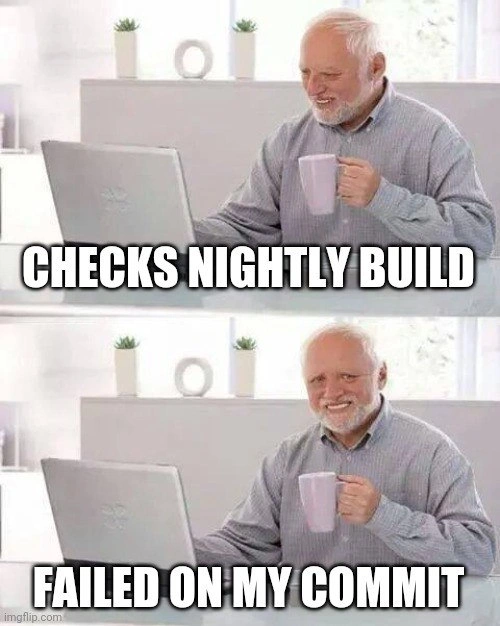
The meme itself is showing the emotional side of this scenario. It features an older gentleman at his laptop with a mild, strained smile – known in internet culture as "Hide the Pain Harold" because he looks like he's smiling through some inner pain. The top caption says "CHECKS NIGHTLY BUILD" and the bottom says "FAILED ON MY COMMIT." The joke here is that the developer (just like Harold) is outwardly calm – he's just casually checking last night's build results – but as soon as he sees that it failed because of his code, he's feeling that pang of anxiety or frustration inside. Yet, like Harold, many of us in that situation will still be sitting at our desk with a semi-smile, trying not to visibly freak out. It's a mix of "Oops, that might be my fault..." and "Alright, stay calm, let's figure this out." This kind of developer humor is very relatable if you've ever broken a build: it's both embarrassing and a little funny in hindsight that a few lines of code you wrote could make the whole team's project yell "FAIL." The good news is, with CI, you usually catch it early (in the nightly run, before the code goes out to customers), and you learn to be extra careful or to run more tests next time. Every developer, junior or senior, encounters this sooner or later – it’s practically a funny survival story you share with others: "Remember that time I broke the build with a one-line change? Classic!" So the meme is a lighthearted way to say "hey, we've all been there."
Level 3: Integration Hangover
Every experienced developer knows this scene: you merge your code into the main branch and head off to relax, only to find out moments later (or the next bleary-eyed morning) that the nightly build pipeline has gone red. Picture our friend Harold in the meme: one hand holding a lavender coffee mug, a neutral smile on his face as he checks the CI dashboard, and there it is – FAILED on last night's run, with error logs implicating the very commit you just pushed. That polite smile is a mask for the immediate post-commit dread: "Oh no... I broke it." The meme uses the famous "Hide the Pain Harold" image precisely because every engineer has worn that same expression – outwardly calm in the office, but internally cringing at the thought of having to clean up a mess. It's the developer poker face when the build status turns red and all fingers point to your last commit.
When a build pipeline fails right after your code is merged, it's the programming equivalent of hearing a record scratch at a party – everything stops, and all attention (or blame) shifts to the culprit. Your mind races through potential causes. Did you skip running some slow integration test locally because it "always passes"? Did a library or dependency update unexpectedly, creating a compatibility issue? Perhaps the CI environment differs from your development setup – for instance, the tests might run in parallel on the CI server or use a real database instead of the lightweight one you used. Any of these differences can expose a bug that never showed up on your machine. There's that classic ironic phrase, "But it worked on my machine!" – and it really might have. Your code was fine in isolation, but now the combined system is revealing something you didn't anticipate. In this moment, it's time to switch into debugging mode: comb through the failure logs, find the stack trace or the test that failed, and pinpoint what went wrong. Maybe you'll spot a null pointer exception in the logs, or a test assertion that didn't match the new logic.
This scenario is a rite of passage in CI/CD culture. Teams strive to keep the main branch green (all tests passing). Many have unwritten rules and running gags about broken builds: if you break the build, you might owe the team donuts, or you'll at least endure some good-natured ribbing in the morning stand-up. Why do these mishaps keep happening? Because moving fast and integrating often is hard to do without the occasional slip-up. In an ideal world, every possible test is run on every commit, and no code that breaks things ever gets merged. In reality, test suites can be thousands of tests long and take hours to run, so we make trade-offs. We run a quick set of core tests for each pull request or commit, and save the full exhaustive testing for a nightly build. It's a pragmatic balance between speed and thoroughness. Of course, that means sometimes you don't find out about a problem until that nightly run. It's a bit like only doing a full medical check-up once a year; most of the time you're fine, but occasionally you uncover an issue that went unnoticed in the quick daily checkups.
When the pipeline does turn red, fixing it becomes top priority. If you're lucky, the fix is obvious – for example, you realize you forgot to update a unit test expectation, or you see a clear mistake in the code (like using the wrong variable name). Those are the best-case scenarios: a quick edit and a push, and the build is back to green. Other times, it's more of an investigation. You might have to reproduce the failure on your own machine by running the same steps the CI did. Tools like git diff help you review what changed, or git bisect in more complex cases to find which commit introduced the problem if multiple changes went in. Occasionally, multiple commits from different developers land around the same time, and then it's a bit of a whodunit to figure out which change actually caused the break. The CI logs might point to a test named, say, UserLoginIntegrationTest, failing on an assertion — now you have to figure out why. Perhaps your code changed how user authentication is handled and an integration test that simulates a login caught a scenario you didn't consider. Or maybe the test is flaky – a notorious term for tests that sometimes pass and sometimes fail due to things like timing issues or external service calls. Flaky tests can make it tricky: you might wonder, "Did my commit really break things, or did we just hit a test glitch?" Nonetheless, the rule of thumb is to assume the new commit exposed a real issue until proven otherwise.
The humor (and pain) in this meme resonates with developers because we've all been that person staring at a broken build with a forced grin. It's a mix of embarrassment, responsibility, and urgency. You know everyone on the team will see that red CI status in the morning. In some teams, a broken main build means stop everything and fix it before doing any new work, because a red build can block others ("failure is contagious" in a shared codebase). So you swallow your pride, maybe make a self-deprecating joke in the team chat – "Looks like I get to be today's build breaker, I'll fix it right away 😅" – and then you get to work troubleshooting. Over time, developers get better at avoiding these situations (writing more robust tests, running critical checks before merging, using feature flags, etc.), but nobody is immune. There's always that one scenario you didn't think of. And honestly, that's why this meme is funny: every developer, junior or senior, recognizes that quiet, soul-crushing moment when you realize you clicked the merge button and now something's broken. You take a sip of coffee, fake a calm smile like Harold, and mutter "alright, let's figure this out" while internally screaming a little. It's the classic integration hangover – you had a smooth day of coding, and now you're paying the price the morning after.
Level 4: Chaos in the Pipeline
In a large software system, merging new code can feel like introducing a small perturbation into a chaotic system. Continuous Integration (CI) pipelines execute dozens or hundreds of tests, but behind the scenes they're grappling with a combinatorial explosion of states. If your code interacts with N modules or services, verifying every possible interaction quickly becomes intractable (think exponential growth in complexity). In fact, determining all the ways your commit might affect a big codebase edges into NP-hard territory. It's like trying to predict every ripple from a single pebble dropped in a lake. CI aims to tame this complexity by running a broad test suite, yet even CI can't provide a mathematically complete guarantee. There's an unwritten Murphy's Law of CI: anything that can break as a result of your change will break, and usually at the worst possible time. The nightly build is often when these latent issues surface, because that's when the full gauntlet of integration tests and checks run. It's as if the pipeline lies in wait for the quiet of midnight to unleash every obscure edge case. Certain bugs are even time-dependent: for example, a test might pass all day but fail right after midnight due to a date-handling edge case (cue those infamous time zone or end-of-day bugs). The end result? A commit that looked fine in isolation opens Schrödinger's box overnight; by morning the CI status has collapsed to a definite state, and it's red.
Unless we employ heavy-duty formal methods to prove correctness (a rarity outside of mission-critical domains), we always carry a sliver of uncertainty with each merge. Ensuring a complex program is entirely bug-free after every change is akin to solving a miniature halting problem – impossible in the general case. So we do the next best thing: we run lots of tests to cover likely scenarios. The nightly CI run is a pragmatic compromise, extending test coverage and simulating a production-like environment to catch issues that earlier, faster tests might miss. But fundamentally, it underscores a truth from computer science and systems theory: in any sufficiently complex system, unexpected interactions will emerge. In other words, chaos finds a way. And often that chaos waits until you're not looking (or asleep) to make its grand entrance, leaving you with a broken build and a cup of cold coffee the next morning.
Description
Two-panel meme featuring the stock photo often called "Hide the Pain Harold." In both panels, an older man with gray hair sits at a white desk in a bright minimalist office, holding a light lavender coffee mug and staring at an open silver laptop; small potted plants and round white decor sit on the shelf behind him. Bold white impact font with black outline overlays the images: the first panel reads "CHECKS NIGHTLY BUILD" and the second panel reads "FAILED ON MY COMMIT." The visual joke contrasts his outward calm with the inner dread familiar to engineers whose latest Git push has just turned the nightly CI pipeline red. It highlights common frustrations around continuous integration, build stability, and the debugging that inevitably follows a broken build
Comments
6Comment deleted
Nothing like checking the nightly and realizing your single-character tweak to a shared proto just granted 112 microservices simultaneous existential crises
The only thing more reliable than a nightly build finding issues is its uncanny ability to trace them back to the one commit you made at 4:47 PM on a Friday while thinking 'what could possibly go wrong with this one-line change?'
That moment when your local environment's carefully curated collection of undocumented environment variables, specific library versions, and 'temporary' PATH modifications creates a perfect storm of 'works on my machine' syndrome - only to have the nightly build's pristine Docker container expose your architectural sins at 3 AM via Slack notification. The real CI/CD was the technical debt we accumulated along the way
Nightly CI is where “non-functional change” meets a 3am git bisect proving your comment-only refactor tickled the one test that isn’t quarantined
'Works on my machine' until the nightly build whispers your commit hash in accusation
Nightly CI: the only colleague who waits until 3am to inform you your 'README-only' commit invalidated the codegen step and broke a test suite that only runs in UTC