Advanced User Status: Unlocked
Why is this Games meme funny?
Level 1: Expert Mode (Toy Version)
Imagine a little kid sees a big sign on a real oven that says, "Only expert chefs can use this." The kid then runs to their toy kitchen, puts on a chef’s hat, and excitedly starts "cooking" with plastic food. The child is acting like a master chef, even though they're just playing pretend with a toy stove. It's funny because the kid isn’t actually doing anything advanced at all. They only feel like an expert because of that sign. In this meme, the same thing is happening: a computer program said "for advanced users only," so the person proudly hops on a toy laptop, feeling like a tech genius. The humor comes from the big difference between how cool and skilled they feel versus what they’re really doing (just playing around).
Level 2: CLI Flags with Training Wheels
Steam is a popular program for buying and playing PC games. In Steam’s settings for each game, there’s an option called “Set Launch Options…”. Launch options are basically extra instructions you can give a game before it starts. They look like plain text commands (often starting with a dash, like -fullscreen or -novid) that tell the game to do something special when launching. This is a way of using the computer’s command-line features without actually opening a terminal – Steam just passes those command-line arguments to the game for you. Because using the wrong command could make a game act weird or not start, Steam puts up a warning saying these settings are for advanced users only. In other words, "Only change this if you really know what you're doing." It’s like a tool chest with a label “experts only” – if you’re not sure what a tool does, probably leave it alone.
For example, a common launch option in games is -windowed, which forces the game to run in a window instead of full-screen. Another one is -high, which tries to make the game run with higher CPU priority (so it can get more processing time). Normally, you don’t need to set those manually — the game or your system picks good defaults. But sometimes advanced players use these flags to troubleshoot issues or eke out extra performance. Steam’s warning just tries to make sure casual users don’t get confused or break something by accident. It’s part of the user experience design: hide the power-user stuff from most people, but allow it with a caution sign for those who seek it out.
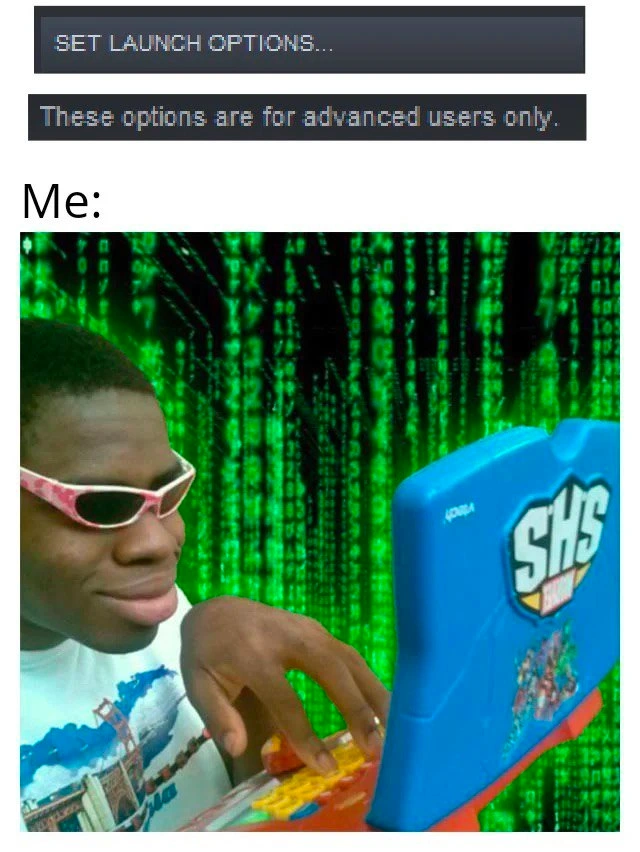
Now, look at the meme image. The top part is that Steam dialog basically saying "Careful, expert area ahead." The bottom part says “Me:” and shows a young kid happily typing on a bright, toy laptop. A toy laptop is literally a child’s pretend computer – the kind with chunky plastic keys and maybe some cartoon stickers, often used to play educational games. The joke here is that instead of a real high-powered setup, the person (the "Me") is using something as simple as a kid’s toy to do an "expert" task. To add to the silliness, the background behind the kid is filled with those glowing green falling numbers from The Matrix. If you’ve seen The Matrix, you know it uses that falling code imagery to represent hacking into a computer world. So in the meme, a child on a toy computer has the dramatic Matrix-style code backdrop, instantly giving off “hacker at work” vibes. It’s a funny mix of childlike equipment with an exaggerated hacker atmosphere.
This contrast is both funny and relatable. Think about the first time you discovered a hidden setting or used a command prompt as a beginner – you probably felt pretty proud of yourself. It’s like when you learn a secret trick that most people don’t know. Even though setting a few launch options isn’t the same as programming, it gives a small taste of feeling like a "techie." A lot of developers and gamers start out by tinkering with things like this. Maybe you edited a game’s text file to change a value, or typed in a cheat code, and suddenly you felt super smart. The meme captures that feeling with the kid and toy laptop: someone who isn’t really an expert but is super excited to act like one. It’s amusing because we know the person hasn’t suddenly become a master programmer just by adding one little setting – just like a child with a fake stove isn’t suddenly a master chef – but the enthusiasm and imagination make it entertaining.
Level 3: Launch Options LARP
This meme brilliantly satirizes the gap between feeling like an expert and actually being one. At the top, the Steam client’s SET LAUNCH OPTIONS dialog bluntly warns that “These options are for advanced users only.” Steam shows this kind of message whenever you try to set custom launch parameters for a game. Essentially, it’s saying: “Hey, you're about to pass manual command-line flags to the game—proceed only if you know what you're doing.” It's a bit of gatekeeping UI: adjusting these launch options means providing extra text commands to the game’s executable, something ordinary players rarely touch. It’s a minor form of CLI (Command-Line Interface) tinkering that can toggle hidden features or performance tweaks in the game.
For seasoned developers or sysadmins, adding a few --flags to tweak how a program runs is routine stuff, hardly arcane magic. But to a less experienced user (or a gamer used to comfy point-and-click settings menus), that ominous “advanced users only” banner makes it feel like you’re entering hacker territory. It's the same psychological allure as a door labeled “Authorized Personnel Only”—suddenly you really want to see what's behind it. The warning practically dares curious tinkerers to prove they're "advanced" by venturing into the forbidden launch settings.
# For example, a power user might manually launch a Steam game like this:
$ steam -applaunch 440 -novid -console -high
# (This starts Team Fortress 2 with no intro video, dev console enabled, and high CPU priority)
To an actual tech veteran, those sample flags above (-novid, -console, -high) are fairly mundane – they're just explicit settings instructing the game: "skip the intro video, enable the console, run in high-priority mode." There's no black magic there, just direct configuration. But if you're a teenager who’s never touched a terminal outside of maybe coaxing Minecraft to run, typing in these cryptic parameters can make you feel like you're hacking the Matrix itself.
And that's exactly what the bottom half of the meme captures. The “Me:” portion shows an overexcited kid furiously typing on a garish, brightly colored toy laptop, while the iconic Matrix-style neon green code cascades behind him. This visual gag is a deliberate, over-the-top contrast. It's tapping into the classic child hacker trope: the absurd image of an inexperienced person (literally a child) imagining themselves as an elite coder because of some superficial tech action. The kid’s plastic rig – complete with cartoon decals and chunky Fisher-Price-style keys – is the farthest thing from a serious hacking machine. Yet the dramatic falling code backdrop shouts “I’m in!” as if he's performing high-level cyber ops. It's a hilarious juxtaposition: the setting screams “1337 h4x0r mode activated” in movie-style visuals, while reality whispers “just playing pretend.”
In meme culture, slapping a Matrix code background behind someone typing is shorthand for "hacker mode engaged." Here it's used ironically: the more the image tries to signal “elite hacking in progress,” the funnier it becomes given the actual scenario. The kid even appears to be sporting a confident smirk (and some snazzy shades), really leaning into that exaggerated hacker aesthetic. It's basically saying: Look at me, I added a launch option flag in Steam, now I'm a full-blown terminal wizard! The humor comes from the huge disparity between the advanced status the person imagines and the toy-grade setup they actually have.
Experienced developers can especially appreciate this joke because many of us were that kid at one point (at least metaphorically). Think back to the first time you popped open a terminal or edited a secret config file and felt a rush of power. Doing something beyond the normal UI – like adding an obscure --enableAwesomeMode switch you found on a forum – makes you feel surprisingly accomplished. It's a tiny step into the world of power-users, and it’s exciting. The meme playfully mocks that overconfidence. The truth is, adding one little parameter doesn't instantly turn you into Neo from The Matrix, but it sure can feel like it when you're a beginner.
There's even a bit of tech history irony here. Not so long ago, manually tweaking launch settings or command-line arguments was just standard procedure for PC gamers and developers alike. (Some of us remember configuring memory and graphics options via command line just to get a game running – being a gamer in the DOS era basically required advanced user skills!) Nowadays, platforms like Steam wrap those tweaks in a GUI and slap on warnings. What used to be normal (typing commands) is now treated as exotic “expert” territory. So when a modern gamer or newbie dev finally crosses into that territory — entering a few arcane text flags — it feels like a big deal. The meme exaggerates that feeling to comedic effect.
The top panel sets up an official-sounding challenge (“only advanced users should mess with this”), and the bottom panel delivers the punchline: an eager but comically under-qualified "hacker" rising to that challenge on a kiddie laptop. It perfectly captures a slice of tech humor: taking a tiny, nerdy tweak and blowing it up with Hollywood hacker drama. Anyone who's been around computers can chuckle, remembering that phase when a small command made us feel like we had root access to the universe.
Description
A two-part meme. The top part shows a screenshot of a Steam client dialog box with a button labeled "SET LAUNCH OPTIONS..." and a warning message below it: "These options are for advanced users only." Below this, the text "Me:" introduces the bottom image. The bottom image features a young Black person wearing pink-rimmed sunglasses, looking smugly at a blue toy laptop. Their hands are on the colorful keyboard, and the background is the iconic green cascading code from "The Matrix." The meme humorously contrasts the "advanced users only" warning with a self-perception of being a master hacker, even when dealing with relatively simple settings. For experienced developers, this resonates with the feeling of diving into configuration files or using CLI flags - tasks that feel powerful but are often trivial, exposing the gap between perceived complexity and actual technical depth

Comments
7Comment deleted
That feeling when you add `--no-sandbox` to the launch options and suddenly you're Neo, except your 'matrix' is just a misconfigured Electron app
Steam: “Launch options are for advanced users only.” Me: pastes -novid -high -console on a Fisher-Price laptop with the same confidence I hot-patch JVM flags in prod - because seniority is just knowing which mysterious CLI incantations still work
After 20 years in tech, I've learned that 'advanced users only' warnings are just the software's way of saying 'here be dragons' - and we all know how that story ends when you're debugging production at 3 AM because someone thought they understood what --experimental-jit-compiler-unsafe-mode actually does
Every senior engineer knows that 'for advanced users only' is just a suggestion, much like 'tested in production' is a deployment strategy. We've all been that person who sees launch options and immediately starts tweaking flags without reading the docs - because who needs warnings when you have Stack Overflow open in another tab and a rollback plan that's definitely not just 'git revert and pray'?
Launch options: where 'advanced' means one typo from nuking your GPU drivers in pursuit of 2 FPS
Steam: “Advanced users only.” Me: paste LD_PRELOAD and -XX:+UnlockExperimentalVMOptions, slap on a Matrix wallpaper, and call it performance tuning
Senior move: paste the 2018 launch incantation -Xms2g -Xmx2g --max-old-space-size=4096 into every service and call it tuning, then spend on-call explaining why the container was OOM-killed