The DevOps Engineer's Guide to Serving a Single HTML File
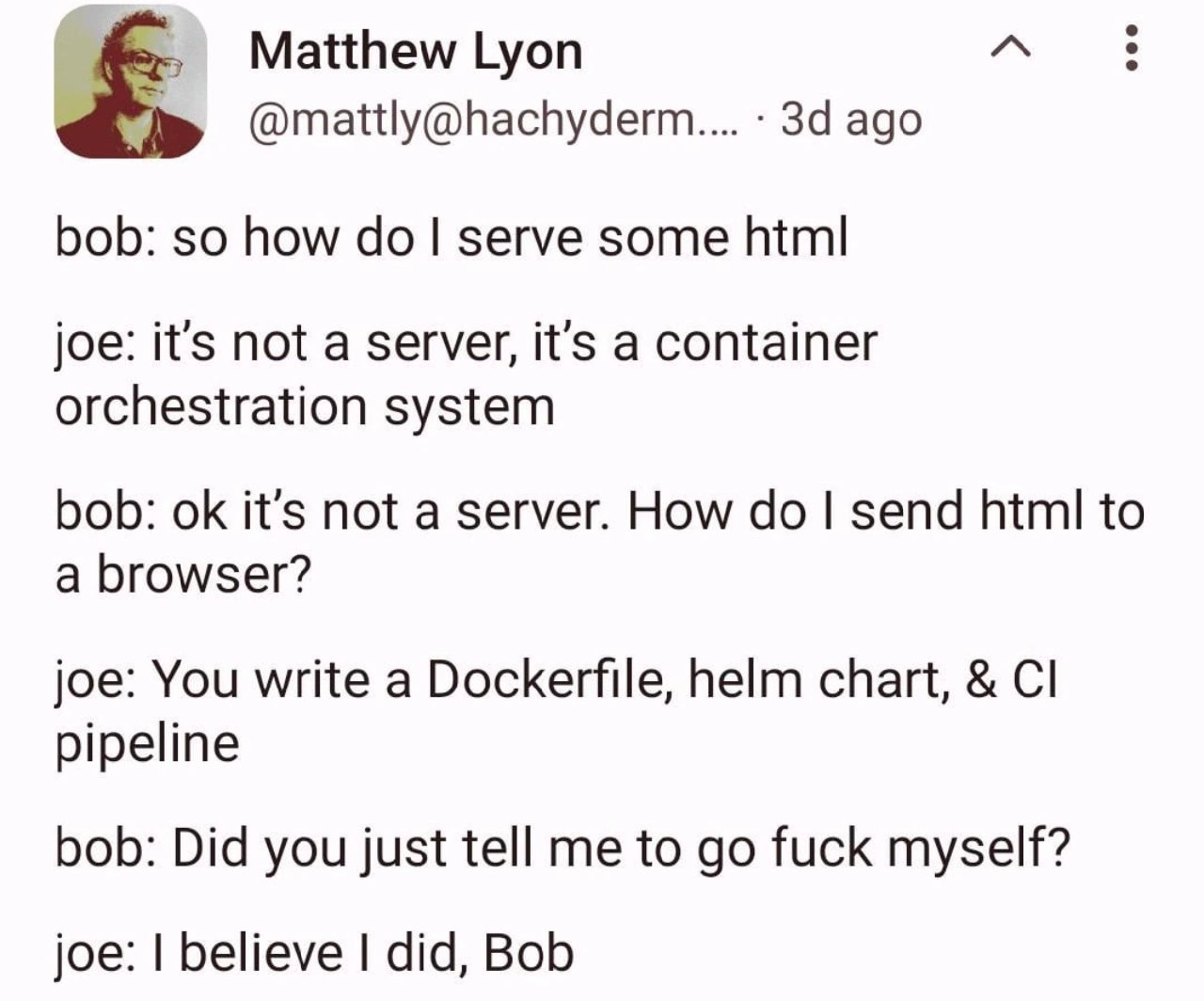
Why is this DevOps SRE meme funny?
Level 1: Truck for a Letter
Imagine Bob just wants to send a letter to someone, and he asks Joe, “Hey, how do I mail this letter?” Instead of saying “just drop it in a mailbox,” Joe replies, “Well, first you need to design a new kind of envelope, then build a delivery truck, set up a whole postal routing system, and establish a logistics company to get that letter delivered.” 😮 Bob would probably blink and say, “So… basically you’re telling me to go do an impossible amount of work for this one letter?” That’s exactly the feeling in the meme. Bob wanted to do something really simple (serve an HTML page, like handing over a letter), and Joe’s answer was unbelievably complicated (like starting a postal service from scratch). It’s funny because it’s over-the-top. We laugh at how absurd it is to use something so huge and complex for a tiny task. Bob feels frustrated and a bit insulted — he just wanted a quick, easy solution, but Joe’s response is like a polite way of saying “not gonna happen without a ton of effort.” In plain terms, the meme is joking about using a massive, complicated machine to do a very simple thing. The humor comes from that huge mismatch. Even if you don’t know anything about Docker or servers, you can understand that telling someone to do way too much work for a simple request is silly (and a little mean). So, it’s like Joe told Bob to build a rocket ship to deliver a pizza — technically one way to do it, but absolutely overkill, and kind of a rude answer to someone who was hoping for something simple.
Level 2: Hello YAML World
Let’s break down what Joe is actually saying in simpler terms, and why Bob is so confused. Bob just asked, “How do I serve some HTML?”—basically how to put a basic webpage online so that when someone’s browser requests it, they get the page. This is one of the simplest things in web development, traditionally. HTML is just a file with markup for a webpage. In the past, you might do something straightforward like run a small web server on your computer or on a cheap hosting service to serve that file. For example, Python has a super simple built-in server: python3 -m http.server 8000 will start serving files from the current directory, and anyone can get them via a browser. That’s what Bob probably expects: a no-frills answer.
But Joe’s response replaces the simple server with a modern DevOps stack. When Joe says “it’s not a server, it’s a container orchestration system,” he’s likely talking about Kubernetes or a similar platform. A container orchestration system is a fancy platform to run containers (lightweight, isolated environments kind of like mini-virtual machines) across many machines. Docker is the tool used to create these containers. A Dockerfile is basically a recipe for building a container image. In a Dockerfile, you might say “start from a base image (like a tiny Linux with Nginx), copy my HTML into the right folder, and launch Nginx.” So instead of just running the HTML directly, you wrap it in a Docker container. Why? Companies do this for consistency: if it runs in a container on your machine, it should run the same way in production. It isolates your app and its dependencies from the host machine. That’s containerization in a nutshell.
Now, one container by itself is okay, but enterprises rarely stop at one. They use clusters of containers managed by orchestration systems like Kubernetes (often abbreviated “K8s”). Kubernetes can deploy and manage hundreds of containers, scale them up or down, restart them if they crash, etc. But to tell Kubernetes what to deploy, you use configuration files, often in YAML format. That’s where Helm comes in. A Helm chart is a collection of YAML config files bundled together to describe a set of Kubernetes resources (like a container deployment, a service to expose it, etc.). Helm charts help templating these configs so they are easier to reuse. Think of Helm as a packaging tool or an installer script specifically for Kubernetes applications. Joe is basically saying, “We won’t run your HTML on a simple web server; we’ll package it in a container and use our Kubernetes cluster to run it.” And to do that properly, you create a Helm chart so that the ops team can deploy it in a standard way.
Finally, Joe mentions a CI pipeline. CI stands for Continuous Integration (often paired with CD, Continuous Deployment). A CI/CD pipeline is an automated process that takes your code, runs tests, builds the application (in this case builds the Docker image), and then deploys it to an environment (possibly using that Helm chart on the Kubernetes cluster). Common tools for this are things like Jenkins, GitLab CI, or GitHub Actions. So instead of manually setting up and copying files, you’d push your HTML code to a repository, and a pipeline would automatically build the new Docker image and release it to the server cluster. This is great for big projects because it ensures every change is tested and deployed in a consistent way without manual error-prone steps.
Now, imagine you’re new (like Bob) and just wanted a simple answer. Joe basically responded with a bunch of advanced DevOps jargon: Dockerfile, Helm chart, CI pipeline. Each of those is a tool or concept that by itself takes time to learn. Bob probably just wanted to hear “use this command” or “put the file here and you’re done.” Instead, he got what sounds like an instruction to set up an entire cloud infrastructure. That’s why Bob asks, “Did you just tell me to go f** myself?”* He feels like Joe’s answer was so unhelpful and over-complicated that it’s as if Joe was being passive-aggressive. It’s like asking how to turn on a light switch and being told, “It’s not a switch, it’s an entire power grid you need to configure.” For a junior developer or someone new to DevOps, this would be overwhelming. Terms like CICD, Docker, Kubernetes, and Helm might as well be a foreign language if you’ve never dealt with them. The meme pokes fun at how tech culture sometimes responds to a simple problem with an immensely complex solution because that’s the “modern best practice.” It highlights a gap in perspective: Bob is thinking small and simple, Joe is thinking big and automated. Neither is wrong exactly—containers and pipelines are a good thing in many cases—but the contrast is huge and kind of ridiculous for this use case. This is common in DevOps humor: joking about how a tiny task ends up requiring a ton of setup and knowledge, making newcomers feel like they asked a dumb question (even though they didn’t). So “Hello YAML World” is our lighthearted way of saying: to get “Hello, World!” on a web page nowadays, you might have to write a bunch of YAML configuration files and become a mini-expert in deployment pipelines. No wonder Bob is taken aback!
Level 3: Containers All the Way Down
In the world of seasoned developers, this meme hits a painfully funny nerve. It’s depicting a classic case of overengineering: Bob’s asking for a simple web server, and Joe responds with an entire Cloud Native deployment pipeline. Why is this so funny (or scary) to experienced devs? Because it’s alarmingly real. We’ve all seen a situation where a straightforward task gets swept into the DevOps complexity spiral. Instead of saying, “throw the HTML file on a server and open port 80,” Joe insists “It’s not a server, it’s a container orchestration system.” Translation: “We don’t do anything the easy way around here.” Bob’s innocent question triggers a cascade of modern best-practices-gone-wild.
Consider what Joe is prescribing: First, containerize the app by writing a Dockerfile for the HTML (because nothing says Hello World like a Linux container image 😏). Then write a Helm chart (Helm is basically a package manager for Kubernetes) to deploy this container to a Kubernetes cluster. Why a cluster? Maybe Joe’s company policy is that every app, even a one-page site, runs in their K8s environment (K8s is shorthand for Kubernetes, and a bit of an inside-joke itself). And of course, you can’t just edit and upload files; you need a CI pipeline to build, test, and deploy the container automatically whenever someone commits changes. By the time Joe is done, poor Bob’s simple HTML hosting has turned into a mini reproduction of how Netflix or Google deploys microservices. It’s containers all the way down — even for a static page.
This humor resonates with seniors because it satirizes the everyday absurdity in tech teams: using a sledgehammer to crack a nut. Joe is basically parroting the kind of “standards” many large organizations enforce. Everyone in DevOps has a war story like this: the 5-line website that required 500 lines of YAML and a fleet of containers to go live. It’s funny now, but it’s also a bit of a horror story — we chuckle while remembering the frustration of setting up something ridiculously elaborate for a trivial need. Joe’s final line, “I believe I did, Bob,” delivered with deadpan corporate seriousness, is the punchline. It’s the equivalent of saying, “Welcome to modern IT, where DevOps means you’ll do ten times the work for the same result, and yes, we all hate it.” The DevOps/SRE crowd calls this “embracing the suck”: you adopt complex tools for the long-term benefits (scalability, consistency, containerized deployments) even when the short-term task doesn’t seem to warrant it. The meme cleverly highlights that disconnect. Bob just wanted to send some HTML to a browser, and Joe’s answer, while technically correct in an enterprise context, is so disproportionately complex that it’s essentially telling Bob to get lost. Seasoned engineers laugh (or cry) because they’ve been Bob — baffled by why something so simple has become so complicated — and they’ve also been Joe, implementing an over-engineered solution because “that’s the way things are done here.” It’s a nod to the shared pain of DevOps overengineering where even a static site must jump through countless hoops of Docker containers and CI/CD pipelines. In short, this meme is a dark comedy about Containerization mania: everything, no matter how trivial, gets the full microservices treatment.
Level 4: Overkill by Design
At the deep infrastructure level, this scenario is born from well-intentioned design choices in modern systems. Tools like Docker and Kubernetes weren't invented just to torment developers; they evolved to solve genuine distributed computing and scalability problems. A container orchestration system (what Joe alludes to) manages dozens or thousands of containerized apps across many servers—scheduling them, handling failures, balancing load. These systems rely on serious computer science: for example, Kubernetes uses an internal key-value store (etcd) that implements the Raft consensus algorithm to keep cluster state in sync (ensuring all nodes agree which containers should be running). This touches on classic distributed systems theory, where the CAP theorem forces hard choices between consistency and availability. In a mega-scale cloud service, such complexity is necessary. The irony is when those same elaborate mechanisms get applied to something as simple as a static HTML file. The whole DevOps arsenal—containerization, CI/CD pipelines, and Helm charts—is overkill by design for Bob’s tiny task because these tools assume Google-sized challenges. Historically, a humble Apache or Nginx web server on a single machine handled static pages just fine. But in the age of containers, even a “Hello World” might ride atop layers of virtualization, orchestration, and automation designed for far grander purposes. The humor here has a whiff of dark truth: the modern default for “serving a webpage” has become so abstract and industrialized that it feels like using a rocket to deliver a letter. The fundamental mismatch between problem and solution is what makes Bob ask, did you really just tell me to go fuck myself with all this complexity? In a way, yes—Joe’s enterprise-grade answer reflects an architecture built for scale first, simplicity last. This is complexity as a feature: a small task must adapt to the big machinery, rather than the machinery adapting to the small task.
Description
A screenshot of a text-based conversation between two people, 'bob' and 'joe', from a post by Matthew Lyon. The conversation shows bob asking a simple question: 'so how do I serve some html'. Joe responds with technical jargon, correcting bob that 'it's not a server, it's a container orchestration system.' When bob rephrases the question, asking how to send HTML to a browser, joe lists a complex set of tasks: 'You write a Dockerfile, helm chart, & CI pipeline.' A frustrated bob asks, 'Did you just tell me to go fuck myself?', to which joe calmly replies, 'I believe I did, Bob'. The meme humorously critiques the tendency in modern software development, particularly within DevOps and cloud-native circles, to over-engineer solutions for simple problems. Serving a single HTML file is a trivial task, yet the proposed solution involves a full-blown, enterprise-grade deployment pipeline, satirizing the hype-driven complexity that often plagues the industry
Comments
14Comment deleted
Some engineers see a nail and reach for a hammer. A cloud-native architect sees a nail and designs a distributed, fault-tolerant, self-healing, nail-insertion-as-a-service platform
Today’s “hello world”: 512 bytes of HTML, 800 MB OCI image, three Helm values files, and the dawning horror that we’ve rebuilt Apache with worse error messages
Remember when deploying a website meant FTPing index.html to /var/www? Now we need a PhD in YAML engineering and three AWS certifications just to serve a 'Hello World' page that could run on a Raspberry Pi from 2012
This perfectly captures the modern web development paradox: we've successfully transformed 'python -m http.server' into a multi-stage CI/CD pipeline with container orchestration, service meshes, and GitOps workflows. Bob just wanted to serve HTML; Joe handed him the entire CNCF landscape. It's the architectural equivalent of being asked for the time and responding with instructions on how to build a watch factory - technically correct, maximally unhelpful, and a beautiful illustration of how we've collectively decided that serving static files now requires a PhD in distributed systems
In 2025, serving index.html requires an RBAC policy, an Ingress, and a priesthood of YAML - python -m http.server is now legacy
Serving static HTML via K8s: because 'nginx -p 8080' lacks that sweet YAML indigestion
Modern “serve index.html”: write a Dockerfile, a Helm chart, and a CI pipeline, pray etcd has quorum, and marvel at how we replaced scp with a platform org
use tens of shell scripts to build and deploy your images. be a man. Comment deleted
write all in one and be a hero Comment deleted
What are scripts for? SFTP/FTPS client would do Comment deleted
write nix config and go to therapy Comment deleted
Neocities: i am a joke for you Comment deleted
Why does it repeat it instead of letting me see the user Comment deleted
Goofy Comment deleted