The Traumatic Life of a Developer's CTRL and S Keys
Why is this DeveloperProductivity meme funny?
Level 1: Game Save Panic
Imagine you’ve been playing your favorite video game for a long time without hitting the save checkpoint. You’ve built up a ton of progress – maybe you beat a few difficult levels or collected rare items. Now picture the lights in your room flicker like the power might go out for a second. Your heart skips a beat. You suddenly think, “Oh no, did I save my game?!” You might even pause the game immediately and mash the save button as fast as you can. Why? Because if the electricity goes out and you haven’t saved, all that hard-earned progress could disappear, and you’d have to do it all over again.
That feeling – the rush of worry that you might lose your work – is exactly what this meme is about. But instead of a video game, it’s a programmer writing code on a computer. The “Ctrl+S” is like the save button in a game. When the lights blink off for a moment (like in a thunderstorm or power outage), the programmer freaks out the same way, thinking “Did I save my code?!” They press Ctrl+S right away, just like you’d frantically save your game. The meme even jokes that the Ctrl and S keys on the keyboard are worn out or “unlucky” from being pressed so often, kind of like how a game controller might get its buttons mashed hard when you’re nervous. It’s a funny way to show how important saving your work is: whether it’s a game or code, hitting “save” often is the safe thing to do – better save than sorry!
Level 2: Better Save Than Sorry
Let’s break down what’s happening in this meme in simpler terms. It’s referencing the very familiar Ctrl+S shortcut that almost every developer (and really, any computer user) knows. Ctrl+S (or ⌘+S on a Mac) is the keyboard combination for the “Save” command in most applications. When you press that, you’re telling your program (like a code editor or a document editor) to save your work to disk – basically, to write all your changes from memory onto a permanent file on your hard drive or SSD. Why is this important? Because if your computer loses power or the program crashes and you haven’t saved, everything you changed since the last save can disappear. This is the developer’s ultimate nightmare: unsaved work getting wiped out.
Now, the meme text goes like this:
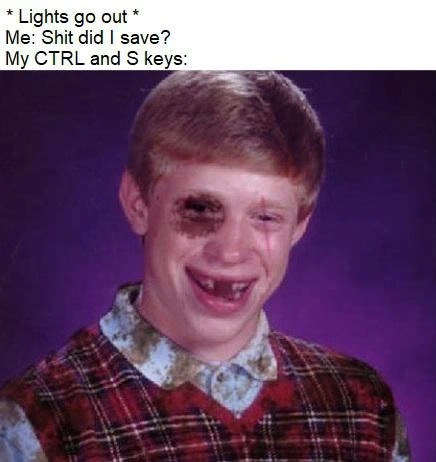
Lights go out
Me: "Shit did I save?"
My Ctrl and S keys: [Bad Luck Brian’s face]
In plain language, it’s describing a situation: the lights suddenly flicker off (maybe there’s a power outage or surge). My immediate reaction is to curse and think “Oh no, did I save my code?!” And then it shows my Ctrl and S keys personified as the unlucky Bad Luck Brian meme character. So why Bad Luck Brian? In internet meme lore, Bad Luck Brian is a famous image of an awkward high school kid who always has ridiculously bad luck in the captions. For example, a classic one was “Falls in mud puddle… on the way to get his school picture taken.” He’s basically a symbol for “uh-oh, that went wrong.” By showing Bad Luck Brian’s face labeled as my Ctrl and S keys, the meme humorously suggests that those poor keys have been through a lot. They’re the unlucky victims of my panic.
Here’s what’s being conveyed:
- “Lights go out” – Even just a flicker of power is enough to scare a developer. Why? Because it hints the computer might shut down. If the computer shuts down suddenly, anything not saved is gone. We call this unsaved_work_panic – the sudden fear that you might lose code you’ve been writing.
- Me: “Shit did I save?” – This is the developer (the meme author) reacting with alarm, basically asking themselves if they hit Ctrl+S recently. It’s a very relatable moment of panic. Even if you have a habit of saving often, in that split second you second-guess yourself. Every programmer has internally screamed “Did I save?!” when something goes wrong.
- “My CTRL and S keys:” [Bad Luck Brian] – This line is pointing to the image of Bad Luck Brian, implying that if my Ctrl and S keys were people, they’d look like this poor unlucky guy. In other words, my save keys are beat-up or unlucky because of how frantically and frequently I press them. It’s a funny exaggeration. The keys aren’t literally alive (of course!), but we often joke as if our tools have feelings. Here, the joke is that my keyboard’s Save combo keys are basically abused so much that they’re bruised and battered. If a keyboard could roll its eyes or look exhausted, it would. The Bad Luck Brian face with a painful grin is a perfect comedic representation of that.
This all plays on a common developer habit: hitting Ctrl+S constantly. New coders learn pretty quickly from more experienced mentors or painful trial-and-error that you should save your work frequently. It’s practically a mantra: save early, save often. Why? Because many of us have experienced that awful scenario where we wrote some brilliant code (or even a long email or report) and then the application crashes or the power goes out. Suddenly, all that work vanishes because we hadn’t saved. It only takes one time losing hours of coding to a random glitch to develop a healthy paranoia.
Muscle memory is a big part of this meme’s joke too. Muscle memory means doing something automatically, without consciously thinking, because you’ve practiced it so often. Developers press Ctrl+S so regularly that it becomes an automatic reflex – their fingers just do it every few minutes, sometimes every few seconds after a significant edit. The meme’s title even says “your CTRL+S muscle memory is questioned,” meaning: I usually save without thinking, but now I’m not sure if I did it in the last crucial moment. When the lights flicker, even that ingrained habit feels uncertain – and that’s why the person panics and jabs Ctrl+S again, just to be absolutely sure.
It’s worth noting that many modern code editors and IDEs (Integrated Development Environments) try to reduce this anxiety with features like autosave or session recovery. For instance, some editors can be set to automatically save files after a short delay or whenever you pause typing. Others keep a backup copy of unsaved changes (like a temporary file) that can be recovered when you reopen the program. These features in theory mean you shouldn’t have to live in fear of losing code. However, not everyone enables them, and not every tool has them on by default. Plus, old habits die hard – a lot of developers still press Ctrl+S out of habit even in Google Docs or cloud-based apps that save every keystroke! It’s a bit funny: we know autosave is there, but we feel better doing it manually anyway.
So, the meme is very relatable for anyone who writes code (or really, works on a computer) because it captures that jolt of developer anxiety. The categories like IDEs/Editors and Developer Productivity are invoked here: not saving work can demolish your productivity (imagine redoing hours of coding from scratch). And the tags like DeveloperHumor and DeveloperPainPoints fit because this scenario is both humorous and a genuine pain point. The bottom line: the meme uses a popular funny image (Bad Luck Brian) and a common scenario (power flicker causing “Did I save?!” panic) to poke fun at how we all obsessively use the save shortcut to protect our code. It’s saying: “Hey, we’ve all been here. Look how conditioned we are to fear unsaved work!” And judging by the collective chuckles, every developer recognizes a bit of themselves in this meme.
Level 3: Volatile Memory Woes
When the lights even flicker in a dev’s office, it’s like a mini-disaster recovery scenario unfolding. In a fraction of a second, a seasoned programmer’s mind jumps to volatile memory vs. permanent storage. We know anything not flushed to disk is sitting in RAM (which is volatile and evaporates when power drops). That’s why the moment a bulb dims, a battle-hardened coder’s muscle memory kicks in to smash Ctrl+S (the universal Save command). It’s practically an instinct born of pain: losing code to a sudden reboot even once is enough to give any developer lifetime anxiety. The humor here is painfully relatable — it pokes fun at how paranoid we’ve become about saving our work.
In the meme’s text, “Lights go out” cues this fight-or-flight response. The dev blurts, “Shit, did I save?” which perfectly captures that instant adrenaline spike. And then we see Bad Luck Brian representing “My Ctrl and S keys.” This image choice is brilliant for senior engineers in on the joke. Bad Luck Brian is the poster child of misfortune in meme culture — the goofy yearbook kid who always has something go terribly wrong. By casting the Ctrl and S keys as Bad Luck Brian, the meme implies those keys have been through hell. Think of the poor keyboard: the Ctrl and S keycaps are probably faded or even chipped from being pounded every other minute. The joke suggests our beloved save-shortcut keys are basically bruised and exhausted, much like Brian’s eternally unlucky face. It’s a wry nod to the DeveloperExperience (DX) of always fearing the worst-case scenario. Even in an age of IDEs with auto-save and cloud backups, we still hammer that shortcut like our sanity depends on it (because once upon a time, it did). This is a shared industry trauma: every senior dev has a war story of losing hours of work to a crash or power outage. We’ve learned — sometimes the hard way — that “Save early, save often” isn’t just advice, it’s survival.
The deeper irony is that, theoretically, we have solutions now. Modern editors and IDEs (like VS Code, IntelliJ, etc.) offer autosave features and recovery snapshots. In a perfect world, that should eliminate manual saves. But here’s the catch: no one with battle scars fully trusts them. We’ve seen autosave fail or not run fast enough before the blackout hit. It’s like distributed consensus in databases: there’s always that narrow window where if the commit log didn’t flush, your data vanishes. The result? Experienced devs treat Ctrl+S less like a shortcut and more like a nervous tick. We press it constantly, often without even realizing — after every semicolon, after every successful compile, sometimes twice for good measure. This meme nails that neurosis. It’s highlighting an absurd truth about developer productivity: we’ve trained ourselves (and our poor keyboards) to mitigate a fundamental risk of computing — that power loss will annihilate unsaved work. The Bad Luck Brian bit adds a dark chuckle: even though we do this obsessively, we still panic “did I really save?” the moment something happens. It’s as if no amount of saving is ever enough to truly feel safe. In essence, the humor lands because it’s true: decades of coding and we’re basically conditioned like Pavlov’s dogs to hit Ctrl+S at the slightest sign of danger. It’s a laugh of recognition — and maybe a little PTSD — at our own developer pain point.
Description
This meme uses the classic 'Bad Luck Brian' template to humorously depict a developer's anxiety about saving their work. The image features a yearbook-style photo of a young man with braces and a plaid sweater vest, sporting a black eye and a pained, awkward smile. Above the image, the text sets up a scenario: '*Lights go out* / Me: Shit did I save? / My CTRL and S keys:'. The joke personifies the CTRL and S keyboard keys as the battered Bad Luck Brian, implying they are worn out and abused from the developer's obsessive, compulsive habit of constantly hitting the save shortcut. This resonates deeply with any programmer who has ever lost work due to a crash or power failure, highlighting the ingrained muscle memory and paranoia that persists even with modern auto-saving features
Comments
8Comment deleted
My IDE has atomic commits, local history, and cloud sync, but my fingers still hit CTRL+S with the frantic energy of someone trying to save a single Word document on a floppy disk during an earthquake
When the lights flicker my pinky auto-hammers Ctrl+S like I’m still editing C over 9600-baud telnet - some legacy reflexes have higher uptime than our entire Kubernetes cluster
After 20 years in tech, I've evolved from 'did I save?' to 'which of my 47 redundant backup systems failed?' - yet somehow still manage to lose that one critical uncommitted change that took 3 hours to debug
Real seniors don't fear power loss - their Ctrl+S muscle memory has better durability guarantees than the WAL it's flushing to
After 20 years of engineering, I've concluded that CTRL+S isn't just a keyboard shortcut - it's a primitive survival instinct that evolved alongside our species. My fingers hit it so reflexively that I've caught myself trying to save physical documents, conversations with stakeholders, and once, embarrassingly, a whiteboard session. The real tragedy isn't the potential data loss when the lights go out; it's realizing that despite having Git, auto-save, and cloud sync, my lizard brain still doesn't trust any of it. We've built distributed systems that can survive datacenter failures, but we can't shake the trauma of that one time in 2003 when Word crashed and took our entire thesis with it
When the lights flicker, I run a manual fsync loop on Ctrl+S until the keycaps hit their MTBF - apparently my editor’s durability is ‘eventually consistent’ with the power grid
After enough brownouts, Ctrl+S became my personal fsync(); my pinky guarantees stronger durability than our database
20+ years optimizing Git commits, yet Ctrl+S is still my unkillable legacy microservice