The Weight of Modern JavaScript Development
Why is this Dependencies meme funny?
Level 1: Huge Backpack, Tiny Book
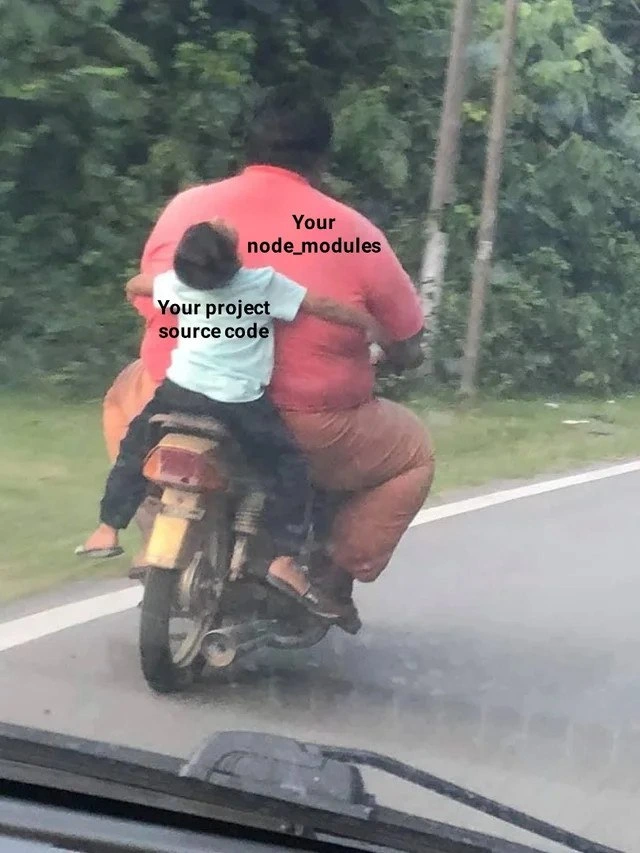
Imagine you wrote a short story that’s just one page long, but to carry that page around you bring a giant backpack filled with hundreds of books. That seems pretty silly, right? The little one-page story is like your small project, and the huge heavy backpack is like all the extra helper code (libraries) you brought in to help your project run. In the picture, the child on the motorcycle is the tiny bit of your code, and the big adult giving the ride is all the supporting code from elsewhere. We find it funny because the helper (the big friend) is way out of proportion to the thing being helped (the little friend). It’s like using an elephant to carry a mouse – the mouse gets where it’s going, but wow, that’s overkill! The meme makes us laugh at how we sometimes need to use a lot of extra stuff just to make a simple idea work in programming. It’s a goofy way of saying our small projects often piggyback on something much, much bigger.
Level 2: Tiny Code, Giant Folder
Let’s break down the joke in simpler terms. In the meme image, a big man on a motorcycle is labeled “Your node_modules,” and a tiny child riding with him is labeled “Your project source code.” This contrast is highlighting how, in a typical Node.js project, the folder called node_modules (which holds all your downloaded libraries) is huge, while the actual code you wrote for the project is very small. It’s a common scenario in JavaScript project structure today: you might only write a few hundred lines of original code, but end up downloading thousands of lines of other people’s code as dependencies.
Some definitions: Node.js is a popular runtime for running JavaScript outside the browser (for example, on a server or to build tools). With Node.js, developers use a package manager called npm (Node Package Manager) to easily share and install chunks of code written by others. These chunks are what we call packages or libraries, and they get stored in that node_modules directory within your project. When you run a command like npm install <library-name>, npm downloads that library (and anything that library depends on) into node_modules. Package management is super convenient – it means you don’t have to reinvent the wheel. If you need to add login authentication or a date formatting function, you can pull a ready-made package instead of writing it all from scratch.
The funny (and slightly shocking) part is how quickly those packages add up. For example, you might create a new React app or install a web framework, and npm will cheerfully download hundreds of supporting packages:
# Big frameworks come with *big* baggage
$ npm install react-scripts # installing a typical frontend toolkit
added 1425 packages in 55s # yes, over a thousand packages for a new app!
In the snippet above, one command added around 1,425 packages to the project – meaning your node_modules just got stuffed with a huge number of files. Meanwhile, your own source code (the components or scripts you write) might be only a few files. This is the npm_install_realities of modern web development: even a small app pulls in a giant node_modules folder. The meme exaggerates this reality by showing the project vs dependencies as an enormous driver vs a tiny passenger on a motorbike. The child (your code) looks almost squashed by the bulky driver (the libraries).
Why do we include so many dependencies? Typically, it’s to save time and use reliable code. For instance, if you use Express (a popular Node.js web server library) to build a server, Express itself will bring along dozens of other packages that it needs to work (parsers, utility functions, etc.). This chain reaction is how dependency bloat happens. Each library you add might have its own list of required packages, and npm will download all of those too. In Node’s design, it’s normal to have nested dependencies: library A needs library B and C, library B might need D, and so on. All of them get tucked into your node_modules folder. It’s a bit like a Linked Lego set – one piece snaps onto another, and before you know it, you’ve built a huge structure.
For a newcomer, seeing a node_modules folder with hundreds of sub-folders can be confusing. You might think, “Did I do something wrong? I only wrote one file, why do I have 300 folders now?” But that’s expected in Node.js projects. A term you might hear is “Dependency Hell” – which refers to the difficulties in managing so many dependencies. In Node’s case, the “hell” is more about how bulky and unwieldy the project becomes. (In other ecosystems, Dependency Hell often means you can’t resolve version conflicts; Node sidesteps that by allowing multiple versions, at the cost of extra copies in node_modules).
Developers handle this bloat by using .gitignore to avoid uploading node_modules to Git repositories (we typically share just a package.json or package-lock.json file that lists the needed packages, and each person re-installs them locally). Tools and practices have also emerged to reduce the pain – for example, Yarn and pnpm are alternative package managers that try to reduce duplicate files and manage the node_modules size more efficiently. Bundlers (like Webpack or Rollup) can also trim down what ends up in your final shipped code (removing unused parts in a process called tree shaking). But during development, you’ll still often see an enormous node_modules folder sitting there. It’s practically a joke in the JavaScript community how a “hello world” app can come with an entire mountain of dependencies.
So, the meme’s message is clear even to a junior dev: Your little project is riding on the back of a huge pile of packages. It’s poking fun at how disproportionate this is. The image makes it visual and absurd – you can see how the small project code is just hanging on while the massive node_modules drives the situation. Once you’ve run a few npm install commands yourself, you’ll likely smile at this because you recognize how true it is. It’s coding humor that also teaches a lesson: always be aware of what you’re adding to your project, because those friendly libraries can bulk up your app quickly!
Level 3: Bloat on Wheels
Picture a NodeJS project that does one simple thing, yet after running npm install you’ve got a node_modules directory the size of a sumo wrestler. This meme hits home for senior developers because it caricatures dependency bloat – a common outcome in modern JavaScript development. The large motorcycle driver labeled “Your node_modules” represents all those hundreds (or thousands) of packages pulled in by npm, while the tiny child “Your project source code” is the actual custom code you wrote. The humor comes from how absurdly imbalanced that relationship is. Experienced devs know that feeling when a small app is propped up by a giant pile of libraries. It’s funny because it’s true: the support scaffolding (libraries, frameworks, tools) often outweighs the app itself.
Why does this happen? In the Node.js ecosystem, there’s a package for almost everything. Need to left-pad a string? There’s a package for that (famously, a 11-line package called left-pad caused chaos when it was unpublished, breaking thousands of builds). Building a web server? Instead of hand-writing the HTTP handling, you pull in Express or Koa, which in turn pulls in dozens of other modules. Each dependency can have its own dependencies (called transitive dependencies), and npm will nest these under your project’s node_modules. Over time this stacks up into a colossal dependency tree. The meme exaggerates it as an overweight driver carrying a tiny passenger: the project vs dependencies ratio in many Node projects really is comically lopsided. Senior engineers chuckle (or groan) because we’ve all opened a simple project folder only to find a node_modules so huge it feels like it contains the entire internet.
This image also satirizes the concept of “Dependency Hell” in a lighthearted way. Dependency Hell traditionally refers to the maddening situation of version conflicts and tangled library requirements. Node’s approach avoids version conflicts by installing multiple versions side-by-side (each module gets its own folder if needed), which sidesteps some classic conflicts but at the cost of disk space and duplication. The result? Fewer version fights, but a hefty node_modules that can be dozens of megabytes for even trivial apps. It’s a trade-off many of us accept: better to carry a lot of baggage than to have two libraries duking it out over a version mismatch. Still, the sheer weight of that baggage is ridiculous enough to joke about. We recall times when checking node_modules into source control was a rookie mistake that led to repositories ballooning in size – a rite of passage for juniors and a facepalm for veterans.
Historically, developers from other ecosystems (like Python’s pip or Ruby’s gems) were shocked by Node’s package management style. JavaScript lacked a rich standard library, so the community shared very small, single-purpose packages freely. This was great for reusability, but it meant projects started depending on dozens of micro-packages for basic tasks. Over the last decade, npm’s registry exploded with millions of packages and the average project’s dependency list grew fat. Long-time devs remember when a fresh React or Angular project first crossed the “1000 node_modules” threshold – an astonishing milestone that birthed countless jokes. The backend engineers who maintain these projects know the pain of auditing huge dependency trees for updates or security issues. There’s also the infamous Windows path length problem: early on, Node’s deeply nested node_modules could create directory paths so long that Windows Explorer choked on them. These are the headaches the meme winks at.
In essence, this meme is funny to us because it captures a core absurdity of Node.js development: our own code (the thing we’re proud of) can feel like a tiny rider hitching a ride on the back of an enormous, unwieldy package ecosystem. It’s a shared joke among developers that even a “hello world” JavaScript app might come with hundreds of dependency files. The image of that small child clinging on for dear life perfectly visualizes how our little project code behaves when riding on the back of the massive node_modules “vehicle”. Seasoned devs laugh, perhaps a bit ruefully, because they’ve lived this – they’ve debugged production issues that traced back to a dependency three layers deep, or spent an afternoon pruning unused packages to trim the bloat. The humor has a “it’s funny because it’s true” sting: modern apps often carry an elephantine amount of supportive code. And just like the bike in the photo somehow stays upright, our bloated apps do run – but we all recognize it’s a wild, disproportionate ride!
Description
This meme uses a candid photograph of two people on a scooter to represent a common developer complaint. The image shows the back of a very large person in a pink shirt driving a scooter, with the text 'Your node_modules' overlaid on their back. Clinging to the driver is a small child in a light-colored shirt, with the text 'Your project source code' on their back. The scene is on a paved road with green foliage in the background, likely captured from a vehicle behind them. The humor comes from the visual metaphor: the massive size of the 'node_modules' directory in modern web development projects, which often contains hundreds of megabytes or even gigabytes of dependencies, is represented by the large driver. In contrast, the actual source code written by the developer is represented by the small child, highlighting how the project's dependencies often dwarf the project itself. This is a relatable pain point for any developer who has watched a slow 'npm install' or checked the size of their project folder

Comments
7Comment deleted
The project is a single line of code that imports 'is-even'. The node_modules directory now has its own gravitational pull and is classified as a dwarf planet
Modern JS projects: six kilobytes of revenue logic clinging to a 400-megabyte node_modules joyride - the moment you realise you’re not shipping software, you’re just an unpaid chauffeur for transitive dependencies
The real architectural decision isn't microservices vs monolith - it's whether your CI/CD pipeline has enough disk space to cache node_modules between builds without hitting AWS storage limits
The classic node_modules paradox: write 50 lines of code, install 500MB of dependencies. It's the only folder that can collapse into a black hole and still somehow be missing the one package you actually need. Senior devs remember when 'lightweight' meant something other than 'only 200,000 files in node_modules' - now we just pray our .gitignore is working and hope the CI/CD pipeline doesn't time out during npm install
Node_modules gets the piggyback ride it deserves, while your 47 lines of glue code white-knuckles the production throttle
Your src is the toddler; node_modules is behind the wheel - and we keep trusting semver like it’s a seatbelt
We call it a microservice because the only micro thing is the part we wrote; node_modules is the monolith driving the release train