Skip to content
DevMeme
2941 of 7435
When 'Lossless' Compression Has Trust Issues
Bugs Post #3248, on Jun 15, 2021 in TG

When 'Lossless' Compression Has Trust Issues

Why is this Bugs meme funny?

Level 1: Vanishing Details

Imagine you have a really detailed picture and you ask a friend to make it smaller so it’s easier to send or carry, but you beg them not to ruin it. Your friend promises, “I’ll keep it exactly the same, just make the file size smaller.” Now, if they’re careful – say they use a special shrinking trick that doesn’t remove anything (like folding a poster neatly) – when you open the smaller file, your picture looks just as perfect as before. That’s like a magic trick where nothing is lost.

But what if instead your friend makes the file smaller by quietly erasing tiny details or using a lower quality copy? 😬 When you open it, the picture is definitely smaller in file size, but now the image looks blurry and you see big blocky spots where there used to be smooth color. The beautiful details you loved are gone or rough-looking. You’d be upset and say, “Hey, you said you wouldn’t mess it up, but now it looks worse!”

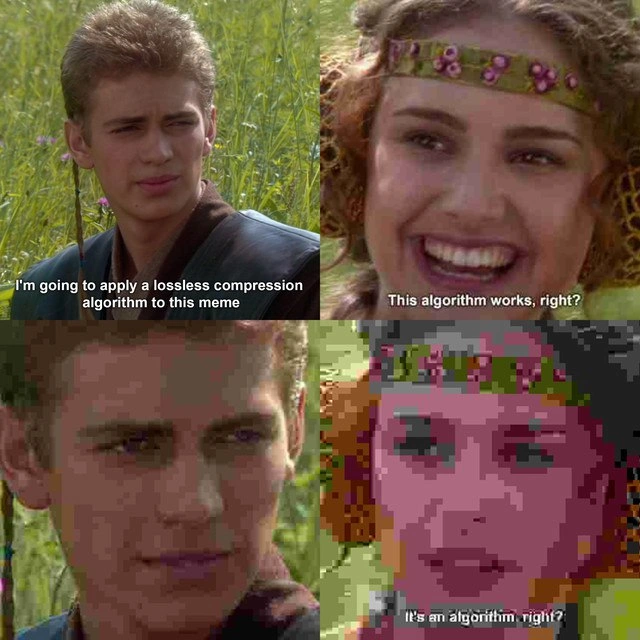
That’s exactly what this meme is joking about, using a scene from a movie. The guy promised the girl he’d compress the image without hurting its quality (meaning no details would disappear). She trusted him. Then the last panel shows the image all messed up and pixelated – definitely not what was promised! It’s funny in the same way a prank or a clumsy magic trick is funny: he said he wouldn’t change the picture, but everyone can see the picture got blurry and blocky instead. The expectation and the result are complete opposites. You don’t need to know the technical terms to get the joke – the girl’s clear face turned into a fuzzy mess, so it’s obvious somebody goofed up big time after claiming everything would be fine.

Level 2: Lossless vs Lossy

This meme highlights the difference between lossless and lossy image compression. Those terms might sound similar, but they are opposites in how they handle data:

  • Lossless compression means no information is lost during compression. When you decompress a lossless image, you get the exact same pixels you started with. The image quality remains identical. Formats like PNG or WebP (lossless mode) use clever techniques (like finding repeating patterns and efficient ways to store them) to reduce file size without altering the image content. It's comparable to compressing files into a ZIP archive – when you unzip, every file is exactly as it was.

  • Lossy compression means some data is thrown away to save space. These algorithms exploit the fact that human eyes might not notice if certain fine details are missing or slightly smoothed out, especially if the compression isn't too extreme. Formats like JPEG or standard WebP (in lossy mode) will irreversibly discard some image information. When you save a photo as JPEG, the file might be, say, one-tenth the size of a BMP or PNG, but if you look closely (or use a heavy compression setting), you might see blurriness, blocky squares, or color banding in the image. That's because the JPEG algorithm simplified and averaged out parts of the picture to achieve a smaller file.

To make it super clear, here's a quick comparison:

Lossless Compression Lossy Compression
No quality loss. The original image can be perfectly reconstructed bit-for-bit from the compressed data. Some quality lost. The original image cannot be fully recovered – some pixels will be different after decompression.
Larger file size (compared to lossy) for the same image, because nothing is thrown away. Much smaller file size possible for the same image, because the compressor throws away details and precision that are deemed less important.
Use cases: preserving artwork, logos, or screenshots where every pixel matters. Examples: PNG, TIFF, or WebP in lossless mode. Use cases: photographs or web graphics where a slight quality drop is okay in exchange for big savings in size. Examples: JPEG, WebP in lossy mode, or HEIC/HEIF formats.

In the meme’s story, Character A claims to use a “lossless compression algorithm”, which by definition should mean the image quality in the final panel stays exactly the same as the original. Character B is smiling and asking for confirmation that the image won’t change (“This algorithm works, right?”). But the punchline is that the final image (Panel 4) is clearly lower quality – it’s full of chunky, pixelated patches and other obvious compression artifacts. This tells us that a lossy method was actually applied. In other words, the developer either used the wrong algorithm or misused the term "lossless." The result: the meme image that was supposed to look untouched now looks like an 8-bit video game version of itself!

You can literally see the little square pixels in Padmé’s face in that last panel. That blocky, fuzzy look is what we call pixelation – it happens when an image’s resolution is too low or it’s been compressed too much, so you start to notice individual pixels. It’s a common artifact of heavy JPEG compression. If the compression had truly been lossless, the bottom-right image would look identical to the top panels (just with a smaller file size behind the scenes). The drastic visual change is exactly why it’s funny – it’s an over-the-top example of “lossless” turning out to be very, very lossy instead. Even someone new to programming can appreciate the joke, because you don’t need to know the exact tech details to see that the poor image lost a lot of its clarity despite the promise that nothing would be lost.

Level 3: The JPEG is Up

Every experienced developer immediately catches the irony here: the meme promises a lossless compression, yet the final image is blatantly covered in lossy JPEG artifacts. It’s the classic case of “It’s fine, I used a perfect algorithm – nothing will break” followed by everything visibly breaking. The humor lands because so many of us have lived this scenario. Picture a developer bragging in a meeting, “Don’t worry, our new image pipeline uses a state-of-the-art compression algorithm, totally lossless!” Meanwhile, the designer or QA (Padmé in the meme) asks with a smile, “This algorithm preserves image quality, right?” – hoping for the reassuring “Of course!” But instead, they get an awkward silence (uh-oh…), and the next thing you know, the images in production look like a 1990s internet thumbnail blown up too far. Blocky faces, smeared colors, text that went from crisp to crummy – the jig is up: someone accidentally saved these with a lossy codec or the wrong settings.

The four-panel format with Anakin and Padmé is a well-known meme template from Star Wars: Episode II. Developers love it because it perfectly delivers that expectation vs. reality punchline. In Panels 1 and 2, the developer (Anakin) proudly declares the plan to use a “lossless compression algorithm” and Padmé cheerfully seeks confirmation that quality won’t be affected. By Panel 3, Anakin’s telling silence says it all: something’s not right. Panel 4 reveals the hilariously horrifying result – Padmé’s face (and the whole meme) now looks like it was run through a 10th-generation photocopy or maybe saved as a JPEG at quality level 5. Her expression is literally pixelated, and not in the censoring way – you can see the chunky squares. The caption in that last panel (usually Padmé repeating “Right?!” with dawning horror) is effectively replaced by the evidence of the botched compression itself. It’s a brilliant visual way of saying, “Uh, you did say lossless... right? Because this looks terrible.”

In real-world developer terms, this joke hits on the difference between formats like PNG vs. JPEG and how easily one can be mistaken for the other if you're not careful. A senior engineer reading this might recall the time someone on their team ran an image optimization tool on all the assets. The tool promised “lossless PNG compression” to shrink file sizes. But oops – they didn’t notice a misconfiguration and the tool actually re-encoded images as JPEG behind the scenes for extra savings. Suddenly all the carefully prepared high-res PNG graphics turned into mushy JPGs. The fallout? Panicked messages flying around: “Why do all our icons look blurry!? I thought this was lossless!”

It’s funny because it’s true: compression_algorithm_misuse is a rite-of-passage mistake. Perhaps a developer used an image library and assumed the default settings were lossless, but default JPEG quality kicked in without them realizing. Or they heard WebP can be lossless and decided to use it, but forgot to enable the lossless flag, so the result was a lossy WebP that looked a lot like a bad JPEG. Seasoned devs have learned to double-check file formats and settings. They know that if someone says “don’t worry, it’s pixel-perfect,” it’s time to ask: Did you use the right codec? Are we sure it’s not downsampling or applying a quantization step? Because as this meme jokingly shows, failing to verify those assumptions can lead to pixelation gone wrong moments.

The title caption, “When your ‘lossless’ image compression turns out very, very lossy,” is basically the punchline spelled out. It’s poking fun at the misuse of the term lossless. In developer circles, calling something lossless when it clearly isn’t will earn you some good-natured ribbing. It’s like calling a scratchy telephone connection “crystal clear” – everyone immediately knows that’s not true. Here, the meme’s creator deliberately applied an obviously lossy compression to the final panel (probably saving it as a low-quality JPEG) to exaggerate the effect. The result is a posterized, blocky mess that would make any graphics engineer wince and chuckle at the same time.

This resonates with anyone who’s managed image assets or dealt with Graphics pipelines. We all dread that moment when a new deployment goes out and a teammate asks, “Umm, why do all the product images look worse now?” That’s the Padmé “This algorithm works, right?” moment in real life. And the sinking feeling when you realize you flipped the wrong switch in the image converter or used the wrong format – that’s Anakin’s blank stare. The final panel is the production aftermath: the “oh no” moment visible on-screen, in glorious pixelated fashion.

In short, the meme is a light-hearted reminder to developers of all levels: always know whether you’re using a lossless or lossy compression, and don’t trust a label blindly. If you promise zero quality loss, those pixels had better come out the other end exactly the same… or the Force (of irritated coworkers) will not be with you!

Level 4: Quantization Quagmire

Deep inside the data compression toolbox lies a fundamental trade-off orchestrated by information theory: you can't compress arbitrary data beyond a certain point without sacrificing information. Lossless compression exploits statistical redundancy in the data, finding patterns and repetition that can be encoded more efficiently (think of how PNG uses the DEFLATE algorithm combining LZ77 and Huffman coding to shrink images with large solid-color areas or repeating patterns). Claude Shannon’s theorem on entropy sets a hard lower bound on how compactly you can represent information without losing any of it. If an image is already quite random or highly detailed, a lossless method can’t magically shrink it much – unless it cheats by throwing some details away, which by definition makes it lossy.

Lossy compression enters when higher compression ratios are needed by being strategically ruthless about data removal. Instead of preserving every bit, a lossy algorithm deliberately discards or approximates parts of the data that are deemed less important to human perception. The classic example for images is the JPEG codec. JPEG converts the image from the spatial domain into the frequency domain using a Discrete Cosine Transform (DCT). This breaks the picture into 8×8 pixel blocks and expresses each block as a combination of cosine wave components (from low-frequency broad strokes to high-frequency fine details). Here's where the quantization quagmire comes in: JPEG then rounds off (quantizes) many of the higher-frequency coefficients to zero or coarse approximations – especially when you crank up the compression to reduce file size. This irreversible step permanently tosses out subtle image information. When the image is reconstructed from this lossy data, those missing details manifest as the infamous JPEG artifacts. The telltale signs are all over the meme’s final panel: blocky 8×8 squares that don’t blend smoothly, muddy and posterized color regions where continuous tones were reduced to flat chunks, and general blurriness on fine features. These are the direct results of heavy quantization; the codec has aggressively pruned away high-frequency content (like film grain, crisp edges, and small text), leaving a smaller file and a visibly degraded image.

In a truly lossless pipeline, nothing of the original would be lost – the algorithm would only remove redundant patterns and you'd be able to perfectly reconstruct Padmé’s face pixel-for-pixel. Formats like PNG or WebP (lossless mode) achieve compression by encoding exact data more cleverly, but they can only go so far. If our meme image lacked large areas of flat color or repetition, a lossless compressor might hardly shrink it at all (entropy is stubborn that way). To get the dramatic reduction needed for that ultra-blocky result, the process clearly went beyond lossless. It must have thrown parts of the image data overboard: essentially, a bold trade of fidelity for file size.

This is where the humor hides in plain sight: a so-called "lossless" algorithm produced an obviously lossy outcome. Any developer versed in image codecs can diagnose the scene at a glance. There’s even a subtle nod to a common confusion in terminology – sometimes people claim something is “visually lossless,” meaning the losses are theoretically there but not noticeable. But in our meme, the losses are anything but subtle! The bottom line from a theoretical perspective is crystal clear: if the output file got significantly smaller and it looks like a pixelated mess, the algorithm must have sacrificed information to the compression gods. In other words, our would-be "lossless" process tiptoed right past the strict bounds of lossless entropy coding and fell straight into the quantization quagmire. It’s a geeky reminder that in compression, as in the Force, there's always a balance – you can save space, or save detail, but trying to have it both ways will inevitably reveal which side you chose.

Description

A four-panel meme using the 'Anakin and Padmé' format from Star Wars. In the first panel, Anakin Skywalker says, 'I'm going to apply a lossless compression algorithm to this meme.' In the second panel, a smiling Padmé Amidala replies, 'This algorithm works, right?'. The image quality is clear in both. In the third panel, Anakin gives a slight, knowing smirk, but his image is now slightly pixelated. In the final panel, Padmé's face is heavily pixelated and distorted into a low-resolution mess, a clear sign of aggressive lossy compression. Her expression is now one of concern as she asks, 'It's an algorithm, right?'. The joke lies in the complete failure to use a lossless algorithm, which should preserve all image data perfectly. Instead, the result is severe data loss, humorously illustrating a catastrophic failure between a technical promise and the actual outcome, a scenario familiar to any developer whose code has produced unexpected, and worse, results
Comments

8
Anonymous ★ Top Pick It's technically lossless; we just lost the definition of what the image was supposed to be. The ticket is now closed as 'working as intended'
  1. Anonymous ★ Top Pick

    It's technically lossless; we just lost the definition of what the image was supposed to be. The ticket is now closed as 'working as intended'

  2. Anonymous

    Labeling a 4:2:0 JPEG as ‘lossless’ is the imaging equivalent of calling a cron-driven REST poller ‘event-driven architecture.’

  3. Anonymous

    The real lossless compression was the pixels we lost along the way - just like how every 'quick refactor' to reduce technical debt somehow creates three new abstraction layers and doubles the bundle size

  4. Anonymous

    When your 'lossless' compression algorithm turns out to be more 'loss-full' than expected - a stark reminder that naming your variables correctly matters less than actually understanding the difference between PNG and JPEG. This is what happens when you confuse algorithmic complexity with actual correctness, or when that Stack Overflow answer you copied was for the wrong use case. At least the final result has that authentic retro 8-bit aesthetic that product management will probably call 'intentional artistic direction' in the post-mortem

  5. Anonymous

    When you confuse DEFLATE with DCT quantization: lossless in theory, JPEG'd in practice

  6. Anonymous

    “Lossless” in the design doc; “WebP quality=20” in prod - QA passed because the only assertion was that the file size went down

  7. Anonymous

    Calling q=10 JPEG with 4:2:0 “lossless” is the same energy as promising a zero‑downtime migration - everyone can still see the block boundaries in prod

  8. @aysommer 5y

    yeah, squoosh

Use J and K for navigation