One Keyword Away from a Network-Wide Outage
Why is this Networking meme funny?
Level 1: Room Without a Door
Imagine you built an extra room in your house and excitedly tell your friend, “I added a new room!” Your friend smiles and asks, “That’s great! You put a door to connect it to the rest of the house, right?” Cue an awkward silence — you realize you forgot to add a door to the new room. Now the room is just sitting there, completely isolated, and nobody can actually get in or use it. Your friend’s smile fades and they repeat, “...You did put in a door, right?”
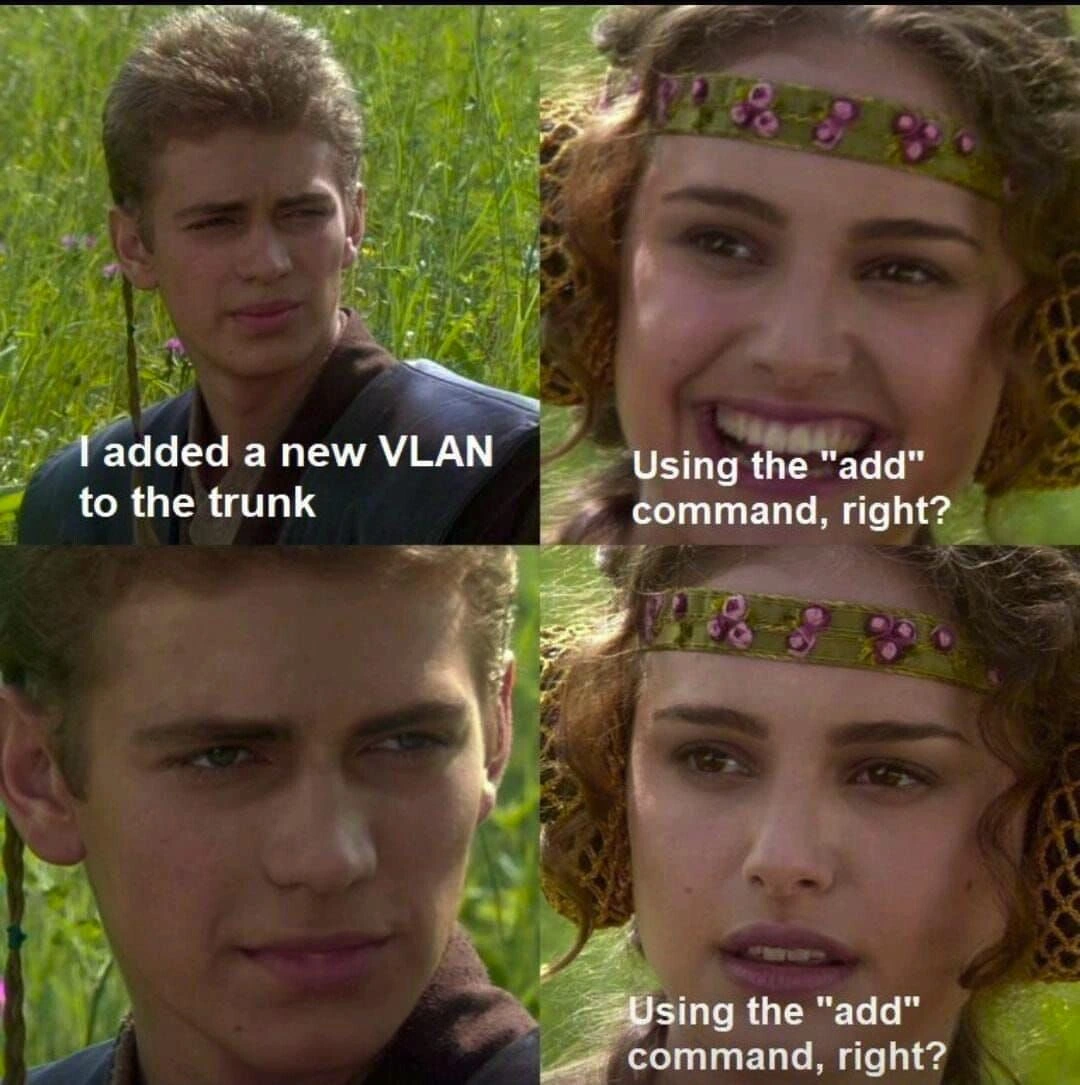
That’s basically what’s happening in this meme. Anakin (the guy in the meme) added something new to the system (a new network segment, like our new room) and was proud of it. Padmé (the woman) assumed he did it properly and asks about the one crucial step that makes it useful (the door, in our analogy). Anakin’s gulp and silence mean he didn’t do that step. Padmé’s growing concern mirrors how we’d all feel hearing bad news like that. It’s funny in a “facepalm” way because it shows someone forgetting an obvious but essential thing. We laugh because we’ve all done something like this at some point – like installing a new appliance but forgetting to plug it in, then wondering why it doesn’t work. The humor comes from that relatable “uh-oh” moment when you get called out with a simple question: “…you did do that, right?”
Level 2: Trunks and VLANs 101
Let’s break down the technical terms and scenario in this meme, step by step, as if you’re new to networking. Here are the basics:
- VLAN (Virtual Local Area Network) – This is like a virtual partition of a network. A VLAN allows a single physical network switch to behave like it’s multiple separate networks. Computers and devices on one VLAN can’t directly talk to those on another, as if they’re on different islands, even though they’re plugged into the same switch. VLANs are often used to segregate traffic (for example, keep the office PCs separate from the guest Wi-Fi, or isolate sensitive servers) while still using the same physical hardware. It’s a way to create multiple mini-networks inside one big network device.
- Trunk port – When you have multiple VLANs and you want to send all their traffic between two switches (or between a switch and a router) using a single cable, you configure a trunk port. A trunk_port carries traffic for many VLANs at once by tagging each Ethernet frame with a VLAN ID (using a standard called 802.1Q). Think of it like a highway that has multiple lanes, where each lane is marked for a specific VLAN’s traffic. In contrast, a regular access port is like a single-lane road dedicated to one VLAN (no tags needed). Trunking (a.k.a. vlan_trunking) is super common in network design because it saves having to run a separate cable for each VLAN – one cable can carry it all, and the tags keep the traffic separated.
- Allowed VLAN list – This is a setting on a trunk port that says, “Out of all possible VLANs, only these specific ones are allowed to use this trunk link.” By default, most switches will let every VLAN through a trunk. But often network engineers trim that down for security or efficiency, specifying an allowed list. For example, if a particular trunk only needs to carry VLANs 10 and 20, you might configure it to allow only 10 and 20. Any frames tagged with other VLAN numbers (say VLAN 30) will be blocked on that link. It’s like a bouncer at a club with a guest list – if your VLAN’s not on the list, you’re not getting through that connection.
Now, what does the phrase “I added a new VLAN to the trunk” mean in practice? It means someone (Anakin, in this case) created a new VLAN on the switch and intends for that VLAN’s traffic to be carried between switches over a trunk port. In a perfect world, if the trunk was allowing all by default, that might be all you need to do. However, if the trunk is using an allowed VLAN list (our bouncer checking IDs), you also have to update that list to include the new VLAN. Otherwise, the new VLAN is like a new team added to a league after the season started – they won’t get scheduled in any games because nobody added them to the roster.
This is where the “add” command comes in. The meme specifically mentions Padme asking, “Using the ‘add’ command, right?” On Cisco switches (a common brand in enterprise networking), you don’t simply re-type the whole allowed VLAN list to add one. If you do, you might accidentally wipe out the old list and replace it with just the one VLAN. Instead, you use a special syntax to add the VLAN to the existing list. For example, if VLANs 10,20,30 were allowed before, you’d use switchport trunk allowed vlan add 40 to append VLAN 40. If you mistakenly just set switchport trunk allowed vlan 40 (without “add”), the switch interprets it as “allow only VLAN 40” – dropping 10, 20, 30. Oops. It’s a common rookie mistake in network engineering. Padme’s question in the meme is basically a sanity check: she’s asking if Anakin did it the safe way (appending) rather than the dangerous way (overwriting), or if he at least updated the list at all.
If you’re studying for your CCNA or just starting out in networking, this meme is actually a free mini-lesson. The key takeaway: whenever you create a new VLAN that needs to go across multiple switches, you must ensure all those trunk links in the path allow that VLAN. It’s one of those steps that’s easy to forget until you’ve been bitten by it once. If you forget, devices on that new VLAN will be able to talk to each other on the same switch, but the moment they try to reach anything on another switch, it’s radio silence. The network isn’t broken overall — other VLANs are still fine — which makes it sneaky. Only the new VLAN is broken because the trunk is silently filtering it out. This often leads to a troubleshooting session where everything looks correct (“VLAN is defined on both switches, ports are set to trunk, why can’t they see each other?”) until someone remembers to ask, “Hang on, did we update the allowed VLANs on that trunk?”
So in simpler terms: Anakin did the first part (made the VLAN) but may have skipped the second part (actually letting that VLAN travel between switches). Padme’s expecting him to say, “Of course I used the add command to put it in the allowed list,” because that’s obvious to anyone with experience. His blank look is a confession that he didn’t think of it. The humor here is gently teaching us a lesson: don’t forget to update your trunks when adding VLANs. The meme format (with Anakin and Padme from Star Wars) is commonly used in IT to show a misunderstanding or an overlooked detail. Padme’s repeated “…right?” and Anakin’s nervous silence is an iconic way of saying “you missed a spot”. Even if you’ve never configured a switch in your life, you can relate to the feeling: it’s that moment when someone asks, “You did the obvious thing, correct?” and you realize with a pit in your stomach that you did not. In networking, as in many fields, missing that “obvious thing” can be the difference between everything working smoothly and a bunch of confused users. This meme just puts that in a funny, easily digestible format (that also doubles as a cautionary tale for aspiring network engineers).
(Side note: The characters in the image are Anakin Skywalker and Padmé Amidala from Star Wars in a well-known meme template. Typically, Anakin says something confident, Padmé asks a clarifying question expecting a certain answer, and Anakin’s silence in the third panel indicates he messed up, leading Padmé to look concerned. It’s a staple of NetworkHumor and tech memes because it perfectly captures those “uh-oh” moments we all dread.)
Level 3: Trunking into Trouble
This meme nails a scenario that makes every experienced network engineer simultaneously cringe and laugh. In the first panel, Anakin proudly announces, “I added a new VLAN to the trunk.” That sounds like a good thing — he’s configuring the network, expanding capabilities. Padme’s smiling face in the next panel represents that brief moment of trust and optimism from a colleague: everything seems fine at first, and she’s expecting the confirmation of a job well done. Her smile (with no caption) basically says, “Great, that’s how you’re supposed to do it.”
But then Padme asks the pointed question in the third panel: “Using the add command, right?” — and that’s where every network engineer’s stomach drops. You can almost hear the awkward silence. Anakin’s face has that deer-in-headlights look, which is the universal sign of “Oh no… I forgot something important.” By the fourth panel, Padme’s expression has shifted from happy to horrified as she repeats, “…right?” Now she already knows the answer from his guilty silence. This four-panel Anakin-Padme meme format perfectly captures the unfolding realization of a screw-up. It’s the same vibe as a code review gone wrong or an on-call incident: one moment everyone’s relaxed, the next moment someone uncovers the fatal oversight and all smiles vanish.
For folks in Networking and IT, the humor here is both hilarious and a bit painful. It satirizes a classic configuration goof-up in network Infrastructure. You announce you made a change, your teammate assumes you followed all the steps, and then — surprise! — you left out the critical part. It’s funny in the way that makes you wince because it’s so common. In this case, the omitted step is updating the trunk’s allowed VLAN list. The meme is basically an inside joke among network engineers: “I swear I added the new VLAN… I just, uh, didn’t allow it on the trunk.” It’s the kind of MisconfigurationError that has caused countless outage bridges and heated Slack messages. In fact, it’s almost a cliché. It’s borderline meme-worthy precisely because every network team has had that one incident. The junior engineer proudly adds a new network segment, and an hour later nothing works because that VLAN’s traffic is getting dropped. Cue the senior engineer asking, “Wait, did you also update the trunk port to allow that VLAN?” — followed by that dreaded silence. This meme’s dialogue is exactly that exchange. Padme’s character is essentially the seasoned coworker or team lead who has seen this all before, while Anakin is the poor soul who thought simply creating the VLAN was enough.
The production-risk behind Anakin’s silence is very real. Forgetting to update allowed VLANs means that even though devices on the new VLAN might be plugged in and configured, they can’t communicate beyond their local switch. It’s as if a new highway on-ramp was built but never opened — cars (data) just pile up or go nowhere. In a real scenario, this could mean a new department’s PCs can’t reach the servers on the other switch, or a new VM network can’t see the internet. If this trunk was carrying critical services, messing up the VLAN list could even knock out existing networks (imagine accidentally dropping VLAN 10 that carries your voice-over-IP phones — suddenly all the phones go dead). That’s the nightmare Padme’s worried face is channeling. It’s a gentle poke at the “you had one job” moment.
What makes this meme extra satisfying for IT folks is the shared trauma behind it. Everyone who’s worked in NetworkEngineering for a while has a war story about “that time a tiny config mistake caused big problems.” It might not always be VLANs — it could be a missing semicolon in code, a forgotten flag in a deployment script, or yes, a missing add in a switch command. The format of the meme, with Padme’s hopeful “right?” turning into alarm, perfectly mirrors a colleague’s reaction when they realize someone might have skipped a crucial step. There’s an unspoken camaraderie in this humor: we’ve all been Anakin at some point, confidently making a change, and we’ve all been Padme, double-checking and then facepalming when the answer isn’t what it should be.
In summary, “Adding a VLAN to the trunk without updating the allow list” is a tongue-in-cheek reference to a well-known networking pitfall. The meme gets a laugh because it dramatizes that pitfall in a simple conversation. It’s Anakin basically saying, “I did the easy part,” and Padme realizing, “You missed the important part, didn’t you?” – followed by that awkward silence that says it all. In the real world, this scenario leads to a lot of scurrying to console into switches and fix the config while coworkers give you the side-eye. In the meme world, we get to laugh at it with relief because this time it’s happening to someone else (and in a galaxy far, far away). It’s OpsHumor at its finest: turning our near-misses and oh-no moments into relatable comedy. After all, if we didn’t laugh about these things, we might just cry or scream. Better to chuckle, fix the config, and maybe print a t-shirt that says “It’s always the VLANs” for next time.
Level 4: The VLAN Menace
Under the hood of this meme lies some serious network plumbing. In an IEEE 802.1Q trunk, each Ethernet frame gets a special tag inserted into its header to indicate which VLAN (Virtual LAN) it belongs to. This mechanism allows a single physical link (the trunk port) to carry traffic for multiple isolated networks at once. The trunk effectively acts like a multi-lane highway for data, where each lane (each VLAN) is kept separate by a unique VLAN ID in the frame. By default, a trunk port will carry all VLANs (IDs 1 through 4094) across to the next switch, but network engineers often prune or limit those VLANs for security and performance using an allowed VLAN list. That list is basically a filter: if a frame’s tag doesn’t match an allowed VLAN ID, the switch politely (or not so politely) drops it. No tag, no entry.
Now, configuration time: on many switches (especially Cisco gear, which tends to inspire a lot of these memes), if you want to restrict a trunk to specific VLANs, you set an explicit allowed list. Suppose initially VLANs 10, 20, 30 are allowed on a trunk. Later, you create a new VLAN 40 that needs to travel that same trunk. You must update the trunk’s allowed list to include it. And here’s the kicker — the way you update that list matters. Cisco’s IOS interface has an add option to append a VLAN without blowing away the existing list. If you don’t use it, you might accidentally replace the entire allowed set with just your new VLAN. It’s a notoriously unforgiving syntax quirk that has caught many engineers off guard:
// Initial trunk config allowing VLANs 10, 20, 30
interface GigabitEthernet0/1
switchport mode trunk
switchport trunk allowed vlan 10,20,30
// Now, adding VLAN 40 (two ways)
switchport trunk allowed vlan add 40 // ✅ Appends 40 (allowed VLANs are now 10,20,30,40)
switchport trunk allowed vlan 40 // 🚫 REPLACES list with only 40 (10,20,30 get dropped!)
In the correct usage above, VLAN 40 is appended to the allowed list, and life is good: all four VLANs can flow across the trunk. In the wrong usage, the switch now allows only VLAN 40, effectively cutting off VLANs 10, 20, 30 from that link. If those VLANs were carrying important traffic (say VLAN 10 had database servers on it), you just created a mini network meltdown and probably a nice ProductionOutage. Even if you simply forgot to add VLAN 40 at all (leaving the list as 10,20,30 and never including 40), any devices on VLAN 40 would be marooned on their local switch, unable to communicate beyond it. The result is the same kind of head-scratcher: “Why isn’t this new network working? We plugged everything in… right?”
What’s happening here is that the switch’s forwarding logic uses the allowed list to decide which VLAN-tagged frames to send across the trunk. VLANs not on the list are essentially invisible to the trunk — it’s as if that new VLAN doesn’t exist on the connection between switches. This is by design: limiting VLANs keeps stray traffic out and keeps networks segmented as intended. But it also means an out-of-sync vlan_trunking configuration (like adding a VLAN without updating the allowed_vlans list) introduces a silent, hard-to-spot connectivity black hole. The frames for VLAN 40 get tagged on one side and then promptly discarded on the other side of the trunk, with no immediate error message. Seasoned engineers know to suspect “allowed list” issues whenever new VLANs mysteriously don’t work.
Historically, this kind of mistake is so common that it’s practically a rite of passage in NetworkEngineering. It’s the sort of lesson you only need to learn once (usually the hard way, at 2 AM, with managers watching). The meme zeroes in on this arcane little detail of VLAN tagging and makes it painfully relatable. Beneath the humor, there’s a fundamental truth: in networking, the devil is in the defaults and details. A trunk will happily transport dozens of VLANs, but only if you remember to tell it which ones. That tiny command (add versus no add) can be the difference between a smooth expansion of your network and an inadvertent self-sabotage. In other words, 802.1Q giveth multi-VLAN magic, and 802.1Q taketh away if you don’t speak its exact incantations. The meme’s joke lands because it turns this deep technical gotcha into a simple, recognizable “Oops” moment that every infrastructure geek can laugh at (after they’ve fixed it, of course).
Description
This meme uses the four-panel 'Anakin and Padmé' format from Star Wars. In the first panel, Anakin says, 'I added a new VLAN to the trunk.' In the second, a smiling Padmé asks, 'Using the "add" command, right?'. The third panel shows Anakin staring silently and grimly. In the final panel, Padmé's smile has vanished, replaced with a look of dawning horror as she repeats, 'Using the "add" command, right?'. The joke is a deep cut for network engineers. On many network switches (like Cisco's), the command to add a VLAN to a trunk is `switchport trunk allowed vlan add [vlan_id]`. However, if you forget the 'add' keyword and just type `switchport trunk allowed vlan [vlan_id]`, you don't add the VLAN; you overwrite the entire list of allowed VLANs with only the new one. This is a catastrophic mistake that can bring down large parts of a network. Anakin's silence implies he made this classic, production-breaking error
Comments
15Comment deleted
That's the look of someone who just replaced an 'allow all' trunk with 'allow vlan 666' and is now watching the monitoring dashboard turn into a Christmas tree
Adding VLAN 42 to the trunk without updating the allowed list: congratulations, you’ve just created Schrödinger’s subnet - it both exists and wakes the on-call at 2 a.m. until observed
The difference between 'switchport trunk allowed vlan add' and 'switchport trunk allowed vlan' is approximately three hours of incident response, seventeen angry emails, and one very educational post-mortem where everyone suddenly becomes an expert on Cisco command syntax
The real horror isn't adding a VLAN to a network trunk - it's realizing your junior engineer interpreted 'trunk' as the main Git branch and pushed directly to production without a feature branch, code review, or even a proper 'git add' staging step. At least with network trunks, you can roll back the VLAN config; with Git trunk commits, you're explaining to the CTO why the deployment pipeline just auto-merged untested code into the release candidate
Anakin's trunk: pruned faster than Jedi after forgetting 'allowed vlan' - classic Cisco gotcha where 'add' alone ghosts your VLANs
VLANs are layer‑2 feature flags - forget to propagate them across every trunk and production ships with the feature silently disabled by configuration
I added a new VLAN to the trunk - welcome to Schrödinger’s subnet: 802.1Q tagged, pruned on that one uplink, DHCP to nowhere, no SVI, and a Sev‑2 that only shows up during STP reconvergence
What do other VLAN-related commands do to hurt the network? What can possibly go wrong here? Comment deleted
assuming it's cisco, you sneeze at it wrong and the whole network goes down. what can not go wrong here? Comment deleted
You wink at it right and it turns into a mikrotik. Comment deleted
double negation, not eng detected Comment deleted
bruh? Comment deleted
there wasn't no double negation nowhere, pardner Comment deleted
No double non-unaffirmation wasn't nowhere, isn't it? Comment deleted
https://youtu.be/lGiNE-FmrLM?t=281 Comment deleted