Search history reveals baffling Git terms to skeptical significant other
Why is this VersionControl meme funny?
Level 1: New Words for Old Things
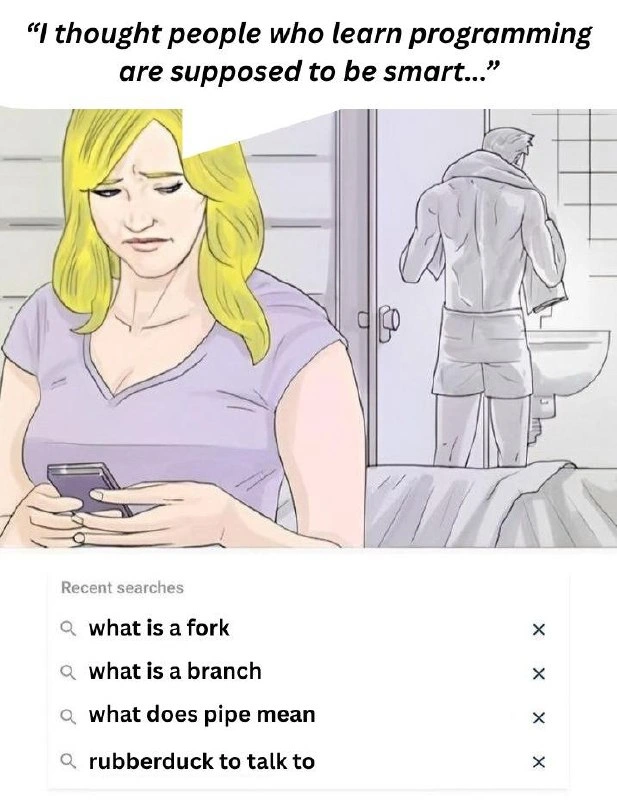
Imagine you’re learning a secret code language where everyday words mean something totally different. You look up at your screen and see the word “fork,” but in this secret language it doesn’t mean the fork you eat with – it’s something else entirely! In the meme, a woman sees her partner’s phone and notices he searched for “what is a fork” and “what is a branch.” She’s confused, because of course he knows what a fork or a tree branch is, right? It’s like if you saw your friend Googling “what is water?” – you’d think they must have forgotten something really basic. But here’s the funny part: the boyfriend is learning programming, and in the programming world, words like “fork” and “branch” have special meanings. He isn’t asking about eating utensils or trees at all. He’s trying to understand the computer-meaning of those words. The same goes for “pipe” (which usually is something water flows through, but in coding it’s a way to connect commands) and “rubber duck” (normally a bathtub toy, but programmers sometimes talk to a pretend duck to help figure out problems!). So, the lady thinks, “Aren’t programmers supposed to be smart? Why is he looking up simple words?” She doesn’t realize he’s actually being very smart – he’s learning the new definitions so he can speak the secret programming language. The humor comes from that big mix-up: to her, it looks like he forgot what a fork is, but really, he’s just discovering a whole new world where forks, branches, pipes, and even ducks mean something totally different. It’s funny and sweet, because we’ve all looked silly at some point when learning something new. In simpler terms: sometimes smart people ask simple questions when they’re exploring a new realm, and that’s perfectly okay (and can lead to some pretty funny misunderstandings!).
Level 2: Forks, Branches & Ducks, Oh My!
So, why did our newbie programmer need to search these everyday words? Let’s decode each term in plain technical English. If you’re a junior developer or just learning this stuff, here’s what those things actually mean in a programming context (and why they’re totally normal to look up):
Fork (Git & Version Control) – In the context of coding, a fork is not the thing you eat salad with. It’s a term used in platforms like GitHub to mean making a copy of someone else’s project under your own account. Imagine you have a recipe book (the code repository) that someone published. If you fork it, you get your own duplicate copy of that entire book which you can start changing independently. It’s your sandbox version of the project. Forking is super common in open-source collaboration: you fork a repo, make changes, and then you can propose those changes back to the original. The reason beginners ask “what is a fork?” is because it’s jargon – if you’re new to Git, you might not realize it’s just fancy talk for “copy this repository so I can work on it separately.” (Side note: There’s also a Unix concept called fork() which duplicates a running program – related in metaphor, but if you’re just learning Git, focus on the repository meaning.) In short, forking a repo = making your own copy of a codebase, nothing to do with utensils.
Branch (Git branch) – A branch is like a parallel timeline in your code’s history. Think of your codebase as a story. The main branch (often named
mainormaster) is the story everyone reads. When you create a new branch, you’re saying “let’s imagine a different storyline starting from this point.” Technically, a branch in Git is just a pointer to a commit; it lets you isolate new work. For example, you might create a branch callednew-featureto work on a cool idea. You now have one version of the code where you’re experimenting (onnew-featurebranch), and the stable version onmainremains untouched. Later, if the experiment works out, you merge the branch back into main – like merging two storylines into one ending. New developers often hear “make a branch for that bug fix” and think “branch??” because outside coding, a branch is on a tree. But here it means a separate workspace for code changes. It’s a core part of GitWorkflow and good BranchingStrategy in teams (where each feature or fix gets its own branch). So don’t worry, when a tech lead says “create a branch,” they aren’t sending you to forestry school; they just mean open a new path for your code changes.Pipe (
|on the command line) – The pipe is a special symbol (|) used in the command-line interface (CLI) to chain commands together. It’s called a “pipe” because it acts like a pipe in plumbing: it takes the output of one command and funnels it as input into the next command. For example, consider:ls /var/log | grep "error"Here,
ls /var/loglists files in a directory, and thegrep "error"part searches for the word "error" in that list. The pipe|connects them, so you only get files with "error" in their names. Without the pipe, you’d have to use temporary files or just visually scan, but the pipe lets programs work together smoothly. For a newbie, seeing a vertical bar in the middle of a command can be puzzling – it’s not immediately obvious that it means “take output of the left side and feed it to the right side.” So searching “what does pipe mean” is a very common rite of passage when learning the CLI. Once you learn it, a whole world of command-line power opens up. But yes, at first glance,|is just a weird character on your keyboard (usually above the Enter key). It’s okay to Google it – everyone has to the first time! Just remember: in programming, pipe = send data through a pipe from one process to another, not something Mario hops into or you smoke. 😉Rubber duck (debugging) – This one is more about developer practice than a software tool. Rubber duck debugging is a nickname for a method where you explain your problem out loud to an inanimate object (often a rubber duck). The idea is that by articulating the problem in simple terms, you’ll often find the solution yourself. The rubber duck is just a cute traditional choice – any object (or patient friend) will do, but a duck is whimsical and always available on your desk. When you’re new to programming, this sounds really strange. You might wonder, “Do I actually need a rubber duck to code?” Some beginners literally go search online to see if people buy special ducks for this! (Hence the query “rubberduck to talk to”.) The truth is, you can use anything – the key is talking through your code. For example, you might say, “Hey duck, I’m trying to figure out why this variable isn’t updating. First, I set it to 5, then I call the function… oh wait, the function is using a copy of that variable!” – Boom, epiphany. The duck’s work is done 🦆. It sounds silly, but it’s a beloved technique in DebuggingAndTroubleshooting because it forces you to slow down and think clearly. And yes, many programmers DO have actual rubber ducks on their monitors as trusty sidekicks. So if you see one, now you know it’s not because we miss bath time – it’s a debugging strategy!
To sum up these definitions: our beginner programmer was encountering specific technical meanings for ordinary words. It’s like learning a new language where familiar words have new definitions. There’s nothing wrong or “dumb” about looking them up. In fact, every developer, junior or senior, uses Google as an extended brain. Concepts like VersionControl systems (Git) come with a whole glossary (fork, branch, push, pull, HEAD, origin, etc.), and no one is born knowing it. The command-line (CLI) has its own mini-language of symbols and operators (| pipe, > redirect, && chaining, to name a few). And the developer community has tons of slang or metaphors (like rubber duck, cookies, bugs) that you just pick up over time. Searching these things is how you learn. So if you’re a newcomer, don’t feel embarrassed – even if your non-coder friends look at you funny for googling “what is a branch,” you’re on the right track. Every expert started exactly there, scratching their head at why a simple word suddenly got so complicated.
Level 3: Not What It Looks Like
From a seasoned developer’s perspective, this meme is painfully relatable and hilariously true to life. The humor comes from that clash of contexts — everyday language vs. programmer jargon — and the ensuing misunderstanding. In the scene, a skeptical significant other sees a list of recent searches on the newbie developer’s phone and quips, “I thought people who learn programming are supposed to be smart…” Why the doubt? Because those search queries make the coder look like they’ve forgotten basic grade-school knowledge! 😅 Let’s break down why this is comedy gold for anyone who’s been through the gauntlet of learning development:
First off, every single term in that search history has a totally different meaning in tech than it does in normal life. As developers (especially those of us who wrestled with Git or the CLI), we immediately recognize what’s really happening. The poor newbie likely just encountered some tutorial or error message and is scrambling to decode the mysterious vocabulary:
- “Fork” – To the rest of the world, a fork is a pointy utensil you eat with, or at most, a road split. But in a developer’s world, particularly in VersionControl and open-source, a fork means copying a repository to your own account to start independent changes. It’s a Git/GitHub staple. Of course a beginner might panic: fork? Do I need a kitchen utensil for coding now? Hence the quick Google search for clarification.
- “Branch” – Normally a branch is something on a tree. But in Git, a branch is a parallel line of development, part of a team’s BranchingStrategy for managing features and releases. New coders often confuse branching with forking (understandably so, since both involve making a "copy" of sorts). Our newbie probably typed “what is a branch” after a tutorial said “create a new branch for your feature” – cue the “uh, branch??” moment. The significant other seeing that search might imagine their partner doesn’t know basic botany 🌳, when really they’re grappling with GitWorkflow intricacies.
- “Pipe” – Outside of tech, a pipe is something under your sink or a smoking instrument. But on the CLI, the pipe (
|) is an operator that glues commands together, passing the output of one program into the input of the next. If you’ve never used a terminal, seeing a tutorial that says something likegrep "error" log.txt | lesscan be pure gibberish. A beginner might literally google “what does pipe mean” after encountering|in a command example. To a bystander, it now looks like our aspiring programmer is unclear on what a pipe is (maybe they skipped plumbing class?). Another point to the partner’s “not so smart?” theory, which makes us techies chuckle because we know the real story. - “Rubberduck to talk to” – Now this one sounds completely absurd if you don’t know the context. Why on Earth is someone searching for a rubber duck to talk to? Is this person so lonely or socially awkward that they converse with bath toys? 😜 In reality, every developer (junior or senior) eventually learns about rubber duck debugging: the practice of talking through your code problems out loud, often as if explaining to a rubber duck. It’s a classic DebuggingAndTroubleshooting technique. Our newcomer likely read somewhere that “you should try talking to a rubber duck to debug” and thought, Do I literally need a rubber duck? Where do I get one? Hence the search query phrased somewhat awkwardly. To their partner scrolling through the phone, this looks completely bizarre – almost concerning! They’re thinking, “My partner is so confused by programming, they’re googling whether they need a toy duck for help. Are they joining a cult?” Meanwhile, seasoned devs are cracking up because we’ve all been there – feeling a bit crazy but also amazed that such a silly trick actually works when you’re stuck on a bug.
The comedy here comes from dramatic irony: we (the tech-savvy audience) understand why the newbie’s searches are perfectly logical in context, but the significant other in the meme does not. It’s a classic case of tech jargon creating a gulf in communication. The girlfriend’s sarcastic remark about “supposed to be smart” hits home because it reflects a real insecurity many newbies have. Programming has this aura of intellectual difficulty, yet learning it often involves moments where you feel unbelievably dumb – like when you have to google basic words or can’t exit vim (another rite of passage!). Every senior developer remembers that phase and can relate. Being smart isn’t about knowing everything upfront; it’s about learning quickly – but try explaining that to someone peeking at your search history.
There’s an unwritten shared experience among programmers: no matter how “smart” you are, you will absolutely find yourself asking seemingly stupid questions, especially early on. The meme pokes fun at that beginner’s scramble to translate English into “Geek Speak.” It also subtly nods to the imposter syndrome many juniors feel. We laugh because we’ve googled all those terms (and then some!) and survived. In fact, the seasoned devs might chuckle remembering the search_history_confession moments in their own life – like hastily closing a StackOverflow tab when someone walks by, because the question was “what does git push actually do?” or frantically searching “Git detached HEAD fix” and imagining non-tech friends thinking you’ve lost your mind (detached_head_state_joke, anyone?).
Another layer here is the relationship dynamic: One partner outside the tech bubble judges the other’s learning process. It’s humorous and a bit heartwarming – who among us hasn’t tried to explain a programming problem to a loved one, only to be met with a blank stare or gentle ridicule? The meme captures that outsiders-see-us-as-crazy vibe. Our code newbie is supposed to be the smart one, yet here they are appearing baffled by forks and ducks. It’s a scenario ripe for misunderstanding and thus humor.
From the industry perspective, the meme is also a light jab at how jargon-heavy our field is. We use simple words for complex concepts – great for insiders once we learn them, but utterly confusing for newcomers and onlookers. It highlights an open secret: even adept programmers rely on Google and documentation constantly. The beginner_git_terminology phase is just the first time you experience it. Truth is, even senior devs find themselves searching basic-sounding things when moving to a new domain (“what is a pod?” in Kubernetes, say – someone overhearing might think you mean peas or whales). The difference is, experienced folks aren’t ashamed of it. We’ve embraced that continuous learning (and the occasional hilarity of it). This meme gets a knowing laugh because it’s a rite of passage on display. The significant other’s snarky remark is one we’ve internalized ourselves when struggling with a simple concept at 2 AM.
In summary, Level 3 readers (the seasoned devs) appreciate this meme as a spot-on portrayal of newbie life and the double meanings in tech. The humor is equal parts empathetic (“aww, I remember being that confused!”) and schadenfreude (“haha, glad those days are behind me… except when they’re not”). It’s a gentle reminder that smart people Google dumb-sounding things all the time in programming. And as every battle-hardened coder knows: if your Google search history doesn’t bewilder a layperson, are you even really coding? 😜
Level 4: The Tech Behind the Terms
At the deepest level, each innocuous word on that search list corresponds to a fundamental tech concept hidden behind everyday language. These terms aren’t random – they’re metaphors chosen by early computer scientists to make complex ideas easier to visualize (at least for insiders!). Let’s peel back the layers:
- Fork (in computing) – In operating systems like Unix/Linux,
fork()is a low-level system call that literally duplicates a process. When a process callsfork(), the OS creates a nearly identical copy of it – new process ID, same code, starting right after the fork call. It’s like an amoeba splitting in two. This concept is so central that the term “fork” got adopted elsewhere. For example, in open-source culture a project fork means splitting the source code into a new independent line of development (imagine a road forking into two paths). GitHub uses forks to let you copy someone’s repository into your own space. Under the hood, it’s not cloning a process in memory (as in OS), but it is copying a complete codebase state so you can start a divergent line of work. Both usages convey creating a duplicate that can evolve separately. The word “fork” evokes a branching point – whether in running software or in a codebase’s history.
// A tiny C example of the fork() system call in action:
#include <unistd.h>
#include <stdio.h>
int main() {
pid_t pid = fork(); // Create a new process by duplicating this one
if (pid == 0) {
printf("Child: I'm a new process!\n");
} else if (pid > 0) {
printf("Parent: I forked a child process with PID %d\n", pid);
} else {
perror("fork failed");
}
}
Above: This code demonstrates a fork at the OS level. After fork(), two processes continue running: one prints “Child...”, the other prints “Parent...”. They share the same code up until the fork call, then go their separate ways. It’s a powerful but mind-bending concept the first time you see it (much like Git for newcomers!).
Branch (in version control) – A branch in Git or any VersionControl system is a way to diverge the code’s timeline. Internally, Git represents your project history as a directed acyclic graph (DAG) of commits. A “branch” is essentially a movable pointer to one commit in that graph, representing a line of development (e.g. the
mainbranch vs afeaturebranch). The term comes from tree structures in computer science: just as a real tree branch splits off from the trunk, a code branch splits off from the main line of development. This is deeply rooted in data structure theory – Git’s model is basically a Merkle tree (each commit points to its parent, and branching means a commit has two children, i.e. a fork in the graph). When you create a new branch, you’re telling Git “remember this point, we might grow in a different direction from here.” To merge later is to bring those divergent lines back together. All of this happens with snapshots and cryptographic hashes under the hood, but the tree metaphor keeps it conceptually manageable. It’s elegant, but for a beginner, hearing “make a branch” conjures up an image of a literal tree branch if they don’t know the context! And Git’s jargon doesn’t stop there – it even talks about a “detached HEAD”, which sound like either a horror movie or a guillotine incident until you learn HEAD is just Git’s name for “the current checkout point” (detached HEAD = you’re on a specific commit with no branch label). The key point: a branch in Git is not a piece of a plant, but a pointer to a sequence of commits forming a development line in your repository’s commit graph.Pipe (| in the CLI) – This one comes straight from core operating system design and the Unix philosophy of building simple tools that you can chain together. A pipe (represented by the
|symbol in a shell) is a mechanism for inter-process communication. It takes the output of one program and streams it as input to another program. Underneath, the OS uses a pipe buffer in memory to connect the two processes. The concept was so important that it became syntax: in Bash or PowerShell you write commands likels /etc | grep confwhich feeds the list of files into a search filter. The name “pipe” is no coincidence – it’s literally a metaphor from plumbing. Early Unix pioneers (like Doug McIlroy) envisioned the output flowing through a pipe into the next program. In fact, in C there’s apipe()system call to set this up manually (creating a uni-directional data channel). The CLI pipeline concept revolutionized how we compose small programs to perform complex tasks, and it’s a beautiful example of abstraction: you don’t need to manually intermediate files, the|does it in-memory. For a newcomer glancing at|, none of this magic is obvious – it’s just a vertical bar character, easily confused with the everyday meaning of a pipe. But behind that symbol lies the whole idea of shell pipelines and stream redirection, which is a cornerstone of command-line power. (As an aside, this metaphor spawned terms like pipeline, filter, and redirection – all plumbing lingo for data juggling tricks in the shell.)“Rubber duck” debugging – Unlike the others, this term comes from developer culture and psychology rather than an OS or tool feature. The idea is simple but backed by cognitive science: when you explain a problem out loud in simple terms, you often pinpoint the solution in the process. Why a rubber duck? It originates from a famous anecdote in the book The Pragmatic Programmer, where a programmer would carry a rubber duck and explain code to it line by line. The duck, being an excellent listener that never interrupts, helps the coder slow down and articulate their thinking. This externalization engages a different part of the brain and often reveals the error or oversight causing the bug. It’s related to the concept of metacognition (thinking about your thinking). Remarkably, it works so well that it’s become a beloved debugging technique in the Troubleshooting arsenal. There’s no complex algorithm here, just human psychology: by pretending to teach or explain to an inanimate object, developers force themselves to confront assumptions and clarify the problem. The term “rubber duck debugging” has stuck around (some devs actually keep a rubber duck on their desk as a trusty confidant). It’s a fun example of how quirky the programming world can be – we’ve taken a child’s bath toy and turned it into a technical term that junior developers dutifully Google. And yes, it genuinely helps squash bugs!
All these concepts — process forking, version control branching, shell piping, and rubber-duck debugging — demonstrate how common words are repurposed to describe intricate technical operations. Each term packs a lot of engineering history: from the design of Unix in the 1970s to the distributed workflows of Git, to clever cognitive hacks for debugging. So if these sound like everyday words performing high-wire tech tricks, that’s by design. The vocabulary of programmers is deliberately metaphor-rich. It makes the tech less intimidating once you know the metaphor, but until then, it can definitely bewilder newcomers (and their loved ones peeking over their shoulder!). This deep context underscores why our confused newbie had to search those terms: there’s serious knowledge hiding behind casual words.
Description
Cartoon-style split panel meme. Top: a blonde woman in a lavender T-shirt looks at a phone while a towel-clad man stands in the bathroom; caption above her head reads, “I thought people who learn programming are supposed to be smart…”. Bottom panel shows a mobile browser’s “Recent searches” list: 1) “what is a fork”, 2) “what is a branch”, 3) “what does pipe mean”, 4) “rubberduck to talk to”. The joke contrasts everyday English words with their much more specific meanings in Git, shell pipelines, and debugging culture, highlighting the early-career scramble to decode developer jargon
Comments
10Comment deleted
The real warning sign isn’t the “what is a fork” query - it’s when the next one is “git rebase vs divorce attorney”; that’s a relationship entering a detached-HEAD state
The real plot twist is when you're a senior architect still googling 'git rebase vs merge' before every PR review, but now you've learned to do it in an incognito window to preserve the illusion of omniscience
The beautiful irony here is that even after 15 years, we're all still Googling 'git rebase vs merge' at 2 AM before a production deployment - the only difference is now we pretend we knew it all along when the junior asks. The real intelligence in programming isn't memorizing every flag and option; it's knowing *what* to search for and having the humility to admit that 'pipe' has at least three different meanings depending on whether you're in bash, RxJS, or explaining your CI/CD pipeline to stakeholders who think it's actual plumbing
The real merge conflict: her expectations vs. his search history proving Git mastery isn't innate - we've all rubber-ducked our way there
Twenty years in, I still Google 'git fork vs branch' before standup - call it cache invalidation - then pipe the explanation to a rubber duck for code review
The real senior move isn’t memorizing Git’s porcelain - it’s Googling fork vs branch, debating whether a pipe is backpressure or accidental fan‑out, and letting the rubber duck do the final architecture review
Ty for trying, I guess Comment deleted
what the fk Comment deleted
We broke it. Comment deleted
ngl this is kinda sad Comment deleted