The Disappointing Web Server 'At Home'
Why is this Microsoft meme funny?
Level 1: Not the Toy You Wanted
Imagine you ask your mom for the latest cool toy that all your friends have. You’re excited and hoping to get it. But your mom says, “We don’t need to buy one; we have a toy at home.” Then you get home and the toy she’s talking about is a really old version of what you wanted – like you asked for a new video game console, and she points to an old dusty one from the 90s. You’d probably sigh and feel a little disappointed, right?
This meme is just like that, but with a web server (the computer program that gives you websites). The kid (who represents a developer) wanted a new, fast web server, but mom gave him the one they already had at home – which is an old Microsoft web server called IIS. It’s funny because it captures that feeling of “aww, not this old thing!” in a tech setting. Everyone who’s been excited about something new but got stuck with an old substitute can relate and have a little laugh.
Level 2: Hand-Me-Down Server Humor
Let’s break down the joke in simpler terms. First, what’s a web server? It’s software that listens for requests on the internet (like “someone wants to see our website”) and sends back the right content (like the HTML page). Common examples are Apache and NGINX (very popular in web development) – these are known for being fast, reliable, and running on Linux, Mac, or Windows. They’re what many developers think of when they imagine setting up a website or an API.
Now, IIS stands for Internet Information Services. It’s Microsoft’s own web server that runs on Windows. If you have a Windows PC or server, you can turn on IIS to host websites. It’s been around a long time and is often used in Microsoft-centric environments, especially for sites built with technologies like ASP.NET. However, among developers, IIS has a bit of a stuffy reputation. It’s seen as the old, enterprise option – the one you encounter at a big company with a lot of Windows servers. Many developers find IIS a bit harder to work with compared to something like Nginx. For example, configuring Nginx or Apache usually means editing a text file with straightforward rules. In contrast, configuring IIS often involves clicking through a Windows interface or dealing with an XML configuration file that feels a bit like editing the Windows Registry. There’s even something called the Metabase (in older IIS versions) which was basically an XML file where IIS kept all its settings – and editing that by hand could be scary because a wrong move might break the whole server. That’s what the meme hints at with “metabase XML pain”.
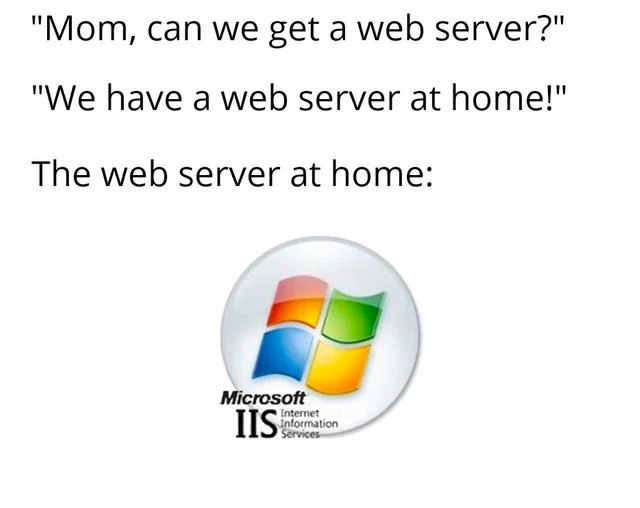
The meme uses the “Mom, can we get X? We have X at home” template. This is an Internet meme format where “X at home” is usually a disappointing version of whatever was asked for. Here, the child asks, “Can we get a web server?” They’re presumably excited about setting up a cool web project. The mom says, “We have a web server at home.” The punchline is the reveal: “The web server at home:” (and we see the IIS logo). It implies that the kid wanted a “good” web server (perhaps Apache or Nginx, something modern and popular), but the mom is suggesting to use what they already have, which is IIS. In the world of web development, this is funny because IIS is considered the less desirable, hand-me-down choice – kind of like asking for a new gaming console and being told to play with an old one from the attic.
Some terms mentioned:
- App pool recycle: IIS runs websites in processes called “application pools”. Sometimes, to keep things stable (like if there are memory leaks), it will automatically restart (recycle) these pools after some time or at scheduled intervals. It’s a feature meant to help, but if you don’t know about it, it can catch you by surprise – your site might suddenly restart or slow down at an inconvenient time. That’s what they mean by “surprise app-pool recycles” – your site restarting out of nowhere can be a nightmare if you’re the one responsible for keeping it running.
- MMC configuration: This refers to using the Microsoft Management Console – basically a Windows interface with checkboxes and settings – to configure IIS. It’s a more visual way to set up a server, compared to editing a config file. Some people find it clunky, especially if they’re used to just writing out settings in a text file.
- Legacy Windows hosting: “Legacy” implies old or outdated. A legacy Windows hosting environment would be an old-fashioned setup using Windows servers and IIS, probably not using the latest cloud or container technologies. Many startups today go straight to cloud services or use Linux servers, so saying something is “legacy Windows hosting” suggests it’s the older style that mostly big enterprises used in the 2000s.
So in simpler terms: The kid (developer) wanted a cool new web server setup. The parent (or boss/IT department) says, “No need, we have one already,” and that turns out to be an older, less cool thing (IIS on Windows). It’s funny because it’s a situation many junior devs eventually experience: you learn about neat tools, but then you’re forced to use an older tool that’s already in place. It’s both a relatable scenario and a gentle jab at IIS’s expense.
Level 3: NGINX Dreams, IIS Reality
At the senior developer level, this meme hits a nerve. The setup is the classic “Mom, can we get X? – We have X at home” format, and here X = a web server. The kid (read: the hopeful developer) yearns for a modern, lightweight web server – think NGINX or Apache or some shiny containerized reverse proxy that all the cool microservices kids use. But the “web server at home” turns out to be Microsoft IIS (Internet Information Services). Cue the groans: for seasoned backend engineers, IIS is the punchline. It’s the legacy Windows hosting solution that no one requests by choice, often foisted upon you by corporate policy or a manager saying, “We already have a server, just use that.” The humor comes from this all-too-familiar IT bait-and-switch: you asked for a sleek race car, you got handed the family minivan.
Why is this funny to those in WebDev and backend circles? Because it riffs on a shared experience: IIS is infamous. It’s the heavyweight, Windows-only web server that many devs associate with frustrating nights in enterprise IT. Decades-old complaints resurface at the sight of that old Windows flag logo. We’re talking about the ghosts of metabase XML configuration, the clunky MMC (Microsoft Management Console) UI for managing settings, and the dreaded surprise app-pool recycles that always seem to hit at the worst possible times. Experienced engineers nod knowingly because they’ve been there – perhaps at 3 AM, on an on-call rotation, scrambling as an IIS application pool unexpectedly restarted and took down a site. There’s a reason “nobody volunteers to maintain IIS.” It’s the server you get assigned, not the one you spin up for fun.
This meme also pokes at the iis_vs_nginx culture clash. In modern architectures, you deploy on Linux with NGINX/Apache, or use Node.js with lightweight servers, or even serverless. They’re open-source, fast, and developer-friendly. IIS, by contrast, represents the enterprise world of Microsoft backends – historically tied to Windows Server, ASP.NET, and a very GUI-driven setup. It’s not inherently a bad web server (IIS powers many large sites), but it has a reputation: heavy, legacy, and finicky unless you’re a Windows admin wizard. The result? When a developer says “Can we get a web server?” they’re hoping for something modern and ubiquitous – and hearing “We have a web server at home: IIS” is like a parent handing you a crusty hand-me-down instead of the cool new toy. The humor lands because everyone who’s wrestled with IIS’s peculiarities can feel the kid’s silent disappointment. It’s a BackendHumor gem rooted in real-life tech choices: the difference between what we want to use and what we’re forced to use.
On a deeper level, it’s satirizing the inertia of enterprise environments. Technologies like IIS stick around in many organizations long past their prime. Why? Because “if it ain’t broke, don’t fix it” meets “we invested in Microsoft’s stack, so we’re keeping it.” A developer might dream of the latest tech stack, but reality is an old Windows Server 2008 box under someone’s desk running IIS because “it’s always run fine.” That dissonance between modern best practices and actual corporate setups is fertile ground for cynical veteran humor. We laugh (perhaps through tears) because we’ve all seen the web server at home scenario play out in real life.
In summary, the meme cleverly encapsulates a rite of passage in backend development: discovering that the cool solution you envisioned has been vetoed in favor of the old familiar one. It’s comedic therapy for the IIS admins with PTSD out there – those who remember editing the Metabase.xml by hand under duress, or uttering prayers over an iisreset command. The next time someone asks for a “real web server” and gets told “use IIS, it’s already installed”, you can practically hear this meme echo in the room.
Description
This image uses the popular 'we have food at home' meme format to make a joke about web server technologies. The text reads, 'Mom, can we get a web server?', followed by the reply, 'We have a web server at home!'. The punchline is revealed below the text 'The web server at home:', which shows the logo for Microsoft Internet Information Services (IIS), including the classic four-paneled Windows flag. The humor stems from the implication that IIS is an inferior or undesirable substitute for the web server the 'child' (representing a developer) actually wants, such as Apache or Nginx. For experienced developers, especially those outside the .NET ecosystem, IIS is often associated with older, more complex, and less flexible Windows-based environments, making it a relatable symbol of being stuck with a less-than-ideal technology choice
Comments
7Comment deleted
The 'web server at home' is the one where you spend three hours debugging a cryptic error in the web.config file, only to realize you just needed to restart the application pool
Remember when the architecture review said “stateless and horizontally scalable,” and ops replied “Cool, we’ll put it on IIS with a nightly app-pool recycle - problem solved.”
IIS: where your nginx config's 3 lines become 47 XML nodes across 6 different management consoles, and somehow you still need to manually edit the registry to get WebSockets working properly
Every senior engineer has that one legacy IIS server from 2008 that nobody dares touch because the original admin left, the documentation is a single sticky note saying 'DO NOT RESTART,' and somehow it's still serving critical production traffic through three layers of reverse proxies. The application pool recycles every 29 hours for reasons lost to time, and the web.config is 4,000 lines of XML that references DLLs compiled during the Bush administration
IIS at home: High availability via Windows Update reboots - true enterprise resilience
Asked for Nginx; procurement delivered IIS, complete with 1740-minute app-pool recycles and an 'X-Powered-By: ASP.NET' souvenir header
Asked for Nginx; procurement says IIS is already included, and suddenly you’re speedrunning 500.19s, ARR quirks, and app pool recycles