
Skip to content
DevMeme
4953 of 7435
The Vim Exit Strategy: A Long-Term Commitment
IDEs Editors Post #5420, on Sep 12, 2023 in TG

The Vim Exit Strategy: A Long-Term Commitment

Why is this IDEs Editors meme funny?

Level 1: Stuck at Step One

Imagine you got a new LEGO set or a cool build-it-yourself toy. You’re super excited, you open the instruction booklet to start building, and then — uh oh — the very first step doesn’t work. For example, the booklet says “Put piece A into piece B,” but either piece A is missing or it just won’t fit into piece B like it shows in the picture. How would you feel? Probably confused, frustrated, and a bit upset, right? You might look around like, “Is it me? Am I doing something wrong? Or are these instructions wrong?” That’s exactly the feeling this meme is talking about, but with computer instructions (documentation for developers). The lady in the picture is making a face like she’s about to cry or scream because she can’t even get started. It’s a funny-exaggerated way to show that when the first instruction fails, anyone would panic a little. Just like you’d be troubled if a recipe’s Step 1 didn’t make sense or a toy’s instructions were broken at the start, developers get that same Oh no! feeling when their guide fails immediately. The humor comes from the fact that it’s such a universal “stuck at the start” moment – we’ve all been there, and it’s both funny and frustrating to see it happen right out of the gate.

Level 2: First Step Frustration

Let’s break down what’s happening in simpler terms. This meme shows a tweet and an image capturing a common developer frustration: you’re excited to try a new software tool, you open the documentation to the “Get Started” page, and then the very first step doesn’t work. Maybe the docs told you to run a command or set something up, but when you do it exactly as written, you get an error instead of success. Instantly, you’re stuck. This is the kind of OnboardingPain many of us have felt. Onboarding means the process of setting up a project or joining a new team and getting all the software to run on your machine. It’s supposed to be a smooth step-by-step guide for newcomers. So when Step 1 fails, it’s like hitting a brick wall right at the start. You’re left thinking, “Wait, did I do something wrong, or are the instructions wrong?” It’s an awful feeling of confusion and disappointment.

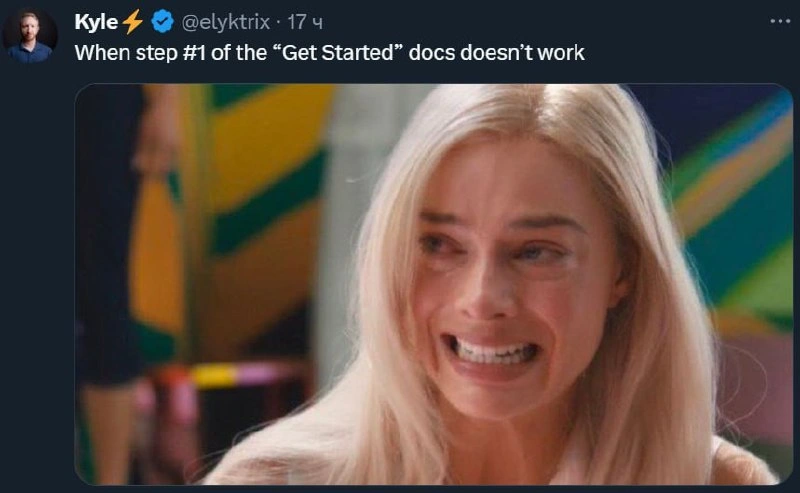
The meme itself is formatted as a Twitter post (a tweet_format_meme). The top text, “When step #1 of the ‘Get Started’ docs doesn’t work,” is the tweet content. It’s basically a short way of saying: “Picture this scenario: you try to follow the guide, and even Step 1 breaks.” Below that text, there’s a reaction image of a blonde woman with watery, upset eyes and a strained expression. This image is there to visually show how a developer feels in that moment. It’s a relatabledeveloperexperience — you can almost see yourself making that face when things go wrong. In developer meme culture, it’s common to use a dramatic or funny reaction image to amplify the emotion of the caption. Here the emotion is pure dismay: “Oh no, what now?!”

A new developer (or anyone following the docs for the first time) expects that the instructions will just work. Documentation is like a recipe: if you follow it step by step, you should get a working app or environment. So, documentation humor like this comes from turning that expectation on its head. The first instruction fails outright. For example, maybe the docs said: “Step 1: Install our tool by running install_tool.” You open your terminal, run install_tool, and… it immediately errors out with “command not found” or some cryptic error message. It’s as if a cookbook’s first step was “crack two eggs” but you open the fridge and there are no eggs — you’d be perplexed and frustrated. The meme gets a laugh (or at least a pained chuckle) from developers because we’ve all been there. It’s an exaggerated yet accurate reflection of how a trivial-sounding setup_instructions_fail can shake our confidence.

Let’s talk about why Step 1 might not work, in practical terms. Often, it’s because the docs and the code are out of sync. The people maintaining the project might have updated the software but forgot to update the guide. So the guide might be telling you to do something that used to be correct, but isn’t anymore. Classic example: documentation says “run build.sh to compile”, but the team renamed build.sh to setup.sh last month, and the docs still have the old name. Oops! Another scenario is missing setup steps that the docs assumed you already knew. Perhaps you needed to install Python or Node.js or some other prerequisite first (that’s the unspoken “Step 0”), and if you don’t, the very first command fails. If the guide didn’t mention “you need Python 3 installed,” a newbie wouldn’t know, and they’d hit an error and panic. This miscommunication leads to documentation woes – the documentation isn’t doing its job.

When this happens, a newbie might feel lost. A more experienced dev might have some coping strategies: check if there’s a more recent documentation, look for a README in the project repository for any updates, or search online (Stack Overflow, forums, GitHub issues) for the error message. Often, you’ll discover you’re not alone – others have reported “Step 1 in the docs is broken, what’s going on?” and hopefully someone replied with a fix or workaround. Still, that’s a rough start for your journey with this new tool! It’s a blow to Developer Experience – which we call DX for short – meaning how easy and pleasant it is for developers to use something. A polished DX would mean even a beginner can get through step 1, 2, 3 without issues. So when even step 1 fails, it shows this product or project hasn’t paid enough attention to DX.

The tweet’s popularity (and the reason it became a meme) is because it’s so relatable. It’s labeled with “#docs” for documentation, and it falls under tech memes because only in software do we frequently see this exact kind of fail. People in other fields might not get it, but developers share a common plight here. We have a bit of a laugh, but it’s a knowing laugh. We’re basically laughing at our own pain and the absurdity that something as simple as following instructions can turn into a mini-crisis. The next time you crack open a new project’s docs and that first command actually works, you might even feel a tiny sense of relief or surprise – because as this meme jokingly points out, we half-expect things to break immediately!

Level 3: Quickstart Quagmire

When the very first instruction in the Getting Started docs bombs out, it’s a special kind of tech irony that senior engineers know all too well. The meme’s tweet caption sets the stage: “When step #1 of the ‘Get Started’ docs doesn’t work.” This immediately evokes memories of countless broken onboarding guides and DocumentationWoes that have tested developers' patience. The reaction image – a blonde woman on the verge of tears – perfectly captures that mix of DeveloperFrustration and disillusionment. It’s funny because it’s true: a failed step one triggers a visceral “oh no, here we go” panic in even battle-hardened coders.

From a seasoned perspective, this scenario is a DeveloperExperience (DX) nightmare. The “Get Started” section of docs is supposed to be foolproof – a happy path for newcomers. If Step One doesn’t work, it undermines trust in the entire platform or library. It’s like a big red flag waving: “Abandon hope, all ye who onboard here.” The humor is laced with pain because we’ve been conditioned by experience: if a quickstart guide has a step_one_failure, the road ahead is likely paved with Stack Overflow searches and GitHub issue trolling. Seasoned devs have learned to recognize this as the start of an onboarding pain spiral. We chuckle at the meme, but only to hide the internal scream.

Why does this step #1 fail happen so often? A quickstart quagmire usually means one or more of the following:

  • Documentation drift: The code or API changed, but the docs didn’t. Perhaps the tutorial was written for version 2.0 and you’re on 2.1 where the commands have changed. Now mycli init is invalid because the devs replaced it with mycli create in the latest release, but nobody updated the README.
  • Missing prerequisites: The guide assumed some setup or installation has already been done (the infamous hidden “Step 0”). Maybe you needed to install a specific runtime, set an environment variable, or brew install a tool. Of course, the docs forgot to mention it. Surprise! The very first command fails because your system isn’t prepped.
  • Typos or mistakes in docs: Yes, it happens. The person writing the docs might have a typo in the command or code snippet. For example, they wrote import libray instead of import library. You faithfully copy-paste, and bam – error. It’s a classic DocumentationHumor moment: the instructions themselves have bugs.
  • Environment differences: “Works on my machine” strikes again. The instructions might only work on a certain OS or setup. Step 1 might assume a Unix-like shell, and here you are on Windows cmd.exe crying as export PATH does nothing. The DeveloperPainPoints here are real – you’re dealing with environment-specific quirks that the docs never warned about.

Imagine a tweet_format_meme like this coming across your feed. A developer (in this case, Kyle⚡ on Twitter) posts a one-liner lament and attaches a dramatic image (that watery-eyed look of despair) to visualize the feeling. It’s a form of DocumentationHumor where the joke lands because it’s relatable: every programmer remembers a time a tutorial’s “Step 1: run build command” yielded red error text instead of magical success. The meme’s comedic punch comes from that instant loss of innocence – you set out all excited to try a new tool or project, and the docs betray you on the very first line.

Technically speaking, this is an indictment of poor DX practices. Robust projects treat docs as a first-class part of the software: they might use tools to test code in documentation, or have quickstart steps included in continuous integration to catch breakages. When that’s not done, documentation rot sets in – guides become outdated or untrustworthy. Senior devs reading this meme are nodding (or facepalming) because they know the systemic issue: writing docs is dull compared to writing code, so it often gets done in a rush or left for later. And then when code changes, busy developers forget to update the tutorial. The result? The next person who tries the getting_started_docs runs head-first into an error on Step 1 and has an existential crisis.

The emotional accuracy of the meme is spot-on. One moment you’re optimistic, ready to explore a new library or framework, and the next you’re wearing the same expression as that meme image – a kind of “near tears, frozen grin” of disbelief. It’s the face of OnboardingPain. You start double-checking the docs URL – did you perhaps read the wrong version? You skim issues or hit Google with the error message. Seasoned devs might even scroll straight to the bottom of the README to see if there’s a “Troubleshooting” section, essentially looking for a hint of “Yeah, we know Step 1 might fail, here’s why.” It’s darkly humorous: for all our advanced tech, we still struggle with something as basic as giving newcomers correct instructions.

In summary, this meme resonates on multiple levels. It satirizes the all-too-common reality of broken_onboarding_guides in tech. It highlights a key DeveloperPainPoint: nothing is more discouraging than following instructions to the letter and getting a face full of errors. The veteran engineers laugh because they carry scars from late-night battles with wonky setup scripts. It’s a laugh of “I’ve been there, friend.” The tweet’s simplicity (“When step #1… doesn’t work”) combined with the vivid reaction image encapsulates that universal dev experience: Documentation promised us a smooth path, but delivered a faceplant. And as much as we gripe and joke about it, we also know we’ll likely be encountering this problem again – possibly tomorrow, in some new project’s README. Cue the mix of laughter and groaning, and pass the coffee.

# For example, what the docs told you to do:
$ mycli init projectName

# What actually happens on Step 1:
Error: unknown command "init"
# (Translation: The quickstart is already out-of-date... classic.)

Description

A two-panel meme illustrating the classic developer struggle with the Vim text editor. The top panel shows a screenshot of a Google search bar with the query 'how to exit vim', a question famously asked by beginners. The bottom panel shows a skeleton sitting at a desk in front of a computer, implying the user died waiting to figure out the answer. This meme humorously exaggerates the notoriously steep learning curve of Vim, a powerful modal editor where simple actions like exiting (requiring a command like ':q!') are not intuitive to newcomers. It's a rite of passage and a long-running joke in the developer community, highlighting the initial pain of learning powerful but non-obvious tools

Comments

19
Anonymous ★ Top Pick The only thing with higher lock-in than a proprietary cloud service is a junior dev's first Vim session
  1. Anonymous ★ Top Pick

    The only thing with higher lock-in than a proprietary cloud service is a junior dev's first Vim session

  2. Anonymous

    It’s not a proper “Quick-Start” until step #1 fails, step #2 is already deprecated, and step #3 is you opening the pull request that becomes next quarter’s OKR

  3. Anonymous

    The real 'Hello World' is discovering that the maintainers last tested their Getting Started guide three major versions ago, but they've been diligently updating the copyright year in the footer

  4. Anonymous

    Ah yes, the classic 'Hello World' that requires three deprecated package managers, two environment variables that aren't mentioned until step 47, and a specific Node version that was only stable for 72 hours in 2019. The forced smile perfectly captures that moment when you realize the 'Quick Start (5 minutes!)' is actually a three-day archaeological expedition through GitHub issues from 2017

  5. Anonymous

    Senior tip: when Quickstart step one 404s, pin to the README’s commit hash and treat the docs as an eventually consistent cache

  6. Anonymous

    Every broken Quickstart has a hidden Step 0: replicate the CI agent’s OS and toolchain, then call it “developer onboarding.”

  7. Anonymous

    Step 1 fails? Congrats - you've fast-forwarded to the real tutorial: reverse-engineering the docs author's prod env

  8. @Rxd117 2y

    😭

  9. @CcxCZ 2y

    Time to get on IRC and shout at the devs.

    1. @ColonelPhantom 2y

      nicely ask for help*

      1. @ZgGPuo8dZef58K6hxxGVj3Z2 2y

        Get ignored for 3 months because last Friday caused some issues

        1. @CcxCZ 2y

          Eh, depends if it's a community project or a corpo that happens to sometimes publish their code. The former rarely stonewalls you. I'm not saying they will help. But at least if they tell you to fuck off you save time trying to get through.

  10. @dollarbr 2y

    I prefer to have a problem in 1st step then happening in last one

  11. 扇子 2y

    you waste 3 months in both options

    1. @mekosko 2y

      But in first case you got the answer

  12. @callofvoid0 2y

    what is IRC ?

    1. @CcxCZ 2y

      The oldest internet chat still in existence. Kinda.

      1. @deerspangle 2y

        Hmmm, BBS might disagree

        1. @CcxCZ 2y

          Yup but I'm not sure if I'd call that *internet* chat.

Use J and K for navigation


