Skip to content
DevMeme
3622 of 7435
Even Vim is Scared of Coding in Microsoft Excel
IDEs Editors Post #3960, on Nov 23, 2021 in TG

Even Vim is Scared of Coding in Microsoft Excel

Why is this IDEs Editors meme funny?

Level 1: Scared of a Monster

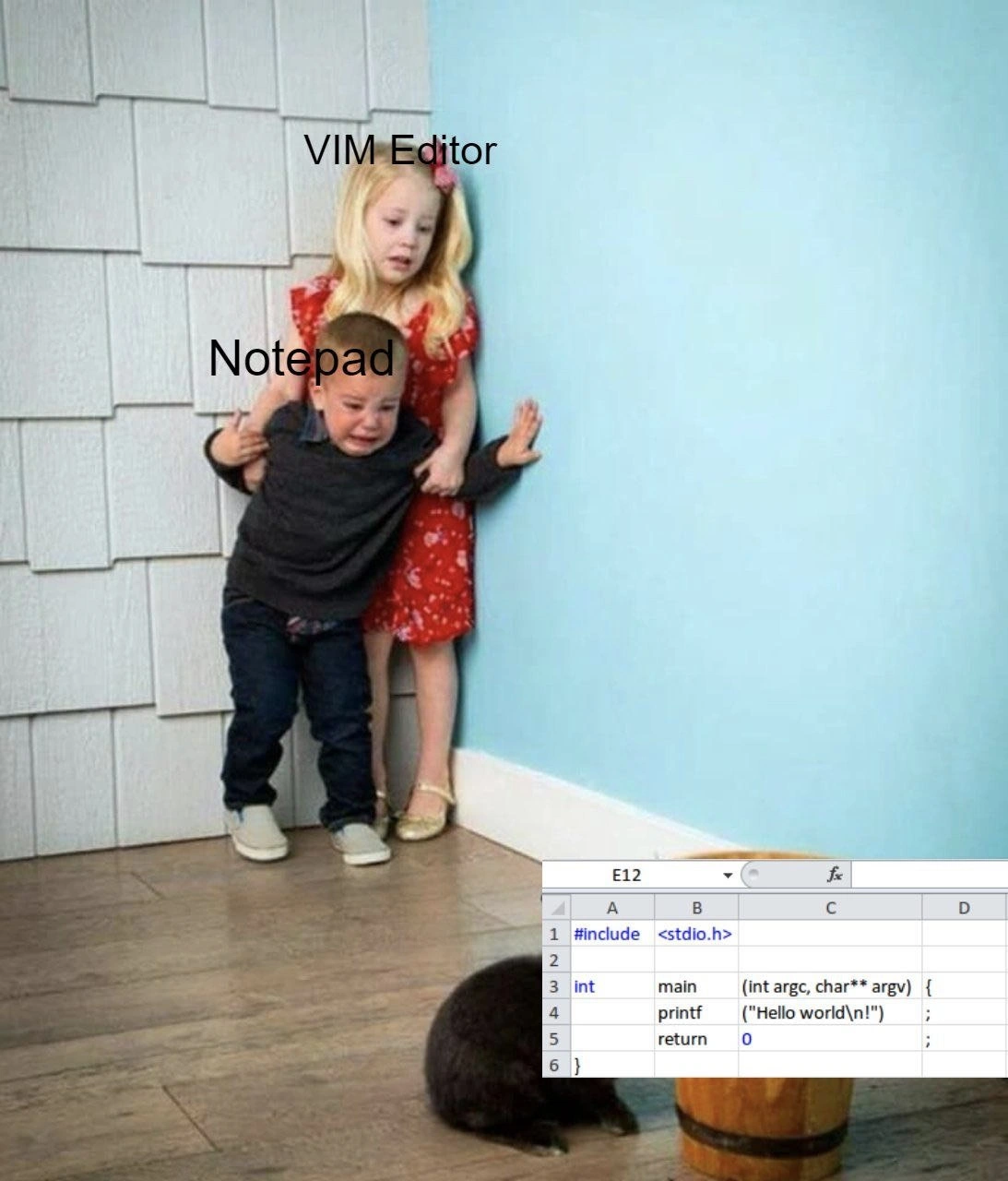
Imagine two kids who usually argue over everything – let’s say one loves a super fancy toy and the other prefers a really simple toy. They bicker all the time about which toy is better. But one day, they both peek into the playroom and see something truly frightening: another child is doing something so bizarre that it’s like a monster appeared. For example, that kid is trying to draw a picture using a calculator instead of crayons. It looks so wrong and confusing that our two siblings immediately forget their quarrel, hug each other, and hide in the corner in fear. The older sibling stands in front, protecting the younger one from the scary sight. In this story, the “monster” is the ridiculously wrong tool being used in a crazy way. It’s funny because normally those two kids fight like cats and dogs, but now they completely agree on one thing: what they’re seeing is horrifying! In the same way, this meme shows two very different text editors (usually competitive like siblings) suddenly united and frightened, because someone started doing something as absurd as writing computer code in a spreadsheet program. It’s a silly take on “the enemy of my enemy is my friend” – even rivals will team up when they see a monstrosity that shocks them both!

Level 2: Excel Is Not an IDE

Let’s break down the basics of what’s going on for a newer developer (or a curious outsider). The meme references three big things: Vim, Notepad, and Excel, and it involves writing a simple C program in a very wrong place.

  • Notepad: This is the simple text editor that comes with Windows. When you open Notepad, you get a blank window where you can write plain text. It doesn’t add any formatting or fancy features. Developers sometimes use Notepad to quickly view or edit code or configuration files because it’s fast and always available, but it’s very minimal. No line numbers, no syntax highlighting, no automatic indenting – just you and your text.

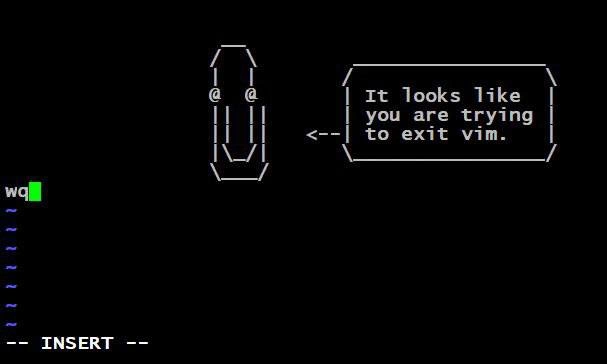
  • Vim: Vim (short for Vi Improved) is a powerful text editor that runs in the terminal (command-line). It’s famous for having a bit of a learning curve – you can’t even quit it without knowing the right command (:q! to force quit, for example, which is a running joke for newbies). But people who learn Vim can edit text at lightning speed completely from the keyboard. Vim is often used by programmers who live in the terminal or need to edit files on remote servers. It has features like syntax highlighting (color-coding your code), search/replace with regex, macros to repeat actions, and so on, but all in a very lightweight, old-school interface. Think of Vim as the sports car of text editors: very fast and responsive, but you need skill to drive it.

  • Excel: Microsoft Excel is not a text editor at all – it’s a spreadsheet program. When you open Excel, you see a big grid made of rows and columns (labeled with numbers and letters respectively). Each little rectangle in that grid is a cell (like A1, B2, C3 references cells by column and row). Excel is meant for organizing data in tables, doing calculations, making charts, and using formulas. For example, you might use Excel to sum up a budget, track expenses, or perform complex financial calculations with functions. Crucially, Excel expects you to input data or formulas into those cells, not paragraphs of text or code with specific formatting.

  • IDE (Integrated Development Environment): This is a software application that provides comprehensive facilities to computer programmers for software development. An IDE usually includes a code editor, but also has tools to compile/run the code, debug it, and manage files for a project. Examples are Visual Studio, Eclipse, IntelliJ, or VS Code (which is more of a powerful editor with extensions acting like an IDE). IDEs and editors are designed for coding – they understand programming languages to some extent, giving features like autocomplete suggestions, error highlighting, and one-click build or run. Notepad and Vim are text editors (Vim is a very advanced one, Notepad a very simple one) rather than full IDEs, but they are commonly used in coding workflows (especially Vim).

Now, the absurd scenario: writing a C program inside Excel. Normally, to write a C program, you’d use a text editor or an IDE to create a plain text file with a .c extension. For example, a very simple C program “Hello World” might be written in a file named hello.c like this:

#include <stdio.h>

int main(int argc, char** argv) {
    printf("Hello world\n");
    return 0;
}

This code, when compiled with a C compiler and run, would print Hello world to the console. In a proper code editor or IDE, each line is just text in sequence, and the tools might color-code keywords (int, return, etc.), help with indenting inside the { }, and let you compile easily.

Excel, in contrast, doesn’t know about C code. If you open Excel and in cell A1 you type #include <stdio.h>, in cell A2 int main (int argc, char** argv) {, and so on (A3 for the printf, A4 for the return 0;, A5 for the closing }), you are essentially using the spreadsheet’s cells as lines of a text file. But Excel will treat each cell as a separate piece of data. By default, Excel might even think you’re entering something like a formula or a piece of text it should process. You likely have to prepend a single quote ' to force Excel to treat each line as literal text (so it doesn’t, say, interpret = argv as a formula or trim spaces). Even then, you have an Excel workbook that displays code in cells, but there’s no way to run or compile that code in Excel. You’d have to copy-paste it out into a real editor or into a compiler. In short, Excel is not an IDE or a code editor – it’s the wrong application for the task.

The meme’s humor comes from personifying these tools as if they’re people: Vim Editor and Notepad are shown as frightened kids. Typically, there’s a kind of joking rivalry in the developer community (hence EditorWars) between those who swear by advanced editors like Vim and those who use simpler ones or more GUI-based ones. Here, Notepad (the simplest) and Vim (one of the more complex editors) are put on the same side. Both are intimidated by something even more outlandish: someone using Excel to write code. This implies that whatever differences Vim and Notepad users have, they both know a terrible idea when they see one.

To a junior developer or someone learning: it’s a gentle lesson in choosing the right tool. You will likely use a text editor or an IDE to write code – that’s the normal and sane way. If someone tries to get you to write code in a spreadsheet or some inappropriate tool, you’re right to be confused (or afraid, as the meme exaggerates). It’s highlighting developer best practices by showing a very extreme “worst practice” in a funny way. Even the simplest proper tool (Notepad) is better than a wrong tool (Excel for code). And even the fanciest tool (Vim) agrees in this case. Essentially, if you ever find yourself writing int main() inside Microsoft Excel, something has gone very, very wrong – and every developer from newbie to veteran will cringe equally.

Level 3: Editor War Ceasefire

In everyday developer life, editor wars are the stuff of lighthearted legend. Seasoned programmers love to argue Vim vs. Emacs, or Nano vs. Notepad++, or CLI vs GUI editors – it’s a nerdy rite of passage. Here we have Vim (the powerhouse modal text editor beloved by command-line aficionados) and Notepad (the no-frills Windows text editor) symbolically represented as two children. Normally, a Vim user and a Notepad user sit at opposite ends of the IDEs_Editors spectrum – one prides in the efficiency of keystrokes and decades-old modal commands, while the other just wants a quick, simple place to type without fuss. You might say Vim and Notepad fans don’t have a lot of overlap. Yet this meme shows them united, huddling together in fear. Why? Because someone has done the unthinkable: writing C code in Microsoft Excel. This scenario is so beyond the pale that it triggers an armistice in the editor wars – a ceasefire born out of mutual horror.

Why is this combination so funny and frightening to developers? It’s essentially a collision of context and purpose. Each tool in the meme has a usual domain:

  • Notepad is a bare-bones text editor; it can edit code as plain text, but offers no extras. It’s like the simplest, baseline way to create a .c file.
  • Vim is a veteran programmer’s tool; famously terse and powerful, it’s designed for coding, offering features like syntax highlighting, quick navigation, and macros – once you conquer its steep learning curve.
  • Excel, however, is a spreadsheet program meant for tables of numbers, formulas, and charts – it’s not a code editor at all. It’s intended for tasks like budgeting, data analysis, or maybe tracking a bug list, but certainly not for writing lines of C source code.

By having Vim shield Notepad from the “nightmare” of coding C in Excel, the meme pokes fun at how universally bad this idea is. Even the most opinionated CLI power-user (Vim) and the simplest text tool (Notepad) find common ground: they’re both appalled. It’s a bit like two rival mechanics both screaming “Don’t use cooking oil as engine oil!” when they see someone about to do something epically wrong. The protective stance (Vim as the older sister figure shielding Notepad, the younger brother) suggests that Vim – typically seen as hardcore – is genuinely concerned for poor Notepad’s wellbeing upon witnessing this atrocity. In other words, “No one should have to see that kind of coding practice.”

On a practical senior-engineer level, there are many reasons this scenario is a tech horror story:

  • No Code Support: Excel doesn’t have features like syntax highlighting, indentation, or bracket matching for C. It’s just not built for code. Writing { and } in separate cells is soul-crushing for anyone who cares about code structure.
  • Auto-Format Failures: Excel loves to auto-format and interpret inputs. Type something that looks like a date or a number, and Excel might helpfully convert it. For example, try writing a variable named SEP10 – Excel might happily turn that into 10-Sep (a date) unless the cell is formatted as text. Writing code means every " or = could trigger weird behavior (did you start a formula by accident?). The meme’s C code (#include <stdio.h> and so on) would need each cell carefully set to text mode, or Excel might do who-knows-what (imagine it auto-correcting printf to some misspelled thing or turning 1 into 1.0). The spreadsheet_abuse here is real.
  • File Format Chaos: C code is meant to live in .c files or at least .txt files. Excel uses a proprietary .xlsx binary format (or older .xls). If someone actually saved that “Hello world” program in an Excel file, the code is trapped in a weird container. You can’t feed ProjectEuler.xlsx to GCC and expect it to compile. You’d have to copy-paste it out – introducing extra steps and chances for errors (maybe some cell was inadvertently omitted or formulas recalculated weirdly). It’s like storing a delicate tool in a box of oatmeal: messy and unnecessary.
  • No Version Control or Diffing: Collaboration on code usually uses version control (git) which works great with plain text. But an Excel file full of code? Good luck diffing changes or merging conflicts. Excel isn’t text-diff friendly – one small edit can scramble the whole file in binary terms. Imagine telling your team, “please merge my changes from this Excel sheet.” Any senior dev would facepalm.
  • Lack of Build Integration: An IDE or proper editor can call compilers, run tests, integrate with build systems. Excel will just sit there with your code in cells, offering to sum some numbers or make a pie chart out of it. The meme’s Excel window showing printf("Hello world\n"); in cell A3 is almost painful: you can’t press F5 in Excel to run a C program. The best you can do is copy that text into a real editor or maybe use Excel’s macro language (VBA) to script an export – but that’s just building a convoluted Rube Goldberg machine around something that should be simple.

All these points resonate with developers as worst practices. It’s a perfect storm of CodingHumor and horror: a spreadsheet IDE. The humor lands because it’s a hyperbolic example of using the completely wrong tool for the job. It satirizes those moments when non-developers or clueless managers say, “Can’t you just do it in Excel?” – a phrase that sends shivers down any engineer’s spine when the task is clearly programming or data engineering. Many experienced devs have war stories of Excel being misused in enterprise settings (huge mission-critical logic buried in Excel macros, anyone?). Excel is powerful for what it does, but when it’s forced outside its domain, the results range from darkly funny to catastrophic. The excel_as_code_editor tag is all about this tongue-in-cheek nightmare scenario.

Finally, the image’s emotional punch – Vim literally protecting Notepad – amplifies the joke: even the toughest, most hardcore tool (Vim has seen real editing wars and survived since the 90s) is scared and saying “Nope, this is too much.” It’s a comedic reminder that no matter our internal EditorWars, all developers can unite against true madness in software development. And coding C in Excel is about as mad as it gets!

Level 4: Turing Tar Pit in A1

At the most theoretical level, this meme hints at the absurdity of using a spreadsheet as a programming environment. Believe it or not, spreadsheets like Microsoft Excel are effectively a form of programming system: their formulas and cell references create a data-flow computation model. In computer science terms, a spreadsheet is Turing-complete – meaning, given enough cleverly set-up formulas (and maybe iterative calculations), it could simulate any computation. Academic papers have even treated complex spreadsheets as programs, emphasizing how error-prone and unstructured they can be. However, writing a C program inside Excel is an ironic misuse of that idea. It’s like taking a theoretically capable but unwieldy tool (a proverbial Turing tar pit) and trying to write a formal C program with it, one cell at a time. Yes, you could encode a program in a table of cells (each cell here holds a line of code), but doing so defeats all the principles of clarity and proper tooling.

From a compiler’s perspective, code is meant to be in a continuous text stream – typically a plain .c source file. Excel, on the other hand, stores data in a grid with individual cell entries, and an .xlsx file is a proprietary, structured bundle (essentially XML data). A C compiler can’t read “cell A1 to A6” as sequential code without someone manually extracting it. There’s a fundamental mismatch in abstraction: text editors and IDEs treat code as raw text to parse, whereas Excel treats input as table data (often applying its own interpretations, like treating = as the start of a formula or auto-formatting "Hello" as a string). The meme exaggerates this to a comical extreme, but it highlights a real CS concern: using a tool outside its intended domain can turn a theoretically Turing-complete platform into a practical nightmare. It’s a bit like trying to prove a point that “you can program in anything” to the extreme – sure, you can even program with Excel formulas or encode a C program in cells, but the lack of proper semantics and structure makes it an insane idea. In the realm of programming language theory and tool design, this situation violates the expectation that code editors should be line-oriented, plain text-based systems with consistent syntax rules. Excel’s grid introduces unintended complexity: imagine lexical analysis where each cell might need to be concatenated with the next, or where formatting might inject hidden characters. It’s a paradigmatic clash – the functional, reactive world of spreadsheets versus the sequential, formal text of C code. And as the meme humorously suggests, this clash is so horrifying on a fundamental level that even vastly different editors find common ground in their terror.

Description

This meme uses the 'Brother Protects Sister' or 'Kids Hiding from Cat' format. A young girl, labeled 'VIM Editor,' holds back a crying younger boy, labeled 'Notepad.' They are both looking with fear and apprehension at a small, dark animal on the floor. In front of the animal is a screenshot of Microsoft Excel being used to write a 'Hello, World!' program in the C programming language. The code shown is a standard entry-point program: '#include <stdio.h>', 'int main(int argc, char** argv) {', 'printf("Hello world\n!");', 'return 0;', '}'. The humor comes from the absolute absurdity of using a spreadsheet program like Microsoft Excel as a code editor, a practice so horrifying that it scares both a basic editor (Notepad) and a powerful, advanced one (Vim). It's a classic joke about using the wrong tool for the job in the most extreme way imaginable, which is deeply relatable and funny to any software developer


Comments

13
Anonymous ★ Top Pick Using Excel as an IDE is the only workflow where 'segmentation fault' could refer to either a memory error or accidentally deleting a column
  1. Anonymous ★ Top Pick

    Using Excel as an IDE is the only workflow where 'segmentation fault' could refer to either a memory error or accidentally deleting a column

  2. Anonymous

    Watching someone write C in Excel and resolve include paths with VLOOKUPs is the first time I’ve seen Vim and Notepad agree on anything - there’s no modal key for pivot-table merge conflicts

  3. Anonymous

    Meanwhile, the architect who approved Excel as the company's official IDE is explaining how it's actually a DSL for tabular programming and the VLOOKUP-based dependency injection framework will revolutionize their CI/CD pipeline

  4. Anonymous

    This perfectly captures the moment a senior engineer realizes their junior used Notepad to edit production config files - though the real horror is that someone thought Excel was an acceptable IDE for C development. At least they're not using `:wq` to exit Notepad

  5. Anonymous

    Notepad's clinging terror: realizing Vim edits Hello World in normal mode without ever needing a mouse

  6. Anonymous

    Vim vs Notepad is a hobby; the real horror is opening model_final_v12.xlsx and discovering a C program split across cells - E12 is main and the pivot table is the build

  7. Anonymous

    When procurement declares “already licensed” equals “IDE,” you end up shipping C from Excel - so even Vim hides behind Notepad

  8. @eth0fox 4y

    I mean, excel can export as TSV

    1. @sylfn 4y

      you separate int from main with tab?

      1. @eth0fox 4y

        I mean, I don't write much c(pp) but it might work...?

        1. @sylfn 4y

          it will work but will be "strange" for native C++ coders

  9. @newmankrr 4y

    lmao

  10. @sylfn 4y

    that guy is on the right

Use J and K for navigation