Skip to content
DevMeme
6544 of 7435
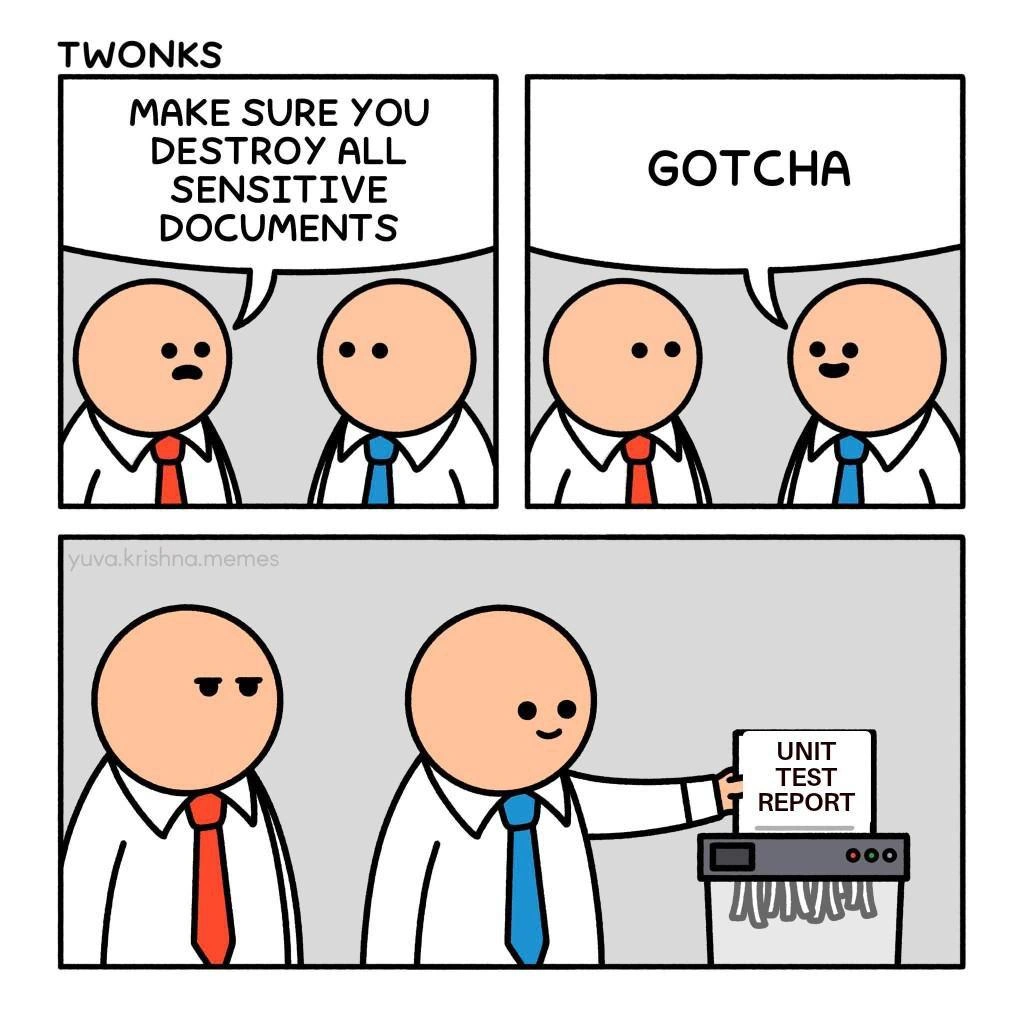
Destroy All Sensitive Documents - Shreds Unit Test Report Instead
Testing Post #7172, on Sep 27, 2025 in TG

Destroy All Sensitive Documents - Shreds Unit Test Report Instead

Why is this Testing meme funny?

Level 1: Out of Sight, Out of Mind

Imagine your mom asks you to clean your messy room. There are toys and clothes everywhere. Instead of actually putting things in their proper place, you scoop everything up and stuff it into your closet or under your bed. From the outside, the room looks clean – ta da! – but in reality you just hid the mess. This comic is playing with that same idea. The “mess” here is a bad report showing that the code isn’t well-tested. The manager (like the mom) says “get rid of anything sensitive/bad.” The developer, being cheeky, decides that report is something he doesn’t want anyone to see (kind of like a bad grade or a big mess). So he hides it by shredding it, just like shoving toys under the bed. It’s funny because we all know hiding a problem doesn’t fix it – but it can be tempting because it makes things look okay. In simple terms, the developer is acting like a kid who, instead of doing their homework, just tears up the report card so no one finds out. We laugh because it’s a naughty, creative loophole: he technically did what he was told, but we know he’s really just avoiding the issue. It’s that silly “out of sight, out of mind” logic – if nobody can see the bad report, maybe the problem will magically disappear!

Level 2: Shredding the Evidence

Let’s break down the scene in simpler terms. We have two office characters: one is a manager (red tie) and one is a developer (blue tie). The manager says “Make sure you destroy all sensitive documents.” Typically, in a company, sensitive documents means things like secret project files, client data printouts, or anything confidential that shouldn’t fall into the wrong hands. Companies even have paper shredders to physically destroy such documents so nobody can read them. A paper shredder is that machine you feed papers into; it chomps them into tiny strips. Once a paper’s shredded, it’s basically gone and unreadable – good for security, yes, but also a great way to hide information.

Now, what’s a Unit Test Report? In software development, unit tests are little programs that check parts of the code to make sure everything works correctly. For example, if you have a function that adds two numbers, a unit test would call that function with 2 and 2 and expect to get 4. When developers run a whole bunch of these tests, they often generate a report at the end summarizing the results. This unit test report might say how many tests passed, how many failed, and give a test coverage percentage (how much of the code was tested). It’s basically a report card for the code’s quality and reliability.

In an ideal world, everyone wants a good report – all tests green (passing) and high coverage (meaning we tested most of our code). But reality isn’t so perfect. Sometimes the report comes out with a bunch of failures or a low score. This can be embarrassing or uncomfortable, especially if a manager or an auditor is going to see it. It’s like getting a bad grade on an exam when your boss expected an A.

So in the comic, the developer hears “destroy all sensitive documents” and cheekily interprets it in his own favor. To him, that failing unit test report is a “sensitive” doc – sensitive in the sense that he really doesn’t want anyone else to see it! Maybe it shows only 20% code coverage or numerous failing tests, which might lead to awkward questions from the manager. His sly solution? Shred the report itself. In panel 4, we see him happily feeding the paper labeled “UNIT TEST REPORT” into the shredder. He’s literally destroying the evidence of the code’s low quality rather than fixing the code or tests.

The manager’s expression (a mix of suspicion and annoyance) is priceless. In panel 3, the manager already seemed to suspect that the dev might do something off-kilter (he’s side-eyeing him with a “Are you serious?” look). And apparently, the manager was right to worry! By panel 4, the deed is done: the developer technically followed orders (he did destroy a sensitive document) but obviously not in the spirit the manager intended. The poor manager probably meant things like shredding old customer records or confidential strategy docs, not the team’s QA reports!

For a junior developer or someone new to Testing, this highlights a basic point: hiding a problem is not the same as solving it. If your tests are failing or your code quality metrics are low, the correct response is to improve the code or write better tests – not to make the report disappear. The meme jokingly shows the absolute wrong way to handle bad test results. There’s even a phrase for this kind of cheeky behavior: “malicious compliance,” meaning following the exact words of an instruction to undermine its purpose. The developer maliciously complies with the manager’s words, choosing a document that technically could be considered “sensitive” (at least to his reputation) and obediently shredding it.

This scenario is funny to developers because it’s a playful jab at real workplace antics. Sometimes teams feel pressure to hit certain numbers, like 90% test coverage or zero known bugs. That pressure can tempt people to game the system. For example, a developer might mark a failing test as “optional” or delete tests entirely just to say “All tests passed!” on paper. It’s like telling your teacher the dog ate your homework – a very developer humor way of avoiding the hard work. We laugh because we know nobody should actually do this, yet we’ve all seen or felt a bit of that temptation when a deadline looms and the test suite is glowing red. The comic just takes that impulse and pushes it to a silly extreme: physically shredding the test report so it’s as if the failures never happened.

Level 3: Covering Up Coverage

Seasoned engineers recognize this comic as a masterclass in malicious compliance and metric gaming. The red-tie manager’s command “destroy all sensitive documents” is meant to address security or compliance concerns – you know, shredding real confidential files like design specs or password lists. But our blue-tie developer finds a perfect loophole: treat the embarrassing unit test report as a “sensitive document” and feed it to the shredder. It’s a sly nod to how teams sometimes handle uncomfortable code quality data by simply making it disappear. Why fix failing tests when you can just eliminate the proof that they failed?

This dark humor resonates because many of us have seen test coverage turned into a mere vanity metric. When a UnitTesting dashboard shows 50% coverage or a bunch of red failing tests, suddenly that report itself becomes a liability. In theory, coverage metrics and QualityAssurance reports exist to improve software quality. In practice, when TestCoverage numbers look bad, someone inevitably thinks: “What if we just… didn’t report this?” It’s the software equivalent of covering your eyes and pretending the bugs aren’t there.

The meme exaggerates a real anti-pattern. Ever heard of a developer commenting out failing tests right before a demo? Or setting all tests to @Ignore so the build passes? That’s basically a digital paper shredder for test results. Consider this tongue-in-cheek Java snippet:

// Digital "shredding" by ignoring a failing test (an anti-pattern)
@Ignore("Will fix this test later")  
@Test  
public void testCriticalFeature() {  
    // This test fails, but we're ignoring it so it doesn't show up in reports  
    assertTrue("critical feature is broken", false);  
}

By slapping @Ignore on the test, the failing case vanishes from the report. Coverage metrics denial achieved! It’s a cheap trick: the test suite looks clean, coverage percent might even go up (since only “successful” tests count), and the manager gets a report with no scary red marks. Of course, the bugs and bad practices are still lurking underneath – the team just swept them under the rug.

This comic also pokes fun at corporate compliance culture. The manager’s phrase “sensitive documents” is corporate-speak for things like confidential plans or personal data. But here it’s twisted: the sensitive secret we’re hiding is our lousy testing record. The manager’s suspicious glare in panel 3 says it all: he intuitively knows that the dev’s “GOTCHA” might be a little too enthusiastic. It’s the look of an experienced lead who’s seen juniors take instructions way too literally. And sure enough, in panel 4 the dev is grinning, shredding the Unit Test Report as if it’s top-secret intel. He’s technically obeying the order, but completely betraying its intent.

For veteran developers, the humor cuts close to the bone. We’ve encountered projects where meeting the letter of the process mattered more than the spirit. It’s always easier to delete the evidence than to address the uncomfortable truth it contains. In real life, maybe it’s quietly dropping a problematic test from the test suite, or tweaking the CI settings to not fail the build on low coverage. The result? Management sees a nice, clean report – ignorance is bliss. The CodeQuality issues remain buried, but hey, the paperwork looks perfect! This is classic developer humor about the disconnect between what we’re told to do and what actually gets done when pressure mounts. The comic makes us laugh (or cringe) because it’s a snapshot of that cynicism: when improving quality is hard, someone will inevitably say, “What if we just pretend everything is fine?” Shred. Problem solved. 🙄

Description

Three-panel comic strip titled 'TWONKS' by yuva.krishna.memes. Panel 1: A character with a red tie (boss/manager) tells a character with a blue tie 'MAKE SURE YOU DESTROY ALL SENSITIVE DOCUMENTS.' Panel 2: The blue tie character responds 'GOTCHA' with a smiling face. Panel 3: The blue tie character is shown feeding a 'UNIT TEST REPORT' into a paper shredder while the red tie character watches with a disapproving side-eye. The joke is that the developer considers the unit test report to be the most 'sensitive' document worth destroying - likely because the results are embarrassingly bad

Comments

8
Anonymous ★ Top Pick The most classified document in any organization isn't the nuclear launch codes - it's the test coverage report that shows 12% on a service that's been 'fully tested' for three sprints
  1. Anonymous ★ Top Pick

    The most classified document in any organization isn't the nuclear launch codes - it's the test coverage report that shows 12% on a service that's been 'fully tested' for three sprints

  2. Anonymous

    Some treat unit test reports like classified documents, which makes sense; if our actual test coverage ever got out, it would probably destabilize the entire project

  3. Anonymous

    SonarQube can’t fail the pipeline if the coverage report enters the write-only shredder

  4. Anonymous

    The only thing worse than finding out your unit tests were never written is discovering they were written, passed, documented... and then shredded because someone thought 'sensitive' meant 'anything that might hurt feelings during code review'

  5. Anonymous

    Every senior engineer knows that moment when a junior dev asks 'Should I commit these test files?' and you realize they've been running tests locally for six months with 23% coverage. This meme perfectly captures the fantasy solution: if the CI pipeline can't see the failures, do they even exist? It's the software equivalent of 'the test environment is down' becoming a permanent state. The real tragedy is that somewhere, a tech lead is nodding knowingly while their SonarQube dashboard screams into the void, and their definition of 'done' includes 'tests optional if Friday afternoon.'

  6. Anonymous

    Unit test reports: the only docs where 80% red screams 'classified technical debt'

  7. Anonymous

    Security told us to destroy sensitive documents, so QA shredded the unit test report - now the error budget and the audit both look green

  8. Anonymous

    Our CI finally went all‑green once Legal classified junit.xml as 'sensitive' and InfoSec mandated secure disposal

Use J and K for navigation