Skip to content
DevMeme
2553 of 7435
When a client complains, devs channel their inner fox: check the logs
Debugging Troubleshooting Post #2828, on Mar 8, 2021 in TG

When a client complains, devs channel their inner fox: check the logs

Why is this Debugging Troubleshooting meme funny?

Level 1: Clues from the App’s Diary

Imagine you have a toy car and it suddenly stops working. You tell your parents, “My toy is broken!” What will they do? They won’t just guess magically what’s wrong – they’ll look for clues. Maybe they’ll check if the batteries fell out, or if a wheel is stuck. In a way, the toy car might “tell” them what’s wrong by showing a missing battery or a broken part. In software, those clues live in something called logs – basically the app’s diary of everything happening inside it. The funny picture shows a developer asking the app’s diary, “What do the logs say?” just like in that silly song about a fox. It’s cute because instead of freaking out, the developer is playfully listening for the app to “speak” through its logs. In real life, when someone says an app is broken, a developer checks the app’s diary (the logs) to find out the real story – kind of like a detective reading clues or a doctor looking at your test results to figure out why you feel sick. The reason this meme makes people smile is because it’s true and relatable: the developer isn’t really a magical fox, but they do need to listen to the app’s clues to fix the problem.

Level 2: But Did You Check the Logs?

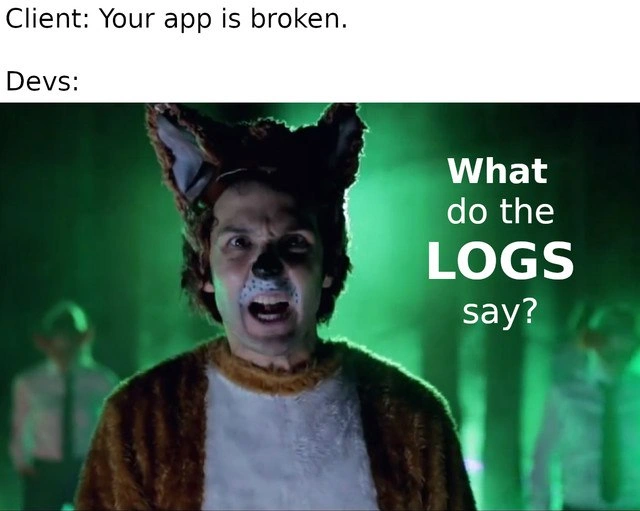
When someone says “the app is broken,” developers don’t magically know the reason. They have to investigate! The first tool in their investigation toolbox is usually the application log. In simpler terms, a log is just a file or record where the app writes down everything interesting that it does – especially errors. It’s like the app’s journal. So when a client bug report comes in (Client: “It’s not working!”), the developer’s immediate reaction is to open that journal and see what’s been recorded around the time of the issue. In the meme’s top panel, the client says “Your app is broken.” The bottom panel humorously shows the dev’s response: instead of panicking, the dev is essentially saying “Alright, let’s see what the logs say.” In fact, the meme literally portrays a dev as a person in a fox costume singing “What do the LOGS say?” – a playful twist on the lyric “What does the fox say?”. This is referencing a goofy pop song by the comedy duo Ylvis, which many people know for its absurd chorus about a fox’s sound. Here it’s been remixed into developer humor: the fox costume represents the dev’s mindset, and “the logs” are what the dev is asking to hear from. 🗒️🎤

So, what do logs say? They tell the story of the app’s behavior. For example, if a user tried to save some data and nothing happened, the logs might contain a stack trace (a multi-line error message showing the chain of function calls) indicating a NullPointerException or a database connection error at that moment. The developer reads this and suddenly the vague complaint has concrete details: Ah, the database failed to respond, or a variable was null. This is the heart of debugging: going from “something’s wrong” to “here’s exactly where and why it broke.” Logs often include timestamps (so you know when things happened), severity levels (e.g. INFO, WARN, ERROR to indicate how serious an event is), and messages the programmers wrote to describe events (like “Payment service failed to connect to DB”). All this information is gold for troubleshooting. A junior developer might learn early on that the answer to “Why did my program crash?” is probably written in the error output or log file. In fact, mentors or senior teammates often ask, “Did you check the logs?” as the first follow-up to any bug report. It’s practically a gentle scolding if you haven’t – because digging through logs is standard operating procedure when facing a production problem.

The meme is funny to devs because it exaggerates this habit. It’s showing the developer in full drama mode, as if performing on stage, to ask for logs. In real life, of course, a developer would just calmly open a log viewer or run a tail -f on the server logs (a command to live-stream log output) rather than actually singing. But the sentiment is spot-on. It highlights the relationship between developers and their logs: no matter what a client or a non-technical stakeholder reports, the truth lives in those log lines. This also touches on Observability and Monitoring in software systems – logs are one of the three pillars of observability (along with metrics and traces). Companies set up dashboards and alerts based on log messages (for example, an alert might trigger if the word “ERROR” appears too many times in a short window). Being able to quickly search logs (maybe using grep in a console or tools like Splunk/Kibana) is a crucial skill. Even for a newer dev, it becomes clear that you can’t just rely on hearsay (“the app is broken”); you have to look at the app’s own records to diagnose the issue. The meme encapsulates that lesson in a single, funny image. After all, when something goes wrong in code, the quickest way to start fixing it is to ask: “What do the logs say?”

Level 3: The Foxy Logging Ritual

In this meme, a client report – “Your app is broken.” – triggers the developer’s almost reflexive response: check the logs. Seasoned engineers will chuckle because they’ve lived this scenario countless times. The meme brilliantly mashes up a pop-culture reference (the viral Ylvis song “What Does the Fox Say?”) with a core debugging habit in tech: when something goes wrong in production, the first thing devs ask is, “What do the logs say?”. The bottom panel shows a performer in a fox costume (from that music video) belting out “What do the LOGS say?” as if logs could sing the answer. It humorously captures how developers, like a musical fox, caterwaul for clues in the application logs whenever a client complains about a bug. 🦊

From an experienced dev’s perspective, this is a ritual born of hard-won wisdom. Application logs are the recorded diary of what the software has been doing: every important event, error, or warning gets written down. When a panicked client or stakeholder says, “It’s broken!”, that’s usually all the information you get. There’s a gap in stakeholder expectations here – the client expects a quick fix, but the dev knows they need evidence. So, like a detective rushing to the crime scene, the developer dives into log files. In production environments, especially when you’re on OnCallDuty at 3 AM dealing with ProductionIssues, the logs are often your only eyewitness. They’ll tell you if a database query failed, if an exception was thrown, or which part of the code blew up. It’s the classic “Works on my machine, but not in production” problem – your machine isn’t broken, the client’s is, so you can’t trust your local tests; you must interrogate the app’s logs in the real environment to find the truth.

This instinct is practically wired into the developer brain. It reflects a key pillar of modern Observability: along with metrics and traces, logging is how we observe and understand a running system’s behavior. Professionally, teams set up centralized logging and monitoring systems (like aggregated log servers, ELK stacks, or cloud log analyzers) precisely because of this universal debugging move. When multiple microservices are involved, you might have a distributed trail of log events across many servers. Senior engineers implement clever tracing IDs that flow through logs of each service, so they can stitch together a coherent story of a user’s transaction. All of that tooling exists because reading raw logs is so vital. The meme’s humor lies in dramatizing this mundane but critical practice: the dev doesn’t even respond in plain words – they metaphorically don a fox suit and sing to the logs for answers. It’s an exaggeration of how eagerly and immediately we turn to log analysis, but it rings true.

And indeed, logs often do “speak.” A quick log scan might reveal a smoking gun, like a null-pointer exception or an out-of-memory error at the exact time of the client’s complaint. For example, a snippet from an error log might look like:

2021-03-08T10:15:30Z ERROR [PaymentService] Unhandled NullPointerException 
    at com.example.app.payment.PaymentProcessor.process(PaymentProcessor.java:42)
    at com.example.app.orders.OrderController.checkout(OrderController.java:88)
    ...  (stack trace continues)

In one glance, a senior dev sees what happened (NullPointerException), where it happened (PaymentProcessor.java:42), and the chain of calls (stack trace) that led to it. Troubleshooting starts right there: maybe a recent code change didn’t handle a null input. Without logs, we’d be blind. That’s why the joke lands so well: of course the app’s broken, now let’s see what the logs have to say about it. Every veteran knows that feeling of scanning log lines, heart pounding, hoping to catch that one line that explains everything. It’s practically a developer’s superstitionwhen in doubt, read it out (from the log file). The meme takes that serious behind-the-scenes moment and makes it absurdly epic by channeling a 2010s novelty dance track. It’s funny because it’s true: whether you’re a battle-scarred senior engineer or a new dev who’s been burned once, you learn to trust the logs more than any vague complaint.

Description

The meme has a two-panel layout. The top white strip contains black text that reads: "Client: Your app is broken." followed by a second line "Devs:". The lower panel is a frame from the "What Does the Fox Say?" music video: a person wearing a brown fox costume and furry ears stands in a green, foggy, forest-themed stage with several blurred dancers in the background; the person’s face is obscured. Large bold white overlay text on the right side says "What" (first line), "do the" (second line), "LOGS" (third, largest word), and "say?" (fourth line). The meme humorously depicts developers’ instinctive reaction to production complaints - immediately examining application logs - highlighting the role of logging and observability in debugging client-reported issues

Comments

11
Anonymous ★ Top Pick Client: “The app’s broken.” Me, channeling Ylvis: tail -f 40 GB/min of ELK, waiting for a correlation-id to drop the beat and expose which feature flag just nuked prod
  1. Anonymous ★ Top Pick

    Client: “The app’s broken.” Me, channeling Ylvis: tail -f 40 GB/min of ELK, waiting for a correlation-id to drop the beat and expose which feature flag just nuked prod

  2. Anonymous

    After 20 years in tech, I've learned that 'the app is broken' translates to anything from a DNS cache issue to someone forgetting their password, but the logs always know the truth - assuming you remembered to add proper logging levels and didn't just console.log('here') everywhere before that production deploy last Friday

  3. Anonymous

    Every senior engineer knows the first law of production debugging: 'It works on my machine' is immediately followed by 'What do the logs say?' Because after 15+ years, you've learned that client reports are Schrödinger's bugs - simultaneously critical and user error until you observe the actual stack trace. The real skill isn't fixing the bug; it's diplomatically explaining why 'it's broken' isn't actionable without log levels, timestamps, and correlation IDs

  4. Anonymous

    Logs: the only witness that turns 'app broken' into 'you rotated prod certs without telling ops'

  5. Anonymous

    Every incident starts with “What do the logs say?” and ends with learning the only crashing pod rotated its logs last night to save on ingestion costs

  6. Anonymous

    Senior reflex: ask for logs; senior reality: 1% sampling, pod rotated 5 minutes ago, and the only surviving line is "200 /health"

  7. @endvvell 5y

    cringe

  8. @vaster_than_empires 5y

    Ring-ding-ding-ding-dingeringeding! Gering-ding-ding-ding-dingeringeding! Gering-ding-ding-ding-dingeringeding!

  9. @deerspangle 5y

    Can get the logs yourself, It's all SaaS now anyway /s

    1. Deleted Account 5y

      it's all sus

      1. Deleted Account 5y

        Software under served.

Use J and K for navigation