Skip to content
DevMeme
2301 of 7435
Client Requirements vs. Codebase Reality
Stakeholders Clients Post #2560, on Jan 9, 2021 in TG

Client Requirements vs. Codebase Reality

Why is this Stakeholders Clients meme funny?

Level 1: Simple Ask, Tangled Mess

Imagine your friend asks you to walk a straight line from your house to the park – easy and direct. But along the way, you get more requests: pick up another friend from a different street, avoid the road that’s under construction, stop by the store to buy snacks. Suddenly, you’re no longer walking a straight line; you’re looping and zig-zagging all over the neighborhood. What was a simple trip became a crazy, tangled route. That’s what this meme is saying: a simple task can turn into a big mess once you add every little extra request and special case. It’s funny because we expect the job to be quick and straightforward, but in reality it becomes as confusing as a spaghetti maze.

Level 2: Simple Request, Complex Code

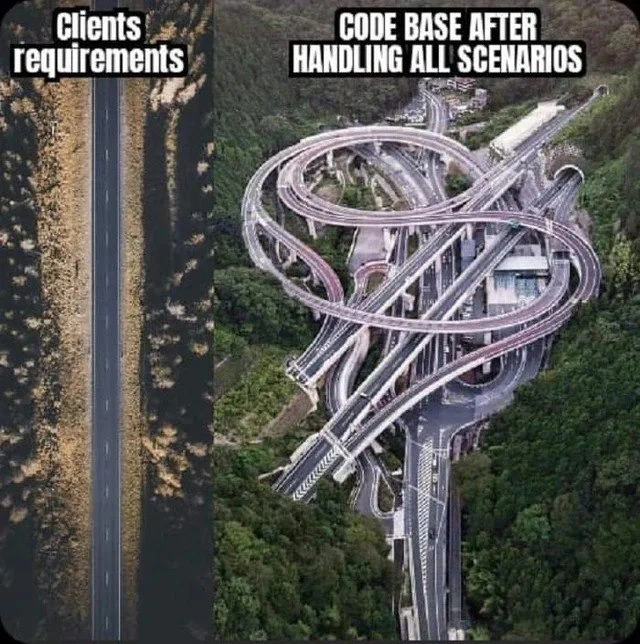
At first glance, this meme shows the difference between what a client asks for and what the software ends up looking like under the hood. On the left, "Clients requirements" is represented by a straight, simple road – meaning the client described a straightforward need. On the right, "CODE BASE AFTER HANDLING ALL SCENARIOS" is a crazy spaghetti-like highway interchange – meaning the actual code became very complicated once the developers included all the edge cases and special rules.

In software, it's common that a simple request grows more complex as you dig into the details. Clients might say, "It just needs to do X," and that sounds like a straight road: one clear path to get from start to finish. But as you start coding, you realize there are many edge cases – these are the rare or unexpected situations your program needs to handle so it won’t crash or behave badly. Every time you discover a new edge case or the client says "Oh, we also need it to handle Y scenario," you have to add more code, often in the form of additional if statements, exceptions, or special functions. Over time, the code can turn into a big tangle of conditions, similar to a highway with loops and ramps going all over the place.

Let's illustrate this with a simple example. Imagine you have to write a function to process orders in an online store. The client initially says: "We only have two types of orders, standard and special, so handle those." Easy, right? Your first version might be:

# Initially: straightforward logic for a simple requirement
def process_order(order):
    # Only standard vs special orders, easy peasy
    if order.type == "STANDARD":
        handle_standard(order)
    else:
        handle_special(order)

This code is clear and easy to follow, like that straight road. Now, suppose a week later the client comes back and says, "Actually, we have gift orders that need gift wrap if they're in the US, otherwise they need a customs form. And sometimes customers pay for expedited processing, but if they forgot to add an address we need to flag that," and so on. You adapt the code to handle these new requirements. A few more elif conditions (Python’s version of "else-if") get added for each new scenario. The function might evolve into something like:

# After: code grows to handle many edge cases
def process_order(order):
    if order.type == "STANDARD":
        handle_standard(order)
    elif order.type == "GIFT" and order.country == "US":
        # special handling for gift orders in the US
        apply_gift_wrap(order)
        handle_standard(order)
    elif order.type == "GIFT" and order.country != "US":
        # special handling for gift orders internationally
        apply_gift_wrap(order)
        attach_customs_form(order)
    elif order.expedited and not order.address:
        # edge case: expedited order missing address
        handle_address_error(order)
    else:
        handle_standard(order)
    # ... imagine more elif blocks for other scenarios ...

Notice how a once tidy function grew into a series of checks and special cases. This is a simplified peek at spaghetti code. The term spaghetti code means code with a messy structure, where the flow jumps in many directions and it's hard to follow what's going on — kind of like trying to trace one strand of spaghetti in a bowl. It often happens when people keep appending new fixes and features onto existing code without reorganizing it.

A few key terms and concepts that relate to this meme:

  • Edge case: an unusual situation that wasn’t accounted for in the initial design. For instance, a user entering an unexpected value, or an order with some unique combination of options. Good developers try to foresee and handle edge cases so the software won't break when something unexpected happens.
  • Scope creep (or feature creep): when a project's scope (the sum of what it's supposed to do) keeps getting bigger. The client might keep saying "Can we also add this? And what about that scenario?" Each time, the project "creeps" beyond its original boundaries. In our example, the requirement grew from handling two types of orders to handling gifts, expedited shipping issues, etc.
  • Over-engineering: sometimes developers anticipate complexities or future requirements that the client didn't even ask for. They might add a lot of code to handle things that might happen. If those things never happen, the extra code was unnecessary complication. It's like building an extra exit on a road "just in case" even though no one currently needs it.
  • Technical debt: think of this like taking shortcuts in code that you'll have to pay back later. For example, instead of redesigning the order processing system to elegantly support gift orders, you quickly insert some elif hacks to meet the deadline. It works for now, but the code becomes a bit uglier and harder to manage – that's the debt. Eventually, someone (maybe you, maybe a future colleague) will "pay" that debt by spending extra time fixing or refactoring the messy code. The more shortcuts and quick fixes you add (the bigger that spaghetti interchange gets), the harder and more time-consuming it will be to make changes in the future, just like untying a big knot.

For a junior developer or someone just starting out, the meme is a cautionary tale. At first, you might not see why adding a bunch of if statements or copying-and-pasting some code is a big deal – if it works, it works, right? But as the codebase grows, you'll find that this approach can lead to serious code quality problems. Code quality refers to how easily other developers (and future you!) can understand, maintain, and extend the code. When the logic is straightforward (like the straight road), code quality is high – it's easy to navigate and reason about. When the logic becomes convoluted with many interdependent parts (like the spaghetti junction), code quality suffers – it's easy for bugs to hide and very hard for someone new to jump in and make changes without breaking something.

Many new developers have an "aha" moment the first time they inherit a piece of over-engineered or messy code. It might have been written with good intentions – handling all the scenarios, making the app robust – but if it's not organized well, it becomes nearly impossible to work with. You might fix one bug and inadvertently introduce two more because the logic paths overlap in weird ways.

In short, the left side of the meme (the straight road) is like the initial promise: clear requirements, simple code. The right side (the tangled highways) is what can happen after multiple updates, added features, and "just in case" code changes turn that simple project into a complex one. It humorously highlights a real lesson in development: without careful design and occasional refactoring, a codebase can become a maze. What started as a neat two-lane road can end up as a spaghetti junction if every detour and pit stop is bolted on without a plan. For anyone who's ever opened a code file and thought "Wow, this is way more complicated than I expected," this meme hits home. It’s a funny reminder to strive for clean, simple architecture – and to be mindful of how seemingly minor changes can add up to a big ball of complexity.

Level 3: Scope Creep Spiral

The meme nails a universal developer experience: the dramatic transformation from a simple, straight requirement to a convoluted codebase entangled by every edge case and caveat. On the left, we see a straight two-lane road labeled "Clients requirements" – symbolizing a clear, straightforward path from idea to implementation. On the right, there's a tangled multi-level highway interchange captioned "CODE BASE AFTER HANDLING ALL SCENARIOS". This wild interchange is a perfect visual metaphor for a codebase twisted into spaghetti code by the time all the special cases, last-minute changes, and quirky conditions have been handled.

For experienced engineers, this contrast between a minimal spec and a maximal implementation is painfully relatable. It’s the classic requirements vs. reality scenario. A client might outline something that seems simple ("We just need a login form, how hard can it be?"), but by the time we've dealt with edge cases and scope creep, the software’s internals become as overbuilt and loopy as that highway junction. Edge cases are those oddball scenarios or extreme conditions that the normal user story doesn’t cover – like a user with an unusually long name, or an account with special legacy flags that need different handling. Scope creep (also known as feature creep) refers to the constant drip of new requirements or "small changes" that widen the project’s scope over time. Each new “What if the user does this…?” or “We also need it to handle that…” is like adding another off-ramp or overpass onto what was once a straight road.

Why does this happen? Seasoned developers can instantly tick off a few reasons:

  • Scope creep: New requirements keep getting piled on. The client’s "just one more thing" turns into five more if/else conditions in the code. What began as a single-lane solution must now support detours for all the extras.
  • Edge-case mania: Every rare scenario ("What if a user’s data comes in a weird format?") demands a special-case branch. Over time, those branches intertwine like highway ramps criss-crossing each other, turning a simple flow into a knot of conditions.
  • Quick fixes over refactoring: Under deadline pressure, developers often slap on a proper redesign a quick patch for each new scenario. Each patch is like adding a makeshift footbridge to solve a local problem. Eventually, you have a shantytown of code – it works, but one wrong step and the whole thing might collapse.
  • Over-engineering: Occasionally, in fear of Murphy’s Law, devs anticipate problems that might never happen and build overly complex "just in case" logic. It’s like constructing an overpass for traffic that doesn’t even exist yet. The code tries to handle every possible situation, even the improbable ones, resulting in layers of checks and structures that might never be needed.

All this extra logic causes the project’s code complexity to skyrocket. We’re not just talking about big-O algorithmic complexity, but the complexity of the code's structure and flow. One measure of this is cyclomatic complexity, which counts the number of independent paths through a program’s source code. Each new condition or branch (every additional loop in that highway) bumps up that number. What was once a clean, linear route is now dozens of intertwined paths. And we all know what that means: more places for bugs to hide, more effort to understand the flow, and a higher chance that a change in one corner will send cars careening off in another. The right side of the meme screams "high maintenance cost" – a system so convoluted that making sense of it requires a full map and legend.

This tangled design is a breeding ground for technical debt. Technical debt is the cost you pay later for quick-and-dirty decisions made earlier. Every time the team said "We don’t have time to refactor, just make it work for now," they took on a bit of debt. The interest on that debt is paid in headaches: debugging becomes nightmarish, onboarding new developers takes ages ("Good luck explaining that highway logic to the new hire!"), and even small changes risk breaking something because the codebase is an unpredictable web of interdependencies. In terms of code quality, it's a nightmare: clarity and simplicity have been sacrificed, and the system is fragile. That highway interchange might be funny in a meme, but if you’re the one responsible for maintaining it, it’s more like a horror story. Make one wrong turn (change a seemingly minor function) and you could trigger a pile-up (cascade of bugs) down the road.

There’s also an implicit commentary on communication between developers and clients. The client or product manager often only sees the left side – the straightforward vision and client expectations that their request will be a simple road to success. They might not realize (or might conveniently ignore) how much complex machinery is necessary under the hood to deliver that smooth ride. It’s a classic case of ambiguous requirements and misaligned expectations: the initial request was too high-level or optimistic, glossing over the pesky details that make implementation hard. So the dev team had to fill in the gaps on the fly, building complexity as they went.

"It'll be quick and easy," they said. "Just a small change..."

Every developer familiar with such promises can practically hear those words echoing. And we know what comes next: six months of code contortions and a commit history that reads like a tome. The right side of the meme is essentially a diagram of that experience.

An experienced engineer sees in this meme a reflection of many real codebases. We've all battled a system that felt like a spaghetti junction of logic – perhaps an overgrown module accreted over years of feature requests, bug fixes, and half-baked enhancements. We chuckle because it’s true: a feature that started simple ends up with layers of edge_case_handling and defensive coding until the original elegance is buried. Maybe the team intended to keep things lean (KISS – Keep It Simple, Stupid was the motto at the start), but fast-forward through a few production issues and frantic late-night hotfixes, and that clean design has mutated. The software might still technically fulfill the client’s needs, but it’s doing so with an over-engineered contraption of a solution.

This shared pain is what gives the meme its punch. The left vs. right images exaggerate the difference for comedic effect, but not by much! Plenty of us have opened a code file expecting a straightforward implementation, only to find loops on loops of special-case handling that make our eyes glaze over like that multi-tier interchange. It’s both funny and frightening. As any battle-scarred developer might quip, “They told me it was a small project... I should have known better.” The meme resonates because behind the humor is a real cautionary tale about how software projects can grow unwieldy. We laugh, we groan, and maybe feel a bit of comfort that we’re not alone – every developer, at some point, has ended up building or inheriting a "spaghetti junction" codebase when a straight road was all anyone ever wanted.

Description

A two-panel comparison meme. The left panel is labeled "Clients requirements" and shows a simple, straight, two-lane road from an aerial perspective. The right panel, labeled "CODE BASE AFTER HANDLING ALL SCENARIOS," shows a massive, incredibly complex multi-level highway interchange with dozens of interwoven roads, on-ramps, off-ramps, and overpasses, also viewed from above, set in a green, hilly environment. This meme humorously illustrates the dramatic increase in complexity from a seemingly simple initial requirement to a fully implemented, production-ready system. It highlights how handling all edge cases, error conditions, user inputs, and various scenarios can transform a straightforward concept into a sprawling, intricate software architecture

Comments

7
Anonymous ★ Top Pick The client wanted a CRUD app. We gave them a distributed, event-driven, multi-region, fault-tolerant system that looks like this. It still doesn't handle leap years correctly
  1. Anonymous ★ Top Pick

    The client wanted a CRUD app. We gave them a distributed, event-driven, multi-region, fault-tolerant system that looks like this. It still doesn't handle leap years correctly

  2. Anonymous

    “Sure, it’s just a straight-forward CRUD,” they said - six sprints later our repo’s a cloverleaf of locale-aware date math, GDPR side roads, and enough feature-flag on-ramps to cause merge-conflict gridlock at rush hour

  3. Anonymous

    The real tragedy isn't the complexity - it's that the straight road still has a race condition at 3am on Tuesdays when the moon is full and someone's using Internet Explorer 6

  4. Anonymous

    This perfectly captures the journey from 'just add a simple if statement' to a codebase where changing a single boolean requires a PhD in topology and a prayer to the merge conflict gods. Every loop represents another stakeholder meeting where 'just one more edge case' was discovered, and every overpass is a backwards-compatibility layer we swore we'd remove 'next sprint.' The real kicker? The client still only uses the straight road on the left, but we're paying the infrastructure costs for maintaining that entire interchange - complete with 24/7 on-call coverage for when someone inevitably takes the wrong exit at 3 AM on a Friday

  5. Anonymous

    Clients ask for a straight path; production adds idempotency, retries, PCI/GDPR, SSO, multi-region consistency, feature flags, and legacy integrations - the control flow becomes a dollar-sign interchange, which feels right since every branch has a toll

  6. Anonymous

    Client hands you a linear spec; you architect the interchange from hell because 'what if the user rotates their phone upside down at 3AM in a Faraday cage?' YAGNI was yesterday's optimism

  7. Anonymous

    “Handle all scenarios” translates to i18n, DST, retries, idempotency, and SSO quirks - until the happy path is a toll road

Use J and K for navigation