Skip to content
DevMeme
1084 of 7435
A Rollercoaster of CI/CD Failure
Deployment Post #1218, on Apr 1, 2020 in TG

A Rollercoaster of CI/CD Failure

Why is this Deployment meme funny?

Level 1: Small Mistake, Big Mess

Imagine you’re drawing a picture for a school project. First, you panic because you think you ruined the main page of your project with a big ugly scribble. Then you breathe a sigh of relief when you realize, “Oh, phew, I didn’t actually mess up the main page.” But then comes the awful surprise: you find out that instead you accidentally plastered that scribble on the front door of the school, for everyone to see! Now you’re freaking out all over again.

In simple terms, this meme is like that story. The developer thought they messed up something in a safe place (which was bad but fixable), then felt relieved because it looked like everything was okay… only to discover the real mistake popped up in the worst possible place – the live product everyone uses. It’s an “Oh no… oh yay… OH NO!” sequence. The reason it’s funny (and scary) to developers is because it captures how a tiny mistake (like a piece of bad code) can suddenly become a huge public problem if you’re not careful. The first panic is thinking you broke something important internally, the calm moment is thinking you got away with it, and the final panic is realizing the real problem is even bigger and out in the open. So it’s basically showing why checking your work and having safety steps is super important – otherwise a small oops can turn into a big uh-oh for everyone!

Level 2: Branches, Builds & Blunders

Now let’s unpack the meme in simpler terms for a newer developer or someone less familiar with these systems. This meme is about Git branches and automated software delivery (often called CI/CD pipelines). It highlights what happens when best practices are not followed. Here are the key pieces:

  • Git and the Master Branch: Git is a version control system that lets developers manage code changes. Repositories often have a main branch (traditionally named "master") where the stable code lives. Think of master as the primary notebook everyone shares – it should always be in good shape. Pushing code to master means you’re updating that main shared code. Usually, teams protect this branch because if you put bad code there, all future work and releases get affected. In newer setups, "master" might be called "main", but the idea is the same: it’s the principal branch. In the meme, when it says “You pushed uncompilable code to master,” it means someone committed code with an error so severe that it doesn't even turn into a running program (uncompilable) and that code was sent to the main project line. This is a big rookie mistake and would normally break the project for everyone. Imagine writing a sentence without proper grammar and trying to publish it in a book – it just doesn’t make sense. In coding, if it doesn’t compile, it’s like the program’s grammar is wrong, and the computer refuses to even turn it into an app.

  • Uncompilable Code: This refers to source code that has syntax errors or other issues that prevent the compiler (the program that turns code into an executable program) from building it. For example, in Java or C++, forgetting a semicolon or brace, or calling a function that doesn’t exist, will cause a compile error. The code won’t run at all until that’s fixed. In our meme scenario, someone evidently checked in code with such errors. Usually, a developer would catch that by running a build or tests before pushing, but mistakes happen (maybe they were in a rush or didn't test). When uncompilable code lands in a shared branch, automated build systems like Jenkins, Travis CI, or GitHub Actions will try to compile it and immediately flag it as a failure. It’s one of the simplest BuildFailures to catch because nothing can proceed until the code compiles.

  • Branch Protection and CI: Because mistakes like this are possible, teams set up branch protection rules. For instance, they might require that code is reviewed by another developer and that all automated tests pass before changes can be merged into master. Continuous Integration (CI) servers run a suite of checks on new code – including compiling the code and running tests – whenever you push changes or open a Pull Request. If any check fails (like a compile error or a failing test), the CI marks it as a ❌ and ideally prevents the code from being merged. This is like an alarm system for code quality. In the meme’s first panel, the alarm should be blaring: “Stop! That code doesn’t even build!” If branch protection is working, Git won’t allow that push to fully merge into master.

  • “It didn't go to master” (Why that’s a relief): The second panel implies that somehow the broken code did not end up polluting the master branch after all. Maybe the push was rejected or it was destined for another branch. For example, perhaps the developer was pushing to a different branch by mistake (say, they intended to push to master but actually pushed to a branch named something else). Alternatively, a continuous integration hook might have caught the error and prevented merging, meaning master stayed clean. The character in the meme is relieved because if master remains intact, the whole team’s main code isn’t broken. It’s like thinking you spilled coffee on the shared project report, then realizing you actually didn’t – the report is fine, everyone breathes easy again.

  • Continuous Deployment to Production: Now, the kicker: “It went to production.” Production means the live environment where the application/service is running for real users or customers. Deploying to production is the final step where code changes go out into the world. Many teams have automated Deployment Pipelines as part of CI/CD (Continuous Integration/Continuous Deployment). For example, an automated pipeline might be set up so that whenever code is merged into a certain branch (often master or a special release branch), the system will automatically deploy that code to a server for users. This is what we call auto_deploy_to_production. It’s great for speed, but only if every check before deployment is solid. In our meme, something clearly went wrong in that pipeline configuration. The broken code “skipped” master but somehow still triggered a deployment. This could happen if, say, there’s a rule like “any code pushed to a branch named production gets deployed immediately.” Perhaps the developer accidentally pushed their changes to a production branch (thinking it was another branch), and the system dutifully deployed that commit. Or the CI system didn’t limit deployments to successful builds. The bottom line: the code with compile errors was sent out to the live application – which is catastrophic because an application with uncompilable code might crash or not start at all. This is a textbook DeploymentFailure. It’s the equivalent of shipping a product with a missing piece – except it’s not just a piece, the whole product won’t even turn on.

  • Why Everyone Panics When Production Breaks: In software teams, a ProductionIncident is the highest priority fire. When something in production is broken, it can cause downtime, loss of functionality for users, and even loss of revenue. It typically triggers urgent all-hands-on-deck attention. So, finding out that bad code went live is far worse than just breaking an internal branch. If master is broken, engineers grumble but can fix it before release. If production is broken, users are encountering errors right now. It’s a wake-up-the-team situation. That’s why the meme’s last panel is panic again – the character realizes the mistake has escaped into the wild, and the tone goes from “phew, dodged a bullet” to “holy heck, the building is on fire!” This reflects an engineer’s emotional rollercoaster: initial panic about messing up, relief when it seemed okay, then double-panic when the real damage becomes apparent.

In summary, the meme humorously illustrates the importance of safeguards like branch protection, proper CI checks, and controlled deployments. For a junior developer, the lesson is: always test your code and make sure it compiles locally; use Pull Requests so others catch your mistakes; and set up CI/CD pipelines that fail fast. If you don’t, you might end up in a nightmare where your simple coding mistake goes straight from your computer to the customer-facing app. It’s like skipping class all semester and then accidentally broadcasting your incomplete homework on live TV – embarrassing and painful for everyone involved!

Level 3: Master Bypass Mayhem

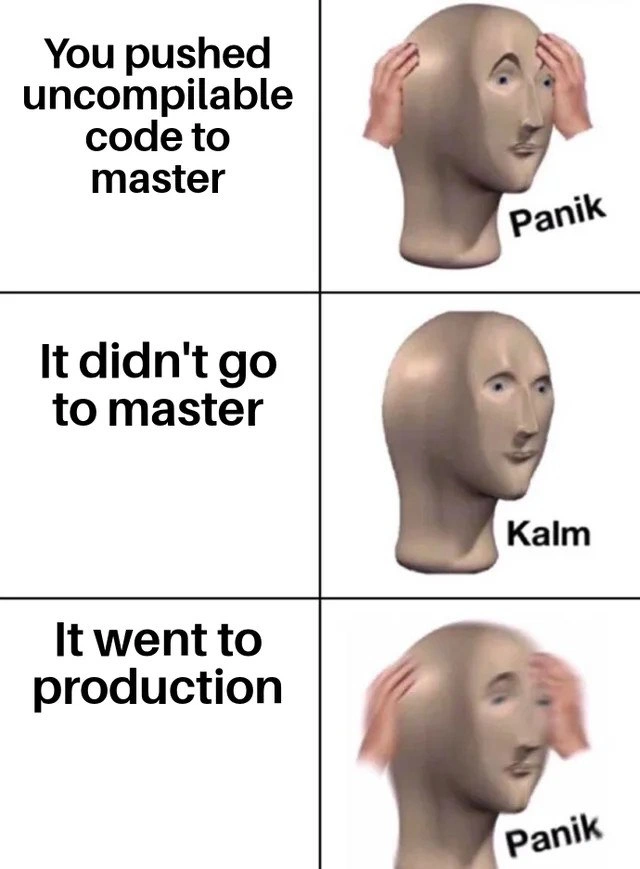
At the highest level, this meme exposes a CI/CD pipeline fiasco that only a battle-scarred engineer could truly appreciate. The classic "Panik/Kalm/Panik" format dramatizes a software deployment horror story in three acts:

  1. Panik (Act 1: Broken Master) – The developer realizes they pushed uncompilable code to the master branch. In a sane workflow, master (the main code line) is sacred; it’s supposed to always compile and ideally pass all tests. Pushing code that doesn’t even build is like dropping a database table in production – an instant oh-no moment. Typically this triggers panic because it means the main branch (used by all teammates and releases) is now broken. Everyone’s builds will fail, CI is red, and you might have just become the most popular person on the team chat for all the wrong reasons. It’s the ultimate BuildFailure on VersionControl: committing code that can’t even turn into a running program. For seasoned devs, this is the stuff of nightmares and immediate hypertension.

  2. Kalm (Act 2: False Relief) – But then, relief: “It didn't go to master.” Whew, maybe you pushed to the wrong branch or your merge didn’t actually happen. Perhaps the code got rejected before polluting master, or you committed to a feature branch by accident. Crisis averted? The meme’s middle panel shows the mannequin head relaxing because the main code line remains clean. No build breaks after merge on master, no angry team shouting “who broke the build?!” in chat. This hints at a scenario where some guardrail seemed to work – maybe a bot or a branch setting prevented the broken code from actually landing in master. In a well-run Continuous Integration setup, this is when your branch protection settings or CI checks kick in and say “Nope, not merging that!” The developer is kalm because they think the catastrophe was avoided in time.

  3. Panik (Act 3: Production Meltdown) – The twist: “It went to production.” 🚨 Absolute terror resumes, now even worse. This is deployment hell – somehow that same broken code deployed live! The code that wasn’t in master still got released. In other words, the safety net failed in the most absurd way possible. It suggests a DeploymentPipeline misconfiguration big enough to drive a truck through. Perhaps an automated deploy script was watching the wrong branch (like a release or production branch) and our broken commit ended up there. Maybe someone manually deployed the wrong commit, or an integration environment auto-promoted a feature branch to prod without QA. It’s a scenario of branch_protection_missing + auto_deploy_to_production = chaos. The code didn’t even compile, meaning the application likely crashed immediately upon startup – a ProductionIssue so bad that the service might be completely down. Every on-call engineer’s pager is blowing up. The bland mannequin head is back to clutching its skull in panic, perfectly capturing that Oh $#!% realization that real users and customers are now seeing a critical failure that should have been caught long before.

This meme hits home for senior developers because it satirizes multiple failure points in a software delivery process. It’s basically enumerating a DevOps horror story where all the best practices were bypassed or absent. How could this happen in a modern CI/CD setup? The veteran perspective knows exactly how: one small oversight or shortcut can cascade into a disaster. Let’s break down the cascade of DeploymentFailures that must have occurred for uncompilable code to skip master and end up in prod:

  • No Local Safety Net: The developer apparently didn’t even run the code or compile it locally before pushing. (Rule 0 of programming: make sure it runs on your machine! But hey, YOLO.) This is how git push mistakes begin: “It worked in my head, so ship it!” 🙄

  • Missing Branch Protection: The repository didn’t have branch protection rules on master or the prod deployment branch. Normally, branch protection would prevent direct pushes or merges unless tests pass. Here, the gate was wide open. No peer review, no CI status check, nothing to stop broken code from entering a critical branch. It’s like leaving the keys in the rocket launch console – anyone can press the red button.

  • CI Pipeline Misconfig: Even worse, the BuildPipeline was either non-existent or configured to ignore failures. In a proper CI, a compile error should mark the build as failed and abort any deployment. Something went terribly wrong – perhaps the build step’s failure wasn’t wired to stop the next step. Maybe someone wrote a sloppy script that doesn’t propagate errors, e.g. using || true or continue on error so the pipeline kept going despite the broken build. Consider a pseudo-pipeline from hell:

    #!/bin/bash
    compile_code || echo "Build failed... but let's deploy anyway! 🙈"
    deploy_to_production  # This runs regardless, oh no!
    

    Here the compile_code step fails, but instead of aborting, the script echoes a message and proceeds. This snippet is essentially what a Continuous Integration nightmare looks like: the failure is shrugged off, and deployment happens no matter what. Our meme’s situation suggests something like this occurred – the BuildSystem gave a red light, but the DeploymentPipeline charged ahead through the red light. 🚦💥

  • Instant Production Deployment: The organization was practicing true Continuous Deployment – automatically deploying every change. That’s not inherently bad (companies like Netflix or Facebook do hundreds of deploys a day), but doing it without safeguards is asking for trouble. Here, auto-deploy was configured so recklessly that even a broken build went live. Perhaps the pipeline was set to deploy from any successful merge into a production branch, and someone accidentally pushed the broken commit into that branch instead of master. It didn’t go to master, it went straight to prod – as if a QA/staging environment or manual approval step just… didn’t exist. This is DeploymentPipeline insanity: akin to a factory that skips the safety inspection and ships a product with parts missing.

The humor (and horror) for seasoned engineers is in the absurdity of these failures combined. It’s a VersionControlHumor cautionary tale. We’ve all experienced one of these mistakes in isolation – e.g., a broken build on master, or a faulty deployment – but seeing them stacked is both funny and blood-pressure-raising. It lampoons the “move fast and break things” culture taken to the extreme: moving so fast you bypass the main branch and break production directly. It’s also a dark reminder: if something can go wrong in your CI/CD, it will, usually at the worst possible time (like Friday 5 PM, naturally). Seasoned devs might chuckle, then immediately go double-check their branch protections and CI configs, just in case… because nobody wants to star in the real-life version of this meme at 3 AM on a weekend.

Description

A three-panel meme using the 'Panik, Kalm, Panik' format featuring the surreal character Meme Man. Each panel has text on the left and a corresponding image of Meme Man on the right. The first panel says, 'You pushed uncompilable code to master,' and shows Meme Man with his hands on his head in distress, with the caption 'Panik'. The second panel says, 'It didn't go to master,' and shows a calm, expressionless Meme Man with the caption 'Kalm'. The third panel says, 'It went to production,' and shows Meme Man panicking again, his hands a blur of motion near his head, captioned 'Panik'. The humor captures the gut-wrenching emotional rollercoaster of a software deployment gone horribly wrong. The initial panic of breaking the main branch is replaced by a moment of relief, which is then shattered by the far worse realization that the broken code has bypassed standard procedures and affected live users, indicating a critical failure in the CI/CD pipeline or version control strategy
Comments

7
Anonymous ★ Top Pick Some teams have branch protection rules. We have 'thoughts and prayers' as a service that pipes directly to the production cluster
  1. Anonymous ★ Top Pick

    Some teams have branch protection rules. We have 'thoughts and prayers' as a service that pipes directly to the production cluster

  2. Anonymous

    Turns out the “accelerated” pipeline was just `docker build || true`; congratulations team, we’ve achieved negative feedback cycles - prod tells us the code doesn’t compile before CI does

  3. Anonymous

    The real panic is when you realize the reason it went straight to production is because someone disabled all the quality gates last Friday to 'just get this one hotfix out quickly' and never re-enabled them

  4. Anonymous

    The real horror isn't pushing uncompilable code to master - it's discovering your CI/CD pipeline has been configured with 'deploy_on_any_branch: true' and your feature branch naming convention accidentally matched the production deployment regex. At least when it fails on master, you get the dignity of a failed build notification before the pager goes off

  5. Anonymous

    Love how our CD fetches HEAD instead of the build artifact - master is protected, prod isn’t

  6. Anonymous

    CI blocked master; CD deployed :latest from your branch anyway - enjoy yesterday’s binary with today’s migrations

  7. Anonymous

    The real kalm killer: prod compiles it anyway thanks to that unchecked 'skip-build' env var

Use J and K for navigation