Skip to content
DevMeme
2177 of 7435
When the 'Advanced AI' is Just a Tautology Engine
AI ML Post #2429, on Dec 8, 2020 in TG

When the 'Advanced AI' is Just a Tautology Engine

Why is this AI ML meme funny?

Level 1: When Help Isn’t Helpful

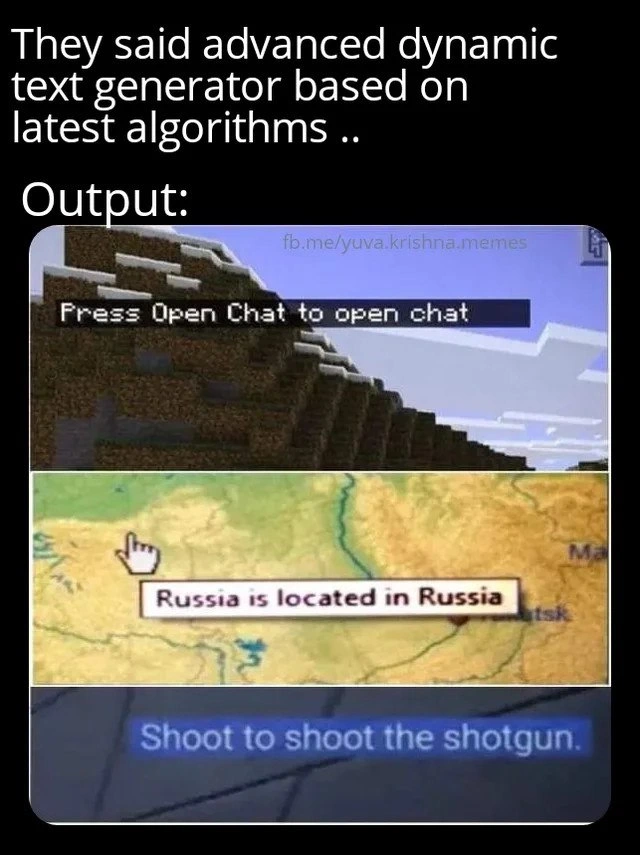
Imagine you ask a friend, “How do I turn on the light?” and they answer, “Just turn on the light to turn on the light.” That’s pretty silly, right? They basically repeated your question as the answer. You wouldn’t learn anything new from that advice. This meme is laughing at a computer doing the same kind of thing. The computer was supposed to give helpful tips, but instead it said things that are obviously true and totally unhelpful – like a teacher who, when you ask for help, just echoes your words back to you. For example, one of the pictures shows a game telling the player, “Press Open Chat to open chat.” In normal words, that’s like a sign on a door that says, “Open the door to open the door.” Well, duh! If I knew how to open it, I would! Another example says, “Russia is located in Russia,” which is like asking “Where is Russia?” and getting the answer “It’s in itself.” These messages make us laugh because the computer is trying to act smart but ends up saying something that a toddler might say when being cheeky. It’s the kind of obvious statement that helps nobody. So the big joke here is: sometimes computers, even fancy high-tech ones, give advice that’s as useful as telling someone water is wet. It feels funny and a bit absurd – like the machine is confidently pointing out nothing new. In simple terms, the meme is showing “helpful” tips that aren’t helpful at all, and we find that laughable because even a child could tell you that those tips are just repeating the obvious.

Level 2: Redundant Tooltip 101

Let’s break down what’s happening in simpler terms. We have an “advanced dynamic text generator” – basically a program feature designed to automatically create small bits of text (we call this kind of text microcopy in UX/UI design). Microcopy includes things like tooltips, button hints, or short instructions that appear in a user interface. The promise here was that some fancy AI or algorithm would write these snippets for us, presumably making them smart or context-aware. The reality, as shown in the meme’s examples, is that the generated text ended up being redundant (meaning it just repeats information we already have) and not helpful at all.

Consider the three screenshots one by one:

  • “Press Open Chat to open chat.” This is an instruction from a game (Minecraft is shown). It’s supposed to tell the player how to open the chat window. Normally, it would say something useful like “Press T to open chat” (if the T key is the chat key). Instead, it says “Press Open Chat to open chat,” which is a useless loop: it’s basically saying “to open chat, open chat.” Why did this happen? Likely because the game tried to fill in a template automatically. It had a generic message format like “Press [button name] to [do action].” Here, the button name was stored as “Open Chat” (maybe a label) and the action as “open chat.” The software just slapped those values in without thinking. So we got a redundant_tooltip where the tooltip (the small help text) just repeats the button’s name. For a user, especially someone new who doesn’t know which key opens chat, this is confusing and unhelpful. It’s a UX failure because the user still doesn’t know what to press. For a junior developer, the lesson is: when automating UI messages, you have to handle cases where your filled-in text might accidentally echo itself.

  • “Russia is located in Russia.” This looks like a tooltip from a map or geography app that’s trying to give info about places. The format probably was something like “[Place] is located in [Country/Region].” That can work for cities or regions (e.g., “Paris is located in France” or “Siberia is located in Russia”). But when the place is a country like Russia, the formula breaks down. The program should have an exception or different phrasing, but it didn’t – so it literally says a country is located in itself. This is obviously true but completely pointless to say. It highlights an AutomationFailure: whoever programmed this feature didn’t include a rule for when the place and the container are the same. Maybe they relied on an NLP algorithm or a data source without cross-checking the output. The result is a textbook example of bad microcopy. For someone using the app, it’s a moment of UXIrony – the interface told them nothing new at all. For a young dev, it illustrates why we must think about edge cases. If you tell a computer to always use a template, it will do so even when it doesn’t make sense. We have to anticipate weird cases like “country located in same country” and program around them.

  • “Shoot to shoot the shotgun.” This is from a video game tutorial. It’s trying to instruct the player on how to fire the shotgun weapon. Usually, games show something like “Click left mouse button to shoot the shotgun” or “Pull RT (right trigger) to fire the shotgun” on consoles. Here we only see “Shoot to shoot…,” which suggests the game omitted the actual control input. It looks like the text was generated by combining an action word and the weapon name. Possibly the template was “[Action] to [action] the [weapon].” If the action word was “shoot,” the template filled in “Shoot to shoot the shotgun.” This is obviously a mistake – it doesn’t tell the player which button or trigger shoots, it just redundantly says “shoot.” For users, that’s just as useful as telling someone “Just do it to do it” – not at all helpful. From a development standpoint, this could be a bug where the game didn’t fetch the correct input name (maybe a missing key binding in the string), or the developers assumed the action word and the instruction could be the same without thinking about how silly it reads. It’s another UXDesign blunder because it fails to guide the player, and it’s unintentionally funny. For newer developers, it’s a good example of why user experience design and clear communication matter. When you use automation or placeholders in text, you have to double-check that the output actually makes sense to a human.

In all these cases, the key technical terms and concepts are:

  • Dynamic text generator: a system or algorithm that creates text on the fly rather than using a fixed, static sentence. It could be a simple rule-based system or involve AI/ML (Artificial Intelligence/Machine Learning). The meme jokingly implies it’s AI-based (with “latest algorithms”), but the errors are so basic that it feels like a dumb automation.

  • NLP (Natural Language Processing): a field of AI that deals with understanding and generating human language. If an NLP algorithm was used here, it didn’t do a good job. Often NLP models need a lot of context to generate useful text, otherwise they might produce generic or nonsense outputs. This meme highlights an AILimitations scenario – where AI falls short in producing useful language.

  • Microcopy: those little bits of text in interfaces (like instructions, tooltips, button text). Good microcopy is concise, clear, and helpful. Bad microcopy (like our examples) can confuse or annoy users. Automating microcopy is tricky, because what works in one context might not work in another – as seen with the Russia example.

  • User Experience (UX): the overall experience a person has when using software or a system. UX includes ease of use, clarity of information, and how satisfied or frustrated the user feels. These redundant messages are examples of a bad user experience because they don’t actually assist the user in doing the task. In fact, they might make the user feel like, “Is this a joke?” or “Did that really just tell me to do the thing by doing the thing?”

  • AI hype vs reality: a common theme in tech where everyone talks about AI as this magical solution, but in practice, implementing it well is hard. The meme title “state-of-the-art text generator” is likely poking at how companies market their features. They might say “We have an AI that writes hints for you!” but if not executed properly, you get outputs like these. It’s a funny reminder that just calling something AI doesn’t guarantee intelligence.

For a junior developer or someone new to these concepts, the meme is essentially showing the failure cases of automated content. It’s a lighthearted lesson: always review what your code or AI actually produces! Just because it runs without errors doesn’t mean it’s giving useful results. Sometimes a simple solution (like a human-written sentence or a well-thought-out condition in code) is better than an “automated” one that ends up stating the obvious. In the end, technology should serve the user – if it produces “Press Open Chat to open chat,” it’s not serving anybody except giving us a good laugh.

Level 3: Smart Systems, Silly Messages

Ah, the bitter comedy of AI hype vs. reality. This meme hits home for experienced developers who’ve seen grand promises faceplant into trivial outcomes. We’re told about a “latest algorithm” powering a dynamic text generator – sounds like some fancy AI/ML magic will be crafting on-screen tips. But the output? Ridiculously simple lines like “Press Open Chat to open chat.” It’s the digital equivalent of a smug assistant proudly declaring, “I helped!” while doing the bare minimum (or less). This contrast is the heart of the humor: the discrepancy between a supposedly intelligent system and its UX failure of serving up Captain Obvious hints. We laugh (perhaps a bit ruefully) because we’ve been there: the feature that was meant to wow users with intelligence instead embarrasses us with AutomationFailures 101.

Let’s unpack the trifecta of redundant microcopy showcased:

  • “Press Open Chat to open chat” – This looks like a Minecraft UI tip gone wrong. Likely the code attempted to guide the player: “Press [key] to open chat.” But instead of the chat key (like “T” on PC), it inserted the action name “Open Chat.” So it ended up literally repeating itself. As developers, we recognize this pattern: some dynamic text system pulled a label or function name and naively plugged it into a sentence. No one told the code that using the phrase “Open Chat” twice doesn’t help the user. It’s a redundant_tooltip classic, akin to a button that says “Save” with a tooltip that also says “Save” – utterly uninformative. From a UXDesign standpoint, it’s a failure to provide context. From a dev standpoint, it’s an oversight that could have been caught with a simple condition (e.g., if the placeholder equals the action, choose a different phrasing). But hey, our state-of-the-art text generator didn’t sweat those details.

  • “Russia is located in Russia” – Here we have a world map tooltip that’s achieved peak redundancy. Likely, the intention was educational: when you hover over a country or region, it should say something like “Moscow is located in Russia” or “Siberia is located in Russia.” However, when the thing you’re hovering is Russia itself, the template fills in country = Russia, container = Russia. Boom: tautology. This screams bad_microcopy from a procedural generation system that wasn’t taught geography hierarchy. Any seasoned dev can guess what happened in the code or data: maybe a function like describeLocation(place) that defaults to "<place> is located in <container>" without an exception for top-level places. The humor is that the computer is technically not wrong – Russia is in Russia – but it’s a worthless fact. It’s a prime example of AILimitations in understanding context. No human writer would bother stating that, but an algorithm doesn’t chuckle at the obvious; it blindly follows its script. For the user, it’s a UXIrony moment: the interface tells you something you already know entirely, under the guise of insight. For devs, it’s a facepalm: somewhere, a developer either didn’t anticipate this case or an “AI-powered” content system had nothing better in its knowledge base, so it served up a tautology.

  • “Shoot to shoot the shotgun.” – This one reads like a glitched video game tutorial. Typically, games show instructions like “Press [Mouse1] to shoot the shotgun” or “Pull the trigger to fire.” Here, it looks like the text generator tried to be dynamic: maybe it had a template like "${actionVerb} to ${actionVerb} the ${weapon}". If actionVerb = “shoot” and weapon = “shotgun”, well… you get shoot in both slots, resulting in a hilariously dumb directive. The player is basically told: “Do the thing to do the thing.” Thanks, game, very helpful. From the developer’s view, this is likely a missing variable or a logic bug – perhaps the code didn’t fetch the input control name properly, or the person setting up the content just copy-pasted the verb without thinking. It underscores a DeveloperExperience lesson: dynamic text is only as smart as the rules and data behind it. If those rules are oversimplified, you get a dumbing-down effect. The game might have an AI-generated or procedurally generated tutorial system meant to cover all weapons/actions with one template, but without special-casing, you get this comedic redundancy. Senior devs might chuckle and cringe simultaneously; we know those late-night coding sessions where you think a generic solution will handle all cases, only to find out later that your code cheerfully advises players to “shoot to shoot.”

All these examples share a core theme: automation without insight. The meme is poking fun at how an “advanced dynamic text generator” can devolve into a redundant phrase generator if not properly guided. This resonates with the veteran crowd because it’s emblematic of real-life AIHumor scenarios in tech. We’ve seen machine learning models that were supposed to revolutionize something but ended up reiterating the obvious or the biased data they were fed. It’s also a UX cautionary tale: Just because something is generated by the latest algorithm doesn’t guarantee it’s useful. In fact, these cases feel like a high-tech version of Clippy’s notorious obvious tips from the ‘90s (“It looks like you’re writing a letter. Would you like to write a letter?” Thanks, Clippy). History repeats itself, only now it’s cloaked in AI buzzwords.

From an engineering perspective, it’s equal parts funny and painful. We strive to improve UserExperienceDesign with smart automation, but poor implementation turns it into a joke. The humor carries a hint of exasperation: how many meetings, stand-ups, and sprint plannings have we sat through touting “intelligent user hints” or “context-aware assistants”? And yet, here we are, with a system proudly telling us that Russia is in Russia. It’s a reminder that in software, common sense isn’t common – you have to code it in. Someone probably rushed this feature, or assumed the latest NLP model would be savvy enough not to repeat itself. Oops. Perhaps there was even a bit of organizational overconfidence: “We have an AI, it’ll handle tooltips automatically, no need for a manual review.” Veteran devs know that’s how you get to production with a tooltip that’s meme-worthy.

In the end, this meme’s scenario is almost cathartic to developers: it validates those of us who roll our eyes at tech hype. It says, “See, this is what happens when you trust the fancy algorithm without supervision.” It’s a chuckle at the expense of AIHypeVsReality, showing that sometimes the latest algorithms need old-fashioned oversight. And it’s a small relief to any dev who’s ever accidentally created a similar tautology in an app – at least you’re not alone, even the “advanced” systems do it! Below is a quick peek at how easily such blunders can slip in:

# Example: Naive dynamic text generation leading to redundant hints

# 1. Generating a chat instruction without context-awareness
action = "open chat"
hint = f"Press {action.title()} to {action}"
print(hint)  # Press Open Chat to open chat

# 2. Generating a location description without hierarchical check
def location_message(region, container):
    return f"{region} is located in {container}"
print(location_message("Russia", "Russia"))  # Russia is located in Russia

# 3. Generating a shooting tutorial without differentiating inputs
verb = "shoot"
weapon = "shotgun"
print(f"{verb.capitalize()} to {verb} the {weapon}.")  # Shoot to shoot the shotgun.

As you can see, without extra logic, the computer is all too happy to produce these obvious howlers. In a code review, a senior dev would flag this immediately: “Uhh, maybe don’t tell players to shoot to shoot?” But if such output sneaks past testing (or if everyone blindly trusts the dynamic_text_generator), it ships and becomes internet fodder. In summary, the meme exaggerates to make a point: even a so-called intelligent system can deliver UX failures that feel like they came from the Department of Redundancy Department. It’s a gentle reminder (delivered with a laugh) that true intelligence in UI text isn’t just about algorithms – it requires context, clarity, and a human touch to avoid these facepalm moments.

Level 4: Algorithmic Tautology Engine

Behind these redundant UI hints lurks the gap between generating language and understanding it. Modern NLP systems, even those boasting state-of-the-art algorithms, can fall into this trap. Whether it's a simple template-based script or a cutting-edge neural network, the machine often has no semantic awareness that it's spitting out a tautology. In natural language generation, you typically have models (from old-school Markov chains to massive Transformer networks) that predict text based on patterns in data. Without rules or context-checking, an algorithm might confidently auto-complete "Press Open Chat to open chat" because it has learned a pattern like "Press [button] to [do action]" without grasping that here button name = action name. The model or script isn’t internally screaming, “Wait, that’s obvious!” – it’s just combining tokens or placeholders mechanically. This is the classic AI limitation: lots of computation, little common sense.

Consider advanced text generators like GPT-style networks: trained on gigabytes of text, they can still produce gems of redundancy if prompted poorly. Why? Because they’re essentially super-fast stochastic parrots – they imitate language statistically. If the training data or prompt suggests a phrasing, the model might go with it even if it ends up as circular logic. Unless explicitly constrained, a generative model doesn’t inherently know that "Russia is located in Russia" conveys zero new information – it just sees a plausible sentence structure (a country and a location phrase that happen to be identical) and rolls with it. Academic literature in NLG calls this a lack of world modelling or common-sense knowledge. Advanced algorithms can use techniques like knowledge graphs or content filters to avoid such silly outputs, but clearly those weren’t in play here. We’re seeing an automation failure at a fundamental level: the system can produce grammatically correct text, but it has no ground truth or contextual sanity check. In essence, the so-called “advanced dynamic text generator” is an algorithmic tautology engine – it regurgitates the input data (button names, location names, action words) as the output advice. All the fancy math and latest algorithms won’t help if the system isn’t taught the difference between meaningful help and an echo. This is like using a rocket-guidance algorithm to draw circles – technologically impressive in theory, yet hilariously redundant in execution. The meme’s examples are a technological Ouroboros (a snake eating its tail) of text generation: a loop where the output consumes itself, offering us no new info, only a perfect self-reference. It’s a reminder that without true understanding or careful design, AI-generated content can descend into absurdity, endlessly repeating the obvious with utmost confidence.

Description

A meme that humorously criticizes the hype around AI-powered text generation. The top of the image has white text on a black background that reads, 'They said advanced dynamic text generator based on latest algorithms .. Output:'. Below this, a three-panel comic strip showcases comically redundant and obvious text from various video games. The first panel is a screenshot from Minecraft with the instruction, 'Press Open Chat to open chat'. The second panel shows a map from a strategy game where a tooltip over Russia states, 'Russia is located in Russia'. The third panel displays an on-screen prompt from a shooter game saying, 'Shoot to shoot the shotgun.' The joke satirizes the gap between the ambitious marketing claims of AI and the often simplistic or literal-minded output of the actual implementation. For experienced engineers, it's a nod to seeing over-engineered systems produce trivial results or recognizing placeholder text that somehow made it into the final product

Comments

7
Anonymous ★ Top Pick This is what happens when your 'advanced AI' is just a glorified `f'Press {action} to {action}'` template string that escaped the sprint demo
  1. Anonymous ★ Top Pick

    This is what happens when your 'advanced AI' is just a glorified `f'Press {action} to {action}'` template string that escaped the sprint demo

  2. Anonymous

    After three sprints and a six-figure GPU bill, our “AI-driven microcopy” shipped: “Press Open Chat to open chat” - congrats team, we’ve productionized SELECT 1

  3. Anonymous

    This is what happens when your NLP model achieves 100% accuracy on the training set because someone accidentally used the label column as a feature

  4. Anonymous

    This is what happens when your training data includes every game tutorial ever written and your loss function optimizes for 'technically correct' - the best kind of correct for passing unit tests, but absolutely useless for actual users. It's the AI equivalent of that senior engineer who responds to every question with 'it depends' or documentation that says 'this function does what it does.' At least when we write circular logic in code, the compiler catches it; when an LLM does it, we call it 'emergent behavior' and add it to the demo reel

  5. Anonymous

    When “AI-powered tooltips” are just enum names templated through i18n, you get “Press Open Chat to open chat” - five nines of correctness, zero bits of information

  6. Anonymous

    Trillion-param LLM finally achieves zero hallucination: pure, undistilled banality at scale

  7. Anonymous

    Our “AI-driven onboarding” ended up as sprintf('%s to %s the %s') with temperature=0 - comically idempotent, tragically production

Use J and K for navigation