
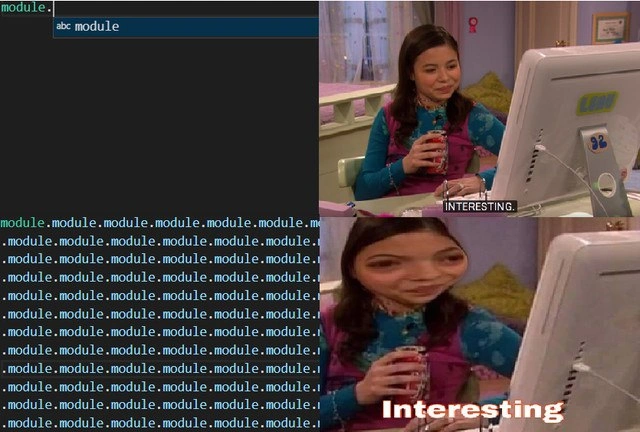
When IDE autocomplete only offers endless ‘module.module’ suggestions
Why is this IDEs Editors meme funny?
Level 1: Copycat Computer
Imagine you’re trying to get help from your computer, but it acts like a copycat friend who just repeats what you say. You ask, “Hey, what can I do with this thing ‘module’?” and the computer simply echoes, “module… module… module…” over and over again. It’s not giving you any new information, just parroting the same word back. That’s what’s happening in this picture. The person on the right is looking at the computer screen and saying “Interesting,” but in a joking way – like when you pretend to be fascinated even though you’re actually annoyed or unimpressed.
It’s funny because we expect computers to be smart and helpful, especially when they try to autocomplete our thoughts. But in this case, the computer got a bit confused and wasn’t helpful at all. It’s as if you asked a helper to finish your sentence, and the helper just repeated the last word you said again and again. The girl in the picture is smiling and saying “Interesting,” kind of like sarcasm – she’s acting like it’s interesting, but really she means, “Well, this isn’t helpful!” This meme makes us laugh because we’ve all had times when something or someone supposed to help just ends up copying us or telling us what we already know. It’s a playful way to show how a computer helper feature can sometimes break and do something silly, and we laugh at how ridiculous it is.
Level 2: Autocomplete Overload
Let’s break down what’s happening in simpler terms. On the left side, we see a dark-themed code editor (common in many programming environments). The programmer has typed module. and an autocomplete pop-up appeared. Autocomplete (often branded as IntelliSense in Microsoft’s editors) is a feature of an IDE (Integrated Development Environment) or text editor that tries to guess what you’re going to type next. It usually suggests valid properties, methods, or variables that start with what you’ve typed. For example, if you have a module or object and you type its name followed by a dot (module.), the editor should list things that belong to that module.
But here, instead of useful options like module.run() or module.name, the only suggestion visible is something labeled “abc module”. That likely indicates the editor thinks module is an instance of the abc module (in Python, abc is a module for Abstract Base Classes). And hilariously, the only completion it provides is literally module itself. In other words, the editor is suggesting the same word you already have, as if adding another .module would get you somewhere. This leads to the text in the editor repeating “module.module.module.module...” over and over because each time you accept the suggestion, it just inserts another “module”. It’s a bit like a glitch or a loop where the tool gets stuck on the word “module”. Python developers might recognize this as a quirk of how modules and names are resolved – maybe the variable is named poorly or the editor can’t figure out what attributes exist, so it falls back to a generic suggestion. This is a classic case of tooling frustration: the feature meant to help (autocomplete) is not actually helping at all. In fact, it’s making things more confusing by filling the screen with repeated words – truly useless_suggestions from the user’s point of view.
Now, look at the right side of the meme. Those two image frames are from a popular early-2000s TV show called iCarly. In the first frame, the teen character (Carly) is calmly sipping a drink in front of an old-school computer monitor with the subtitle “INTERESTING.”. In the second frame, the image is zoomed and distorted with the caption “Interesting” in bold. This “icarly interesting” meme format is used online to react to something in a sarcastically fascinated way. Here, it represents the developer’s reaction to the absurd auto-complete behavior. The developer is basically thinking, “Oh, wow, so interesting that my IDE only gives me module.module endlessly!” – obviously said with heavy sarcasm. The character’s subtly amused face in the first image and the exaggerated zoom in the second convey that mix of mild interest turning into wry disbelief. It’s a visual way to say “This is interesting… but not in a good way.”
So, at this level, the meme is about a programmer encountering a silly problem with their IDE’s autocomplete. It’s highlighting a relatable developer frustration: you expect the computer to assist you, but it ends up just parroting your input back at you, like a glitchy echo. Anyone who has used code editors (like VS Code, PyCharm, or others) has likely experienced suggestions that felt off or unhelpful. Maybe you’ve typed a variable name and the editor suggests the exact same name or some gibberish property that’s not what you need. It’s annoying in the moment, but when you see it exaggerated in a meme (with the word “module” scrolling off the screen), it becomes humorous. You laugh because you recognize the scenario. The categories IDEs_Editors and DeveloperExperience_DX mentioned for this meme are all about these kinds of everyday coder experiences with our tools. It’s both comforting and funny to know that others have run into the same “my IDE is being dumb” moment. In short, the meme uses the iCarly “Interesting” reaction to say: “Yep, look at my super smart editor giving me nothing but module.module.module. Isn’t that interesting?” (Cue eye-roll).
Level 3: Modules All The Way Down
This meme targets a very specific developer pain point: when your code editor’s IntelliSense (the fancy term for IDE auto-completion) goes completely off the rails. In the left panel, the developer types module. expecting helpful suggestions (perhaps functions or attributes inside a module). Instead, the IDE offers an absurd scenario: the only suggestion is essentially the word “module” itself. Accepting that suggestion just appends another .module – leading to an infinite chain like module.module.module.... It’s a programming Ouroboros – the auto-complete is eating its own tail, suggesting nothing new, just the same identifier repeatedly. This is both hilarious and exasperating for experienced developers. We’re seeing an auto_completion_fail where the tool that’s supposed to boost productivity is stuck in a useless loop.
Why is this funny to a seasoned developer? Because it’s painfully relatable. Many of us have been in the middle of coding, counting on the IDE to magically complete a thought, and then bam! – it offers nonsense or duplicates. It’s like the IDE is trolling us: “Oh, you want suggestions? Interesting… how about I just repeat what you typed?” The right column’s reaction image (from the Nickelodeon show iCarly, with the character dryly saying “Interesting.”) perfectly captures our sarcastic developer reaction. We sit there, sip our coffee, eyebrow raised, staring at the screen as the suggestions list scrolls with module.module.module.... The caption “Interesting” in bold white text emphasizes the irony – as in “Well, that’s really helpful… not.”
From a senior developer’s perspective, this joke also hints at deeper issues in Developer Experience (DX) and tooling. It’s poking fun at how our sophisticated IDEs and editors sometimes can’t handle edge cases, especially in dynamically-typed languages like Python. Perhaps the code analysis got confused by a poorly named variable (module is a pretty meta name), or the language server’s symbol resolver encountered a circular reference. This results in intellisense_overload – the tool floods the screen with useless_suggestions. It’s a subtle roast of modern tooling: even with all our advanced language servers and AI autocompleters, we still hit moments where the best suggestion is essentially “I have no idea, here’s the same thing again.” Every experienced dev has that battle-scarred cynicism: of course the one time we desperately need a hint, the IDE just shrugs and echoes back our code. In a way, it’s a commentary on trust – we rely on these tools, but when they fail, it’s comedic how spectacularly they do so. The shared laughter comes from the relatable dev experience of being let down by our beloved tools in a manner so silly you have to laugh.
Description
The meme is a two-column, three-panel collage. Left column: a dark-theme code editor / REPL window shows the user typing “module.”; the autocomplete pop-up lists only one real entry, “abc module”, while the editor buffer fills with dozens of duplicated words: “module.module.module.module...” scrolling off the screen. Right column: two stacked frames from a sitcom (character’s face blurred) where a teenage girl sips a canned drink in front of an early-2000s CRT monitor. In the first frame, TV subtitles read “INTERESTING.” In the second, the same image is zoomed with bold white text “Interesting”, emphasizing ironic fascination. Technically, it pokes fun at IntelliSense-style completion that becomes useless noise, highlighting developer tooling frustration and the relatability of poor IDE suggestions

Comments
7Comment deleted
Nothing humbles a 12-core laptop faster than an LSP that, on “module.”, confidently suggests “module.module” - because who wouldn’t want their import graph to resemble a Möbius strip?
The real 'interesting' part is explaining to the junior dev why their innocent 'from abc import *' just created a dependency graph that would make M.C. Escher proud, and now the entire module resolution system is having an existential crisis trying to figure out if it's importing itself or being imported by itself
When your IDE's autocomplete suggests 'module.module.module...' it's not a bug - it's accurately representing the average depth of your webpack config's resolve.alias chain. At least it's being honest about the circular dependency hell you're about to debug at 2 AM when the bundle size mysteriously balloons to 47MB
If autocomplete shows module.module.module, your package layout is crying for help; PEP 420 won’t rescue you from "from module.module import module"
You know you’ve reached Enterprise Modularity when the import is from module.module.module import Module, IntelliSense calls every hit “module,” and the only real behavior lives in a side effect buried in __init__.py
Dependency graph? A complete graph where every abc module imports every other abc module
module. Comment deleted

