
Skip to content
DevMeme
3879 of 7435
VS Code User Rage Quits After Accidentally Deleting Everything
VersionControl Post #4224, on Feb 18, 2022 in TG

VS Code User Rage Quits After Accidentally Deleting Everything

Why is this VersionControl meme funny?

Level 1: Gone in One Click

Imagine you’ve been drawing an amazing comic in a sketchbook every day for three months. You’ve got pages and pages of work that you haven’t copied or shown to anyone yet – it’s all in that one sketchbook. Now, you decide to try a new desk organizer, and it has a special button labeled “cleanup.” You think this will just tidy up some loose sheets, so you press it. POOF! The desk organizer’s “cleanup” actually means throw the entire sketchbook into a shredder. All your drawings are confetti now. You frantically check the trash can hoping you can tape them back together, but the shredder’s bin is empty – it burnt everything to ashes. You never imagined one button could do something so destructive so quickly. You feel absolutely horrified and furious — months of hard work are just gone. In a rage, you blame the company that made this organizer, swearing you’ll never use their stuff again.

That’s basically what happened in this meme. The developer’s code was like that sketchbook, and the “Discard Changes” button in VSCode was like that misleading cleanup button. One wrong click, and all the code disappeared with no easy way to get it back. It’s funny in the way that a cartoon is funny when a character presses a big red button and their house explodes — except if it happened to you in real life, you’d be extremely upset. The meme makes us laugh a bit because we get that feeling: the mix of shock, anger, and “Oh no, what have I done!” when something gets deleted. It also reminds us, simply, to always be careful with big buttons and to save our work in safe places, because we never want our precious project to go “gone in one click.”

Level 2: Stage, Revert, Regret

Let’s unpack what’s going on in simpler terms. Visual Studio Code (VSCode) is a popular code editor/IDE that many developers use to write software. It has an integrated Source Control panel (for working with tools like Git, a system that tracks changes in your code). In Git (and other version control systems), you normally stage changes (prepare them to be saved), then commit them (actually save a snapshot of your project history). If you have changes you don’t want to keep, you can discard or revert them, which usually means throwing away your unsaved edits and going back to the last committed version of the file.

Now, in this meme’s scenario, the user had 5000 files that VSCode was ready to stage. That implies a couple of things to a technical eye: either this project had thousands of new or modified files that were never committed to Git over three months (yikes, that’s a lot of untracked work!), or maybe the user opened a folder that isn’t a Git repository and VSCode mistakenly treated everything as changes. Either way, that’s an unusually large number of files to have as unstaged changes. Typically, you’d commit changes regularly to avoid such a pile-up. But this person was “just playing” with VSCode’s source control, meaning they likely were new to VSCode (and perhaps to Git version control itself). They saw the interface suggesting there were 5,000 changes and thought, “Hmm, I don’t want these staged… let’s just discard them to clear it out.”

In a normal situation, hitting “Discard Changes” on a file tells VSCode/Git to throw away the modifications on that file. If the file was edited, it reverts to how it was at the last commit. If the file was brand new (never committed to the repository), you’d expect VSCode to maybe remove it from the list of changes or ask “do you want to delete this new file?” Ideally, it would just ignore untracked files unless you explicitly delete them. However, due to a bug in VSCode (specifically in version 1.15.0 back in 2017), the “Discard All” function was too aggressive. Instead of just forgetting the changes, it permanently deleted the actual files from the disk.

This is where the data loss happened: all those uncommitted files – which apparently contained 3 months of the user’s work – were wiped out. They didn’t go to the Recycle Bin as you might expect when deleting files on Windows. (On Windows, if you delete a file via the graphical interface, it usually moves to a Recycle Bin, from which it can be restored. But if a program deletes a file or you use certain commands, it can bypass the Recycle Bin and be gone immediately.) So the user frantically checked the Recycle Bin… nothing there. Those files were really gone.

Imagine being in this situation without knowing the technical details: you click a button to “discard” changes, thinking it’s like cancelling an action or undoing an edit, but then you realize the entire folder of your project files is empty. That’s horrifying! For a junior developer or anyone new to version control, it’s a nightmare because you might not even know if there’s a way to get stuff back (and in this case there wasn’t, short of specialized file recovery tools which often don’t fully work).

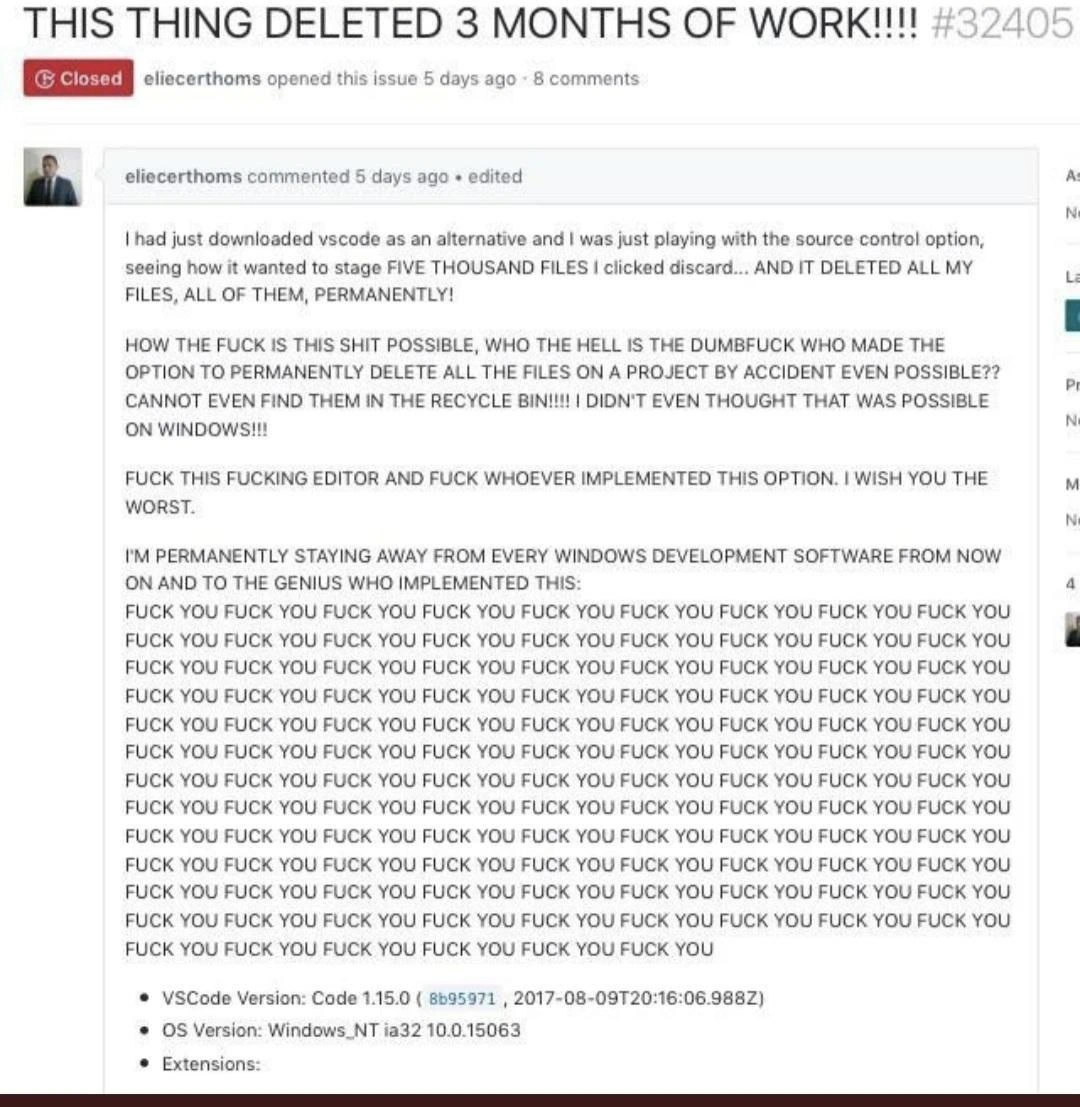
The meme shows the user’s reaction on the official GitHub issue tracker for VSCode. GitHub is a platform where developers can collaborate on code and also where users can report bugs or issues. Here, the user opened an issue titled “THIS THING DELETED 3 MONTHS OF WORK!!!!” (all caps, multiple exclamation points – they are very upset). In the description (the large comment in the screenshot), the user explains exactly what happened: they tried VSCode, the source control tab wanted to stage 5000 files, they hit discard to cancel that, and VSCode deleted all their files permanently. Their reaction is full of pure developer frustration and anger – they use a lot of swear words and basically curse out the VSCode developers, calling whoever implemented the feature a “dumbf***” and saying “F*** this editor” and “I wish you the worst.” It’s an extreme emotional response, likely written in the heat of the moment when the person realized they lost a huge amount of work.

For context, losing 3 months of work is devastating. If the user truly had no backups and never used Git to commit that code elsewhere, then those files are irrecoverable. Most of us learn (perhaps the hard way) to always keep backups or use version control properly after suffering a loss like this. That’s why one of the tags/points in the meme description mentions “poor backup/version-control hygiene.” It implies the user might not have been following best practices like committing code to a repository or keeping copies of important work. It’s a hard lesson: always save and back up your work, especially before experimenting with new tools or options.

This incident also highlights a bug in the software (VSCode) – a pretty serious one. It falls under the category of “destructive defaults,” meaning the software’s default behavior (or a readily accessible option) was destructive (caused data loss) without enough warning or safety mechanism. In software development, bugs that cause data loss are considered very severe. For an IDE or editor, a bug that deletes user code is about as bad as it gets. I can imagine the VSCode team patched this quickly once they realized what was happening. The issue is marked Closed in the screenshot, which likely indicates it was resolved or at least acknowledged. (They might also have closed it because of the profanity, who knows – but typically they’d address the bug too.)

From a junior dev perspective, what lessons or concepts does this meme convey?

  • Version Control: Tools like Git are meant to help you track changes and avoid losing work. But you have to use them properly (commit your changes). If you don’t commit for months, the tool can’t protect you – and in this weird case, the tool actually became the danger. It’s like not buckling your seatbelt, and then the airbag itself knocks you out when you hit a bump – something that’s supposed to protect you ends up hurting because it wasn’t used as intended (or because it malfunctioned).

  • IDE Integration: Modern editors like VSCode integrate source control features into the UI to make life easier. Instead of typing git commands in a terminal, you can click buttons. However, as a developer you should still understand what those buttons do. The “Discard Changes” button in VSCode is basically telling Git “throw away my local modifications.” Normally, for tracked files, that means revert them to the last commit (you lose any new edits). For untracked files, there’s nothing to revert to – so the safe approach would be to just not touch them or maybe prompt “do you want to delete these new files?”. The bug was that it went ahead and deleted them, treating them as if “discard” meant “delete”.

  • Backups and Git Commits: The fact that 3 months of work wasn’t committed suggests either the user didn’t know how to use Git, or they were procrastinating on version control. A rule of thumb developers learn is to commit your work in progress, even if it’s not finished, ideally at least daily or whenever you make significant changes. And push those commits to a remote repository (like GitHub or a private backup) if you can. That way, even if your local files get deleted or your computer dies, you have a copy of the code somewhere else. This meme is basically a giant ad for “don’t forget to use version control properly!”

  • User Error vs Software Bug: Sometimes when things go wrong, it might be the user’s mistake (like pressing the wrong button or misusing a tool). Other times it’s the software’s fault (a bug in the program). Here it’s a bit of both. The user maybe didn’t fully understand what “Discard” would do (especially with untracked files), but more importantly, the software had a bug that made “Discard” far more destructive than it should have been. The user expected a minor action and got a nuclear outcome – that’s on the software design/bug. It’s also a communication issue: perhaps VSCode didn’t make it clear that those 5000 files were untracked/new and that discarding them meant deletion. Good UI/UX should warn, “You are about to delete 5000 files. Are you sure? This cannot be undone.”

  • The Rant & Developer Culture: The screenshot of the GitHub issue is shocking because of how angry and profane it is. In professional communities, especially open-source projects, such a tirade is very uncommon (and against code-of-conduct rules). Most bug reports are polite, even when reporting serious issues. This user was just beyond the breaking point. While it’s not good to curse out maintainers (they’re humans too, and usually trying their best), the rant does capture the raw emotion of a developer who lost everything. It’s the kind of emotional response many might feel internally but would express more diplomatically. The meme is bringing attention to it because it’s an extreme example of developer frustration on public display. It’s almost theatrical in how over-the-top the swearing is – which is why it gets shared: “Look at this insane bug report where the guy literally says ‘F--- you’ dozens of times.” It’s a form of catharsis and dark humor for other developers: “I’ve felt like this, even if I didn’t say it out loud.”

  • Context (2017 vs Now): The issue mentions VSCode version 1.15.0 from 2017. VSCode was relatively new back then (it was first released in 2015). New software often has nasty bugs initially. By 2022 (the post date of the meme), VSCode is at version 1.64+ and far more mature. This particular bug is long fixed. Now, if you try to discard changes in VSCode, it’s much safer – it won’t delete untracked files without warning. In fact, modern VSCode might not even let you discard untracked files via the UI; you’d have to delete them manually or explicitly. The meme thus also serves as a bit of tech history for juniors: “Hey, did you know VSCode had a bug back in the day that used to delete files? Crazy, right? But they fixed it and the tool learned from that mistake.” It shows how software improves and why updates are important.

In essence, Level 2 explains that the meme is about a software bug in VSCode’s Git integration leading to catastrophic data loss, and it highlights the importance of proper use of version control and backups. It’s funny in hindsight because it’s so over-the-top and rare, but it’s also a story with real lessons. If you’re a new developer reading this, take it as advice: always keep your code backed up (use GitHub or another remote repository, or at least make copies), and be cautious with any feature that says “discard” or “delete” – make sure you understand what it will do. The difference between a tracked file and an untracked file in Git is huge: tracked files are in the Git database and can be restored if committed; untracked files exist only on your disk until you commit them. VSCode treated discarding untracked files as deleting them – a mistake you now know to avoid. And if it ever asks to discard thousands of files, double-check what’s going on before confirming!

Level 3: Weapon of Mass Deletion

When a single innocent-looking button can nuke an entire codebase, you know you’ve got a Grade-A footgun on your hands. This meme immortalizes a notorious early VSCode bug where clicking “Discard Changes” was essentially hitting the self-destruct sequence for your project. The screenshot shows a real GitHub issue titled in panic: “THIS THING DELETED 3 MONTHS OF WORK!!!!” – complete with a Closed tag, suggesting the maintainers either fixed the bug or noped out after witnessing the carnage. The hapless developer’s comment is an expletive-laden tirade that any coder who’s lost work can empathize with (the guy basically copy-pasted F-bombs like he was writing a script to test string length). It’s darkly funny because it’s a scenario straight out of a developer’s nightmare: you’re exploring a new IDE feature, click a tempting button, and poof – years (or in this case, months) of code vanish without a trace.

From a senior dev perspective, the humor cuts deep: Visual Studio Code’s Source Control panel was supposed to simplify version control, but a bug turned it into a digital paper shredder. The user’s story is painfully relatable: VSCode’s Git integration detected ~5000 modified files (probably everything in the project, since no .gitignore or initial commit was in place), so our curious dev hits “Discard” thinking it would just undo those changes. Instead, VSCode went full rm -rf on the workspace. The meme highlights the absurdity: how could a modern IDE lack a safety net like a confirmation dialog or a move-to-trash for such a destructive action? It’s a classic case of a tool doing exactly what you told it to, in the most literal and dangerous way. Experienced engineers have a saying for this kind of design flaw: “sharp knives” – features so powerful they’ll cut you if you’re not careful. Here, “Discard Changes” was a razor blade without a handle.

Under the hood, what likely happened is that VSCode ran a Git command to revert the working directory. For tracked files, “discard” usually means git checkout -- <file> (restoring the last committed version). But for untracked files – which a newbie might not have committed yet – Git has no “previous version” to revert to. The unfortunate logic in VSCode 1.15 probably called something like git clean -fd, or worse, directly invoked file deletion APIs. This effectively says, “remove any files Git isn’t tracking,” which wipes out new files that were never committed. And unlike deleting through Windows Explorer, which sends files to the Recycle Bin, a programmatic deletion via Node.js or Git is immediate and permanent. The user’s shock – “CANNOT EVEN FIND THEM IN THE RECYCLE BIN!!!! I DIDN'T EVEN THOUGHT THAT WAS POSSIBLE ON WINDOWS!!!” – is both tragic and comic. Seasoned devs read that and shake their heads knowingly: Yes, Windows will skip the Recycle Bin if you delete files in code or use certain flags. It’s absolutely possible to vaporize data in an instant.

Let’s break down the expectation vs reality here, which is the crux of the humor and horror:

Developer’s Intention (Click ‘Discard Changes’) VSCode’s Actual Action (Buggy v1.15) Resulting Aftermath
“Please undo my local edits. I only want to keep the last saved/committed code.” “Sure! I’ll permanently delete every uncommitted file in the project. Why save anything?” 5,000 files gone for good, no backups, developer screaming into the void.

In a sane world, Discard Changes should be a safe operation that only affects version-controlled files and never deletes untracked stuff without explicit confirmation. This bug violated that trust in the most brutal way. The meme’s punchline is essentially “one click = total obliteration.” It’s the same dark humor as a production database wipe story – funny only after you’ve recovered (if you ever do). Every senior developer has at least one scar from a catastrophic command run by mistake (like the notorious git reset --hard or the legendary rm -rf / on the wrong server). This VSCode incident is a modern addition to that Hall of Fame of Fail. It’s also a cautionary tale: always commit your work (or back it up) because your tools can betray you, especially when they’re new and not battle-tested. Remember, VSCode in 2017 was a young IDE; bugs like these are the reason veteran devs are wary of “magic” GUI features. We’ve been burned before – sometimes literally watching code we’d toiled over get flushed down /dev/null.

The rant in the screenshot, while over-the-top with rage, resonates because it’s a visceral reaction to the ultimate developer horror: unexpected data loss. The author curses out the VSCode team (“I WISH YOU THE WORST” – ouch) which is admittedly not how professionals should report bugs, but you can almost hear the despair behind the keyboard. Losing “3 months of work” in seconds is the kind of gut punch that makes even hardened coders feel sick. The cynical humor here is that the very tool meant to help manage code changes ended up managing to delete the code. It’s irony at its finest: a VersionControl feature causing version annihilation. The meme also pokes at developer frustration and a bit of user error: the commenter swears off “every Windows development software from now on,” which is like rage-quitting an entire ecosystem because of one bad bug. Seasoned devs might chuckle and think, “Yeah, I said I’d quit too... until I cooled down and reinstalled it a week later.” (In reality, VSCode fixed this bug quickly, and by 2022 it’s one of the most popular editors – hopefully with far fewer project-nuking buttons.)

In summary, Level 3’s deep dive finds the humor in shared trauma. This meme is funny because it’s true: tiny mistakes or oversights in tools can have catastrophic outcomes, and every experienced programmer has learned that the hard way. It’s a reminder of the golden rules we preach: commit early, commit often, and always have backups. Otherwise, one misclick might make you the author of the next legendary GitHub rant, dropping F-bombs and blaming a “dumbf*** option” for nuking your sanity along with your code.

Description

A screenshot of a closed GitHub issue, number #32405, titled in all caps: 'THIS THING DELETED 3 MONTHS OF WORK!!!!'. The issue was opened by user 'eliecerthoms' and shows an extremely angry comment. The user recounts downloading VS Code and, while experimenting with the source control option, accidentally clicking 'discard' on five thousand files, which permanently deleted them without sending them to the recycle bin. The comment is filled with profanity and disbelief that such a destructive, irreversible action is possible. The user vows to stop using all Windows development software and repeatedly curses the implementer of the feature. At the bottom, VS Code version 1.15.0 and Windows_NT ia32 10.0.15063 are listed. The meme captures the universal developer fear of accidental mass file deletion and the rage that follows when a tool's UX is perceived to be dangerously unintuitive, leading to catastrophic data loss. It's a classic example of user frustration when guardrails are missing from powerful features
Comments

54
Anonymous ★ Top Pick The fastest way to clean up a messy codebase is to give a junior dev the 'discard all changes' button in VS Code without a confirmation dialog. It's the 'rm -rf' of GUIs
  1. Anonymous ★ Top Pick

    The fastest way to clean up a messy codebase is to give a junior dev the 'discard all changes' button in VS Code without a confirmation dialog. It's the 'rm -rf' of GUIs

  2. Anonymous

    Reminder: if a single UI button translates to `git clean -xfd && sync`, you’re not using an editor - you’re running `rm -rf .` with theme support

  3. Anonymous

    The only thing more permanent than a git commit is apparently VSCode's interpretation of 'discard changes' on untracked files - turns out it's less 'git checkout' and more 'rm -rf /*' with extra emotional damage

  4. Anonymous

    Three months of work and the first git command ever run on the repo was, effectively, git clean -fdx. The real issue was filed against the wrong repository

  5. Anonymous

    Ah yes, the classic 'discard changes' operation that senior engineers know really means 'permanently delete everything without confirmation or backup' - because who needs a staging area metaphor to actually behave like a staging area? This is why experienced devs treat new IDE features like production deployments: test in isolation, read the docs twice, and always have a backup. The real tragedy here isn't just losing three months of work; it's discovering that your version control UI can bypass the OS-level safety net (Recycle Bin) while you're still learning the tool. This is the kind of footgun that makes you understand why enterprise teams mandate specific IDE versions and configurations - and why 'works on my machine' evolved into 'works with my exact toolchain snapshot.'

  6. Anonymous

    VSCode’s “Discard All” is just a GUI for git clean -fdx - if that nuked three months of work, your DR plan was “single laptop, no replication, pray to the Recycle Bin.”

  7. Anonymous

    VS Code's 'Discard All Changes': the only feature with worse UX than a git reset --hard after three months unsaved

  8. Anonymous

    If your IDE wires “Discard All” to git clean -fdx, congrats - you’ve shipped a one-click DR exercise; when RPO equals hope, the Recycle Bin isn’t a strategy

  9. @trainzman 4y

    never seen a man as dumb as he is

    1. @Box_of_the_Fox 4y

      If I saw discard button I'd thought that it means don't change anything. So it's not user that's stupid but UI that's shit. But that's normal for Microsoft

      1. @kitbot256 4y

        it's actually git behavior they implemented. But the page is epic none the less

    2. @dsmagikswsa 4y

      Apparently he didn’t use git before, actually there is a pop up to ask you to confirm to discard option if you accidentally click the discard.

      1. @trainzman 4y

        Yet there's a logical difference between "unstage" and "discard"

    3. @dugeru42 4y

      visual studio once wiped my project it crashed and leaked RAM whch was stuck i rebooted and project no more exists, only zero bytes folder remains

      1. @dsmagikswsa 4y

        VSCode or VS?

        1. @dugeru42 4y

          vs it was 2-5 years ago when i still used шindoшs

          1. @trainzman 4y

            Well you could tell no more than just "visual studio once"

  10. @upgradeovec 4y

    https://github.com/microsoft/vscode/issues/32405

    1. @RiedleroD 4y

      hey… I think that's a dev I know…

  11. @BuHoGPaD 4y

    Люди делятся на три типа: Те, кто пока не бекапит данные Те, кто уже бекапит данные И те, кто проверяет, что бекапы живые People are divided into three types: Those who do not backup data yet Those who already backup data And those who check that the backups are alive

    1. @QutePoet 4y

      But does Git repo count as backup?

      1. @BuHoGPaD 4y

        not if you're keep it in your local storage

      2. @kitbot256 4y

        That’s exactly how he managed to delete everything. Read the GitHub thread

        1. @QutePoet 4y

          So do as me — GitLab or Gogs VM with full backup of this VM.

  12. @HarryCopter1 4y

    Hetman partition recovery и нет проблем

  13. @JoseAngelSanchez 4y

    ALWAYS use a version control (means Git). Commit frequently in your feature branch. Push your branch to remote at the end of the day, even if it's a work in progress...

    1. @Vivaldes 4y

      +100500

    2. @Agent1378 4y

      Svn is fine!

  14. @LastStranger 4y

    and he didn't have git?

  15. @trainzman 4y

    And yet discard could be named more explicitly

  16. @trainzman 4y

    Anyway working with things thru commands should be taken with attention, I often pray when I merge just because

    1. @dsmagikswsa 4y

      It is true if you think yourself as a engineer. Always know what you are doing.

  17. @dugeru42 4y

    step 2 is unnecesary

  18. @karim_mahyari 4y

    Seems about right. He used windows anyway... (But tbh, what happened to him is really painful; now I will have raised heartbeat and tense hands when I use git.)

    1. @dugeru42 4y

      it is harder to nuke history tho so if files are in git they aren't going anywhere

    2. @kitbot256 4y

      I use vscode on Fedora and another one on Mac.

      1. @karim_mahyari 4y

        Oh, I like vscode, just the windows part sounds kinda off

  19. @DemonOfRohit 4y

    People should not use inferior text editor like vscode

  20. Max 4y

    first vscode deleted his files, then windows deleted his github account, lol, they are really after him.

  21. Max 4y

    just because he wrote a wall of fuck you, that's no reason to be deleted!

  22. @MagnusEdvardsson 4y

    This is what the guy saw, clicked on "discard all" and then blamed the editor for it. It's hilarious 😂

    1. @RiedleroD 4y

      oh lol

    2. @AlexKart20129 4y

      "discard all changes" != "delete all files" Because the files were already there. That's really dumb behavior to delete the files and not mention that files will be deleted. Almost as dumb as not having a backup of all important source code. Two extremely dumb devs found each other.

      1. @slnt_opp 4y

        It is saying that all untracked files will be deleted, always did

      2. @ErisVicious 4y

        well if its your first commit - you`re just discarding new changes.

    3. @Cynic_Alex 4y

      The thing is... He didn't do any CHANGES. So there's was no problem to discard em IRREVERSIBLE. He had some(~5000 omg) files linked and he was okay with discarding changes (that he didn't do at all). It is version control software or shit mixing machine? I can see why he's upset

  23. @ItsTheShrimp 4y

    just use vim lol

  24. @ShiningFlames 4y

    Thats why i just use git from cli always :v Can never be sure how are they implementing which functionality

    1. @dsmagikswsa 4y

      You can check git output log to see the actual command.

      1. @ShiningFlames 4y

        After the execution :v

  25. @MagnusEdvardsson 4y

    Adding files to a folder is a change.

    1. @dsmagikswsa 4y

      You need to reply his message so that he can see your reply.

  26. @MagnusEdvardsson 4y

    Don't really care if he does or not

  27. @ErisVicious 4y

    having whole project done as one big commit that he had discarded - is totally his fault

Use J and K for navigation
