Editor Philosophies: VS Code's Browser Core vs. Emacs's Internal Browser
Why is this IDEs Editors meme funny?
Level 1: We Are Not the Same
Imagine two kids comparing their toys. One kid has a small lemonade stand, but he only operates it by setting it up inside a big supermarket. The other kid says, “Oh yeah? I built a tiny supermarket inside my lemonade stand so I can sell anything!” The first kid’s stand needs that huge store to work, but the second kid’s stand amazingly contains an entire store inside it. They look at each other and one proudly says, “We are not the same.”
In this simple story, the lemonade stand is like a text editor, and the supermarket is like a web browser. The first kid’s stand (editor) only works because it’s inside a big supermarket (like an editor that needs a web browser to run). The second kid’s stand is so powerful it has a whole supermarket inside it (like an editor that has a web browser built into it). The joke is that the second kid is bragging about doing something extraordinary and reversed. It’s funny because it’s an over-the-top comparison, and you can sense the playful pride. One is saying, “You rely on that big thing to do your job,” and the other replies, “Ha! That big thing actually runs inside my little thing.” In the end, it’s just a silly way to say “my way is different from yours – we are not the same.” The humor comes from the exaggeration and the kids trying to one-up each other, just like programmers sometimes brag about their favorite tools in a friendly way.
Level 2: Old School vs New School
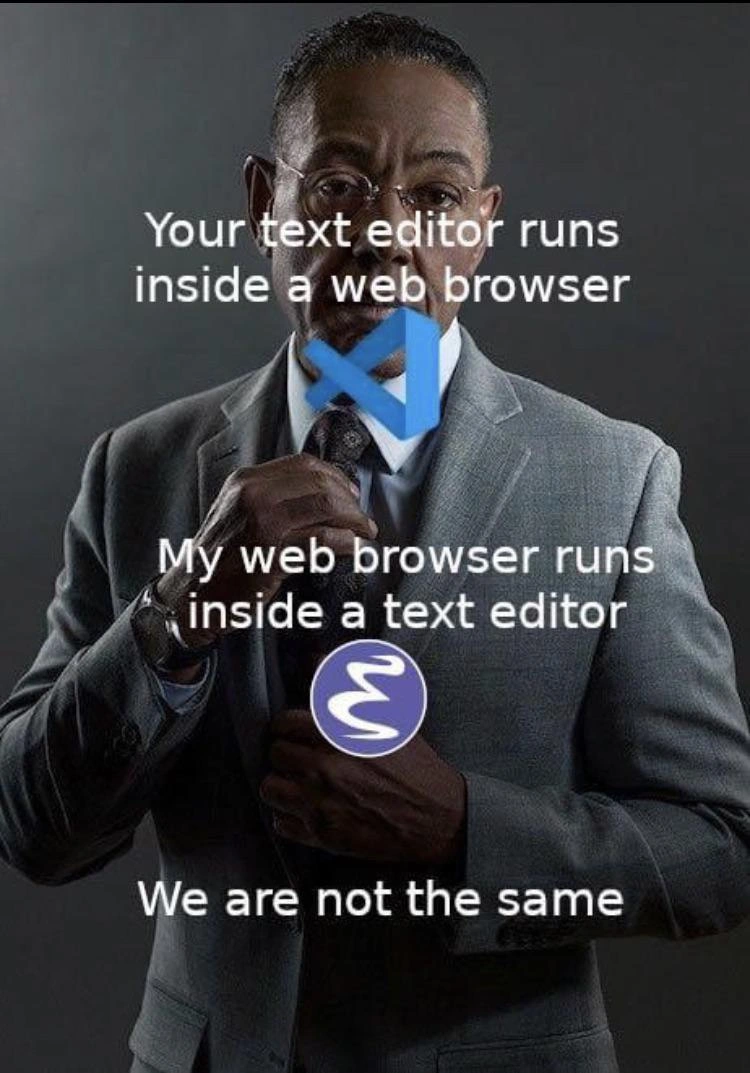
This meme compares Visual Studio Code and Emacs, two popular code editors from very different eras, in a playful brag. The text says: “Your text editor runs inside a web browser. My web browser runs inside a text editor. We are not the same.” Let’s break that down in simpler terms:
Visual Studio Code (VS Code) is a modern code editor (released in 2015) that many developers use. It’s built with web technology – specifically, it’s an Electron app. Electron means it’s essentially running a mini Chromium web browser behind the scenes to display the editor UI. In other words, VS Code is kind of like a website (written in JavaScript/TypeScript) wrapped up to look like a desktop application. So when the meme says “Your text editor runs inside a web browser,” it’s referring to this fact: VS Code needs a web browser engine (Chromium) to run. This is a bit of a friendly insult, implying VS Code is not a “real” stand-alone editor but a web-page in disguise. It’s a popular technology trade-off – using a browser engine makes VS Code cross-platform and easy to extend with web tech, but it also means it can be heavier (using more memory, etc., much like having a Chrome tab open for coding).
Emacs is a very old yet powerful text editor (initially created in the 1970s, long before web browsers existed). It has a loyal following among programmers who like its extreme customization. Emacs has its own scripting language, Emacs Lisp, which allows users to modify and extend it in dramatic ways. People have written all sorts of extensions (called Emacs packages) to make Emacs do more than just edit text. Yes, this even includes browsing the web. Emacs has a built-in web browser program (one of them is humorously named eww, short for “Emacs Web Wowser”). It mostly shows web pages as text inside your editor window. So when the meme says “My web browser runs inside a text editor,” it means an Emacs user can open a website from within Emacs itself. Instead of launching Chrome or Firefox, an Emacs user could, for example, press a few keys and fetch a web page right inside their editor window. It’s like Emacs contains a mini web browser.
The punchline “We are not the same” emphasizes the contrast: the VS Code user’s setup versus the Emacs user’s setup are opposites. This is a form of tech tribalism or playful rivalry. In developer culture, there’s a long-running EditorWars joke where users of different editors (like Emacs, Vim, VS Code, etc.) claim their choice is superior. Here the Emacs user is shown as a bit of an elitist or expert, basically saying: “Look, you rely on a web browser underneath your editor, but I can actually do the reverse and put a browser inside my editor – that’s how powerful my tool is.” It’s an exaggerated comparison meant to be funny.
The image enhances this joke: it shows a confident man in a suit adjusting his tie. His head has the VS Code logo, and near his chest is the Emacs logo like a badge. It’s as if two personas are in one: the VS Code user (head/logo) and the Emacs user (badge) each stating their line. The suit-and-tie look gives off a confident swagger – a vibe that one side (the Emacs side) feels like the sophisticated, seasoned pro. The Emacs logo worn like a medal implies the person is proud of being an Emacs power user.
For a newer developer, here’s what’s key to know:
- VS Code is very popular because it’s easy to use, has a visual interface, and lots of plugins (extensions) to add features. It’s sometimes called an IDE (Integrated Development Environment) because it can do so much (debugging, version control, etc.). But internally, VS Code running on Electron means it’s sort of built on Google Chrome tech. Many newcomers might not realize that when they open VS Code, they’re actually running a specialized browser that shows the editor.
- Emacs is less common among beginners today, since it has a steeper learning curve (and an old-school interface, often just text on a black screen unless you customize it). But those who use Emacs can be very passionate about it. Emacs is extremely flexible – you can write code to change how it works. Some compare Emacs to a tiny operating system because you can do a lot without leaving it. The fact that you can check email or browse the web in Emacs is a point of pride for its users. It’s like a self-contained world. However, it might not display modern websites with images or videos nicely – it’s mostly for reading text content from the web (like articles, documentation, or plain HTML).
The meme’s humor comes from discovering these quirky facts and the bragging tone. If you’ve ever heard developers tease each other about their tools, this is a prime example. The Emacs user is basically saying “I’m on another level.” The VS Code user (being implicitly younger or more mainstream) gets teased for using a tool that depends on a big external component (the browser engine). Meanwhile, the Emacs user is portrayed as the hardcore hacker who can bend their tool to do anything, even things it was never originally meant to do (like web browsing).
In simpler terms, imagine one programmer happily using VS Code because it’s convenient, and an older programmer chuckles and says, “Heh, did you know my editor that was made before the internet can actually surf the internet?” It’s a playful generational clash: Old School vs New School in software tools. The phrase “We are not the same” isn’t meant literally here – it’s internet-slang for “I do things very differently (and I think my way is cooler in a jokey way).” So, the meme is DeveloperHumor pointing out the wild difference between two coding tools and the pride their users take in them. Even if you’re new to this joke, it highlights how diverse the programming world can be: one dev’s editor is built on Chrome, another dev’s editor can be a Chrome (well, sort of!). Quite the contrast, indeed.
Level 3: Editor Inception
The meme highlights a hilarious role reversal in the perennial editor wars: Visual Studio Code vs Emacs. The captions set up a tech inversion:
“Your text editor runs inside a web browser” – a jab at VS Code being built on an Electron shell (essentially a Chromium web browser running a text editor).
“My web browser runs inside a text editor” – a proud boast that Emacs, the veteran editor, can itself host a web browser inside an Emacs buffer.
“We are not the same.” – a smug mic-drop asserting one-upmanship.
This is a classic we_are_not_the_same_meme format, but tailored to developer humor. It mocks how VS Code, a modern editor, is effectively a web app (a electron_based_editor running on Chrome under the hood), whereas Emacs, a 1970s-era editor, can embed tools like a browser within itself. The well-dressed man adjusting his tie (a suit_tie_confidence_meme pose) exudes smug confidence – visually representing the self-assured Emacs power user flaunting an Emacs badge of honor on his chest. The VS Code logo over the head symbolizes the identity of a modern dev whose editor is tied to a browser, whereas the Emacs logo pinned like a medal suggests, “I wear my editor’s prowess proudly.” It’s tech tribalism in a nutshell: each camp claiming technological superiority.
The humor works on multiple levels of developer knowledge. First, there’s the architectural irony:
Visual Studio Code is built on Electron, meaning it includes a full Chromium browser engine plus Node.js. In effect, VS Code is a web browser (Chromium) that happens to run a text editor UI. That’s why the meme says “your editor runs inside a web browser” – the VS Code application is literally a Chrome-based container. Seasoned devs often joke about Electron apps: they consume lots of memory, because under the hood you’re spinning up what is essentially a desktop Chrome instance for a text editor. IDEsAndTextEditors built this way trade efficiency for cross-platform consistency and a rich plugin ecosystem. So VS Code’s great developer experience (DX) – smooth UI, extensions, IntelliSense – rides on a hefty browser engine. It’s the modern approach: leverage web technology for everything, even native apps.
Emacs, on the other hand, is an old-school extensible editor dating back to the era of terminal screens. It’s powered by Emacs Lisp, a full programming language within the editor. Emacs fans love to remind everyone: “Emacs is not just a text editor, it’s practically an OS.” This meme plays on exactly that notion. Emacs can manage your emails, your to-do list, play Tetris, and yes, browse the web. The line “my web browser runs inside a text editor” references Emacs’s built-in web browser capabilities (like the
ewwpackage – Emacs Web Wowser). It’s the inverse scenario: instead of an editor running on a browser engine, you have a browser running on an editor engine! Emacs essentially says, “Anything your fancy modern tool needs an entire Chrome browser for, I can do within my lisp-driven sandbox.” It’s an absurd flex, highlighting Emacs’s ideological design: extreme extensibility and integration. In Emacs, the web page is just another text buffer that you can open withM-x eww:
;; In Emacs, open a web page inside the editor:
(require 'eww) ; load the built-in web browser
(eww "https://www.example.com") ; browse the web from inside Emacs
In the above snippet, eww fetches and renders a webpage inside Emacs. It won’t play fancy videos or render CSS like Chrome – it’s mostly text-based – but it works for reading articles or documentation. Emacs developers relish that they can do this without leaving their editor. It feels like computing inception, with layers embedded within layers: a browser_inside_editor, while VS Code is an editor_inside_browser. This one-upmanship is both prideful and tongue-in-cheek: the Emacs user implies, “I don’t need a Chrome-based editor – I am so powerful I can include a browser in my 40-year-old editor.”
The tech tribalism angle is strong. Developer communities often form around tools, leading to playful rivalry: Emacs vs Vim, Emacs vs modern IDEs, and now Emacs vs VS Code. Each side teases the other. Here, the Emacs elitist (half-jokingly) asserts that VSCode users are running a bloated pseudo-IDE that’s effectively a Chrome app. Meanwhile, Emacs is portrayed as the lean, elegant master tool that can subsume tasks like web browsing. Of course, reality is nuanced: VS Code’s approach offers user-friendly polish, while Emacs’s approach offers unparalleled customization. But the meme exaggerates to comic effect. The Emacs user in the meme straightens his tie, implying “I am on a different level,” hinting that we are not the same. Seasoned devs recognize this as a continuation of the age-old EditorWars – the same pride and jesting that once surrounded vi vs Emacs now appears in VS Code vs Emacs form.
From a senior developer perspective, there’s also an inside joke about DeveloperExperience_DX trade-offs:
- VS Code’s extension ecosystem (in JavaScript/TypeScript) and its ability to easily integrate web content (like an embedded live preview or docs via web views) exist thanks to the Electron browser engine. It’s a design that says: “we have plenty of RAM and CPU in 2023, let’s make the editor easier to extend by using web tech.” It prioritizes convenience and modern UI, which most devs love – no wonder VS Code became so popular. But the cost is complexity under the hood and heavier resource usage.
- Emacs’s philosophy is the opposite: “we have an environment that’s fully programmable in Lisp, we can bend it to do anything.” It’s more spartan (text UIs, weird keybindings, minimal mouse), but insanely flexible. Emacs extensions (often called EmacsPackages) can transform the editor entirely – you could turn Emacs into a file manager, an email client, or a project planner. The meme’s line about running a web browser in Emacs is a perfect example of Emacs’s hackable nature. Emacs was doing “extensions” long before app stores: users write Lisp code to add features. It’s harder at first (you might spend days tuning Emacs), but it’s deeply rewarding for power users. That’s why die-hards wear their Emacs mastery like a medal.
Finally, the phrase “We are not the same” itself is a meme trend, usually to humorously boast about a hardcore approach vs a basic one. In dev culture, it’s often used ironically – we know it’s tongue-in-cheek. Here, the Emacs user isn’t literally saying VS Code users are inferior humans; it’s a playful flex saying “my setup is on another plane of nerdiness.” DeveloperHumor often thrives on these exaggerated comparisons. Both tools are just editors at the end of the day, but framing them like a sophisticated connoisseur vs a casual user makes for a great joke. The image of a slick suit-clad man with logos swapped in cements the absurd formality of this “confrontation.” It’s the emacs_vs_vs_code showdown: two approaches to coding, each with devotees, distilled into one brilliant punchline. The senior dev chuckles because they’ve seen this debate play out for years in different forms, and the meme cleverly captures that eternal tech boast: my setup is ultra, yours is cute – we are not the same.
Description
The meme uses the 'We are not the same' format, featuring Giancarlo Esposito as Gus Fring from Breaking Bad, looking stern and adjusting his tie. It contrasts two popular text editors by highlighting their underlying architecture. The top text, 'Your text editor runs inside a web browser,' is paired with the Visual Studio Code logo, referencing that VS Code is an Electron application built on the Chromium browser engine. The middle text, 'My web browser runs inside a text editor,' is accompanied by the Emacs logo, alluding to the fact that the highly extensible Emacs editor has its own built-in web browser (like `eww`). The punchline, 'We are not the same,' asserts a sense of superiority for the Emacs user. The joke delves into the 'editor wars,' making a nuanced point about software philosophy: comparing a modern, web-tech-based editor with a classic, monolithic, and endlessly customizable environment that some users treat as a complete operating system
Comments
12Comment deleted
VS Code is an editor that learned how to be a browser. Emacs is an operating system that condescends to edit text between browsing sessions and running a shell
VS Code ships a full Chromium so your editor can cosplay as a browser; Emacs just evals (eww "https://news.ycombinator.com") and renders the web in a buffer - because after 40 years of Lisp, context switching is the only thing we’ve garbage-collected
The real flex is when your junior asks why your IDE needs 2GB of RAM and you explain it's because someone decided JavaScript was a systems programming language, while the greybeard in the corner is reading email, browsing Reddit, and managing Kubernetes clusters... all from within their 1976 text editor
The real power move is running Emacs inside VS Code inside a browser inside a VM inside a container inside another VM, just to prove that abstraction layers are turtles all the way down - and your 64GB of RAM still isn't enough
VS Code: Chromium with syntax highlighting. Emacs: Lisp-powered universe with a browser side gig
VS Code is a browser pretending to be an editor; Emacs is an editor pretending to be an OS - only one lets you bind HTTP to C-x C-f and avoid paying the Electron RAM tax twice
Electron runs your editor in a browser; Emacs runs the browser as a buffer - same RAM tax, but only one lets me TRAMP into prod and Google the outage without alt‑tab
Guys, what it is? Comment deleted
Second it Comment deleted
Emacs 😉 Comment deleted
great OS & desktop environment, but it lacks decent editor ;) Comment deleted
Cap https://learn.microsoft.com/en-us/microsoft-edge/visual-studio-code/microsoft-edge-devtools-extension Comment deleted