Developer Tooling Superiority: VS Code vs. Neovim
Why is this IDEs Editors meme funny?
Level 1: We Are Not the Same
Imagine two kids doing their homework. One kid uses a super fancy calculator that shows graphs and has a touch screen. The other kid pulls out an old-school calculator that only has the basic black-and-white display. The first kid says, “Look, my calculator is like a little computer!” The second kid crosses his arms proudly and says, “Well, my calculator doesn’t even need pictures or fancy stuff – I just punch in numbers the hard way. We are not the same.”
It’s a silly kind of bragging, right? Both kids are just solving math problems in the end. But one feels proud because they’re doing it in a more “old-fashioned” or challenging way. That’s exactly what this meme is joking about. One developer is using a modern, colorful program with lots of buttons (like the fancy calculator). The other is using a plain text, no-mouse-needed program (like the simple calculator) and feeling like a cool hacker for doing so. The meme makes it funny by having the second person act overly superior about it: “we are not the same.” In real life, both ways can work just fine – it’s just a playful way to tease about different styles. The message to even a non-tech person is: people can get very proud about the tools they use, even when they’re essentially doing the same job. It’s like one friend saying, “I ride my bike with no hands, you use training wheels – we’re totally different!” It’s meant to make you grin, because at the end of the day, both friends are just riding bikes.
Level 2: Terminal vs GUI Showdown
Let’s break down the joke in simpler terms. This meme compares two ways to edit code: using a modern GUI editor like VS Code, or using a terminal-based editor like Neovim. VS Code (Visual Studio Code) is a popular code editor that runs in a normal window on your desktop – it has menus, buttons, panels, and you can use your mouse. It’s built with web technology (HTML/JavaScript), so in a sense it’s like a fancy website packaged as an app. When the meme says “Your text editor runs in a browser,” it’s referring to this fact – VS Code is powered by the same engine as the Chrome browser (called Chromium). That’s why you see the VS Code logo under that caption. VS Code even has an integrated terminal feature, meaning inside VS Code you can open a panel that is a command line prompt. So some VS Code users literally run their terminal inside their editor window.
Now compare that to Neovim (logo in green). Neovim is an upgraded version of Vim, which itself is the classic keyboard-driven text editor dating back to 1991. Vim/Neovim doesn’t have a typical graphical interface – it runs in a terminal window (the CLI, or Command Line Interface). Everything in Vim/Neovim is controlled by the keyboard: you open files, edit text, and run commands all by typing, without any buttons or mouse clicks. When the meme says “My text editor runs in a terminal,” it’s pointing out that the Neovim user is operating entirely in that black-and-white terminal environment. In other words, they open a Terminal (say, on Linux or macOS) and launch nvim to edit code, rather than clicking an icon for a big standalone program.
This is a GUI vs CLI face-off. GUI (Graphical User Interface) tools like VS Code are generally easier to start with: you can click menus, there’s a sidebar showing your files, and you can install extensions from a marketplace with a couple clicks (VSCodeExtensions are add-ons like themes, debuggers, linters, etc.). The Developer Experience (DX) is very newbie-friendly – common tasks are intuitive and visible. On the other hand, terminal editors like Vim/Neovim have a steeper learning curve. You have to remember commands (for example, to save a file you type :w or to quit you type :q). There’s no GUI button for “Save”! But once you learn it, many developers find it super fast to navigate and edit text without ever leaving the keyboard. Neovim also has plugins (often called Vim plugins since it shares heritage with Vim), but installing them might mean editing a config file or using a plugin manager through the terminal — not as straightforward as VS Code’s one-click installs.
The meme text “We are not the same” highlights how some devs take pride in these differences. It’s like one saying: “I’m on a different level because of the tool I use.” There’s a bit of playful tech elitism here. The Neovim user implies, “Hey, I’m such a pro that my workflow doesn’t even need a graphical interface – I live in the terminal!” Meanwhile, the VS Code user has the full modern IDE experience (complete with a built-in terminal, file explorer, and maybe a cute cat-themed color scheme via extensions). Neither approach is objectively “better” overall; it’s about preference and familiarity. But in developer culture, TextEditorChoice can become a fun tribal identity.
To put it plainly, here’s how the two compare:
| Feature | VS Code (GUI Editor) | Neovim (Terminal Editor) |
|---|---|---|
| Interface | Graphical window with menus, tabs, icons (GUI) | Text-based, runs in a terminal (CLI/TUI) |
| Tech Under the Hood | Built on Electron (essentially a Chrome browser) | Runs in console using UNIX text APIs |
| Extensions | Huge marketplace (JavaScript/TypeScript plugins) | Plugin scripts (Vimscript/Lua via config) |
| Ease of Use | Easy for beginners (point-and-click, familiar UI) | Steep learning curve (must memorize keys) |
| Typical Users | Popular with all devs, especially newcomers | Favored by keyboard enthusiasts & old-school devs |
| Startup & Memory | Heavier: takes a bit to load, uses more RAM | Lightning fast start, tiny memory footprint |
| Coolness Factor 😎 | “Modern and convenient” cool | “Hardcore hacker” cool (tech hipster chic) |
Both tools ultimately let you edit code, run tests, and get things done. But the TerminalLife vs IDE life difference can feel huge when you’re the one using them. This meme simply exaggerates that feeling. If you’re a junior developer, you might have started with a friendly GUI editor like VS Code (and that’s great!). Over time, you might encounter colleagues who swear by Vim or Neovim, proud that they can do everything with just a keyboard in a black screen. They might joke about VS Code being “just Chrome with extra steps,” while VS Code fans joke back that at least they don’t have to solve a puzzle just to exit their editor. It’s all in good humor – a way for developers to bond (and banter) over the tools they love.
Level 3: Chromium vs Curses
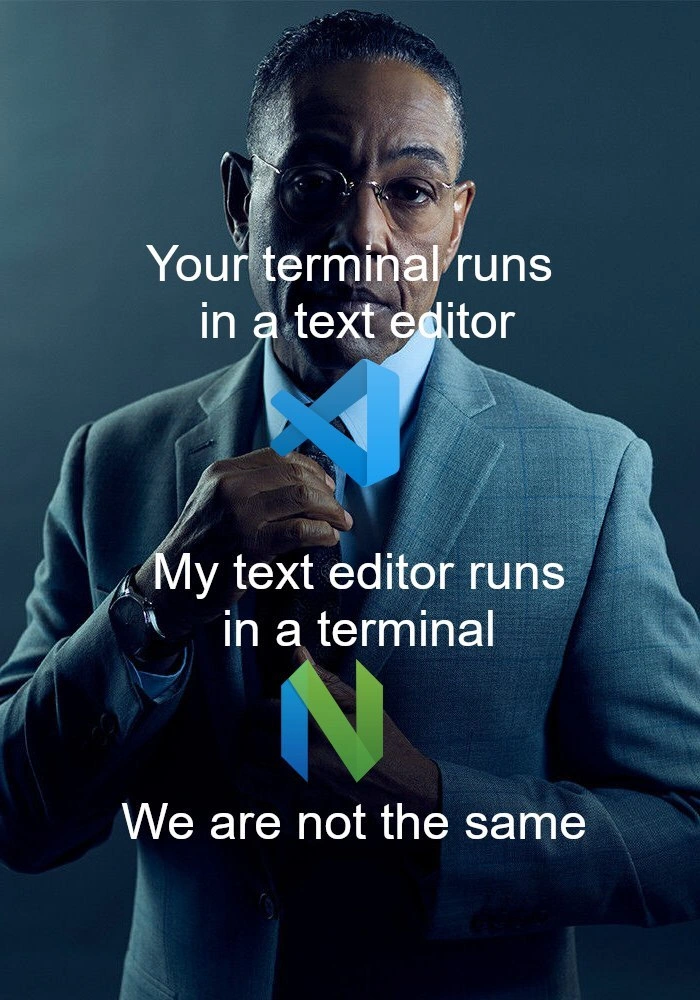
The meme pits Visual Studio Code (VS Code) against Neovim in a classic editor rivalry with a modern twist. It proclaims: “Your text editor runs in a browser. My text editor runs in a terminal. We are not the same.” This tongue-in-cheek flex is referencing the under-the-hood tech of each editor. VS Code is built on Electron, which means each VS Code window is essentially a mini Chromium web browser running a JavaScript app. In contrast, Neovim (a modern Vim) runs entirely in a terminal – a text-only interface often powered by libraries like ncurses that draw windows out of characters. The meme humorously elevates this architectural difference into a badge of honor.
Seasoned developers recognize this as the latest flare-up in the eternal editor wars. Back in the day it was Emacs vs vi, with Emacs jokingly called a “tower of pain Lisp” and vi lauded for its blazingly fast startups on 80s hardware. Today, VS Code is the shiny GUI-heavy IDE/editor hybrid that can feel as weighty as a Chrome tab (because it is a Chrome tab under the hood). It even embeds a terminal emulator inside it – so one dev’s terminal actually runs inside their text editor. Meanwhile, Vim/Neovim users live in the land of green text on a black background, where the editor itself runs inside a terminal window. This reversal is the crux of the joke: one camp is effectively running a text editor inside a web browser, while the other is running a text editor inside a shell – and each side loves to boast about it.
Why is this funny to experienced devs? It riffs on a mix of tech elitism and genuine workflow differences. The Neovim user in the meme pulls a Gus Fring-level smugness (hence the suave suit image) about their hardcore command-line workflow. There’s an implied “real hackers edit in Vim” snub here. This attitude has deep roots: working in a terminal is seen as requiring more skill (memorizing key combos, config files, :wq to quit) and supposedly offers lightning-fast Developer Experience (DX) once mastered. GUI editors like VS Code, with their mouse-friendly interfaces and one-click extensions, can be painted as “training wheels” – great for beginners but a bit bourgeois for the purist. Of course, in reality VS Code is a powerhouse and hugely popular for good reason: it has an integrated debugger, rich plugins, and a slick UI that boosts productivity. But that doesn’t stop veteran CLI devotees from rolling their eyes at its 500MB RAM footprint and Electron quirks (like slower startup compared to a nearly instant vim launch).
The meme’s “we are not the same” format exaggerates this culture clash for comedic effect. It satirizes how some devs wear their tool choices like a identity. The VS Code logo (blue) and Neovim logo (green) in the image reinforce the tribalism: it’s IDE vs TUI (Text User Interface), GUI vs CLI, Point-and-Click vs Keyboard Kung Fu. It’s poking fun at the subtle editor supremacy complex. We’ve all seen that colleague who boasts about editing config files in Vim from a terminal on a remote server, side-eyeing the junior dev who opens the same file in VS Code’s SSH plugin. The truth is, both tools can ultimately accomplish the same tasks – writing and editing code – but the developer pride and strong opinions around them create endless playful jabs like this meme. In an industry where TextEditorChoice sometimes feels like a personality test, the meme nails the absurd seriousness with which devs compare workflows.
And just to add a layer of irony only senior nerds might appreciate: Microsoft (who makes VS Code) actually put VS Code inside a browser for real – see VS Code Web and GitHub Codespaces. And on the flip side, Neovim can be given a fancy GUI or even run inside VS Code via a plugin. So the lines aren’t as stark as the meme implies. But that’s the joke – in the end, whether your dev environment is a polished Electron app or a glowing terminal, we’re all just pushing characters around a file. Still, the “I edit in a terminal” crowd will savor this meme as a cheeky affirmation of their 1337 command-line cred, while the VS Code folks chuckle and get back to coding – likely with an actual Chrome DevTools window open inside their editor. We are not the same, indeed.
Description
This meme uses the 'We are not the same' format featuring the character Gus Fring from the TV series Breaking Bad, portrayed by actor Giancarlo Esposito. He is shown in a sharp grey suit, adjusting his tie with a confident, serious expression. The meme is split into three lines of text superimposed over the image. The first line reads, 'Your terminal runs in a text editor,' accompanied by the blue Visual Studio Code logo. The second line says, 'My text editor runs in a terminal,' positioned next to the green and blue Neovim logo. The final, punchline text at the bottom declares, 'We are not the same.' The humor stems from the long-standing 'editor wars' and the philosophical differences in developer workflows. It contrasts developers who use a graphical editor like VS Code with an integrated terminal versus those who use a terminal-native editor like Neovim, implying the latter is a more 'hardcore' or purist approach. This is a classic in-joke for developers, poking fun at the perceived elitism of command-line tool enthusiasts
Comments
45Comment deleted
The VS Code user has a terminal for running commands. The Neovim user's entire operating system is just a config file for their text editor
Your VS Code fires up a full Chromium per tab; my Neovim spawns 42 Lua plugins, three LSPs, and a tmux pane - yet htop still thinks it’s a rounding error compared to Slack
The real power move is running Neovim inside VS Code's terminal, then opening VS Code inside Neovim using the browser extension, creating an infinite recursion that finally achieves the mythical O(∞) time complexity we've all been avoiding in production
The real irony? Both camps spend more time configuring their editor than actually writing code - one through a JSON settings file with IntelliSense, the other through a Lua config that requires reading the entire Neovim API documentation. At least the Neovim user can claim their 50ms faster startup time justifies the three weeks spent optimizing their init.lua
VS Code: terminal as a comfy plugin. Neovim: terminal as your unyielding overlord - true freedom is hjkl servitude
Your editor runs in Electron; my nvim runs in a terminal - powered by the same herd of Node/Python LSPs. You pay in RAM, I pay in dotfiles
When your terminal is a VSCode widget, one crash wipes both; in tmux+neovim it’s just a child process - failure domains still matter even in editor wars
I use a terminal that runs inside a neovim that runs inside a terminal Comment deleted
i use gvim in its own window Comment deleted
I use a text editor in a terminal that runs in a text editor that runs in a text editor that runs in a browser that runs in a vm that runs in a OS that runs in hardware Comment deleted
neovim is shit it cant even :w !sudo tee % Comment deleted
Wait it can't? Bruh, it is worse than i could've imagined... Comment deleted
You use vim because you are just a poser. I use mcedit because I am just a user. Comment deleted
You use Vim because of its flexibility I use Vim because I still hasn't figured out how to quit bloody thing Comment deleted
thats <mod>+enter (i3 default for "new terminal") pkill vim<enter> Comment deleted
or better <esc>:wq<enter> to save <esc>:q!<enter> to quit immediately (or not? probbaly for cutrent tab only) Comment deleted
Current tab only Comment deleted
i bet it's harder to use tabs in vim than exit it Comment deleted
True Though there are no memes about tabs in Vim ¯\_(ツ)_/¯ Comment deleted
no one reaches them anyway Comment deleted
(i started using vim tabs after one girl sent a message like "you don't need any window managers if you have vim with tabs") Comment deleted
why tho? 'gt' next tab, 'gT' previous tab, just like in the browser. ez Comment deleted
exit is simpler Comment deleted
simpler but mnemonic, yuck! it's all about muscle memory with vim. i use tabs extensively with NERDtree for trees and tabs, then floatterm for terminal and fugitive for git integration. Comment deleted
and I still lack touch typing skills Comment deleted
staggered keyboard issue, had to switch to an ortho. got a cozy tg channel just about that, link in the profile ;) Comment deleted
The link is... probably not there Translation, top to bottom: Last seen recently Username (for mentions) Description/Bio "Notifications" ON Comment deleted
i was too slow Comment deleted
sry, just updated it and prolly needs to sync. here it is https://t.me/klava_lova Comment deleted
batya says "malatza, well done!" Comment deleted
(thanks for the keys tho) Comment deleted
or just ZZ to save&quit and ZQ to quit without saving Comment deleted
now do vim Comment deleted
I think that being first class citizen of terminal is one of most important points that makes me using vim-like editors Comment deleted
You must provide translation of your memes to english, according to rules Comment deleted
There is a translation in piccaption... Comment deleted
what caption? Comment deleted
https://t.me/devs_chat/90000 Comment deleted
yeah but for the gif Comment deleted
The gif says "I don't understand Russian" Comment deleted
oh lmao Comment deleted
I don't know what kind of language it is, it looks like Russian Comment deleted
but it is not Russian (i can detect my native language pretty well) Comment deleted
Maybe some kind of dialect Comment deleted
a, no translation for the gif probably something with "I don't understand what's written in Russian" probably in Ukrainian Comment deleted