Skip to content
DevMeme
1131 of 7435
Visual Studio's Heavy-Handed 'Rename' Operation
IDEs Editors Post #1263, on Apr 5, 2020 in TG

Visual Studio's Heavy-Handed 'Rename' Operation

Why is this IDEs Editors meme funny?

Level 1: Sticker vs Paperwork

Imagine you have a pet goldfish named Goldie. One day, you decide Goldie should have a cooler name, like Sparkle. If you handle it the simple way, you just start calling the fish Sparkle – easy! This is like renaming a file using your computer’s basic file system: quick and no fuss, like putting a new name tag on Goldie’s bowl. Now think of the complicated way: you not only change the name on the bowl, but you also go around the house and update every list or note that ever mentioned Goldie. You flip through your diary to change “Goldie” to “Sparkle,” you edit the family pet records, you even call the vet to update Goldie’s name in their system. That’s a TON of work just for a little name change, right? It’s like filling out heaps of paperwork just to officially change the pet’s name.

In the meme, Visual Studio is doing that big paperwork process. Renaming the file in a simple way is super fast (just like calling the fish a new name), but Visual Studio acts like it has to update everything in the world that mentions that file’s name (like doing all the paperwork). The result? Something that should have been done in a second now has you waiting and waiting, watching a loading spinner – just like you’d be waiting in line if you were filing forms at an office. It’s funny because we don’t expect a tiny change to turn into a big hassle. The meme makes us laugh at how silly it is: Visual Studio, which is supposed to help, sometimes makes a quick thing feel as slow as molasses. It’s as if you asked for a new sticker and got a giant stack of forms to fill out instead.

Level 2: Rename Cascade

For newer developers, let’s unpack what's going on. Visual Studio IDE (Integrated Development Environment) is a powerful editor that tries to manage everything about your project. That includes something as simple as renaming a file. When you rename a file in plain Windows Explorer (or any OS file manager), it literally just changes the name tag on that file – this usually takes only a few milliseconds because it’s a quick update in the file system’s directory. Think of it like renaming a folder on your desktop: click, type new name, done. No big deal.

However, when you do the same action inside Visual Studio’s Solution Explorer, the IDE thinks, “Oh, you’re renaming a code file – I should help make sure everything stays consistent!” This helpfulness is where the trouble begins. Visual Studio will go through a refactoring process. Refactoring is a fancy term developers use for changing code structure (like names of files, classes, or functions) without changing what the program actually does. A rename refactor isn’t just about the file’s name; it’s about every place that name is used. For example, if you have a C# class named Starfish in Starfish.cs and you decide to rename the file to PatrickStar.cs in the IDE, Visual Studio will ask: “Do you also want to rename the class Starfish inside to match the file name?” It will also update the project configuration to reference PatrickStar.cs instead of the old name. If any other code files were referencing something about Starfish.cs specifically (like including it, or in C++ projects, perhaps an #include "Starfish.h"), the IDE tries to find those and update them too. This is the cascade. One little rename triggers a chain reaction through the codebase.

All those checks and updates can be slow, especially in a big project. The meme jokes that Visual Studio turns this into an “infinite loading screen.” It’s an exaggeration, of course – it’s usually not infinite – but it can feel like forever when you’re waiting. You’ll see a progress spinner or a dialog saying “Renaming…” while the IDE chugs through the code. This is a well-known developer pain point. In fact, “Tooling frustration” is a common theme where developers get irritated that their tools (which are supposed to make development easier) sometimes lag or complicate simple things. It’s also a hit to Developer Experience: a slick, efficient workflow is part of good DX, but here the workflow stalls because the tool is being overzealous.

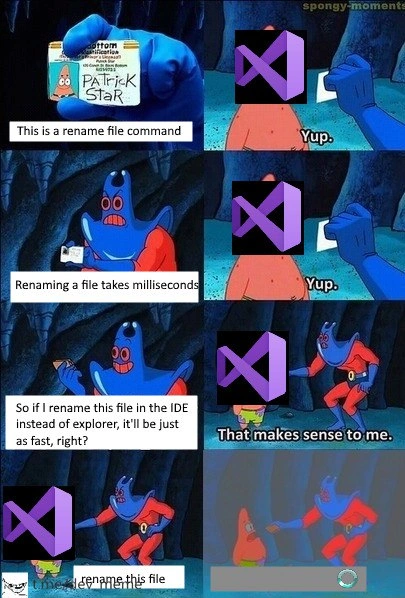
The SpongeBob scene is used to illustrate this in a humorous way. Man Ray in the first panels lists obvious facts (“This is a rename command, renaming is quick, so doing it in the IDE should be just as fast, right?”) and Visual Studio (Patrick) agrees with each step. That’s basically describing how a new developer might assume things work – rename the file and move on, easy-peasy. But in the last panel, instead of doing it quickly, Visual Studio has Patrick’s wallet and there’s a spinner icon with “rename this file.” This represents the moment you realize the IDE is doing way more than just slapping a new name on the file, as your simple request turns into waiting…and waiting. It’s a funny exaggeration of how something straightforward becomes unnecessarily complicated. As a junior dev, it teaches you two things: (1) IDEs like Visual Studio are powerful but can be slow for certain operations, and (2) sometimes a manual quick fix (renaming in Explorer and manually fixing references) might actually save you time – though it’s riskier if you don’t know all the places to update.

In summary, the meme is a lighthearted take on a lesson every developer learns: not all “simple” changes are simple under the hood. Visual Studio is basically saying, “Sure, logically this should be fast,” but then you experience the reality of the tool’s inner workings. It’s both a joke and a bit of wisdom about how development tools operate.

Level 3: Refactor Overkill

In this meme, Visual Studio (represented by Patrick with a purple VS logo) turns a trivial task into a saga. We have Man Ray (the villain) logically walking Visual Studio through a simple premise: renaming a file is almost instantaneous at the OS level. Visual Studio cheerfully agrees at first – "Yup, that makes sense." But when it actually comes to executing the rename in the IDE, we hit an infinite loading spinner. The punchline is that the IDE’s "Rename" command, which should be a millisecond metadata update, instead behaves like a full-scale refactoring operation grinding away in the background.

Under the hood, a file rename inside Visual Studio isn’t just renaming the file on disk. It’s doing a lot more: updating the project’s .sln/.csproj entries, possibly adjusting namespaces or class names to match the new filename, and ensuring that any references to that file or symbol are updated across the entire codebase. Essentially, Visual Studio treats a simple rename as a symbolic refactor. This means it might:

RenameFile("OldClass.cs" -> "NewClass.cs"):
    // Visual Studio's heavy-duty approach
    find all references to 'OldClass' in the solution
    update each reference to 'NewClass'
    modify project files (e.g., .csproj) to list NewClass.cs
    if class name == "OldClass", prompt/rename class to "NewClass"
    refresh Intellisense and project state (show spinner)

Each of those steps can touch dozens or hundreds of files in a large solution. What should be a constant-time file system operation (updating one entry in the file table) becomes a proportional O(n) traversal of the project. It’s like using a bulldozer to plant a flower: sure, it gets the job done, but wow is it overkill. This is classic ToolingFrustration and RefactoringPain rolled into one: the very tools meant to improve Developer Experience (DX) sometimes introduce more friction. Seasoned developers have learned (often the hard way) that a seemingly innocent action in a heavyweight IDE can trigger a cascade of background processes – code model updates, UI refreshes, even partial recompilation or index rebuilding. No wonder Visual Studio’s “Yup, that makes sense” gets flipped on its head with that spinning progress circle; the IDE is effectively stealing your time (hence the wallet gag) for something the OS could do in a blink.

The humor cuts deep for veteran developers because it’s so relatable. We’ve all been there: you right-click to rename a file within Visual Studio, expecting a quick change, and suddenly you're staring at a “Preparing rename refactor…” dialog or a progress bar creeping along. The meme exaggerates it as an infinite loading screen, poking fun at how the simplest tasks can get bogged down by IDE overhead. It’s highlighting an open secret in enterprise development: powerful Integrated Development Environments (IDEs) like Visual Studio provide conveniences (safe renames, automated refactors), but those conveniences aren’t free – they come at the cost of speed and sometimes sanity. And when you're on a tight deadline, watching Visual Studio grind away on a rename can make you question all of your life choices (or at least your choice of editor). It’s a tongue-in-cheek reminder that sometimes the “smart” tools feel pretty dumb when they turn a millisecond operation into a coffee-break event.

Description

A six-panel meme using the 'Patrick Star's Wallet' format from SpongeBob SquarePants to criticize the performance of Visual Studio. In the meme, the character Man Ray represents a developer, and Patrick Star's face is covered by the purple Visual Studio logo. Panel 1: Man Ray holds up an ID card and says, 'This is a rename file command.' Visual Studio Patrick replies, 'Yup.' Panel 2: Man Ray states, 'Renaming a file takes milliseconds.' Again, 'Yup.' Panel 3: Man Ray logically concludes, 'So if I rename this file in the IDE instead of explorer, it'll be just as fast, right?' Panel 4: He says, 'That makes sense to me,' seemingly convinced. Panel 5 shows the text 'rename this file.' The final panel depicts Man Ray and Patrick standing apart, with a loading spinner icon at the bottom, indicating a long wait. The joke targets the notoriously slow performance of large IDEs like Visual Studio for operations that are instantaneous in a basic file explorer. While the OS renames a file in milliseconds, the IDE initiates a complex refactoring process, scanning the entire project for references, which can be painfully slow in large codebases, a frustration well-known to experienced developers


Comments

7
Anonymous ★ Top Pick Renaming a file in the OS is a single command. Renaming a file in Visual Studio involves a full project dependency analysis, a background check on the new name, and a consultation with three different language servers, just to make sure you *really* meant it
  1. Anonymous ★ Top Pick

    Renaming a file in the OS is a single command. Renaming a file in Visual Studio involves a full project dependency analysis, a background check on the new name, and a consultation with three different language servers, just to make sure you *really* meant it

  2. Anonymous

    Only Visual Studio can turn a four-byte NTFS metadata tweak into a Roslyn zen retreat that pegs two cores, dirties the .sln, and still asks if you want to reload the project afterward

  3. Anonymous

    VS Code's file rename: where a simple mv command gets wrapped in seventeen layers of abstraction, each one checking if you really meant to rename that file, indexing it for search, updating git decorations, triggering three different language servers, and notifying every extension that once looked at that file sideways

  4. Anonymous

    Ah yes, the classic IDE rename: a simple filesystem operation that somehow triggers a full project reindex, TypeScript server restart, Git status check, linter re-run, and three extension hooks - all while you watch the progress bar crawl through 47,000 files in node_modules. Meanwhile, Windows Explorer just... changes the filename. It's like asking your IDE to flip a light switch and watching it recalculate the entire building's electrical load first

  5. Anonymous

    Explorer: rename is a syscall. Visual Studio: rename is a consensus protocol - Roslyn, ReSharper, CodeLens, MSBuild, and your SCM must agree who Foo.cs is now

  6. Anonymous

    Explorer updates a directory entry; Visual Studio launches a saga - Roslyn scans, MSBuild reevaluates 187 projects, NuGet re-restores, IntelliSense reindexes - and your two-letter rename becomes a calendar event

  7. Anonymous

    CLI 'mv': O(1) bliss. VS Code explorer F2: O(n) tree rebuild, because who needs sub-second DX in a monorepo?

Use J and K for navigation