Skip to content
DevMeme
2807 of 7435
Dual-Booting with Retro-Futuristic Style
OperatingSystems Post #3102, on May 14, 2021 in TG

Dual-Booting with Retro-Futuristic Style

Why is this OperatingSystems meme funny?

Level 1: Powering Up in Style

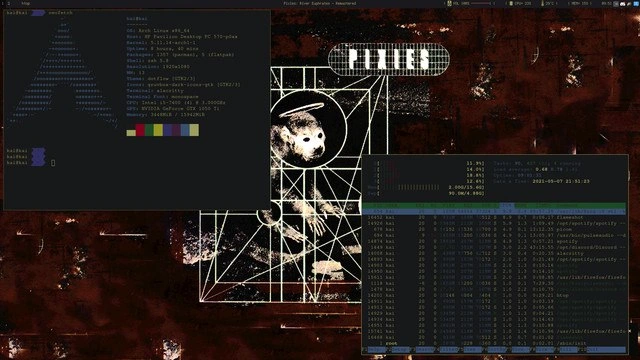
Imagine turning on your computer and before it even fully starts, you’re greeted by a scene from a cool old-school video game. Instead of a plain screen, there’s a colorful pixel drawing of a funky computer desk with neon lights, and in the middle it’s asking you, “Do you want to play on Ubuntu or Windows 7 today?” It’s like the computer’s start-up menu got a costume and props from the 1980s! Usually when a PC starts, any menu you see is super basic and boring – just simple text. But here someone decorated that normally boring start screen to look like a retro sci-fi arcade. It’s a bit like having a fancy welcome mat at your front door that also lets you choose between two rooms to enter. One room is a Linux room (Ubuntu) and the other is a Windows 7 room. Whichever you pick, that’s the operating system the computer will go into. The funny part is just how extra this decoration is: most people never even think about changing that early boot screen (some might not even know it exists), but this person went all-out and turned it into a piece of art for their own amusement. It’s as if a gamer decided the menu before the game starts should look just as exciting as the game itself! Even though it doesn’t make the computer run any faster or do anything different, it brings a big smile because it shows the owner’s personality right from the moment of power-up. In simple terms: this meme is showing a computer that “boots up” (powers on) in style – with a flashy, personalized start menu that screams “I love tech and I have fun with it!”. It’s cool and funny because it’s taking something ordinary and technical, and making it creative and playful, just for the joy of it.

Level 2: Boot Menu Bling

What’s happening in this image is that the user has totally personalized the first thing you see when the computer turns on: the boot menu. Normally, when you power up a computer with more than one operating system (called a dual-boot setup), a simple text screen asks you to choose which OS you want to start. GRUB, which stands for Grand Unified Bootloader, is a common program on Linux systems that shows this menu. By default GRUB is pretty plain – usually just a black or purple background with white text listing options like “Ubuntu” or “Windows”. But here, a creative Linux user gave GRUB a full makeover, turning it into a vibrant retro gaming-style screen! This custom grub_theme features pixel art that looks like it’s from an old arcade or an 8-bit video game. You can see a drawn retro computer workstation: an old boxy CRT monitor (those bulky screens from the 90s), a red joystick, some floppy disks, a soda can, and a burger all in chunky pixel detail. It’s like a scene from a classic cyberpunk anime or a Nintendo game, and it’s not something you’d ever expect your boot menu to look like. Front and center on that pixelated monitor in the image is the word “VirtuaVerse” in neon magenta – that’s actually the title of a cyberpunk adventure game, which the theme is referencing for style points. And right below that, neatly integrated, are the actual boot options in white text: “Ubuntu”, “Advanced options for Ubuntu”, “Memory test”, and “Windows 7 (on /dev/sda1)”. Those entries are exactly what a standard dual-boot GRUB menu would show on this system, but they’ve been styled to appear as if they’re part of the retro screen (notice how they sit nicely on the drawn monitor’s screen area). The label "/dev/sda1" in “Windows 7 (on /dev/sda1)” is Linux’s way of saying “the first partition of the first hard drive” – that’s where Windows 7 is installed. So the menu is basically offering a choice: boot into Ubuntu (a popular Linux distribution), or boot into Windows 7, or run some special options like memory diagnostics.

For someone new to this, the key points are: this laptop has two operating systems installed, and normally you’d get a plain selection menu at startup. But because it’s Linux and Linux lets you tinker with nearly everything, the user has configured the bootloader to use a custom theme. This involves editing configuration files under Linux (for example, putting theme assets in /boot/grub/themes/ and updating GRUB’s settings so it knows to use the new theme). The result? When the machine starts, instead of a boring list, you get this super cool pixel_art_boot_screen with a cyberpunk vibe. It’s eye candy for any tech enthusiast. Think of it like changing the wallpaper or theme on your phone or PC, except this is happening at a much deeper level – right when the computer is just starting up, even before the operating system fully loads. On a Windows PC, you might be used to seeing just a simple logo or spinning dots during boot, and you probably wouldn’t modify that (it’s not designed to be easily changeable by users). But on Linux, even the boot menu is fair game for customization if you know what you’re doing.

This kind of LinuxVsWindows contrast is part of the joke: the Windows 7 bootloader would never look like this! Only a Linux user would spend time making the startup menu look like a scene from Blade Runner. Also, dual-booting itself is a bit of a tech enthusiast thing these days – it means this person likely uses Ubuntu for most tasks but still has Windows 7 available, perhaps for some specific software or games. Dual-booting requires a bit of setup: you partition the drive to install both OSes, and GRUB is typically installed by Ubuntu to take control of the boot process (because Windows by itself doesn’t recognize Ubuntu, but Ubuntu’s GRUB is friendly and will include Windows in its menu). The meme definitely highlights bootloader_themeing as an extreme form of Configuration fun. If you’re relatively new to computers, imagine customizing something that most people never even see (or see only for a split second). It’s a testament to both the flexibility of Linux and the quirky dedication of some users. They want their machine to reflect their personality from the moment they hit the power button. And indeed, here the personality is “I love retro cyberpunk art and I’m proud of my Linux hacking skills!” The final touch: that little green “bug REPORT” text drawn on the top – it doesn’t actually do anything, it’s just part of the art making it look like a software interface. But it’s a fun detail, almost poking fun at the situation: if something did go wrong with this custom boot setup, the user would literally be looking at a “bug report” label as they try to fix it! In summary, for a junior developer or a tech beginner, the big takeaway is: yes, even the boot menu can be customized on Linux. It’s an advanced, purely-for-kicks project that shows the imaginative lengths to which tech hobbyists will go. This picture is the result of combining serious low-level computer knowledge with a love for creative expression in computing.

Level 3: Full Cyberpunk Boot

For seasoned developers and sysadmins, this image hits a special mix of nostalgia and technical flexing that evokes a grinning “of course a Linux user did that” reaction. The humor here is in how far the customization has been taken. LinuxCustomization culture is famous for letting you tweak every little thing about your system – from the desktop environment down to the blinking cursor style in a terminal. But customizing the GRUBBootloader screen with a full retro_cyberpunk_aesthetic goes beyond the usual. It’s like the user said, “Why stop at the desktop theme? Let’s skin the boot menu too!” Seasoned Linux folks know that you can theme GRUB, but very few actually bother to do it, because, well, you only see that menu for a few seconds on boot (and messing with boot configurations always carries the slight risk of ending up with an unbootable system at 3 AM). So, when we see a Dell Precision’s GRUB menu transformed into what looks like a scene from a pixel art game, it’s both impressive and comical. It’s impressive because the person clearly invested time and skill to edit config files, convert images, possibly generate a custom font or splash screen, and test it out. It’s comical because it’s an over-the-top level of bling for something that’s usually utilitarian. This is a classic case of a power user flexing their OperatingSystems knowledge: only a confident tinkerer attempts a boot_menu_customization this deep.

The dual-boot setup between Ubuntu and Windows 7 adds another layer of inside humor. Anyone who has maintained a dual-OS system can relate to the almost old-school vibe here. Windows 7 vs Ubuntu is a bit of a timewarp combination – Windows 7 was the popular OS of late 2000s, and Ubuntu represents the ever-evolving Linux world. Seeing Windows 7 (on /dev/sda1) listed feels like a throwback to an era when many devs had to dual-boot: perhaps Windows for Adobe Photoshop or gaming, and Linux for development and real work (or vice versa). By May 2021, Windows 7 had been out of official support for over a year, so it’s likely kept around for legacy applications or pure fondness. The presence of it in the menu might make seniors chuckle – “Ah, still keeping that Windows 7 partition around, I see. Classic!” It’s also a reminder of the careful dance one had to do with bootloaders: install Windows first, then Linux, because Windows tends to bulldoze the boot sector if installed later. Experienced folks have tales of Windows updates neutralizing GRUB, or hours spent with Live CDs restoring a lost bootloader. So a fully functioning dual_boot_setup with a fancy theme screams “I not only beat the bootloader boss, I made it my pet.”

The cyberpunk theme itself is a gold mine of geeky references that senior techies appreciate. The pixel art background depicts a CRT monitor with a neon pink title “VIRTUAVERSE” – which is actually the name of a cyberpunk adventure game by Theta Division. That’s a double homage: it’s a game about a retro-futuristic hacker world, and here we have a real boot menu styled to look like a retro hacker’s workstation. On the pixelated desk there’s a joystick (hello, arcade nostalgia), a floppy disk or two (remember installing Linux from a stack of floppies? Pepperidge Farm remembers…), a soda can and burger (the classic all-night coding sustenance), and old-school tech decor galore. It’s a lovingly crafted scene that looks like it leapt right out of a 1980s sci-fi anime or a Shadowrun game. The fact that this is all happening on a Dell Precision laptop – a sturdy, workhorse machine often seen in offices for serious CAD work or development – gives it a retro-meets-reality charm. This isn’t a modern RGB-lit gaming rig; it’s a clunky grey laptop probably from early 2010s, which makes the neon cyberpunk theme even more tongue-in-cheek. It’s like seeing an old IBM terminal display a scene from Tron.

From a senior perspective, there’s also an ironic nod in the tiny details: the top of the pixelated monitor has labels like “FX” and a green bug REPORT indicator. It mimics a software interface inside this boot screen. The “bug report” tag is amusing because any veteran knows: if you’re messing with boot loaders and custom themes, there’s a non-zero chance you’ll encounter a “bug” (often self-inflicted) that leaves you troubleshooting in a live USB environment. It’s as if the theme itself knows it’s pushing the limits – a playful self-aware joke. Also, calling the boot menu "Advanced Options for Ubuntu" as one entry is so dry compared to the flashy theme around it – that contrast is funny. The mundane text of boot entries (Ubuntu, Memory test, etc.) against a wild cyberpunk frame is almost like a geeky fashion statement: function meets flair.

Ultimately, this meme tickles experienced devs because it’s the ultimate “because I can” Linux moment. It highlights the difference in philosophy: on Linux, the system is yours to mold completely (even the boot sequence visuals!). On Windows (especially something like Windows 7), you might get a boot menu if you multi-boot, but it’s going to be a bland black screen with white text or the Windows logo at best. The Windows Boot Manager doesn’t exactly invite users to skin it with pixel art of, say, Master Chief or Mario. The freedom to tinker is a hallmark of the Linux world, and this photo shows someone taking that freedom and running absolutely wild with it. A senior dev might chuckle and think, “I remember editing grub.conf back in the day to change a background color—but this person took it to another level!” It’s equal parts admiration and amusement. We’ve all seen impressive dotfiles or customized desktops shared online, but customizing GRUB is showing dedication on a whole new layer. It’s the kind of nerdy accomplishment you excitedly show to your fellow Linux enthusiasts: “Check out my boot screen!” – something that would completely baffle a normal user. In short, the meme exaggerates a quintessential Linux trait (extreme customization) in a way that only those familiar with system configuration and dual-boot tribulations fully appreciate. And like any good inside joke, it carries a bit of “Man, remember when we used to do stuff like that? Good times.” nostalgia along with the punchline.

Level 4: Boot Sector Sorcery

At the most fundamental level, this meme is about bending a low-level bootloader to the will of a creative user. The laptop’s GRUB (Grand Unified Bootloader) is typically a plain text menu that lives in the twilight zone between the firmware (BIOS/UEFI) and the operating system. Under the hood, when you power on a PC, the BIOS hands control to a tiny piece of code in the Master Boot Record (512 bytes if using legacy MBR!). That tiny stage-1 code’s sole job is usually to find and load a more feature-rich stage-2 loader from disk. GRUB2, which most Linux systems use these days, is modular and powerful: it knows how to read filesystems (like the ext4 partition where Ubuntu is installed), set video modes, and display a menu with OS choices. Normally, GRUB’s menu is a simple black-and-white list for choosing whether to boot Ubuntu or Windows. But here, the user has unleashed some boot sector sorcery to conjure a full pixel_art_boot_screen with a retro cyberpunk theme. GRUB is operating in a graphics mode (using BIOS VESA or UEFI GOP) to render a bitmap background and custom text colors/fonts. It’s remarkable because at this pre-OS stage, you’re working with very limited resources and drivers – the customization lives in configuration files loaded by GRUB from the disk before any OS kernel even starts. The dual_boot_setup itself is managed by GRUB’s ability to chainload the Windows bootloader. That means one of the menu entries doesn’t directly boot Windows 7’s kernel; instead, it loads the Windows boot sector from /dev/sda1 and hands control to it (much like a relay). In GRUB’s config, a Windows entry often looks like:

menuentry "Windows 7 (on /dev/sda1)" {
    insmod ntfs       # load support for NTFS filesystem
    set root=(hd0,1)  # first hard disk, first partition
    chainloader +1    # chain-load the first sector of that partition
}

This snippet instructs GRUB to load the Windows bootloader from the NTFS partition and execute it, thereby launching Windows 7. It’s a clever technical dance: GRUB acts as an orchestrator between BIOS and whichever OS you choose. Now, doing all this and loading a custom theme is a delicate feat. The theme (likely a grub_theme named after “Virtuaverse”) includes a background image and styling defined in GRUB’s configuration files. GRUB must be compiled or configured with support for images (often .png or .tga files) and maybe even custom fonts. The background artwork – that pixelated cyberpunk scene – might be stored as a compressed image in /boot/grub/themes/ along with a theme.txt defining layout, colors, and even the position of menu text so that the options appear exactly on the drawn CRT monitor on screen. This is low-level graphical theming: think of it as doing graphic design in a program that normally doesn’t even have mouse support! It’s all configured via text files and maybe a bit of trial and error to align the menu. From an OS theory perspective, it’s fascinating because it blurs the line between the firmware-like environment and the user’s personalization. We’re effectively seeing a user-crafted GUI running before any operating system is up – a testament to Linux’s Configuration flexibility and open design. In a world where most bootloaders (like the Windows Boot Manager) only show a basic text or logo, GRUB’s open nature lets hackers and tinkerers inject personality into the earliest boot stages. This means the humor in the image comes from the sheer complexity and nerd prowess required to make the boot menu look like a scene from a retro game. It’s as if someone wrote a tiny video game level that runs for a few seconds each time the machine starts. The retro_cyberpunk_aesthetic isn’t just for show; it’s a proud display that even the boot sector can be a canvas for creativity. It’s software bootloader meets digital art, pulling off a vibe straight out of a 1980s hacker movie at the BIOS level. Sorcery indeed!

Description

A photograph of an older Dell Precision laptop screen, which displays a heavily customized GRUB bootloader menu with a pixel-art, cyberpunk theme. The theme, titled 'VIRTUNIVERSE' in a pink, stylized font, is set against a vibrant, pixelated cityscape at night. The boot menu provides the classic dual-boot options: 'UBUNTU', 'ADVANCED OPTIONS FOR UBUNTU', 'MEMORY TEST', and 'WINDOWS 7 (ON /DEV/SDA1)'. The entire interface is designed to look like a retro computer terminal within a futuristic setting, complete with UI elements like a 'BUG REPORT' button. This image is a celebration of deep system customization, a passion often found in the Linux and open-source communities. It showcases the user's dedication to personalizing their entire computing experience, starting from the moment the machine powers on. The contrast between the modern Linux OS and the aging Windows 7, all wrapped in a retro aesthetic, appeals to experienced tech enthusiasts who appreciate both legacy systems and modern customization
Comments

7
Anonymous ★ Top Pick Some people spend weeks perfecting their IDE's color scheme. Real ones spend months theming a bootloader menu they only see for five seconds
  1. Anonymous ★ Top Pick

    Some people spend weeks perfecting their IDE's color scheme. Real ones spend months theming a bootloader menu they only see for five seconds

  2. Anonymous

    Spent Friday night giving GRUB a neon cyberpunk makeover - if we’re going to dual-boot Ubuntu and Windows 7 just to keep that one ActiveX payroll app alive, the shame might as well look retro-cool

  3. Anonymous

    Nothing says "I've achieved platform independence" quite like a game that requires you to dual-boot into Windows 7 to meet its memory requirements while testing on Ubuntu

  4. Anonymous

    When your GRUB bootloader has better production values than your actual application UI. This is what happens when a sysadmin discovers Blender during a kernel compilation - suddenly choosing between Ubuntu and Windows 7 feels like selecting a character in an 80s arcade fighter. The real question: did they spend more time theming GRUB than actually configuring the system? Bonus points for keeping Windows 7 on /dev/sda1 as a nostalgic museum piece, like maintaining COBOL in production but making it *aesthetic*

  5. Anonymous

    GRUB is the most honest roadmap: Ubuntu (the stack we maintain), Advanced options (kernels we’re scared to purge), Memory test (our incident response plan), and Windows 7 on /dev/sda1 (the vendor lock‑in we pretend is “legacy”)

  6. Anonymous

    Call it multi‑cloud v0.1: Ubuntu prod, Windows 7 DR, orchestrated by GRUB with zero RBAC - and the only UI in the org that actually has a theme

  7. Anonymous

    In Virtuaverse, the real endgame glitch is a bad Windows ISO checksum - even cyberpunks bail on 5GB re-downloads

Use J and K for navigation