The Ultimate On-Call Pager: Now with Root Access
Why is this EmbeddedSystems meme funny?
Level 1: The Little Phone That Could
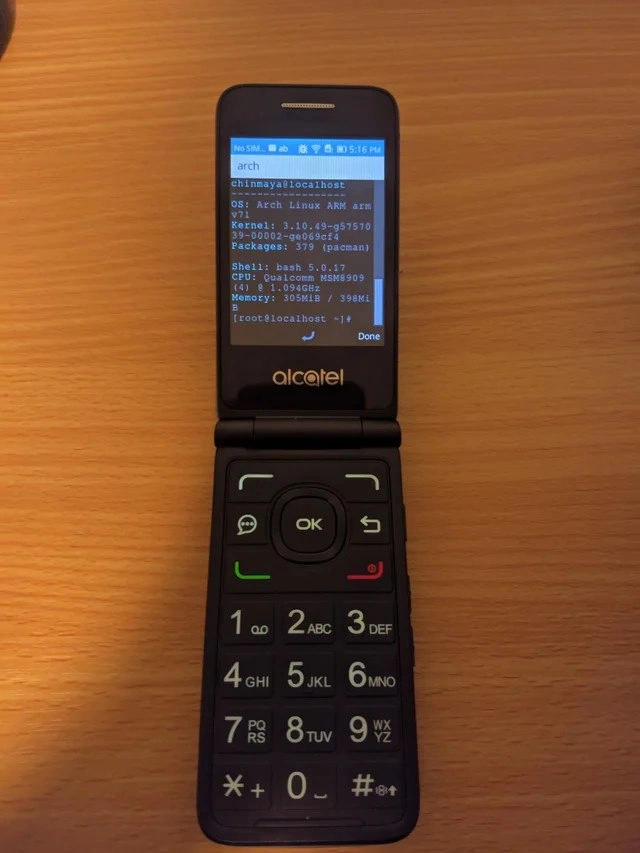
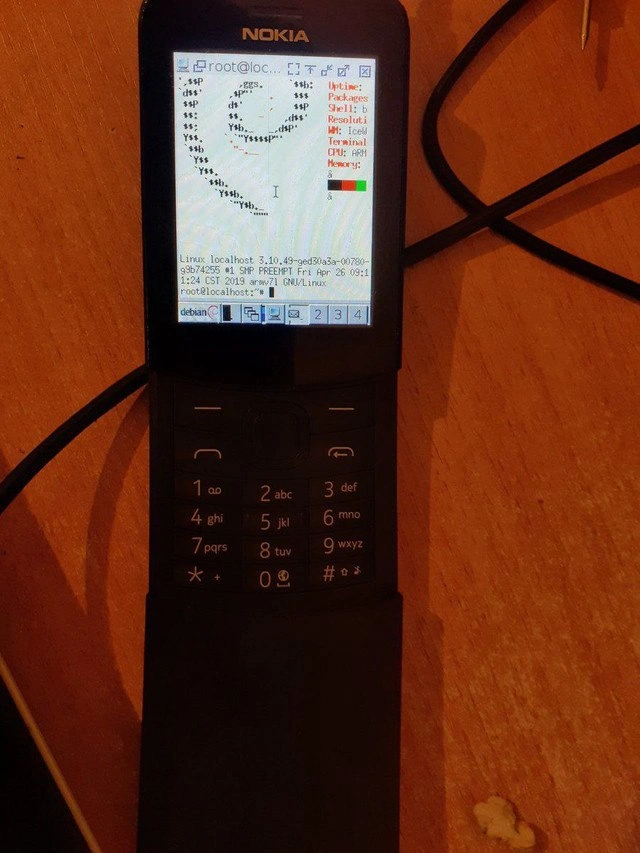
Imagine taking a really old, simple flip phone – the kind with a tiny screen and just number buttons – and turning it into a small computer. It’s a bit like putting a high-powered sports car engine into a go-kart. It doesn’t really belong there, and it might not be very practical, but it’s amazing (and kind of funny) that it works at all! In this meme, someone managed to squeeze a whole computer operating system (Linux) into that little phone. That’s like making your toy robot suddenly do all the chores a big robot would do. It’s surprising and silly because phones that basic aren’t supposed to run complicated programs. The screen is showing nerdy computer information with a little penguin logo, and you can even type commands (though you’d have to press those number keys a bunch of times to get letters – imagine texting really long messages just to tell the phone what to do!). The reason people are laughing and impressed is because it’s an outrageous example of “doing something just because you can.” It makes us feel happy and amused to see a tiny old phone perform a big computer’s job, kind of like a little engine that could pull a huge train. This flip phone with Linux is that little engine, chugging along and making us all smile by achieving the unexpected.
Level 2: Linux on a Flip Phone
Let’s break down why this image is so cool (and funny) from a tech perspective. We have an old Nokia flip phone – the kind of phone that predates modern touch-screen smartphones. It usually runs a very simple built-in operating system for calling and texting, with a T9 keypad (the keypad with numbers where you press “2” three times to type a letter like ‘c’). In the meme, this humble device is shown running Linux, the same kind of operating system core that runs on servers, desktop PCs, or Raspberry Pi hobby boards. In fact, it looks like it’s running a whole desktop environment (LXDE) with a start menu, window controls, and even multiple desktops (“1 2 3 4” at the bottom are likely workspace switch buttons). This is totally out of place for a tiny 2-inch screen! Normally, feature phones like this don’t let you install new operating systems, so to get Linux on it, some clever hacking was involved. The person probably managed to root the phone, meaning they gained administrator-level access to the phone’s original system. “Root” in Linux/Unix is the superuser account that can do anything (it’s like having the master key to the device). With root access, they could install a new OS or run a different software environment. The meme caption “every device deserves root” is basically saying every gadget should allow its owner that master key – it’s a playful jab at companies that lock down devices.
The terminal on the screen is running a program called neofetch, which is popular in the command-line community for showing off your system info alongside an ASCII art logo (in this case, the Linux penguin mascot Tux). Neofetch lists things like how many software packages are installed, what shell you’re using (the shell is the command-line interface, likely bash here), screen resolution (a readout of how many pixels the tiny screen has), the window manager (WM) which is LXDE – a lightweight graphical interface suitable for low-power machines – and details about the CPU (an ARM processor, common in phones) and memory usage. Seeing those stats on a Nokia’s screen is wild because we expect that kind of readout on a full computer. It’s like seeing a spaceship control panel inside a go-kart. The EmbeddedLinux aspect is real here: many devices secretly run simplified Linux kernels, but typically without any user-facing desktop. This hacker went ahead and put a full desktop user interface on it, turning the phone into a mini Linux PC. They even have an xterm terminal window open (that’s a basic terminal emulator program) showing a root@localhost prompt, which confirms they’re operating as the root user on the device named “localhost”. The presence of LXDE’s interface (with window minimize/close buttons and multiple desktop spaces) on such a small screen is both adorable and absurd – normally you’d need a mouse or touch to navigate, but with only a T9 keypad, they might use the phone’s navigation keys to move a cursor or select items. It’s definitely not practical for daily use, but as a tech demo it’s super impressive.
For a junior developer or someone new to this, a few terms here are worth explaining. Embedded systems are basically specialized computers within gadgets (like the simple computer inside a microwave or an old phone). They often run stripped-down operating systems or firmware. Here, “embedded Linux” means using Linux as that stripped-down OS in a tiny environment. Hardware hacking is when enthusiasts tinker with a device’s electronics or software beyond its intended use – in this case, installing a new OS on a phone. It’s a fun way to learn how things work under the hood. The ARMv7 mentioned is just the type of processor architecture the phone has – very different from the Intel or AMD x86 processors in most PCs, which is why special steps (like cross-compiling programs) were needed to get software working on it. The community finds this meme funny because it’s such a mismatch: an old-school phone running modern computer software. It’s like watching someone control a space shuttle with a TV remote – technically possible with enough effort, but hilariously over-the-top. In short, someone took an ordinary flip phone and turned it into a tiny Linux computer just to see if they could, and they succeeded. For techies, that’s both inspirational and humorous at the same time.
Level 3: Root All The Things
For seasoned developers, this image hits that sweet spot of hardware humor and hacker pride. It’s the absurd juxtaposition of old-school phone hardware with the power-user command line tools usually reserved for beefy PCs. In the dev community, there’s a running joke that if something has a processor, sooner or later an enthusiast will try to run Linux on it – be it a fridge, a toaster, or in this case a classic Nokia flip phone. This meme screams “Because we can!” It’s a celebration of overengineering_fun: doing something wildly impractical (like cramming a modern desktop OS into a tiny device) purely for the challenge and geeky bragging rights. Every detail here is an inside nod to HackerCulture. The phrase “every device deserves root” riffs on the idea that the owner should have full root access (administrator privileges) on gadgets they own. Seasoned devs remember the countless nights “rooting” Android phones or jailbreaking old devices to liberate them from factory restrictions. Seeing root access on a humble flip phone scratches that rebel itch – it’s the ultimate feature_phone_hacking victory, claiming the highest privileges on a device never intended to be user-tinkered.
The humor also comes from the sheer impracticality. That little screen is running a whole graphical desktop with an xterm terminal window – complete with the ASCII Tux from neofetch proudly showing system info. Neofetch is a tongue-in-cheek choice: it’s a tool hackers use to show off their system specs in terminal, often on fancy rigs or exotic setups. Here it lists stats like CPU (an ARMv7), Packages installed (probably a tiny Debian install), Shell (likely bash), and WM: LXDE – yes, this phone is running a window manager usually seen on actual PCs! The tiny green-and-red memory bar is especially comical: on a device with maybe a few hundred MB of RAM at best, you’re still flexing with a memory usage graph as if it were a full laptop. Experienced devs chuckle because they know how unnecessary (and finicky) this all is – yet they secretly love it. It’s reminiscent of the classic “Will it run Doom?” challenges – where people run the Doom game on absurd hardware – except here it’s “Will it run a full Linux desktop?” The answer: apparently yes, if you’re crazy enough.
There’s shared nostalgia too. Nokia flip phones evoke the pre-smartphone era of T9 texting and Snake game, a time when phones were appliances, not pocket computers. By giving it a desktop_on_embedded makeover, the hacker bridges 2005 and 2021 in one device. Seasoned developers who grew up with these flips feel a mix of fondness and geeky glee seeing a penguin pop up on that little LCD. It’s like seeing an old car outfitted with a modern Tesla autopilot – charmingly ridiculous. And let’s talk about that T9_keyboard usage: anyone who remembers texting “hello” by pressing keys like “44-33-555-555-666” can appreciate how masochistic it would be to write command-line commands that way. The meme doesn’t show it, but one imagines typing sudo apt-get update on numeric keys would require monk-like patience. This pain is part of the joke – it’s a proof_of_concept, not something you’d actually use for serious work. The senior folks nod knowingly, remembering their own “just because I can” projects (like installing a full LAMP server on a Raspberry Pi or compiling Gentoo on a ancient netbook). It’s a badge of honor in the community: doing the technically possible, not because it’s needed, but to push boundaries and have a great story to tell. In a world of locked-down devices, seeing root_on_phone with a proper Linux distro on a clamshell handset is immensely satisfying. It’s a hackers_delight showing that with enough ingenuity (and perhaps a fair bit of stubbornness), you really can run Unix on anything – even on a phone that still has a “#” and “*” key.
Level 4: ARMing the Flip Phone
Under the hood of this nostalgic Nokia flip phone lies an ARMv7 system-on-chip originally meant for a basic keypad phone OS. Yet here it is running a full GNU/Linux stack with a graphical desktop. Achieving this feat requires serious low-level hacking: from unlocking or replacing the phone’s bootloader (the initial program that launches the OS) to loading a custom Linux kernel (the core of the operating system). The kernel version shown, 3.10.49-gde30a0, hints that the hacker either built a custom kernel or repurposed the device’s existing firmware (many modern feature phones like those running KaiOS actually use a Linux kernel under the hood). To get Linux running, one must cross-compile the software – meaning you compile Linux and its programs on a more powerful PC but targeting the phone’s ARM CPU architecture. This involves setting up the proper toolchain (e.g. using an ARM GCC compiler), configuring kernel options for the phone’s hardware peripherals, and possibly writing or tweaking device drivers so that the display, keyboard, and other components all work with standard Linux. It’s a delicate dance at the hardware interface: the tiny LCD screen, the battery monitor, the T9 keypad, and even the phone’s charging circuitry all need compatible drivers in the Linux kernel.
Running a desktop environment like LXDE on such limited hardware is a testament to Linux’s scalability. The phone likely has very little RAM and a slow processor, so the hacker chose LXDE (Lightweight X Desktop Environment) because it’s known for being resource-friendly. Even so, getting a windowed GUI on a 2-inch screen is a bit insane – you have to configure the X server (the window system) to run at the phone’s petite resolution (perhaps something like 240×320 pixels) and possibly use a framebuffer driver if no GPU acceleration is available. The screenshot’s window decorations and the numbered “1 2 3 4” virtual desktop switcher along the bottom suggest a fully operational X11 session, which is remarkable on a flip phone. Consider the input problem: the phone’s T9 keypad isn’t designed for command-line interface use, so the software has to interpret key presses as mouse movements or keyboard events. The hacker might have mapped the D-pad (if the phone has one) to move the cursor and certain keys to act as modifiers (for example, pressing “#” to bring up a symbol input mode). Underneath it all, the shell shown in the xterm is running as the all-powerful root user, meaning they have complete control of the device. Achieving root@localhost on a phone like this likely meant exploiting some vulnerability or using a manufacturer service mode – a serious deep dive into OS internals. This is embedded systems engineering at its most hardcore: squeezing a full multi-user, multitasking OS into a place it was never meant to be. It’s a real-world example of the mantra “Linux everywhere” – thanks to its open-source nature and modular design, you can strip Linux down and rebuild it to run on almost anything with a CPU. The penguin has truly waddled into every device imaginable, from high-end servers down to this unassuming little flip phone, defying both the hardware’s constraints and the manufacturer’s original intent.
Description
A photograph of an old black Nokia slider or flip phone, a classic piece of early 2000s mobile technology, sitting on a wooden surface. Instead of its native Symbian or feature phone OS, the small screen is displaying a full-fledged Debian Linux desktop environment. A terminal window is open, running as root (`root@localhost:~#`), and shows the output of a system information utility, complete with an ASCII art logo. The details confirm it's running Linux kernel 3.10 on an ARM CPU, with the IceWM window manager. This image is a testament to the hacking and tinkering spirit, demonstrating the impressive technical feat of porting a modern operating system to extremely old and resource-constrained hardware. For experienced engineers, the humor lies in the sheer impracticality and dedication of the effort - the challenge and success are the entire point, regardless of usability. It's a nod to the 'because I can' attitude that drives many low-level programming and hardware hacking projects
Comments
7Comment deleted
I see your mobile-first design and raise you a T9-first deployment pipeline
Ported LXDE to a Nokia flip - just to have empirical evidence that 32 MB can run a full desktop, so maybe our 400 MB sidecar could show some restraint
Finally found hardware where Kubernetes actually can't run... yet. Give it six months and someone will have a single-node cluster managing Snake and SMS containers
When your production server goes down and you need to SSH in, but all you have is your backup Nokia from 2005. At least you know it'll still have battery after running that kernel compile for 72 hours straight - and it'll survive being thrown across the data center when the deployment fails
PM said “mobile support,” so we cross-compiled X11 and ran neofetch as root on a T9 Nokia - proof that with enough yak-shaving, even apt-get can be thumb-driven
SecOps upgrade: our prod bastion is a Nokia running IceWM - battery for days, and typing “rm -rf /” on T9 takes so long that change control kicks in automatically
Nokia RX-51 booting Linux: unkillable ARMv7 tech debt that predates your first Kubernetes cluster meltdown