Skip to content
DevMeme
2806 of 7435
The Arch Linux Workstation: A Symphony of Customization
OperatingSystems Post #3099, on May 14, 2021 in TG

The Arch Linux Workstation: A Symphony of Customization

Why is this OperatingSystems meme funny?

Level 1: Decorating Your Room

Imagine you have a plain bedroom and you decide to decorate it exactly the way you like. You paint the walls your favorite color, put up posters of something you love, arrange your desk just so, and add cool lights that glow in a color that makes you happy. You even set up a fancy digital clock on the wall that says, “Good afternoon, [Your Name]!” when you walk in. Now your room isn’t just any room – it’s your special space and it shows off your personality.

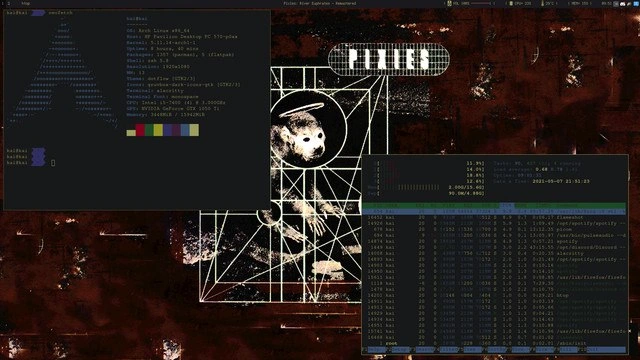
What’s happening in this picture is just like that, but on a computer. The person has taken a regular computer screen (the desktop) and decorated it to fit their style. The background has a neat glowing logo (kind of like a big poster they really like). The top of the screen has some nerdy “stats” displays – think of it like putting up a thermometer and a calendar in your room, but here it’s showing the computer’s health (how busy the computer is, etc.) in a colorful, fun way. They even changed the web browser’s start page to say hello and show the time, which is like having a custom welcome mat or a personalized message board. And just as you might use markers and stickers to personalize your stuff, this person uses code files and settings to personalize their computer’s look. It’s funny and charming to other programmers because it shows how much love and effort someone put into making their computer truly their own – even though it works the same as any computer, it looks super cool and unique. Just like a beautifully decorated room can make you smile every time you enter, this customized setup probably makes the owner happy and proud every time they turn on their PC. It’s a way to be creative and have fun with technology, kind of like art for programmers.

Level 2: Ricing 101

So what exactly are we looking at, and why are developers excited about it? This image is showing a highly customized Linux setup, specifically on Arch Linux. Arch is a flavor of the Operating System Linux that is very minimal out-of-the-box and is popular among power-users. People who use Arch often like to tailor every aspect of their system. This kind of visual customization is jokingly called “ricing” (slang for making your desktop look fancy, as if you’re “souping up” a car). And indeed, this meme post is like a showcase on the Linux customization subreddit r/unixporn — where users share their beautifully personalized desktops.

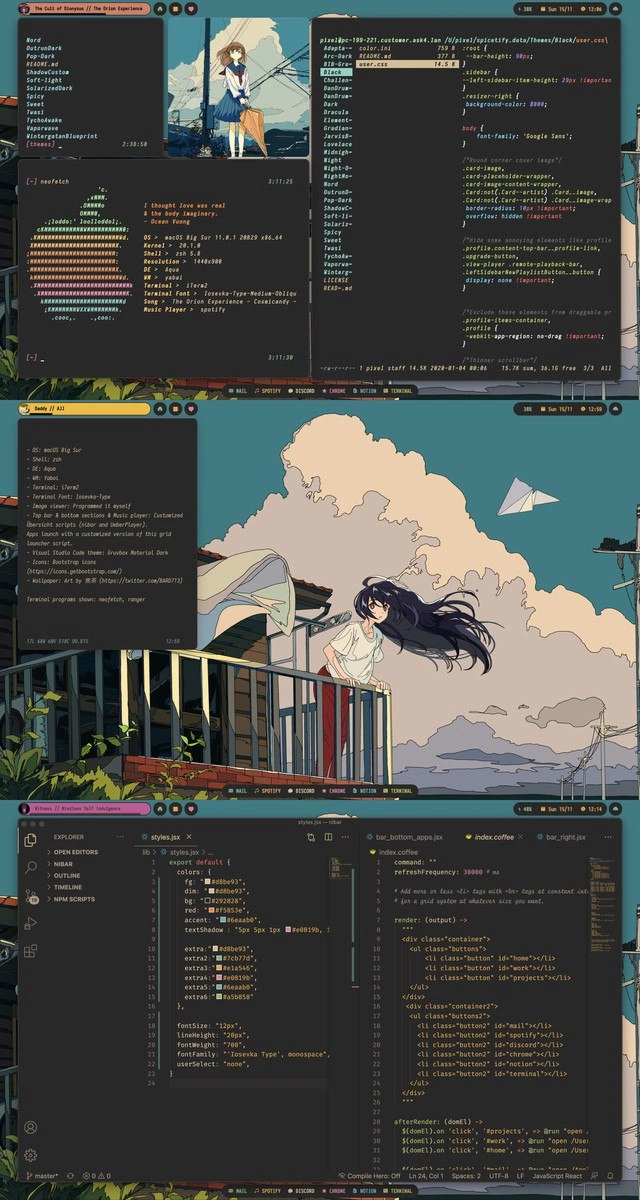
Let’s break down the components in simpler terms. In the top panel, two command-line tools are running side by side in a terminal (text) window. The left side is neofetch, a CLI tool that prints out your system information along with a big ASCII version of your OS logo (in this case, the Arch Linux logo). It lists things like the username (kat@archlinux), the operating system name, the kernel version (the core part of the OS), how many packages are installed, and so on, plus it shows a palette of colors being used. People often run neofetch just to show off their environment details in one pretty snapshot. On the right side is htop, which is like a text-based Task Manager. Htop shows real-time CPU usage, memory usage, and running processes in an organized, colorful way. Those horizontal bars and numbers for CPU and memory quickly tell you how busy the system is. In the screenshot, they’re mostly green and low, meaning the system isn’t very loaded – but they sure look cool bouncing slightly, giving the image some “live action.” New developers might not run these all the time, but it’s common to fire them up when taking a screenshot of your Linux desktop to demonstrate both system stats and aesthetic theme consistency. It’s partly practical, mostly just showing off in a friendly way.

The middle panel is a Firefox browser window with a custom start page. Instead of the usual Google search or default homepage, this user’s start page is extremely minimal: just the time, date, a greeting with their name (“Good afternoon, kat”), and the Arch logo in the background. This kind of start page can be achieved with a browser extension or a custom HTML file. It’s purely decorative and for personal convenience – giving a dashboard-like feel when you open the browser. It also perfectly matches the wallpaper: same Arch logo and color scheme. This tells us how thoroughly customized the whole setup is, from terminal to web browser. Even the color accents in Firefox (the top bar looks purple) appear to match the overall purple-pink theme. Many developers love dark themes (dark background, light text) because it’s easy on the eyes during long coding sessions – and let’s admit it, it also looks sleek. Here everything uses a dark theme setup with a few bright neon highlights so the whole screen looks unified and intentional.

The bottom panel shows Visual Studio Code, a popular code editor (almost an IDE) that a lot of programmers use for coding in various languages. But here, VS Code isn’t showing a typical code project – it’s open to a configuration file for Polybar. Polybar is a tool that provides a customizable status bar usually for window managers like i3. A window manager such as i3 is a lightweight interface that controls how windows appear and are arranged, without the full graphical fluff of something like Windows or macOS desktops. Tiling window managers like i3 let you split your screen into tiles for each program (which is likely how the user neatly placed the terminal windows side by side on the top panel). Polybar replaces the default bar (the thing that might show the date, system tray, workspaces, etc.) with one you can script and style yourself. In the config file visible, we even see an ASCII art title “POLYBAR” at the top – that’s a fun flourish by the config author – and sections like [global] or color settings. This is one of the user’s dotfiles – “dotfile” is a nickname for any config file on Linux whose filename starts with a dot (making it hidden by default). Developers often spend time editing these text files to change their system’s behavior or looks. For instance, the Polybar config will determine what info the bar shows (time, CPU, music, etc.) and which fonts and colors to use. The user is editing it in VS Code likely for the convenience of syntax highlighting and search, treating their configuration as code to be improved. Many programmers actually keep their dotfiles in a Git repository (sometimes on GitHub) as a backup and to share with others. It’s not unusual to see comments like “check out my dotfiles repo!” among people who do a lot of customization.

Another term in the tags is ArchLinuxUserRepository (AUR). The AUR is a community-driven repository of software for Arch Linux. It basically contains installation scripts for a huge number of packages that aren’t in the official Arch Linux repositories. For a power user who loves tweaking their system, the AUR is a goldmine – you can find all sorts of niche tools, themes, and bleeding-edge software there. For example, if Polybar or a specific VS Code theme or an icon pack wasn’t in the official repo, it’s probably available in the AUR. Arch users often mention the AUR as a major perk (and one reason they’re willing to use a more challenging distro). It’s referenced here to highlight just how customizable and extendable Arch can be, feeding into this whole ricing culture.

In simpler terms, what this meme shows is a developer’s personalized workspace on their computer. It’s the software equivalent of a highly customized car’s dashboard. We have the Operating System (Arch Linux) providing the base, the command-line tools (neofetch, htop) providing system info and monitoring in a flashy way, the window manager and bars (i3 + Polybar) providing a custom interface and layout, and the code editor (VSCode) being used to fine-tune the configs (dotfiles) that make it all work. For a newer developer, it’s like walking into a senior programmer’s office and seeing custom gear everywhere – at first, it might be confusing what each thing does, but it’s all there to either make the workflow smoother or just to make the environment more enjoyable to work in. The meme celebrates the effort and skill involved in crafting such a setup, and other devs find it both inspiring and a bit amusing, because they know it likely took a lot of command-line magic and maybe a few “I broke my system, now I have to fix it” moments to get it to this point. In the end, though, it’s their perfect setup and that’s something of a badge of honor in the development community.

Level 3: Command-Line Couture

This three-panel setup is essentially a showcase of a perfectly “riced” Arch Linux system – an enthusiast’s digital masterpiece. The humor (and awe) for seasoned devs comes from recognizing just how many moving parts are harmonized here. The top panel screams "Look, I use Arch!" without the user needing to actually say it. In the upper-left, the terminal runs neofetch, printing out system info alongside an ASCII Arch Linux logo. This is a classic flex: neofetch isn’t about utility (we don’t really need ASCII art of a distro logo to code), it’s about pride. Those lines – “kat@archlinux”, the kernel version, package count, and that matching color palette – telegraph to any Linux veteran: “Yes, I run Arch, and I’ve tuned it to perfection.” (It’s the terminal equivalent of a boastful bumper sticker.) In the upper-right, we see htop monitoring CPU, memory, and swap usage with colorful bars. Running htop live on a screenshot is another insider move: it adds dynamic street cred to the scene, proving this isn’t just a static mockup. The combination is funny to experienced folks because it’s so over-the-top: we’ve all seen (or been) the dev who spends a Saturday wiring up fancy status displays that impress our fellow nerds more than anything. It’s form and function – mostly form, if we’re honest – and we love it.

Look at the cohesive design: the wallpaper is dark wood grain with a neon glow-effect Arch logo in purple-pink, and everything adheres to that color scheme. The Firefox browser’s minimal start page in the middle panel isn’t a stock homepage; it’s a custom Firefox startpage showing a simple clock (“3:00 PM, Saturday May 8”) and a greeting “Good afternoon, kat” beneath the Arch emblem. This suggests the user has even styled their browser to blend with the desktop theme (likely using a minimalist home page extension or custom HTML/CSS). It’s a nod to how deep the customization rabbit hole goes – even the web browser bows to the aesthetic. Seasoned developers recognize this as the hallmark of the Unixporn community (yes, that’s the real name of a subreddit for sharing *nix desktop screenshots). The meme pokes gentle fun at how far enthusiasts will go: everything from the window manager (almost certainly a tiling WM like i3 to achieve those perfectly split terminals and borderless windows) to the browser homepage is meticulously planned. There’s an inside joke here: configuring a tiling window manager and custom bar often involves significant setup and occasional breakage (each update is an adventure), but when it all works, you get this — a desktop so slick it’s practically digital art.

In the bottom panel, our proud Arch user has Visual Studio Code open, editing a configuration file that begins with ASCII art spelling “POLYBAR”. This is the config for Polybar, a popular custom status bar. The fact that it’s open in VS Code hints at the workflow: even configuring the desktop is done through code editing. (Ironically, some Arch purists might razz that VS Code – a Microsoft-made editor – is running on Arch; it’s a fun contrast between minimalist Linux culture and using a heavyweight modern IDE. But hey, whatever gets the job done in style!). The polybar config is essentially a dotfile controlling the top bar’s modules and colors. In it you’d define what info appears in the bar (time, workspaces, volume, etc.) and all the lovely color codes to match that purple-pink theme. For example, a snippet might look like this:

; Polybar configuration snippet
[bar/mybar]
modules-left = i3 workspaces
modules-center = date 
modules-right = cpu memory volume

[color]
foreground = #c0caf5      ; text color (soft purple)
background = #1e1e1e      ; dark background
accent     = #d16aa3      ; accent color (pinkish)

Tuning these values is a trial of patience and passion known well by those who maintain dotfiles. Experienced devs will chuckle at the familiarity: spending hours tweaking config files (~/.config/polybar/config or an i3 config, among many others) to get that perfect shade of purple on your volume icon – it’s a rite of passage. There’s even an unwritten rule that your dotfiles end up on GitHub for eternal bragging rights and easy porting to your next machine. This meme encapsulates an elite tier of TerminalLife: when your operating system isn’t just a tool but a canvas. The senior perspective finds humor in the sheer commitment on display. It’s not mocking in a mean way – it’s more of a respectful grin. We’ve been there: pouring countless hours into polishing our development environment instead of, say, actually coding that feature due Monday. 😅 The payoff? A system that’s uniquely yours, that other devs either envy or playfully tease. In an industry where everything can start feeling abstract, this tangible personal touch is both technically impressive and endearingly excessive. Arch Linux users are infamous (or famous) for saying “I use Arch, btw” – here, they don’t have to say it; every pixel of this screenshot says it for them.

Description

This image is a composite of three screenshots showcasing a meticulously customized Arch Linux desktop environment, a practice known as 'ricing.' The wallpaper features a glowing pink-to-purple gradient Arch Linux logo against a dark, wood-like background. The top panel displays a clean desktop with several windows: a 'neofetch'-style system information panel with a geometric ASCII art, and a detailed system monitor (possibly 'gotop' or 'btop') showing CPU and memory usage. The middle panel shows a minimalist lock screen or idle screen with a large digital clock over the Arch logo. The bottom panel reveals the underlying configuration, with Visual Studio Code open to a file named 'polybar.conf', which is used for customizing the status bar. This demonstrates the developer's deep involvement in personalizing their environment, from visual aesthetics to functional tooling. For senior engineers, this isn't just a desktop; it's a finely tuned instrument for productivity and an expression of technical identity
Comments

7
Anonymous ★ Top Pick The only thing more satisfying than closing a thousand lines of pull requests is finally getting your Polybar modules to align perfectly. One of these is a daily occurrence, the other is a career milestone
  1. Anonymous ★ Top Pick

    The only thing more satisfying than closing a thousand lines of pull requests is finally getting your Polybar modules to align perfectly. One of these is a daily occurrence, the other is a career milestone

  2. Anonymous

    If you nail the gradient match between htop’s CPU bars and your polybar theme, every production spike just looks like more “ricing” - instant SLA compliance

  3. Anonymous

    The three stages of Arch Linux: spending 40 hours perfecting your rice, 2 minutes actually using it, then explaining to your coworkers why their Ubuntu setup is technically inferior while they ship features and you're still debugging your custom window manager keybindings

  4. Anonymous

    When you spend 40 hours customizing your Arch Linux rice with the perfect purple gradient, neofetch ASCII art, and system monitors, but only 2 hours actually coding - because clearly, the real engineering challenge is achieving that perfect aesthetic while maintaining sub-200ms terminal startup time. The 'btw I use Arch' energy is strong with this one, and honestly, with a setup this clean, they've earned the right to mention it in every conversation

  5. Anonymous

    Arch + Polybar: desktop SRE - instrument with INI, then run pacman -Syu as the chaos monkey. Honestly, it fails more predictably than our Kubernetes

  6. Anonymous

    Riced Arch so hard Polybar greets you by name - unlike Jira tickets that know you by ID

  7. Anonymous

    Spent a whole sprint tuning polybar INI so htop lines up with the wallpaper - observability theater, but for dotfiles

Use J and K for navigation