The Duality of Vim: The Struggle to Exit vs. The Refusal to Leave
Why is this IDEs Editors meme funny?
Level 1: Locked Room, Cozy Home
Imagine you walk into a big room that’s a bit strange — there are no clear doors or signs telling you how to get out. A new person walks in and after a while they start to panic because they can’t find the exit. They might shout, “Hey, how do I get out of here?!” They feel trapped and frustrated, like being stuck in a maze. That’s the situation for the beginner in this meme: he’s using something (a program called Vim) and doesn’t know how to quit it, just like someone who can’t find the door.
Now think of another person who has been in that same weird room for a long time and actually learned all its secrets. This person knows where the hidden door is, sure — but they’ve also decorated the place, arranged it just how they like, and they love being there. In fact, they’ve made it so cozy and useful that they don’t really want to leave at all. So when someone asks them about exiting, they go, “Why would I want to leave? This place has everything I need!” They’re completely comfortable inside. That’s the expert in the meme: he’s so happy using Vim that the idea of closing it (leaving the room) sounds silly to him.
The meme is funny because it shows these two people side by side: one is desperately looking for a way out, and the other is puzzled why anyone would want to get out in the first place. It’s like a kid getting lost in a play area versus another kid who has turned that play area into their own fun fort. The exact same environment is scary to one and awesome to the other. Seeing those opposite feelings next to each other is what makes it humorous. Basically, the joke says: something that confuses a beginner can be the favorite place of an expert. The beginner is frantic, asking for help, and the expert is chill, even a bit smug, about loving that same situation. It’s a playful way to show how the more you know about something, the more at home you feel — to the point where you might never want to leave!
Level 2: Learning to Quit
Vim is a text editor that you run in a terminal (a text-only window). It’s not like a usual graphical editor where you can click on menus or the close button. Vim is controlled entirely by the keyboard, and it has different modes for different tasks. This is the key point: Vim’s behavior changes depending on its mode. When you first open Vim, you’re in Normal mode (also called command mode). In Normal mode, if you press a key—say k or j—you won’t see “k” or “j” appear on the screen; instead, those keys are interpreted as commands (in this case, moving the cursor up or down). To actually insert text, you have to enter Insert mode by pressing a key like i (for "insert") or a (for "append"). In Insert mode, the letters you type will show up as text in the file, just like in a regular editor. Then, when you want to go back to commands (like saving or quitting), you hit the Esc key, which takes you out of Insert mode back to Normal mode. Vim also has a Visual mode (for selecting text) and a Command-line mode (for typing out commands after a colon :), but the two main ones to understand are Normal vs Insert.
Now, the tricky part for newcomers is usually how to exit Vim. In a normal GUI app, you’d click the X button or go to File -> Exit, or press a shortcut like Alt+F4 or Cmd+Q. None of those exist or work in Vim’s plain terminal interface. Instead, you have to remember a little command. Here’s how you properly quit Vim:
- First, press
Escto ensure you’re in Normal mode (this cancels anything you might have been in the middle of, like Insert mode or a half-typed command). - Then type
:qand press Enter. The:opens a prompt at the bottom of the screen (that’s Command-line mode), and q is the command for “quit”. So:q+ Enter should close the editor if nothing has been changed.
But there’s a catch: if you made changes to the file, Vim doesn’t want you to lose them accidentally. In that case, :q will fail with a warning. You have two options then:
- Type
:wqand hit Enter, which means “write (save) and quit.” This will save your changes to the file and then exit. - Or type
:q!and hit Enter, which means quit without saving changes (the ! is like “force quit, I know what I’m doing, discard changes”).
So the quick answer to “How do I exit Vim?” is usually: press Esc, then type :q! (if you don’t need to save) or :wq (if you want to save) and press Enter.
Now, why is this such a meme? Because if you don’t know that procedure, Vim doesn’t really give you any hint. A new user might try all sorts of things — pressing Ctrl+C, or Ctrl+X, or maybe just mashing keys — and nothing obvious happens. It’s like being in a room with a hidden exit: until someone tells you “push the panel on the wall,” you might be stuck there. A lot of beginners actually give up and do something drastic like closing the whole terminal or even restarting the computer to get out of Vim, which is kind of funny considering it’s just one command to exit (once you know it).
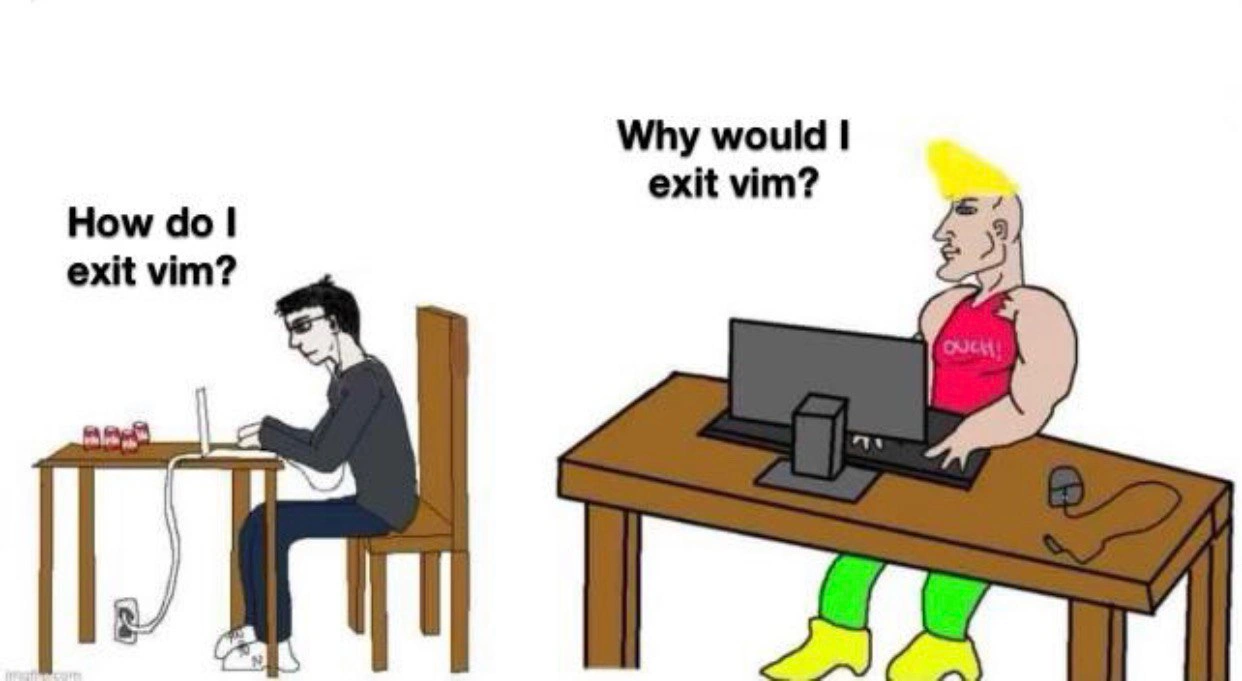
In the image, the left side shows exactly that beginner frustration. The left character (the newbie) is shown hunched over a laptop, looking frustrated. He asks, "How do I exit vim?" because he genuinely doesn’t know the magic steps to leave. This is a common question — so common that it’s become a running joke among programmers. The empty energy drink cans imply he’s been trying to figure it out for a long time (probably reading forums or documentation, or just trying everything he can think of). The power cord plugged in hints that this has become an epic struggle – like his battery was dying so he resorted to plugging in so the quest to quit Vim could continue. It’s an exaggeration, but it feels true if you’ve ever been stuck in a program and couldn’t find the exit. The phrase "How do I exit vim?" has almost become shorthand for “I’m new to the command line and I just hit my first big hurdle.”
On the right side, we see the exact opposite scenario. The character on the right is the experienced power-user. A power-user means someone who knows a tool inside and out and uses advanced features confidently. This guy is drawn as big and muscular with a cool hairstyle – a caricature of confidence. Instead of asking how to exit, he responds with, "Why would I exit vim?" This response highlights that he never feels the need to leave Vim at all. In real life, once someone becomes comfortable with Vim, they often discover that they can do almost everything within it. For example, if they are writing code, they can write and edit all their files in Vim. If they need to compile the code or run tests, they can do that by opening a terminal inside Vim or suspending Vim briefly (Ctrl+Z) and coming back, or using plugins. They can open multiple files in splits or tabs inside Vim. They might even use Vim to write emails or blog posts with the help of plugins. Essentially, they treat Vim like their main environment, not just a program. So the joke on the right is that this expert doesn’t even remember the last time he exited Vim because he’s always in it.
The contrast is the joke. One person can’t get out; the other person doesn’t see why you’d ever get out. It’s showing two extremes:
- Newbie perspective: Vim is confusing, hard to use, and something you might want to escape from once you accidentally get into it.
- Expert perspective: Vim is awesome, powerful, and you stay in it on purpose because it makes you efficient.
This is very much TerminalHumor or DeveloperHumor that plays on the shared experiences of developers. Newer developers (or those who primarily use GUI editors like VS Code, Sublime, or an IDE like IntelliJ/Eclipse) often find Vim daunting. Many have literally typed "how to exit vim" into Google at some point. Meanwhile, some seasoned developers prefer Vim over any graphical editor and will happily spend all day coding in a black-and-white terminal window, because for them it’s faster and more productive. The meme exaggerates the seasoned dev’s stance as, “I love it so much here, I never leave.”
It helps to know that Vim is a bit notorious for its steep learning curve. It’s not uncommon to see jokes like “Vim: I came for the editing, stayed because I can’t quit.” The left side of the meme is basically that joke personified! The right side is another common joke: people who get really good with Vim sometimes develop a kind of pride or humor about it, like they’re part of an exclusive club. They might tease, “Oh, you want to exit Vim? Why would you ever want to do that? Real developers never leave Vim.” It’s a playful ribbing – not meant to gatekeep, just poking fun at how passionate and intense people can get about a text editor.
So, in summary, the meme shows a beginner who is overwhelmed by a tool (Vim) and an expert who is ultra-confident with the same tool. The text editors and modal interface (where you have to press Esc + :q to quit) create this peculiar situation where not knowing a simple command can leave you feeling stranded. Once you do know it, you might actually love the tool so much you joke about living in it. It’s a classic case of developer experience differences: what is user-hostile to one person is user-heaven to another, purely based on knowledge and familiarity. And because Vim is such a staple in programming (it’s installed on almost every Linux/Mac system by default, and many workflows involve it), this little scenario has played out thousands of times, making it perfect meme fodder. Everyone gets to laugh: the newbies laugh nervously (“yep, been that confused guy”), and the veterans laugh knowingly (“haha, that’s me with my never-ending Vim session”). It’s all in good fun around the quirks of our tools.
Level 3: Modal Nirvana
For anyone who's been around programmers, this meme nails a classic inside joke about Vim’s learning curve. The cartoon’s captions say it all:
Newbie: "How do I exit Vim?"
Expert: "Why would I exit Vim?"
On the left, we have the eternal beginner question — “How do I quit this thing?” Virtually every developer has either asked this themselves or heard someone else desperately plead for help with Vim. In fact, “How to exit Vim” has achieved legendary status on the internet. There’s a famous Stack Overflow question by that exact title, sitting at the top of Google results, with thousands of upvotes and tongue-in-cheek answers (like “Don’t. Embrace Vim.” or lengthy step-by-step guides that humorously go over every possible key). It’s funny now, but at one point it was serious business for each of us. Many seasoned devs remember their first time encountering Vim — perhaps it launched when they ran git commit for the first time, or they opened a config file on a server — and then time stood still as they stared at the screen, utterly lost on how to simply close the program. It’s practically a rite of passage in the software world. You mash keys, nothing happens, maybe you trigger weird beeps or see unintelligible tildes and colons, and frustration mounts. CLI tools like Vim don’t hold your hand, and that shock is both terrifying and, in hindsight, hilarious.
The meme uses the popular “virgin vs chad” format to amplify this contrast. On the left side (the "virgin" newbie), the cartoon figure is drawn slouched and frazzled, with a thin frame and an exhausted expression. Notice the details: a few empty energy drink cans next to his laptop and a power cord plugged into the wall. Those cans imply he’s been at this all night, caffeinating himself while desperately trying to find a way out of Vim. The fact that he had to plug in his laptop suggests the vim_exit_problem has gone on so long his battery almost died! This is, of course, an exaggeration for comedic effect — hopefully no one spends so long trying to exit that they run out of battery — but it underscores how stuck that left-side character feels. The text above him, “How do I exit vim?”, isn’t just a question; it’s practically a cry for help. It captures that mix of confusion and panic a newbie faces when confronted with Vim’s unfamiliar interface. There’s a touch of self-deprecating humor in it for developers: we laugh because we’ve been that person, utterly defeated by a mere text editor.
Now, the right side (the "chad" power-user) flips the scenario completely. This character is the picture of over-the-top confidence: muscular build, straight posture, flashy mohawk hair, and cool attire (a ripped tank top that literally says “OUCH!” in bold letters, and some neon pants — he looks ready to rock the Terminal like a superstar). Above him, instead of a question, there’s a smug retort: “Why would I exit vim?”. This encapsulates the vim_power_user_mindset. To an expert user, Vim isn’t a trap—it’s a paradise. The joke here is that the concept of leaving Vim doesn’t even occur to the expert because Vim is where they’re most productive and comfortable. In real life, power users sometimes jokingly portray Vim as not just an editor but a way of life. They customize their Vim environment with plugins and spend so much time in it that they half-joke it’s easier to stay in Vim forever than to use anything else. The meme exaggerates this to the point of absurdity: the Chad character basically implies, “Exit Vim? That’s cute — I never do that.” It’s poking fun at the almost cult-like devotion Vim enthusiasts have.
This juxtaposition is what makes the meme DeveloperHumor gold. On one side, we have a totally relatable pain point: a beginner encountering one of computing’s little gotchas (the :q command that isn’t obvious) and feeling utterly defeated. On the other side, we have the ultimate power move: someone so advanced they’ve transcended that problem entirely. It’s the same software, but two completely opposite experiences. This highlights a real phenomenon in developer culture: tools with steep learning curves create a big gap between novices and experts. Vim is famous for that. There’s a saying that Vim has two modes: “beeping” and “not working,” which is a jokey way to describe a new user’s impression when every key they press just seems to produce errors or do nothing. But once you get past that, there’s almost a holy aura around the tool. People become fans of Vim, even evangelists. They’ll happily spend time fine-tuning their .vimrc and brag about how they edited an entire project, compiled code, and sent emails all from Vim without touching the mouse once. In the meme, the Chad character embodies that pride and excitement — he’s basically saying “Vim is so good, why would you use anything else, or ever close it?”
Beyond the humor, there’s some truth to the Chad’s stance: experienced users genuinely leverage Vim for incredible efficiency. They use keyboard shortcuts that look like gibberish to outsiders but perform complex edits in seconds. For example, a power user might delete an entire function with dap (delete a paragraph) or jump to a specific file with a few keystrokes. Because Vim is embedded in the terminal, they might :split the window to edit multiple files side by side, or use :! to run shell commands without leaving the editor. Over years of use, Vim becomes second nature — it’s not just a tool you occasionally open, it’s * where you live* when coding. No wonder the expert in the meme looks so at ease at his big desktop: he’s in his element. The computer on his desk is drawn bigger and more powerful-looking than the newbie’s tiny laptop, emphasizing that he’s got a serious setup. Yet amusingly, despite the hardware difference, what truly sets them apart is knowledge and mindset. The caption "Why would I exit vim?" is both arrogant and endearing in its nerdy way; it implies the expert has possibly forgotten that most people do exit an editor regularly — he’s so far down the rabbit hole that staying in Vim all day feels normal.
From a DeveloperExperience_DX perspective, this meme is also commenting on how different the journey can be depending on your familiarity. The beginner experience: bafflement, maybe a bit of fear (“Am I going to have to reboot my system to get out of this program?!”). The expert experience: empowerment, even smugness (“This is my kingdom, I know every command by heart”). The truth is, every expert was once that newbie. The humor has an undercurrent of camaraderie: it’s okay, we’ve all been the guy asking how to quit Vim, and with time you might become the guy who chuckles and says “quit Vim? I haven’t done that in ages.” It’s a harmless elitism played for laughs.
The Chad vs. Virgin meme format itself is a bit of internet culture that often pairs a struggling, awkward character (“virgin”) against a confident, successful counterpart (“Chad”). Here it’s used in a programmer context. The left is the archetype of a confused beginner (virgin newbie who can’t navigate the CommandLineInterface), and the right is the ultramasculine metaphor for a master (Chad power-user who has conquered the CLI editor). By using this format, the meme taps into an existing joke vocabulary: readers instantly recognize the dynamic and expect an absurdly one-sided comparison. In this case, the comparison is about something as trivial (yet iconic) as quitting a text editor. That incongruity – treating the simple act of exiting an editor with the same gravity as, say, an epic hero vs loser scenario – adds to the humor.
In short, the meme exaggerates a real developer scenario to highlight the gap between novice and guru. It’s funny because it’s so true for those in the know. Pretty much every programmer can share a war story about being stuck in Vim, and many can also share the moment they realized they’d become so proficient that Vim was now the easiest part of their job. Seeing those two extremes side by side — one hapless, one totally in control — strikes a chord and makes us laugh at how far one can come. After all, today’s Vim guru is yesterday’s frustrated newbie. The only difference is, once you learn Vim’s secrets, you might join the camp that jokes about never leaving it. The meme captures that absurd devotion perfectly: “How do I exit Vim?” is met with “Exit Vim? Why on earth…?”
Level 4: The Halting Editor Problem
In theoretical computer science, there's the famous Halting Problem – deciding if a program will finish running or loop forever. Humorously, exiting Vim is often likened to an unsolvable puzzle of that caliber. Newcomers joke that quitting Vim might as well be NP-hard (a tongue-in-cheek reference to extraordinarily tough computational problems) because of how elusive the solution feels at first. Of course, unlike a true unsolvable problem, Vim can be exited with the right command, but for the uninitiated it might as well require a PhD proof. This meme exaggerates that idea: a beginner treats leaving Vim like an impossible riddle, while the expert doesn’t even see a problem to solve.
Under the hood, Vim operates on a distinct modal interface paradigm – essentially functioning like a finite-state machine for editing. It has various states (modes): Normal mode for navigation and commands, Insert mode for entering text, Visual mode for selecting text, and Command-line mode (triggered by pressing :) for executing commands like saving or quitting. Each mode changes what your keystrokes do. For example, the keystroke j in Normal mode moves the cursor down a line, but in Insert mode that same j would just insert the character "j". There’s a dedicated transition key (usually Esc) to switch from Insert back to Normal mode. From Normal, typing : enters Command-line mode where you can input a command such as :q to quit. Formally speaking, you could draw a state diagram of Vim’s operation: hitting Escape brings you to a command state, pressing I or A transitions into an insert state, and so on. In terms of design, Vim’s behavior is a bit like a domain-specific language for editing, complete with its own grammar and states. Each command is a "sentence" in Vim's mini-language (for instance, dw is a two-letter sentence meaning "delete word"). Experienced users become fluent in this language of keystrokes.
This design was born out of historical and technical necessity. Vim is a modern clone of vi, an editor created in the late 1970s when computers were slow and terminals were often just text with no mice or graphical interfaces. Back then, every character sent over a connection was precious, and arrow keys or on-screen menus either didn’t exist or were too slow. Modal editing was a clever solution: in one mode, keys insert text, and in another mode those same keys act as powerful commands. It’s a bit like using one set of tools for two different jobs by switching context. The efficiency is remarkable – for example, instead of moving a cursor with ten down-arrow presses, an expert could simply hit 10j in Normal mode to jump 10 lines down instantly. Instead of laboriously highlighting a paragraph with a mouse to copy it, a Vim user might press vip (select visually inside paragraph) followed by y (yank/copy). These terse sequences are possible because Vim’s modal design turns the keyboard into a sort of combinatorial instrument, where short key combinations do sophisticated operations. In essence, Vim provides a composable editing language: small commands can be combined into more complex actions, somewhat analogous to how functions compose in programming. This makes expert editing incredibly fast and almost rhythmic – once you know the “language,” editing feels like playing an instrument or solving a puzzle from the inside.
However, this power has a flipside: discoverability. Many modern interfaces are designed to be intuitive or at least give visual clues (menus, buttons, prompts). Vim offers few such hints; it assumes you either know what you’re doing or you’ll take the time to learn. That’s why a newcomer often can’t even figure out how to quit the program – there’s no visible “Exit” button, and if you don’t already know the :q command, it’s not going to volunteer that information. From a human-computer interaction standpoint, Vim violates the principle of modelessness (Jef Raskin famously argued that modes can be confusing and error-prone). Vim unabashedly embraces modes for the sake of efficiency, which is both its genius and the source of comedic DeveloperExperience_DX pain for beginners. A new user who doesn’t realize they’re in Insert mode might try all sorts of key combos in vain, not knowing they need to hit Esc first to switch modes and issue the quit command. In formal terms, the user hasn’t activated the correct state transition (they’re effectively giving Insert-mode inputs when the system is expecting a command-mode sequence). It’s a classic state mismatch problem.
For the expert in the meme (the Chad on the right), none of this is a struggle – they have internalized Vim’s state machine so well that everything is muscle memory. In fact, their perspective is almost the inverse problem: they’ve optimized their whole workflow around Vim, to the point where leaving Vim feels inefficient. Many Vim aficionados configure their environment such that Vim is perpetually open. They might use terminal multiplexer tools (like tmux or screen) to keep a Vim session running across projects and even logins. Their ~/.vimrc (Vim’s config file) is filled with custom keybindings and plugins so that virtually any task can be done without exiting the editor. Need a shell? They might invoke :!bash or use the built-in terminal emulator. Need to switch files? They open splits and buffers inside Vim rather than using an external file explorer. Source control? Plugins allow running git inside Vim or at least editing commit messages seamlessly. Over time, Vim becomes less a tool you open and close, and more like a persistent computational habitat. This is why the right-side caption, "Why would I exit Vim?", resonates – a true power-user has everything set up inside Vim and treats it like home.
Ultimately, the humor at this deep level is about the extremes of user adaptation. We have a tool that is theoretically simple to leave (:q and you’re out) yet the design principles and historical context make that simple action non-obvious. It highlights a fundamental computing idea: a program’s interface can dramatically change how users perceive difficulty. To a seasoned developer, Vim’s modal interface is a logical structure – almost a form of editing calculus that they’ve mastered. To a beginner, it’s a mysterious black box that “won’t let them out.” The meme exaggerates this contrast to comic effect, but it’s grounded in truth about how differently experienced users interact with tech compared to newbies. In Vim’s case, the entrance is easy (it’s everywhere, one typo on the command line and you’re in Vim before you know it), but the exit requires knowledge. So much knowledge, in fact, that many of us remember the almost existential panic of our first vim encounter. And then, later on, some of us remember the opposite satisfaction of realizing we hadn’t closed Vim in days because we never needed to. It’s a mini saga of learning in the developer journey – from “I can’t escape!” to “Escape key? Who needs escape when you live here?”.
Description
A classic 'Virgin vs. Chad' Wojak meme format contrasting two developer attitudes towards the Vim text editor. On the left, the 'Virgin' character is a slender, anxious-looking programmer hunched over a small laptop, asking the famous beginner's question: 'How do I exit vim?'. This panel represents the initial, often frustrating experience of learning Vim due to its non-intuitive, modal nature. On the right, the 'Chad' character is depicted as a muscular, confident user with blonde hair, sitting at a proper desktop setup. He poses the rhetorical question, 'Why would I exit vim?'. This embodies the perspective of a seasoned Vim power user who has mastered the editor to such an extent that it serves as their all-encompassing development environment, making the act of closing it unnecessary. The meme humorously captures the steep learning curve and the subsequent deep loyalty associated with Vim
Comments
35Comment deleted
The ultimate Vim power move isn't just never exiting; it's running your shell, git, and database client inside it, then complaining that your IDE friends have to 'alt-tab' to a different window like a barbarian
You don’t exit vim; you keep opening splits until the layout matches your microservice diagram - eventually the window manager panics and does the quit for you
The real Chad move is aliasing ':wq' to deploy straight to production because you've transcended the need for version control when your muscle memory can undo commits faster than git reflog
The Vim learning curve isn't a curve - it's a cliff face. You spend your first hour frantically Googling ':q!' while your terminal holds your code hostage, then five years later you're running macros across multiple buffers and judging anyone who uses arrow keys. The real exit strategy isn't leaving Vim; it's accepting you'll never leave. Eventually, you stop asking 'how do I exit?' and start asking 'why would I use anything else?' That's not mastery - that's Stockholm syndrome with syntax highlighting
'How do I exit Vim?' evolves to 'Why exit? My entire stack runs in :split panes.'
I don’t exit Vim; I :mksession, detach tmux, and let the OS reboot around it
Once you glue tmux + neovim + fzf + LSP together, “exit vim” becomes a decommission plan - it’s cheaper to migrate the OS around it than to quit
Isn't it :wq? Comment deleted
Just :q for exit Comment deleted
Yes but that way it wouldn't save anything and a person who doesn't know they might lose their changes Comment deleted
It won't let you quit with unsaved changes, unless you insist with "!". Comment deleted
Oh, cool. I don't use vim that much anyways Comment deleted
Then use :q! so that they would definitely lose their changes Comment deleted
if u wanna exit and don't know how to do it u definitely don't want to save them changes Comment deleted
try vim easy mode vim -y Comment deleted
Ah yes, the easy mode that's actually harder Comment deleted
ZZ Comment deleted
Oh wait, forgot the esc key first, I always forget that Comment deleted
:q wq for writequit Comment deleted
:x 🤷♂️ Comment deleted
You can press esc and then two times shift Comment deleted
just opened vi to test exiting it via double-shift and got confused for a bit, but then I remembered… Comment deleted
(Iirc) Comment deleted
I wonder what would ChatGPT say about quitting Vim. 🤔 Comment deleted
What is interesting about it Comment deleted
It may be the new revelation we all have been waiting for so long. Comment deleted
minesweeper Comment deleted
? Comment deleted
does it run windows minesweeper in wine? Comment deleted
yes Comment deleted
This is how to exit vim 😜 Comment deleted
Vim 2.0: Added GUI; You cannot exit vim until your coverage becomes 100% Comment deleted
Why exit? You just call a new shell from inside vi 😎 Comment deleted
"how to exit terminal mod" Comment deleted
You use control + D Or maybe run another vi XD Comment deleted