The Senior Dev's Wisdom
Why is this Career HR meme funny?
Level 1: All Editors Great and Small
Imagine three friends are writing a story, and each friend insists their way of writing is the best:
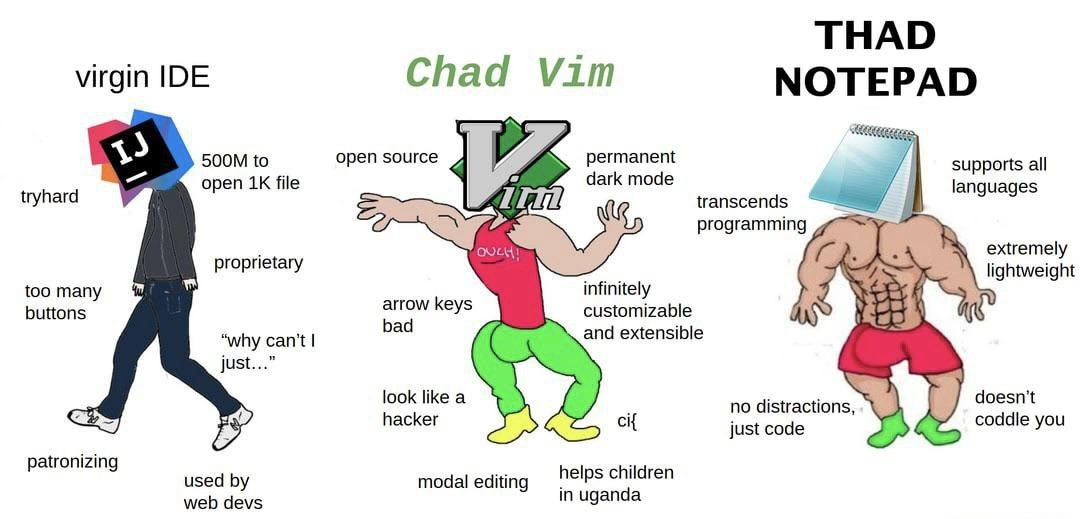
Friend 1 has a fancy computer program for writing. It’s like a supercharged Microsoft Word that does everything: it checks spelling, shows a list of chapters, even hints how to finish sentences. But it’s a bit slow – like it takes a while to open, and sometimes all those helpers can be a little annoying (“Do you want help with that? Are you sure about this word?” every few minutes). This friend’s method is powerful but feels bulky. In our analogy, that’s the big IDE (IntelliJ) – very helpful and full of features, but heavy and kind of bossy.
Friend 2 writes with a special notebook and pen. This pen is tricky: it has different modes. One mode is for writing letters normally, and another mode is for giving commands – like you flick the pen a certain way to erase a word or swap two sentences. It took a long time for this friend to learn those pen tricks, but now he can write and edit really fast with secret shortcuts that only he knows. He doesn’t have any spellcheck or auto-suggestions, just his skill. It looks kind of cool and cryptic when he’s working, like he’s drawing secret runes. This is like using Vim – a tool where you rely on your own expertise and clever shortcuts (modal editing) to get things done quickly. Once you know it, it’s super efficient, but learning it was an adventure.
Friend 3 just grabs a plain piece of paper and a pencil. No computer, no special pen, nothing – just the basics. He writes his story by hand. There’s zero help: the pencil won’t underline a misspelled word, and the paper is just blank with no prompts. But he feels proud because he doesn’t need any gadget or aid; it’s just him and his raw skill. He can start immediately (paper and pencil are ready in an instant) and there’s nothing to distract him – no notifications, no buttons, nothing. It’s pure writing. In our tech analogy, that’s like coding in Notepad – the simplest editor. It’s lightning-fast to open and use, but offers no assistance. You’ve got to know what you’re doing entirely on your own.
Now, the funny part: these friends are playfully arguing about whose method is superior. The first friend says, “Well, I have all these cool tools, I’ll never make a mistake!” The second friend goes, “Haha, I don’t need those crutches, I can do everything with my secret tricks – look how fast I can move my pen!” And the third friend smirks, “You both rely on stuff – I just use my hands and brain, I’m on another level!” It’s like kids in a playground comparing who has the cooler toy or who is tougher because of how they do something.
The meme exaggerates this argument. It calls the first friend the “virgin” – meaning in meme-slang a weak or uncool guy – for depending on the big fancy tool. It calls the second friend the “Chad” – meme-slang for a cool, strong guy – for mastering the special editor. And it invents “Thad” for the third friend to be an even cooler mega-strong character because he doesn’t even need a tool at all practically. The truth is, of course, you can write a story or code with any of those methods; each has pros and cons. But it’s funny to see how each friend boasts about their style as if it makes them better.
In simple terms, this meme is poking fun at how developers sometimes tie their ego to the tools they use: the ones who use big advanced programs vs. the ones who use old-fashioned or simple tools. It’s like arguing over using a high-tech oven with presets versus a classic charcoal grill versus just cooking on an open campfire. Everyone gets the food cooked, but each swears their way is the “real” way.
So the humor here is like an inside joke among programmers: no matter what you use to write your code – a super IDE, a classic editor, or just the bare minimum – some people will always brag that their way is the best. The meme makes us laugh because it shows how silly it is to treat a text editor like a badge of honor. In the end, what matters is the story (or code) you create, not so much the tool you used to write it. But watching people turn their editor choice into a macho contest? – that’s the playful spirit of this joke.
Level 2: Choose Your Weapon
For a more junior developer (or someone new to the joke), let’s break down what’s going on with these three coding tools and why they’re portrayed this way. The meme is essentially comparing an IDE, a terminal-based text editor, and a bare-bones text editor, highlighting the differences in features and philosophy of each.
IDE (Integrated Development Environment) – Think of this as the all-in-one mega tool for coding. The example here is JetBrains IntelliJ IDEA (the head of the left figure). IntelliJ is a popular IDE, especially for Java and other languages, known for having tons of built-in features: code auto-completion, real-time error highlighting, one-click build and run buttons, graphical debuggers, form designers, version control integration – you name it. An IDE like this is designed to make a developer’s life easier by providing everything in one place. But the joke points out some common criticisms:
- “500M to open 1K file”: This is hyperbole for how heavy IDEs can be. Indeed, modern IDEs often use hundreds of megabytes of memory and have noticeable startup times because they load lots of components (project indices, UIs, plugins). If you just want to quickly edit a tiny 1 KB script, launching a huge IDE can feel like overkill – like using a freight truck to deliver a postcard. This is often referred to as IDE bloat, meaning the software might be considered bloated (sluggish and resource-intensive) compared to simpler editors.
- “Too many buttons”: Open IntelliJ and you’ll see toolbars, menus, windows, icons for dozens of actions. To a newcomer, it can be overwhelming – you might not even know what half the buttons do. The meme mocks this complexity, suggesting the UI is cluttered with features that might confuse or distract (“do I really need 5 different panels on my screen?”).
- “Patronizing”: This refers to the feeling that the IDE is babying the developer. For instance, IntelliJ might underline a variable and say “Hey, you didn’t use this” or pop up “Did you mean...?” suggestions constantly. Some people appreciate these hints, but others feel patronized – like the tool is nagging or treating them like they don’t know what they’re doing. The meme jokes that the IDE coddles the user, possibly to the point of annoyance.
- “Proprietary”: IntelliJ is not open-source; it’s a product by JetBrains. “Proprietary” means the source code is closed off and it’s developed commercially (though there are free Community editions). In developer communities, proprietary tools can be viewed with some suspicion or negativity, especially when compared to open-source (which is seen as more community-friendly). The meme uses this as a minus point for the IDE side.
- “Why can’t I just…”: This phrase captures a common frustration: sometimes IDEs have their own way of handling things (generating boilerplate code, forcing certain project structures, etc.). A dev might exclaim “Why can’t I just do X like in a simple editor?!” when the IDE makes a simple thing complicated. It’s that feeling of the tool getting in your way when you want to quickly edit or run something your own way.
- “Used by web devs”: Now, this is an inside jab. It stereotypes that web developers (often considered less concerned with performance or low-level details) prefer heavy IDEs and fancy tools, implying they are less hardcore. It’s not truly factual (plenty of hardcore backend devs use IntelliJ!), but memes play on stereotypes. To a junior, know that this is just tongue-in-cheek. In reality, many developers across domains use IDEs for their productivity benefits, but the meme jokingly frames it as if real tough programmers wouldn’t.
Vim (Modal Text Editor) – Vim is represented by the buff middle character “Chad Vim”. Vim is a very powerful text editor that runs in the terminal (or console window). Unlike an IDE, Vim doesn’t present buttons and graphics; it’s primarily keyboard-driven and has a modal editing model:
- Modal editing: This means Vim has different modes for different tasks. The two main ones are Normal mode (where your keystrokes are interpreted as commands – e.g., pressing
dddeletes a line) and Insert mode (where you can type text into the file). When you open Vim, you’re in Normal mode by default. For newbies, this is confusing – if you start typing and Vim is in Normal mode, strange things happen (because those letters are being treated as commands)! That’s why jokes about “How do I quit Vim?” abound – new users get stuck because:qis the command to quit, not obvious at first. However, once you learn the modes and commands, you can edit text with a speed and precision that’s hard to match with a regular editor. That’s why the meme glorifies it. - “Arrow keys bad”: This is a specific bit of Vim culture. In Vim’s Normal mode, you move the cursor with the
h,j,k,lkeys. Many Vim gurus avoid using the arrow keys at all – partly as a challenge and partly because on old keyboards or terminals, arrow keys weren’t always convenient. By keeping your fingers on the home row (the keys where your fingers rest when touch-typing), you can navigate without moving your hand. Vim die-hards sometimes even disable arrow keys to force themselves (or trainees) to use the Vim way. So “arrow keys bad” is a cheeky way of saying “I’m such a Vim pro, I don’t even touch the arrows.” It’s exaggeration, but it’s a known attitude. Don’t worry – if you use Vim, you can still use arrow keys if you want; the meme is just amplifying a boastful stance some take. - Open source: Vim is free and its source code is publicly available. It’s been around since 1991 (and is based on an even older editor
vifrom 1976). Being open source means a community of developers maintains it, and anyone can contribute improvements. The meme lists this as a proud badge. To many, open source implies trust (“no corporate spyware!”) and longevity (Vim will likely outlive many commercial products). - “Permanent dark mode”: When you use Vim in a terminal, typically the terminal’s default is a black background with light text (or you customize it that way). Vim itself doesn’t have a graphical interface with color themes like an IDE might; it uses the terminal’s colors or simple color schemes. The meme is just playfully noting that Vim has always looked like a dark-themed app, long before “Dark Mode” became a trend in modern software. It’s an aesthetic and cultural nod – hacking on a black screen is the classic image of a programmer.
- “Infinitely customizable and extensible”: Vim can be tailored endlessly. You can write scripts (in Vimscript or use plugins written in other languages nowadays) to add functionality. Want auto-completion? There’s a plugin for that. Want to remap a key to do something crazy? You can. You can even turn Vim into an IDE-like environment by adding file explorers, syntax checkers, etc. Veteran Vim users often have a finely tuned
~/.vimrcconfig file with dozens or hundreds of custom settings. It’s not literally infinite, but practically, you can do a ton – limited only by your skill and patience. By contrast, in many IDEs you’re limited to the options the GUI exposes or the plugins someone else made. With Vim, if you’re adventurous, you can automate pretty complex editing tasks or create your own shortcuts. The meme highlights this to show why Vim enthusiasts love their tool – it’s empowering, if you invest the effort. ci{: This is an example of Vim’s command syntax and power. In Vim’s Normal mode,cis the “change” operator (think of it as “delete selected text and switch to insert mode to type new text”). What followscdescribes the text to target.i{means “inside { }”. So,ci{is a quick sequence to change everything inside the nearest curly braces. Imagine you have a function like{ oldCode(); }– place your cursor anywhere inside that block, hitci{, and poof! The oldCode() content is deleted and Vim drops you into Insert mode so you can write new code inside the braces. This impresses a lot of new learners when they see it – because it’s so efficient compared to manually selecting text. The meme throws inci{as a sort of wink to those who know Vim. If you’ve never used Vim, it looks like gibberish, but now you see it’s a shorthand for a powerful editing move. It represents the technical finesse that Vim makes possible.- “Helps children in Uganda”: This one might leave you scratching your head at first. It sounds so over-the-top positive – what does a text editor have to do with Uganda? The explanation: Vim’s creator, Bram Moolenaar, designated Vim as “charityware”. In the documentation, he asked that if you enjoy Vim, please consider donating to a charity helping underprivileged children in Uganda (Bram did volunteer work there). So, Vim’s popularity indirectly helped raise funds for that cause. The meme blows this up humorously: as if using Vim makes you a saint. It’s a playful exaggeration of Vim’s cred – not only is it technically cool, it’s also virtuous! For a new developer, the takeaway is just that Vim has a wholesome backstory in addition to being a powerful tool.
- Modal editing: This means Vim has different modes for different tasks. The two main ones are Normal mode (where your keystrokes are interpreted as commands – e.g., pressing
Notepad (Bare-bones editor) – On the far right, labeled “THAD NOTEPAD”, we have Windows Notepad, represented as the ultimate macho minimalist. Notepad is about as simple as you can get for editing code or any text:
- It’s essentially a blank white window with black text. No syntax highlighting (keywords aren’t colored), no autocomplete, no linting, nothing. The meme describing it as “supports all languages” is a tongue-in-cheek way of saying: if it’s plain text, Notepad will edit it. You could write a Python script or C program or a poem – Notepad won’t know the difference. It won’t help you with the syntax, but it also won’t stop you. It saves files as plain
.txtby default, but you can save with any extension and it won’t complain. - “Extremely lightweight” is very true. Notepad is a tiny program. It opens almost instantaneously, even on an old computer. It uses minimal memory. In fact, it’s often used to quickly jot something down because it’s so quick to launch. If IntelliJ is like a Swiss Army knife with 50 tools, Notepad is a single pencil – super light, but also not much built-in capability beyond writing text.
- “Doesn’t coddle you”: Unlike an IDE or even Vim, Notepad provides zero guidance. It won’t auto-indent your code or tell you if your syntax is wrong. New programmers might find it very challenging to write complex code in Notepad because you won’t get any warnings when you make a mistake. You only discover errors when you try to compile or run the code with another tool. The meme spins this as a macho positive trait, as if being uncoddled forces you to be a tougher programmer. It’s a bit like saying “I learned to swim by being thrown into the deep end – no floaties!” Again, it’s humor – in reality, there’s no shame in using helpful features, but the joke is that Notepad users are the ultimate rough-it-and-love-it coders.
- “No distractions, just code”: There’s some honesty in this. With Notepad, you have a blank canvas and nothing else. No side panels showing project files, no pop-ups, no notifications – just you and your text. For some, that clean simplicity is zen-like and helps them focus. For others, it’s lacking too many conveniences (even basic ones like search-and-replace with regex, which Notepad’s older versions didn’t have). But the meme presents it as an ideal of focus: nothing stands between you and the code you’re writing.
- “Transcends programming”: This phrase is a bit whimsical. It suggests that using Notepad is beyond just programming tools – it’s such a basic, fundamental tool that it’s in a category of its own. Notepad is something everyone (not just programmers) uses for various tasks: writing notes, editing configuration files, etc. It’s practically part of the operating system’s furniture. So if a programmer chooses to use Notepad to write actual code, they’re kind of going outside the usual “programmer tool” realm into a more primitive, perhaps purer form of coding. The meme treats that as an almost spiritual level of simplicity – like achieving coding nirvana by relying on almost nothing except raw skill. It’s hyperbole, meant to be funny because obviously Notepad itself isn’t giving anyone supernatural coding powers. It’s more that the person who can efficiently code in Notepad might be seen (jokingly) as some kind of ascetic guru who has transcended the need for luxuries.
- It’s essentially a blank white window with black text. No syntax highlighting (keywords aren’t colored), no autocomplete, no linting, nothing. The meme describing it as “supports all languages” is a tongue-in-cheek way of saying: if it’s plain text, Notepad will edit it. You could write a Python script or C program or a poem – Notepad won’t know the difference. It won’t help you with the syntax, but it also won’t stop you. It saves files as plain
To put these comparisons in perspective, let’s summarize how these tools differ in a more tangible way:
| IntelliJ IDEA (IDE) | Vim (Terminal Editor) | Notepad (Basic Editor) | |
|---|---|---|---|
| Launch time & resource use | Heavy – can take seconds to launch and uses a lot of RAM (hundreds of MB). It’s doing a lot under the hood (loading plugins, indexing code). | Light – launches in a blink and uses maybe a few MB of RAM. Very little overhead since it’s basically a text buffer with smarts. | Ultra-light – opens instantly, uses minimal memory. It’s as simple as programs get. |
| Features & Assistance | Rich feature set: code completion, error highlights, graphical debugger, refactoring tools, UI designers, etc. It actively helps you and sometimes tells you what to do. | Minimal out-of-the-box: you get super-efficient editing commands, but no GUI. You add features via plugins (like file tree explorers or autocompletion), and you must memorize commands. It helps if you command it to – there’s a steep learning curve. | Bare-bones: basically just open, edit, save text. No automatic help at all. If you want to compile/run code, you do it outside of Notepad. It never interrupts or suggests anything – true “no distractions”. |
| Customization | Some flexibility: you can install plugins or adjust settings (themes, keymaps), but you’re largely confined to provided options and plugin ecosystem. The core behavior is fixed by the vendor. | Extremely customizable: almost every behavior can be tweaked via configuration. You can remap keys, write macros, or script it. There’s a vast community of plugins. You shape Vim to your workflow. However, this requires effort and knowledge of Vimscript or configs. | Virtually no customization: maybe you can change the font and turn word-wrap on/off. That’s it. No plugin system. It always behaves the same straightforward way. Simplicity means not much to tweak. |
| User Skill Requirement | Low-to-medium: beginners can start using an IDE pretty easily thanks to the GUI. It’s designed to be user-friendly (though the many features might overwhelm at first). It will guide you with buttons and wizards. | High: steep learning curve. You need to spend time learning commands, modes, and tweaking settings to get comfortable. Many beginners struggle initially (even quitting Vim requires knowing :q!). But once learned, many actions become lightning fast. |
Very low (to use, not to code effectively): anyone can open Notepad and start typing – it’s no harder than using a simple text editor like writing an email. But since it doesn’t help you, you need enough coding knowledge to manage without any hints or tools. |
Notice how each column appeals to different priorities. The IDE (IntelliJ) is all about convenience and powerful features at the cost of heaviness and abstraction. Vim is about efficiency and control – it’s lightweight and can be tailored, but demands skill and setup. Notepad offers simplicity and speed at launch, but with zero extras – it assumes all the skill and tooling come from you. These differences are exactly why developers playfully argue over which approach is “better” – it often boils down to what you value: ease of use vs speed vs simplicity vs flexibility.
Now, why are they calling one “virgin” and another “Chad” and so on? This comes from an internet meme format. In many memes, the “virgin” character is depicted as shy, frail, or inferior, while the “Chad” character is confident, strong, and superior. It’s a satirical way to compare any two things – one is made to look lame, the other cool. Here, the virgin IDE is drawn slouching, with negative traits listed, whereas Chad Vim is drawn muscular with praise. The twist is they added a “Thad” which isn’t a common meme term generally, but it rhymes with Chad and implies an even higher tier (sometimes online you see “Gigachad” for an extremely buff version – this is similar). So Thad Notepad is like the ultimate form of the joke, making Notepad the unsung ultra-hero beyond even Vim.
For a junior dev, it’s helpful to also know that these portrayals are exaggerated for comic effect. In reality:
- Many developers use IDEs every day to great success. They’re not “virgins” or lesser programmers; they just prioritize productivity and have big projects where IDE features shine.
- Vim is indeed powerful and many experienced devs love it, but it’s not objectively “better” for every task. It requires practice. Some people try Vim and decide it’s not for them and that’s okay. The meme glorifies Vim’s strengths by poking fun at the struggles of others.
- Notepad is very rarely used as one’s main code editor for large projects – it lacks so many conveniences that it’s impractical for most. The meme using Notepad as a Chad-like character is intentionally absurd. The humor is in treating a humble, outdated editor as if it’s the pinnacle of coding machismo.
This meme falls under EditorWars and DeveloperHumor, because it makes light of the almost tribal loyalty developers can have for their tools. It also touches on ToolingFrustration – the frustration with heavy tools (like waiting on an IDE) or with obtuse tools (like learning Vim’s arcane commands). Every dev, junior or senior, eventually finds their preference and might lovingly tease those who choose differently.
To sum up, the meme is saying:
- Using a full-fledged IDE like IntelliJ might make you productive but in meme terms you’re a “tryhard” who relies on an overpowered tool (and maybe you don’t know how to code without those training wheels).
- Using Vim means you’re a 1337 hacker (leet hacker) who writes code with sheer skill, customizing everything and doing it all in a terminal like it’s the Matrix. It’s portrayed as the cooler, more hardcore choice for those in the know.
- Using Notepad means you’re basically a coding god who has ascended beyond conveniences and can manage with absolutely nothing but pure knowledge and willpower – the meme tongue-in-cheek implies this is the ultimate flex, though it’s rarely done in practice.
Remember, these are humorous stereotypes. In real life, good developers pick the right tool for the job or the one that makes them most comfortable. Some even mix and match (for example, using an IDE for one task, Vim for quick edits in a server terminal, and Notepad for a quick note). This meme just takes the extremes to make us laugh at how passionate and silly we can get about something as simple as our text editor choice.
Level 3: The Editor Holy War
In the world of programming, the choice of text editor or IDE can spark a holy war as fervent as any tech debate. This meme humorously stages a three-way showdown between a bloated modern IDE, the venerable Vim, and the ultra-minimal Notepad. It riffs on the classic "virgin vs Chad" meme format: the left side "virgin IDE" (with JetBrains IntelliJ IDEA as the avatar) is portrayed as weak and over-engineered, while the middle "Chad Vim" flexes minimalist muscle, and an even mightier right-side "Thad Notepad" one-ups them all with pure simplicity. This satirical contrast highlights the extremes developers joke about when arguing over their editing tools – a cornerstone of DeveloperCulture known as the EditorWars.
At a senior developer level, the humor comes from recognizing the trade-offs in DeveloperExperience (DX) each tool embodies. The "virgin IDE" epitomizes IDE bloat: feature-rich and patronizing with hand-holding prompts, but accused of being slow and memory-hungry (the meme’s jab “500M to open 1K file” pokes fun at how a full-fledged IDE might consume hundreds of megabytes of RAM just to display a tiny text file). Seasoned devs have all experienced waiting for an IDE to index a project or install updates while a simple editor would open a file in a blink. The meme labels this figure "tryhard," implying that relying on a heavy GUI tool is somehow less cool or authentic – a tongue-in-cheek nod to elitist attitudes where needing an IDE’s help is seen as overkill. “Why can’t I just…” captures the frustration when an IDE imposes its way of doing things (perhaps by auto-generating files or enforcing project structures) and you find yourself fighting it to perform a simple task. The IDE is called proprietary, highlighting that JetBrains tools are closed-source products (often requiring a license for full features), which some open-source purists in the community look down upon. And the final dig, “used by web devs,” is a playful slur in certain programmer cliques – implying that these fancy, hand-holding tools are the realm of “less hardcore” developers (in truth, IntelliJ IDEA is used widely beyond web development, but stereotypes make for good punchlines). All these insults encapsulate a shared comic trauma: many senior engineers recall being newbies who leaned on big IDEs, only to later realize how much the IDE was doing for them (and occasionally hiding from them). The DeveloperHumor here is in exaggerating those feelings of being coddled or constrained by an IDE, which veteran devs either fondly remember or actively resent.
Now contrast that with "Chad Vim" strutting in the middle. Vim is depicted as lean, mean, and ultra-confident – the archetype of a power user’s tool. The meme heaps praise on Vim with phrases that seasoned devs recognize as both hype and half-truth:
- Open source: Vim’s code is freely available, maintained by a community (originally by Bram Moolenaar). In the culture war, this is a virtue signaling of moral and practical superiority – no corporate strings attached, no licensing fees, just community-driven software. Senior devs often champion open-source tools for their transparency and flexibility.
- Permanent dark mode: This is a tongue-in-cheek way to say Vim runs in a terminal (typically with a black background and green/white text) or that Vim users prefer dark color schemes. It’s poking fun at the stereotype that real hackers always code on a black screen with glowing text – a visual synonymous with Hollywood hacker aesthetics. Modern GUIs (including JetBrains IDEs) can of course do dark mode too, but Vim had that “dark mode by default” vibe decades ago when IDEs were still bright and cartoonish. It’s a cultural reference that resonates with anyone who grew up on terminal editors.
- “Arrow keys bad”: This refers to a well-known Vim mantra. Expert Vim users insist on using
h,j,k,lfor navigation (left, down, up, right respectively) instead of arrow keys. To outsiders this sounds absurdly elitist – why shun arrow keys? – but Vim pros argue it keeps your hands on the home row for efficiency. The meme distills a piece of Vim lore: in vim-centric communities, hitting arrow keys is considered a newbie move, whereas staying in normal mode and using Vim’s own motions for everything is the Chad way. This detail shows the meme’s author is savvy about modal editing culture. Seasoned developers grin at this because it’s a real in-joke: some dotfiles even disable arrow keys to force the habit, a kind of tough love training. - Modal editing: This is Vim’s fundamental feature – switching modes for different tasks (command mode for issuing commands vs insert mode for typing text, plus others). The meme praising “modal editing” highlights the viewpoint that Vim’s unconventional approach, once mastered, makes you far more efficient than the point-and-click or always-insert approaches of traditional editors. Senior devs know this is partly true: a Vim guru can perform complex text transformations with blinding speed using key combos, which is why “infinitely customizable and extensible” appears next. Vim can be transformed to your liking – from key remappings, macros, and
~/.vimrctweaks to a rich plugin ecosystem, you can bend Vim to your will. This is often contrasted with big IDEs where you’re limited by what the designers allowed or require heavy plugins that might slow things down. The meme exaggerates by saying “infinitely” customizable, tapping into that pride of Vim users who spend years perfecting their setup. The humor is that while Vim itself is lightweight, many power-users end up loading it with dozens of scripts and plugins (from file explorers to autocomplete engines) until it almost becomes an IDE itself – but hey, at least they chose those features, not some corporation! ci{: This cryptic snippet is pure Vim nerdery. It’s an example of Vim’s terse commands – specificallyci{means “change inside curly braces”. To an experienced coder, this showcases Vim’s surgical editing powers: with just a few keystrokes you can delete the contents inside a{...}block and drop directly into insert mode to type new code. Visualize editing a function body or an object literal – instead of clicking and dragging to highlight, hitting delete, then typing, a Vim user does it in two keystrokes. Senior devs familiar with Vim smirk at this, becauseci{is one of those beloved text objects Vim trick: it feels almost like coding magic when you first master it. Includingci{in the meme is both flex and gatekeeping – casual coders might not even know what it means, but the elite Vim crowd nods knowingly. It’s akin to flashing an insider gang sign in the editor community.- “Helps children in Uganda”: This one sounds absurd, but it actually alludes to a real historical aspect of Vim. Bram Moolenaar, Vim’s creator, released Vim as charityware – users are encouraged to donate to Uganda-based charities (like the Kibaale Children’s Centre) if they find the software useful. It’s a wholesome fact turned into a meme: the idea that using Vim is so righteous it even has philanthropic ripple effects. The humor is in the over-the-top righteousness of Chad Vim: not only is Vim technically superior (in its fans’ eyes), it’s morally superior too! The seasoned engineer chuckles here: only in programming jokes do we get text editors bragging about saving children. This line also satirizes how open-source projects sometimes tout their altruism, contrasting sharply with the “proprietary” greed aura cast on the JetBrains side.
Finally, we meet "Thad Notepad" on the right – an even buffer, god-tier character representing the simplest tool of all: plain Notepad. This is the meme’s escalation from Chad to something even beyond – perhaps "GigaChad" in internet lingo, humorously labeled "Thad" to rhyme. Senior devs recognize this as poking fun at the hyper-minimalist bragging that occasionally surfaces in dev circles. Notepad (specifically Windows Notepad, the little .exe that’s been around since Windows 1.0) is the archetype of a lightweight_editor:
- It launches in a split-second, uses only a few MB of memory, and is available on any Windows machine without installation. Calling it “extremely lightweight” is almost an understatement; compared to IntelliJ’s 500MB appetite, Notepad is a sip of water next to an elephant.
- “Supports all languages” is a cheeky claim: Notepad has no syntax awareness or language tooling at all. But precisely because it doesn’t know anything about the code, you can technically write Python, C, HTML, or even Brainf**k in it – it’s all just text to Notepad. This line satirizes sales-pitch language. An IDE might boast “supports X languages with intelligent features”; Notepad’s “support” is simply not caring what you write. It won’t auto-complete your Java or lint your JavaScript – it treats them equally (with indifference!). Senior devs see the irony: of course Notepad supports every language… just not in the way managers might imagine.
- “Doesn’t coddle you” and “no distractions, just code” drive home the point that Notepad provides zero assistance and zero frills. This is presented as a virtue in the meme, as if the ultimate tough-love training. An IDE might underline your errors, suggest fixes, manage your project structure – in Notepad, you are on your own. No squiggly red lines when you mistype a variable, no one complaining if you mix tabs and spaces. It’s just you, the text, and whatever consequences come when you later run the code. Seasoned developers recognize this swagger: the meme is basically saying, “Real devs don’t need fancy tools holding their hand.” “No distractions” implies a kind of zen-like focus – no popups, no update nagging, no side panels or theming to tinker with. It’s coding as pure text-editing, as bare as it gets. The joke, of course, is that such purity can be both a curse and a badge of honor. Anyone who’s accidentally written a complex program in Notepad and then struggled to debug it will tell you it’s not exactly fun – but in meme territory, suffering builds character!
- Finally, “transcends programming” is a hilarious exaggeration suggesting Notepad is so fundamental that it’s beyond just coding – it’s a universal tool. This hints at the fact that Notepad is actually a general-purpose text editor: you can write code, but you can just as easily jot down a shopping list or paste random data. It’s not even for programmers specifically. The meme elevates that to almost spiritual level: as if using Notepad is no longer about the craft of programming at all, it’s about ultimate self-reliance. A super-senior developer might joke that they have ascended and no longer need features to write flawless code. The humor here is self-aware absurdity: in reality, nobody becomes a coding deity just by ditching their IDE for Notepad, but it sure sounds badass in a meme.
What makes this meme resonate with experienced devs is how it exaggerates grains of truth from real life:
- Developer identity often (half-seriously) gets tied to editor choice. Some developers wear their editor like a badge of honor – “I’m a VS Code person,” “I’m all Emacs,” “I only use vim inside tmux,” etc. It becomes a point of pride and good-natured ribbing. The virgin vs Chad format takes that pride to comical extremes.
- The trade-off between feature-rich IDEs and minimal editors is an age-old balancing act. Seasoned professionals know that an IDE like IntelliJ can massively boost productivity for large projects (with features like code navigation, refactoring, debugging, integrated version control). But they also know the downsides: high resource usage, sometimes reduced understanding of what’s happening under the hood, and the pain when the IDE’s abstraction breaks. On the flip side, tools like Vim demand investing time to learn and configure, but reward you with speed and control – if you can get past the infamous “how do I quit Vim” stage without giving up. This meme capitalizes on that rite of passage feeling: Vim is often seen as a step from novice to guru, which is why the Vim character is idolized here. And then comes Notepad, which flips the script by saying the true guru goes even further, abandoning all conveniences entirely.
- There’s also a historical nod: the EditorWars have raged for decades. Long before IntelliJ or VS Code, programmers vehemently debated Emacs vs vi (the granddaddy editor battle). Vim is the direct descendant of vi (hence “Vi IMproved”). Emacs, not featured in this meme, has its own claim to legendary status (and plenty of memes too, often joking it’s an entire operating system). Older devs recall these battles of wit on forums and newsgroups. The meme’s structure mirrors those arguments: one side calls the other bloated and try-hard; the other side calls them archaic or masochistic. And then a third voice might pipe up with “well I just use cat and write code by echoing lines to a file” – which is essentially the Notepad stance taken to maximal sarcasm. The escalation from “Chad” to “Thad” captures that tongue-in-cheek one-upmanship.
- Lastly, the meme hits a comedic sweet spot in shared developer pain: we’ve all seen an IDE take forever to load or freeze our machine (causing eyerolls and jokes about needing a NASA PC to run Xcode or IntelliJ). We’ve also either been or known that person who sings Vim’s praises, maybe a little too zealously – the friend who has custom keybindings for everything and encourages everyone to try Vim because “you’ll be so productive, I swear,” while others retort “I don’t want to spend 2 months learning to exit the editor.” And we’ve definitely opened Notepad at some point for a quick edit and laughed that, hey, it does open faster than anything else. This meme takes those everyday observations and cranks them up to 11.
In summary, at the senior perspective, the meme is funny because it captures the absurdity and passion of developer tool preferences. It’s riffing on real trade-offs — IDE vs text editor, convenience vs control, out-of-the-box vs endless tweaking — but in a caricatured way. It satirizes how some developers attach their ego to their tools: the IntelliJ user mocked as a coddled “virgin” with training wheels, the Vim user glamorized as the cool “Chad” with elite skills, and the Notepad user deified as an ascetic superhuman who has transcended earthly comforts. The experienced engineer laughs because they know in reality each tool has its place; but they’ve also encountered those exact attitudes in the wild, which makes the exaggeration hilariously on point. This is classic DeveloperHumor: turning our daily tooling frustrations and loyalties into a cartoonish epic showdown.
Description
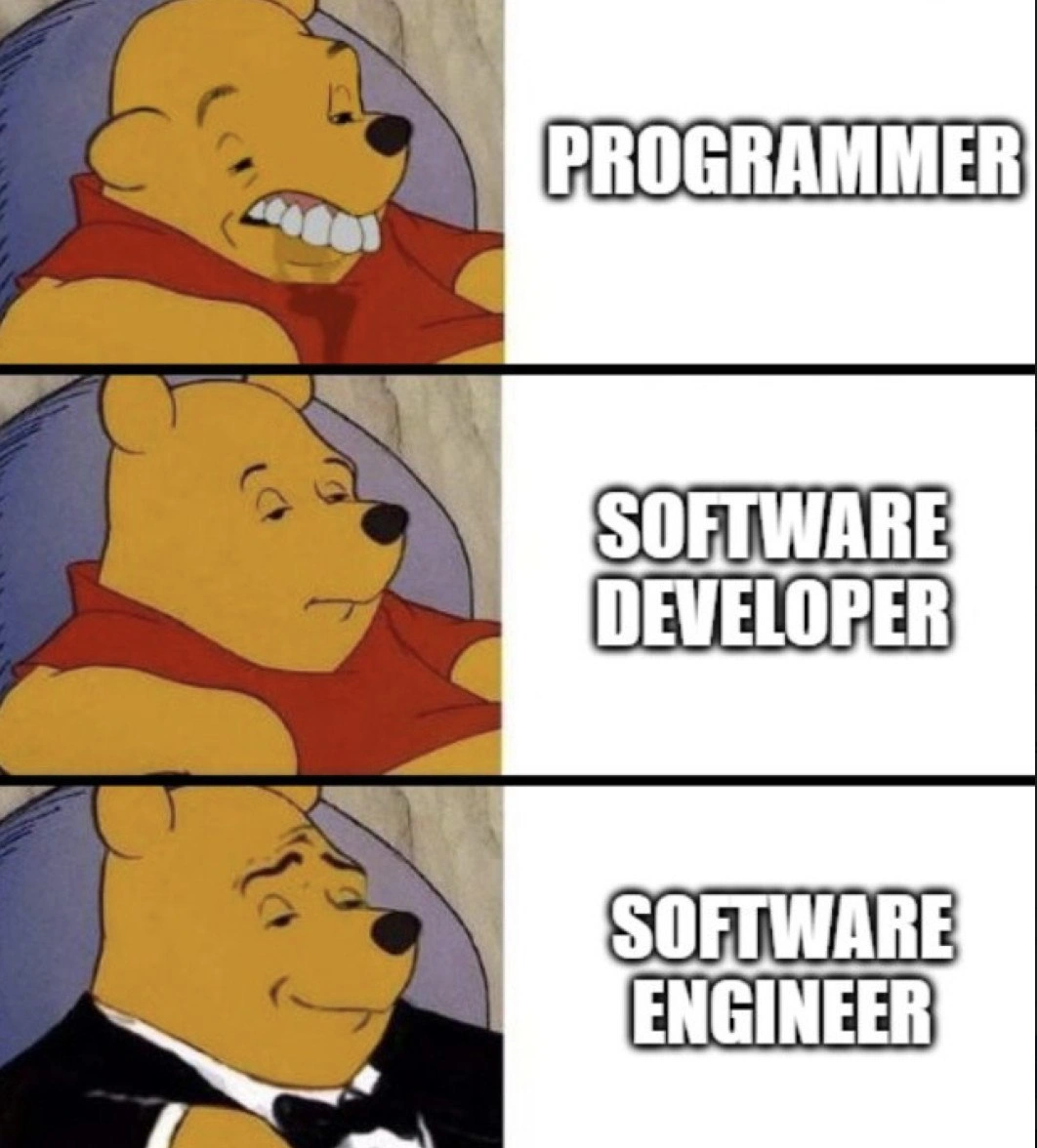
This meme likely contrasts the mindset of a junior developer with that of a senior developer. It might use a format like the 'Expanding Brain' meme or a 'Virgin vs. Chad' comparison. The junior developer might be focused on writing clever, complex code, while the senior developer prioritizes readability, maintainability, and simplicity. This reflects the hard-won experience of senior engineers, who have learned that the most valuable code is not the most complex, but the easiest to understand and change. The humor comes from the relatable journey from naive enthusiasm to pragmatic wisdom
Comments
7Comment deleted
A junior developer writes code they can understand. A senior developer writes code that a junior developer can understand
Real senior workflow: let IntelliJ eat 8 GB to index the code that just cratered prod, hot-patch it over SSH in Vim, then write the RCA in Notepad - because it’s the only part of the toolchain that never nags for an update
The senior architect who spent three days configuring their vim setup to save 0.2 seconds per keystroke just watched the intern fix production with Notepad++ and a regex they found on Stack Overflow
The real senior move? Using Vim keybindings in your bloated IDE while secretly keeping Notepad open for that one legacy config file that crashes every parser known to humanity. Because after 20 years, you've learned that the best tool is whatever lets you ship on Friday and still make your kid's soccer game - even if it's editing production YAML in Windows Notepad at 4:47 PM
IDEs for juniors chasing features; Vim for chads mastering escape; Notepad for vets who know zero deps scales forever
Editor selection by incident severity: SEV-3 - IDE with code insight; SEV-2 - Vim over SSH, muscle memory; SEV-1 - Notepad on the last Windows box that still boots
Senior take: IDE = features + cold start, Vim = 'ci{' muscle memory + dotfile tax, Notepad = zero dependencies + zero guardrails - choose your operational overhead