A throwback to Apple's colorful Bondi Blue era
Why is this Apple meme funny?
Level 1: Time Travel Desk
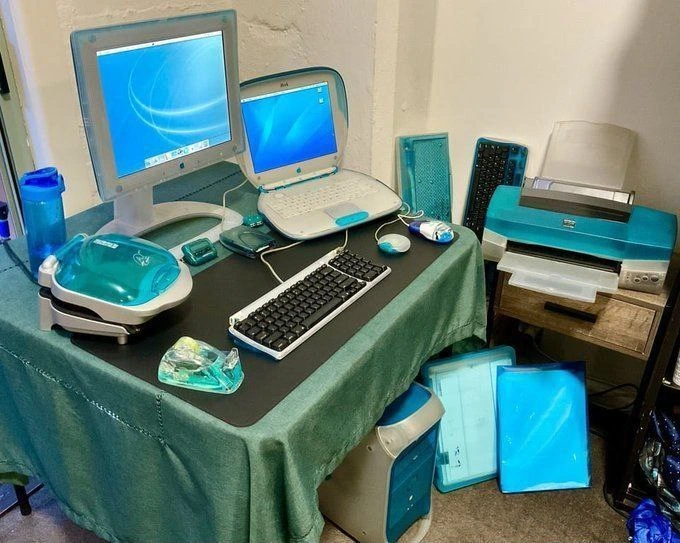
Imagine you walked into a friend’s office and it looked like a scene from 25 years ago – that’s what’s happening in this picture. Everything on the desk is old-fashioned and bright blue, as if someone took a time machine back to 1999 and bought all the coolest Apple computer stuff of that era. There’s a big, boxy computer under the table and a bulky old monitor on top that looks like a small TV (not like the slim screens we have now). The laptop is super thick and curvy, with a funky blue color; it doesn’t look anything like the thin silver laptops people use today. Even the mouse and other gadgets are the same bluish color and style. It’s almost like if your friend decided to decorate their entire desk with matching vintage toys.
Why is this funny? Well, it’s a bit like if someone showed up to do today’s work riding a horse and buggy instead of a car – it would be surprising and kind of silly. The old computer setup is very cool in a retro way (imagine a really old game console or phone that your parents might have used, but all in a shiny blue plastic case). People who have been working with computers for a long time find it funny and endearing because it reminds them of “back in the day.” It’s a warm, nostalgic feeling – kind of like hearing an old familiar song. But it’s also amusing because we know how inconvenient those old machines are compared to what we have now. It’s like trying to watch YouTube on a VCR – you just can’t, and if you tried, it would be a huge hassle! So the emotional core here is a mix of fond remembrance (aw, I remember this old computer!) and relief (glad we don’t have to use that anymore!). The desk stuck in 1999 makes us smile because it’s as if someone decorated their workspace as a perfect late-90s time capsule. It’s super cool to look at, like a piece of history, but most of us wouldn’t actually want to trade our modern tools for it. In simple terms: it’s funny because it’s like seeing a dinosaur in a world of modern pets – fascinating, nostalgic, but a little impractical for everyday life today.
Level 2: Before USB-C
What we’re looking at here is a desk filled with retro Apple products from around 1998–1999, all in a bright aqua blue color scheme known as Bondi blue. This color and style came from Apple’s late-90s design refresh – back then, Apple made its computers translucent and colorful instead of the typical gray boxes everyone else had. The big blue box under the table is a Power Mac G3 tower, which was a high-performance desktop computer for its time (it contains the main components like the processor and hard drive). The monitor on the table is a CRT Apple Studio Display – “CRT” means Cathode Ray Tube, the old type of display that is deep and heavy like a old TV, rather than the thin flat monitors we use today. On the table, that curved blue-and-white laptop is a clamshell iBook, Apple’s consumer laptop from 1999. It’s nicknamed “clamshell” because of its round, shell-like shape – if you look closely, even the handle on it makes it look a bit like a funky purse or a seashell. This iBook was made of translucent plastic too and was quite sturdy (and heavy!) compared to modern MacBooks.
All the accessories share the same blue theme. The small round mouse, often called the “hockey puck” mouse, was the USB mouse Apple included with those early iMacs and iBooks. It’s perfectly circular and matches the Bondi blue aesthetic (though many found it awkward to hold). There’s also a translucent blue peripheral that looks like an external Zip drive – a Zip drive was a device used to read special disks about the size of a thicker floppy disk but could hold 100 MB or more (which was a lot back in the late 90s). Think of a Zip disk kind of like a USB flash drive’s ancient ancestor: it let people save large files and carry them around, before cloud storage or high-capacity USB sticks existed. On the right, we see an inkjet printer with blue accents; it’s likely an old USB or possibly parallel-port printer (before wireless printing, you had to connect printers with a cable directly to your computer). Even the spare parts leaning against the wall – like extra blue panels and keyboard shells – show how everything used to come in this matching color style.
Seeing AppleProducts from this era all together is both cool and funny because it’s so different from today. For example, today’s Macs use USB-C ports (the small oval connectors) for almost everything – power, data, displays – but the gear in this photo is from the pre-USB-C days. The iBook and Power Mac G3 mainly used USB-A ports (the older, rectangular USB plugs) and other now-obsolete ports. For instance, the Power Mac G3 tower was one of the first Apple desktops to include FireWire ports (fast for the time, used for video cameras and external drives) and still had an old ADB port for keyboard/mouse on some models. If you’ve only ever used modern laptops, you might be surprised that these old machines have ports and connectors that simply don’t exist on new computers. “Dongles” weren’t really a thing yet; instead, you had entirely different cables for each job. Need to connect a monitor? That likely used a VGA cable (an old video connector) or a bulky Apple display connector. Connecting to the internet in 1999 often meant plugging in a phone line to a 56k modem and listening to those screechy dial-up sounds – Wi-Fi was just taking off, and that iBook was actually famous for being one of the first to have wireless (Apple’s AirPort) as an option.
The term legacy hardware constraints basically refers to the limitations and quirks of old equipment like this. These older computers are far less powerful than even a basic smartphone today. They have slower processors, less memory, and use older standards. For a developer, working on such a machine means dealing with an outdated operating system (likely Mac OS 8 or Mac OS 9 on these, which came before today’s macOS and even before OS X). Modern software tools (like today’s Xcode or Visual Studio Code) won’t run on those systems. In fact, a lot of software development kits (SDKs) and programming languages that current developers use simply didn’t exist or were in their infancy back then. If someone needed to maintain code for a program that runs on these old Macs, they’d have to use the tools from that era. For example, instead of Swift or modern Java, they might be writing in C or C++ using an old IDE like CodeWarrior. And if they needed new libraries or updates, there’s no modern App Store or easy internet downloads – you might end up hunting through very old websites or using CDs to install software. It’s a bit like trying to play a new video game on a 25-year-old computer; it just isn’t compatible without a lot of special effort.
For a junior developer (or anyone who started using computers in the more recent decade), this setup looks like a strange museum piece. It’s the sort of RetroComputing rig you might see on Reddit or at a tech show where enthusiasts demo vintage machines. The humor here is partly TechNostalgia – older devs remember using these exact devices and have stories (both fond and frustrating) about them. Maybe they remember how exciting it was that the iMac G3 had USB ports at all (since PCs at the time still had serial and parallel ports for peripherals), or how the iBook’s colorful design turned heads at coffee shops. At the same time, they recall the pain of trying to get these things to talk to newer equipment – imagine trying to find a charger or replacement battery for that iBook now, or opening a Photoshop file on that 333 MHz G3 processor (spoiler: it would be sloooow). For newer folks, it’s educational to see how far things have come: the LegacyHardware here was groundbreaking in its day (the Power Mac G3 was considered super fast around 1999), but compared to anything today it’s extremely limited. In short, the meme is pointing out the amusing situation of someone actually using all this obsolete (but cool-looking) gear as their workstation. It’s like saying, “Hey, imagine doing your software job with computers from when Friends was still airing new episodes.” It’s funny because it’s a little absurd by modern standards, yet not entirely impossible (some people really do keep these old systems running for specific tasks or as a hobby).
Level 3: Candy-Colored Legacy
This setup is basically a time capsule of late-90s Apple hardware – a developer’s desk turned into an exhibit of TechHistory. We see a Bondi-blue Power Mac G3 tower lurking under the table and an open clamshell iBook laptop on top, both proudly clad in Apple’s iconic translucent plastic design. There’s even a matching CRT Studio Display (a hefty glass tube monitor) glowing with a retro blue wallpaper. Every peripheral on the desk – from the hockey-puck mouse to what looks like an external Zip drive – shares that same aqua-blue translucence. It’s a full vintage Apple setup, evoking an era when Apple decided computers should be playful shades of candy colors instead of dull beige. For senior engineers, this scene triggers instant nostalgia: it’s late ’90s aesthetic overload, a flashback to when Steve Jobs had just returned to Apple and was hell-bent on proving that even serious hardware could look like a futuristic toy. And yes, Apple fans back then actually loved it – until they had to use that round mouse for more than five minutes (the ergonomics were about as bad as its fashion was good).
But beyond the cool blue exteriors lies the LegacySystems reality that makes this funny (and a little painful). Running a dev environment on these machines in 2024 is like trying to use a 20-year-old rulebook in a modern game – no modern SDKs will compile for this setup. The Power Mac G3 uses a PowerPC G3 CPU, a completely different architecture (big-endian RISC) from today’s Intel x64 or Apple M1 chips. In practical terms, that means if you have some ancient code or software that only runs on Mac OS 8/9 or early OS X, you can’t just fire up Xcode on a new MacBook and build it. Xcode (Apple’s modern IDE) flat-out refuses to target those old systems – you’d have to dust off CodeWarrior or Apple’s bygone MPW toolkit on the actual G3 to maintain that code. It’s the classic legacy hardware trap: sometimes critical software only works on obsolete machines, forcing developers to keep these relics running. Senior devs swap war stories about that one lab or factory that still has a vintage Mac in the corner because a million-dollar piece of equipment is tethered to it via some archaic SCSI cable. No one dares turn it off or upgrade it – it might be controlling the sprinkler system of Doom or the payroll from 1999. So seeing an entire Bondi-blue workstation isn’t just a fashion statement; it hints at the very real scenario of being stuck in 1999 to support some ancient but mission-critical app. It’s both hilarious and horrifying – like discovering the company’s cloud is actually a couple of these translucent boxes humming under a desk.
This meme’s humor also comes from the sheer contrast between then and now in our daily dev life. Today we have razor-thin laptops with USB-C ports and edge-to-edge LCD screens; back then we had chunky translucent machines with CRT monitors and a jungle of specialized cables. Remember, this was pre-USB-C era, even Wi-Fi was brand new – the clamshell iBook was actually one of the first consumer laptops to offer wireless networking (Apple’s original AirPort, 802.11b, a whopping 11 Mbps!). Yet here we are, looking at a desk where everything still connects via cords: the keyboard likely uses old-school USB-A (or even ADB if it were an earlier model), the printer probably needs a USB cable (forget wireless printing), and that Zip drive attaches with either USB 1.1 (painfully slow ~1 MB/s) or maybe SCSI if it’s even older. It’s a reminder that in 1999, syncing a 100 MB file to a colleague meant physically handing them a 100MB Zip disk (if you were lucky enough to avoid the infamous “click of death” that killed those disks). There’s a kind of dark humor in picturing a modern dev workflow on this desk: pushing code to GitHub over a 56k dial-up modem, or containerizing an app when the OS itself predates modern container tech. Of course, none of that is realistically happening here – you’re probably stuck using tools from the dial-up era. CI/CD on a G3? More like Commit and Imagine, because continuous integration wasn’t a thing when these were state-of-the-art. In short, this image nails a hardware humor double-punch: it’s visually funny because it’s a gorgeous, ridiculously cohesive retro theme, and it’s technically funny (or tragic) because working on such LegacyHardware would be a herculean exercise in patience, problem-solving, and scavenging for drivers on 20-year-old archive sites. The TechNostalgia is strong – any dev who survived the Y2K era can’t help but grin at the Bondi-blue glory, even as they whisper “thank goodness for progress” under their breath.
Description
A photograph showcasing a complete desktop computer setup of vintage Apple products from the late 90s/early 2000s, all featuring the iconic translucent turquoise plastic design. On a green-clothed desk, there is a large Apple Studio Display (CRT), an iBook 'Clamshell' laptop to its right, and an Apple Pro Keyboard and Mouse in front. Both screens display the classic Mac OS X Aqua wallpaper. To the left is a matching zip drive, and below the desk is a Power Macintosh G3/G4 tower. To the right of the desk is a large, color-matched printer. The entire collection, including a tape dispenser and water bottle, adheres to the same vibrant, retro aesthetic. This image is a nostalgic homage to Apple's 'Bondi Blue' design language, which revolutionized computer aesthetics under Steve Jobs. For experienced engineers, this setup represents a pivotal moment in tech history - the shift from purely functional beige boxes to design-centric hardware. It evokes memories of Mac OS 9 and the early days of OS X, a period marked by significant technological transitions like the move to PowerPC G3/G4 processors and the introduction of USB. It's a celebration of a time when hardware had a unique and playful personality
Comments
7Comment deleted
This was the peak of industrial design, right before we decided everything should be a sterile, aluminum rectangle and the only color option was 'space gray'
Somewhere in the corner of every data center there’s still a Bondi-blue Power Mac like this running the license server for a tool we phased out a decade ago - nobody dares reboot it because the last person who could recompile it left during Y2K prep
Back when we complained about vendor lock-in, at least the ecosystem matched your furniture
When your entire development environment runs on PowerPC and you're still waiting for Rosetta to translate your modern dependencies - but at least your desk has more aesthetic coherence than your microservices architecture. This is what 'backward compatibility' looked like before we had Docker containers; you just kept the entire physical machine around and called it 'vintage computing.'
When your monolith fit one desk and scaling meant another iMac, not a K8s namespace
Back when CI meant CodeWarrior on a Power Mac G3, rsync to the clamshell iBook, and centralized logging via the DeskJet - USB 1.1 throughput so low it implemented rate limiting for free
Design tokens got CI coverage - procurement rejects any device not matching --color-primary: bondi-blue; even the printer passes, our microservices still can’t agree on a schema