
Skip to content
DevMeme
5728 of 7435
The Esoteric Genius of Comparing Vim to Cursive
IDEs Editors Post #6281, on Sep 27, 2024 in TG

The Esoteric Genius of Comparing Vim to Cursive

Why is this IDEs Editors meme funny?

Level 1: When Analogies Attack

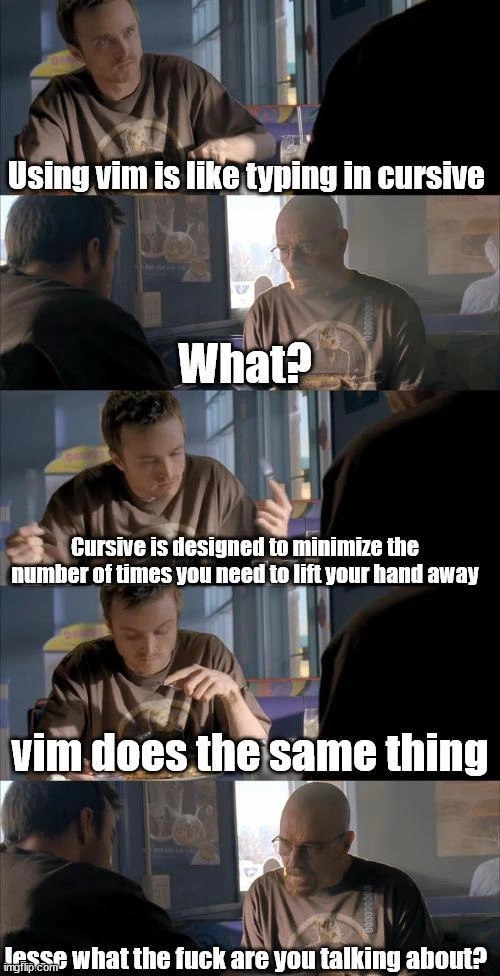
Imagine two friends sitting in a restaurant. One friend is super excited about a special way he uses his computer to write code. He says, “Using this tool is just like writing in cursive!” He’s basically bragging, “When I type, I never have to stop or pause, just like when you write cursive handwriting without lifting your pencil from the paper.” He thinks this makes him really fast and cool at typing. The other friend looks at him, completely confused, and goes, “Wait... what? That sounds ridiculous.” It’s as if the second friend is saying, “Dude, I have no idea what you’re talking about.” This mismatch is what makes it funny. We’ve got one person making a wild comparison between typing and fancy handwriting, and he’s very serious about it. Then we have his buddy just staring and basically saying the comparison makes no sense. It’s like if someone said, “I can run so fast because I tie my shoes in a special way,” and their friend is just baffled. We laugh because the first friend’s explanation is so over-the-top and nerdy that the second friend’s puzzled reaction feels totally relatable. In the end, the joke is showing how a silly analogy can turn a normal chat into a hilarious “Wait, what?!” moment between friends.

Level 2: No Hand-Lifting 101

So what’s all this about Vim and cursive, anyway? Vim is a popular text editor that runs in a terminal (the text-only command prompt environment, also known as the CLI or Command Line Interface). Unlike a typical text editor (say, the editor in VS Code or Notepad) where whatever you type just gets inserted on screen, Vim has modes. When you open a file in Vim, you usually start in Normal mode. In Normal mode, the characters you press aren’t typing letters into your document – they’re executing commands. For example, pressing dd in Normal mode will delete an entire line of text. Pressing h, j, k, or l moves the cursor left, down, up, or right (these four letters are conveniently under your right hand on the home row of the keyboard). To actually insert text, you press i (for Insert mode) which lets you type normally. When you’re done inserting text, you hit the Esc key to go back to Normal mode and continue issuing commands. This modal editing design means a skilled Vim user is constantly switching between modes to navigate and edit text without relying on arrow keys or a mouse. Essentially, you keep your fingers in one main spot and use short key sequences to get things done.

Now, think of cursive handwriting – the style where you write letters connected in a flowing manner. Why do people use cursive? One big reason: it’s faster to write because you don’t have to lift your pen off the paper for each letter. All the letters in a word are joined, so you can write in one continuous stroke until the word is done. This minimizes those little interruptions of stopping and re-positioning your pen. The meme draws an analogy to Vim, saying “typing in cursive” to evoke that same idea of never pausing your flow. When Jesse says “Cursive is designed to minimize the number of times you need to lift your hand away… Vim does the same thing,” he’s claiming that Vim lets you code without constant interruptions – you don’t lift your hands from the keyboard or break your concentration with mouse clicks. In other words, Vim’s whole philosophy is to keep you “in the zone,” just like cursive lets you keep writing fluidly. For someone familiar with Vim, this analogy clicks: fewer context switches (like moving hand to mouse or arrow keys) means more efficiency. It’s all about minimizing movement for speed and comfort.

However, if you’re not already a Vim user or you’ve never heard this kind of argument, Jesse’s comparison can sound pretty strange. Using a text editor isn’t something most people would liken to handwriting techniques! That’s exactly why Walter’s response in the meme is, essentially, “Huh, what on earth are you talking about?” It’s the reaction of someone who finds the analogy a bit over-the-top. And that contrast is where the joke lies. One character is super excited about this deep (maybe overly technical) insight into typing efficiency, and the other character represents the bewildered newcomer who’s hearing this and thinking it’s nonsense. This captures a common situation in tech: an enthusiastic pro tries to explain a niche DeveloperTool or technique with grandiose logic, and their friend (especially if they’re new or simply not as obsessed) is left scratching their head.

The choice of the Breaking Bad meme format amplifies this humor. In the images, Jesse Pinkman (on the left in a hoodie) is animated and eager as he gives his explanation, while Walter White (on the right, bald with glasses) looks increasingly confused and frustrated. Memes using these two characters often play on Jesse enthusiastically saying something odd or naive, and Walter responding with disbelief or exasperation. In this case, Jesse’s lines about Vim and cursive appear in bold white text over the earlier panels, and Walter’s infamous line “Jesse, what the f** are you talking about?”* captions the final panel. This line is a popular quote from the show turned into a meme, widely used whenever someone says something that just doesn’t make sense to the listener. The whole setup is instantly recognizable to meme-savvy developers: it signals that Jesse’s statement is kind of crazy or off-the-wall, and Walter (like the audience) is having the classic “did you really just say that?” reaction. It’s a perfect comedic device to highlight the editor efficiency debate here – one person taking it super seriously, and another person effectively bringing them back down to earth with a blunt reality check.

In simpler terms, the meme is pointing out how passionate tech folks can get about tools like text editors. DeveloperCulture has plenty of these tongue-in-cheek fights: whether it’s Vim versus a big IDE, or dark mode vs light mode, people love to champion their favorite setups. Here a Vim fan is so proud of his keyboard-driven workflow that he’s comparing it to a totally different domain (handwriting) to prove how elegant and efficient it is. It’s a form of nerdy bragging – “look, I’ve optimized my workflow to the max, down to how often I lift my fingers!” And it is true that Vim experts can do a lot with just a few keypresses. But to an outside observer, especially a newer developer, this can sound as puzzling as somebody saying they type in magic runes. 😄 The meme gets its laugh by exaggerating that disconnect. We’re essentially laughing along with Walter. Even if we do understand Jesse’s point (heck, maybe we agree Vim is great), we also recognize how overzealous and ridiculous such arguments can appear. It’s a lighthearted jab at the sometimes over-the-top analogies tech folks use to justify their favorite tools, perfectly packaged in a scene of two characters at a diner having the most outlandish conversation about writing code like one writes fancy cursive script.

Level 3: The Cursive Code Conundrum

At first glance, this meme dives into a niche of developer culture: a fervent Vim user making a lofty comparison between coding and cursive handwriting. The claim “Using vim is like typing in cursive” is an almost poetic way to justify modal editing efficiency. It riffs on the idea that cursive writing was designed to minimize lifting your pen from the paper, thus speeding up writing. In Vim’s world, the equivalent is minimizing how often you move your hands away from the keyboard’s home row or switch modes. Seasoned devs recognize this as a classic efficiency argument in the EditorWars: Vim enthusiasts often pride themselves on doing everything via keyboard with minimal fuss. The humor here is that Jesse (the character speaking) is dead-serious about a metaphor that’s both clever and absurd, while Walt (the other character) is utterly baffled – a dynamic any experienced programmer recognizes when someone takes tool evangelism a bit too far.

For those deep in developer culture, there’s a knowing grin to be had: we’ve all seen colleagues defend their favorite editor or IDE with almost evangelical passion. Vim versus Emacs, CLI versus GUI, tabs versus spaces – these debates are practically a rite of passage in programming circles. Here, the meme satirizes the efficiency obsession of some power-users. Vim’s modal editing lets you perform edits and navigate text without frequent context switches (for example, pressing j in normal mode to move down a line instead of reaching for arrow keys or a mouse). This is genuinely a productivity boost for experts – shaving off tiny delays every time you avoid lifting your hand. Over hours of coding, those microseconds can add up (or so Vim fans claim). It’s the same logic as cursive: fewer breaks in flow, more speed. The conundrum is whether this really matters for most people, or if it’s more of a nerdy point of pride. Experienced devs chuckle because they’ve seen how passionate arguments over such micro-optimizations can become surprisingly heated. There’s an element of truth wrapped in hyperbole – the best kind of inside joke.

The use of the Breaking Bad diner scene format cranks the relatability up another notch. Jesse Pinkman is portrayed as the over-enthusiastic junior dev (or that one coworker) excitedly sharing his brilliant insight about Vim’s efficiency. Walter White, on the other hand, embodies the senior engineer or the pragmatist who’s heard one too many grandiose analogies. His response – “Jesse, what the f**k are you talking about?” – is an iconic line template from the show, repurposed here as the perfect punchline. In context, it’s exactly how a team lead might react during a code review if someone started comparing their coding style to 18th-century penmanship. The meme’s punchline capitalizes on Walter’s exasperation to mirror our own reaction: a mix of amusement and disbelief. After all, comparing a modern text editor to cursive handwriting is hilariously out-of-left-field. The sun-lit diner setting and serious faces just make the absurd dialogue even funnier – it’s a mundane environment for such a dramatic declaration.

What makes this especially funny to veteran developers is the grain of truth that’s been stretched to comic effect. Yes, avoiding unnecessary hand movements (like not leaving the keyboard for a mouse, or not drifting off the home keys) is a real productivity technique. The famous editor vi (Vim’s precursor, born in the 1970s) was crafted in an era of slow terminals and no mice, where efficient commands were gold. Cursive writing, similarly, was emphasized when writing speed mattered for, say, taking lots of notes or writing letters. But in today’s world, the practical difference of these optimizations can be tiny – often overshadowed by higher-level factors like code design or, frankly, how fast you can think. The meme playfully pokes fun at how devs sometimes fixate on these low-level efficiencies. It’s a gentle roast of the Vim devotee who can’t resist a grand analogy to justify their years of honing arcane keyboard shortcuts. For those in the know, it’s both an affectionate nod to DeveloperExperience geekery and a reminder not to take ourselves too seriously when we start likening text editing to calligraphy practice.

Description

A five-panel meme using the 'Jesse what the fuck are you talking about?' format from the TV show Breaking Bad. The scene depicts Jesse Pinkman earnestly explaining a concept to a confused and frustrated Walter White. In the first panel, Jesse states, 'Using vim is like typing in cursive'. Walter reacts with a simple 'What?' in the second panel. In the third and fourth panels, Jesse elaborates on his analogy: 'Cursive is designed to minimize the number of times you need to lift your hand away' and 'vim does the same thing'. The final panel delivers the punchline with Walter's exasperated reply, 'Jesse what the fuck are you talking about?'. The meme brilliantly captures the experience of trying to explain the ergonomic and efficiency benefits of Vim to someone unfamiliar with its modal, keyboard-centric philosophy. Just as cursive minimizes lifting a pen, Vim is designed to keep a developer's hands on the home row, avoiding the mouse. The analogy is surprisingly apt but sounds absurd on the surface, making Walter's reaction perfect for developers who've been on either side of this conversation


Comments

11
Anonymous ★ Top Pick Explaining Vim's efficiency is like explaining recursion. You start with a simple, elegant idea, and by the end, everyone is just confused and angry, and you're the only one who thinks it makes perfect sense
  1. Anonymous ★ Top Pick

    Explaining Vim's efficiency is like explaining recursion. You start with a simple, elegant idea, and by the end, everyone is just confused and angry, and you're the only one who thinks it makes perfect sense

  2. Anonymous

    The real tragedy is that after twenty years we still argue cursive vs. Vim instead of teaching teams how to exit Nano

  3. Anonymous

    The real efficiency gain from vim isn't the modal editing - it's the hours saved not having to explain to your PM why you spent three sprints configuring your .vimrc instead of shipping features

  4. Anonymous

    This perfectly captures the vim user's dilemma: you can explain modal editing, hjkl navigation, and staying on the home row until you're blue in the face, but to anyone who hasn't spent 6 months building muscle memory just to exit the damn thing, it sounds like you're defending writing in hieroglyphics because 'it's more efficient once you learn 3,000 characters.' Meanwhile, VSCode users are shipping features while you're still explaining why :wq is intuitive

  5. Anonymous

    Vim and cursive: both fluid mastery until a single backspace demands ritualistic penance

  6. Anonymous

    Vim is basically a KLM-optimized editor: every mouse click is a page fault and every macro is a write-ahead log for your fingers

  7. Anonymous

    Vim is KLM-optimized editing - operator+motion as Huffman codes that kill homing - until you SSH into prod and Esc adds 250ms, so your ci( decompresses straight into regret

  8. @the_doom_guy 1y

    Don't care + didn't ask + esc + Ctrl + : + q

    1. @pixelsex 1y

      ZZ should be enough

  9. @Sp1cyP3pp3r 1y

    someone pls send that pic with programming in cursive

  10. @ZgGPuo8dZef58K6hxxGVj3Z2 1y

    HAHAHHAHAHAHHAHAHAHAHHAHA

Use J and K for navigation
