Skip to content
DevMeme
4498 of 7435
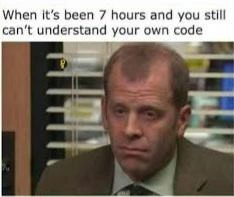
Seven-hour code comprehension spiral visualized with a bewildered office reaction
CodeQuality Post #4936, on Oct 14, 2022 in TG

Seven-hour code comprehension spiral visualized with a bewildered office reaction

Why is this CodeQuality meme funny?

Level 1: Lost in Your Own Maze

Imagine you drew a really confusing maze for your friends to solve, with twists and turns all over the page. But when you look at it the next day, even you can’t find the way out of your own maze. You trace one path, then another, and you just keep getting lost. You spend the whole afternoon trying to understand this maze that you yourself designed, and it’s super frustrating. You’re thinking, “Wait, I made this... why don’t I get it anymore?” In the end, you’re left scratching your head, totally bewildered by your own puzzle.

That’s exactly what’s happening in this meme. The “maze” is the complicated code the programmer wrote. It was their own creation, but it became so overcomplicated and messy that now even the creator can’t figure it out without a ton of effort. The picture of the confused man in the office is like the programmer after hours of trying – he looks as lost as someone stuck in a maze with no exit. It’s funny in a simple way: we usually expect that if you build something or make up a game, you know all the tricks to it. But here the programmer is just as lost as anyone else would be. It’s a reminder that sometimes we make things harder than they need to be, and then even we can’t handle them! So, the meme makes us laugh and think, “Oh no, I hope I never make a mistake like drawing a maze (or writing code) so confusing that even I can’t understand it later.”

Level 2: What Did I Write?

This meme highlights a classic programming oopsie: writing code that is so confusing that even you, the original author, can’t understand it later. The top text says, “When it’s been 7 hours and you still can’t understand your own code,” and below it is a picture of a man in an office cubicle looking completely bewildered and exhausted. In simpler terms, the developer has spent an entire workday trying to figure out what their own code is doing, and they’re still lost. That’s both funny and sad to any programmer! It’s funny because you’d expect that if anyone could understand the code, it would be the person who wrote it. But here the opposite is true – even the creator is stumped. And it’s a bit sad (in a relatable way) because it shows something is really wrong with that code’s readability.

CodeQuality is the key idea here. Good code quality means the code is organized and clear enough that another developer (or your future self) can read it like a story and follow what’s happening. If code quality is poor, the code might technically work, but understanding or changing it becomes a nightmare. When the meme mentions 7 hours of confusion, that’s a tongue-in-cheek way to say the code is a mess. Imagine opening a file you wrote and it feels like it’s written in a foreign language – you keep reading it over and over, tracing through it, and nothing clicks. This often happens when code has CodeSmells, which are signs of bad design or practices. For example, a code smell could be a super long function that does 10 different things, or variable names that are meaningless (like a, foo, thing) so you can’t tell what they represent. If you’ve ever come back to an old school essay you wrote and couldn’t follow your own argument because it was poorly written, it’s the same vibe here with code.

Now, why would someone’s own code be so hard to read? One big reason is technical debt. This is a software term but it’s easy to understand: say you had to get something done quickly in your code, so you took shortcuts – you wrote it in a rushed, sloppy way just to make it work. That’s like borrowing time from the future. It’s called “debt” because later you have to pay that time back, usually with interest. In our meme scenario, the developer is paying that interest by spending seven painful hours deciphering the quick-and-dirty code they wrote earlier. In hindsight, if they had spent a bit more time writing it cleanly or documenting it, they wouldn’t be suffering now. But in the moment (maybe due to a deadline or laziness), they created a need_for_refactor – meaning the code now badly needs to be cleaned up and improved.

Debugging is the process this person is stuck in. Debugging typically means finding and fixing errors or understanding why something isn’t working. It often involves going through code line by line, maybe printing out values or using a debugger tool to see what’s happening. Usually, when you debug your own code shortly after writing it, you have a mental map of how it’s supposed to work. But if the code is overly complex or if a lot of time has passed, that mental map fades. It’s even worse if the code wasn’t self-documenting (clear from the code itself) and had no external documentation. The meme exaggerates it to 7 hours, which hints that the code is truly confusing. In a well-lit scenario, understanding a piece of code you wrote should maybe take minutes or a few readings, not an entire day. The fact it’s taking so long is a comedic way to say “this code is unbelievably convoluted.”

Often, developers have trouble reading legacy code, which means old code written by someone else (or even by themselves long ago) that has been running for years. Legacy code is notorious for being tricky because it might use outdated practices or no one remembers how it works. In this meme, the twist is that the “legacy” code in question might be just a few months old and written by the same person – yet it feels ancient and cryptic because of how poorly it’s written. The developer is basically treating their own past code like a mystery to be solved. There’s a running joke in programming: “I hate reading other people’s code, and that includes the code I wrote myself.” This meme is a perfect illustration of that joke.

Let’s look at a tiny example of what confusing code might be like, to understand why it’s hard to read. Imagine we have the following function:

// Example of hard-to-read code:
function mystery(a, data) {
  let x = 0;
  for (let i = 0; i < a; i++) {
    x += data[i % data.length] || special(i);  // 'special' is some function defined elsewhere (not obvious here)
    if (x > 1000) break;                       // Why 1000? (magic number with no explanation)
  }
  if (x == 977) return secret;                 // 'secret' is probably a global variable not shown here
  return x;
}

Even without knowing JavaScript deeply, you can feel the confusion: What does mystery do exactly? It loops i from 0 to a, and for each i it does something with x and data. There’s a call to a special(i) function – but we don’t see special defined here, so we have no clue what it does or why we need it. There’s a check if (x > 1000) break; – breaking out of the loop if x gets larger than 1000, but why 1000? That number 1000 is a magic number: a number that appears with no context or explanation. Maybe 1000 is some kind of threshold, but the code doesn’t say what it means, so it’s just an arbitrary value to anyone reading. Then, if x == 977 the function returns secret – but secret isn’t defined here either! Perhaps secret is a global variable or something set elsewhere, but again, from this snippet alone you can’t tell. Finally it returns x if that special case didn’t trigger.

Now, if you wrote this function quickly and then came back a month later, you might be just as puzzled as we are now. You’d be asking yourself: “What is this supposed to calculate? Why 1000? What is this special function? Did I define secret somewhere else?” It’s a prime example of a code_legibility_nightmare. The code works (let’s assume it runs), but it’s not obvious how or why it works, making it really hard to modify or debug. This is where refactoring comes in. Refactoring means improving the internal structure of the code without changing its external behavior. If we refactored this mystery function, we’d do things like: give it a more descriptive name (what mystery is it solving?), rename x to something like sum or total if that’s what it is, avoid using a mysterious constant like 1000 (or at least define a constant with a name, e.g. MAX_POINTS = 1000 and then use if (x > MAX_POINTS) which is self-explanatory), and definitely clarify what secret is or eliminate that hidden dependency. We might also add a comment like // stop if total exceeds a safe limit to explain the break, if it’s not obvious. By cleaning up in this way, we ensure that future us (or any other coder) can understand the code in a glance, instead of having to play detective for hours.

The setting of the meme – an office with a tired-looking man – reinforces the feeling. That image is actually from the show The Office, and the character’s blank, defeated expression is a perfect visual for “I’ve been debugging all day and my brain is fried.” In a real-world scenario, by the time you hit hour 7 of trying to debug something, you’ve probably drunk a lot of coffee, scribbled notes everywhere, maybe even started talking to your rubber duck (a common debugging trick is to explain your code out loud to a rubber duck or an inanimate object). Yet, nothing is making it click. The longer you stare, the more your face starts to look like that dude in the meme – completely zoned out and confused_office_reaction achieved. The humor here is that we’ve all been that person at some point, and it’s usually our own fault for writing code that wasn’t as clear as it could have been. It’s a gentle poke encouraging developers (especially newcomers) to write cleaner code. Because if you don’t, you will eventually be that exhausted person squinting at your own functions wondering, “Huh? What did I even mean by this?”

In summary, this meme is saying: write code that you can still understand later! It highlights the importance of clear coding practices. For a new developer, the lesson is that you should use meaningful variable names, break down complicated tasks into smaller functions, and comment your code where necessary. Otherwise, you might gain some “fun” experience in spending a day debugging something you yourself wrote – which is not exactly the most productive or enjoyable way to spend your time. The meme turns that scenario into a joke we can all laugh at, because hey, if you don’t laugh, you might cry. After all, nothing is more facepalm-worthy than being defeated by your own creation.

Level 3: Spaghetti Code Hangover

When a developer stares blankly at the screen after 7 hours of code spelunking, you know the technical debt chickens have come home to roost. The meme’s top caption – “When it’s been 7 hours and you still can’t understand your own code” – is basically a senior engineer's horror story. The bottom image (a weary office guy with a thousand-yard stare, a la The Office) captures that exact DebuggingFrustration: the dev has hit a wall of confusion and fatigue. Why is it funny? Because it’s painfully relatable. Every experienced coder has encountered a piece of code so convoluted that even the original author (you!) is utterly baffled by it later. It’s the facepalm realization that your LegacyCode isn’t some ancient module from a retired coworker – it’s the function you wrote last month under pressure. The humor comes from that cruel irony: we expect to struggle with mysterious legacy systems or other people’s bizarre hacks, not our own code. Yet here we are, with the developer wearing the same drained expression as Toby Flenderson in HR, silently asking, “Who wrote this garbage?” only to find out the call is coming from inside the house.

Technically, this scenario screams CodeQuality issues and CodeSmells that have been left to fester. If seven hours of reading still isn’t enough to decipher the logic, you’ve got a serious code_legibility_nightmare on your hands. It’s likely a big ball of spaghetti code – tightly coupled functions, tangled control flow, and variables named x, y, and temp that tell you nothing. Picture a function with so many nested if/else blocks and loops that its cyclomatic complexity is off the charts. Each additional branch multiplies the mental paths you have to consider, leading to a combinatorial explosion in your brain. No wonder your thoughts hit a stack overflow of cognitive load after hours of this. The developer’s bewildered look is basically the result of a one-person code debugging_marathon through a maze of unclear logic. It’s a spaghetti code hangover – you’re suffering now for all those shortcuts and clever tricks you pulled when writing the code.

Let’s peel back why this happens. Often it starts innocently: maybe you wrote that module at 2 AM during a crunch or slapped together a quick fix to meet a deadline, promising yourself you’d “clean it up later.” Fast-forward and “later” has arrived with a vengeance. That half-baked solution has turned into your self_readability_issues nightmare. In software engineering, we talk about technical debt – the idea that doing things the quick-and-dirty way (like writing confusing, undocumented code) is like taking on debt. You save time upfront, but you’ll pay interest on it eventually. Here, interest is due: the seven_hour_debugging_session is you paying back time because past-you skipped the refactoring and documentation. It’s dark comedy: the code worked then, so nobody (especially management) complained; but now when something needs changing or a bug appears, you’re the poor soul stuck deciphering hieroglyphics that past you left behind. It’s like debugging a stranger’s code, except the stranger is you from six months ago with a different brain state.

Seasoned devs will nod at a few classic culprits showcased by this meme:

  • Poor naming and no docs: Functions called doThing() or variables named data and result1 – no semantic clues. No comments to explain the weird math in line 50. Future you is left scratching your head, muttering “What did I write here?”.
  • Massive functions and complexity: One function does way too much – reading this one piece is like reading an entire module. Deeply nested logic, edge cases jammed in with if flags all over. It’s a refactor_needed red flag: the code needs to be broken into simpler pieces.
  • Magic numbers and hidden constants: Suddenly there’s a 42 or 1000 in the code with zero explanation. Why 1000? Why 42? Without a comment or a named constant, you have no idea if those are limits, thresholds, or just arbitrary. Every magic number is an invitation to stare at the ceiling in confusion.
  • Silent fixes and hacks: Perhaps there’s a try/catch swallowing errors with no log, or a mysterious // TODO: workaround for now comment left unresolved. These kind of tactical bandaids make the logic murky. When it breaks later, you have no context and spend hours rediscovering why that hack was there.
  • Lack of tests: No unit tests to document expected behavior. So the only way to know what the code should do is to reverse-engineer it mentally or run it and see what happens. It’s like a black box – you feed it input and pray.

All these issues contribute to a code complexity beast that even the original creator struggles to slay. The meme exaggerates it for comic effect, but it’s rooted in truth. You can almost hear the internal monologue of the developer in the image: “I swear I used to know what this does… Why in the world did I write it this way?!” followed by that sinking feeling when git blame points right back at your own username. It’s a humbling moment. As a result, the poor dev’s day is shot – they’ve been sucked into a deep debugging spiral, trying to reconstruct their own thought process from months ago. That blank, exhausted face in the photo says it all: this is the cost of bad CodeQuality, paid in stress and lost time.

For senior engineers, the laugh comes with a wince. We’ve learned (the hard way) that RefactoringNeeded is not just a suggestion – it’s critical. The meme is essentially a cautionary tale wrapped in humor: if you write messy code, be prepared to be the confused person decoding it later. It underscores the importance of writing clean code (clear, simple, well-named, well-documented code) from the start. Otherwise, you’ll be gazing into your own code abyss thinking, “I have met the enemy, and it is me,” just like our unfortunate friend in the picture. It’s funny because it’s true – and every experienced dev who chuckles at this meme is probably also mentally vowing, “Alright, time to go add some comments and unit tests before this happens to me… again.”

Description

The meme has a classic two-panel layout. In a white banner at the top, bold black text reads: “When it’s been 7 hours and you still can’t understand your own code”. Below the caption is a screenshot from a television office setting showing a suited man (face blurred) staring blankly ahead, framed by venetian-blind windows and beige cubicle walls, conveying deep confusion and fatigue. The image humorously captures a developer’s despair after spending an entire workday trying to decipher their own poorly documented, convoluted logic. Technically, it highlights issues of code readability, hidden complexity, and the mounting technical debt that forces engineers into marathon debugging sessions

Comments

6
Anonymous ★ Top Pick Seven hours in and I’ve concluded my 2019 self invented a new pattern: the Schrödinger Singleton - simultaneously global and duplicated until observed in prod
  1. Anonymous ★ Top Pick

    Seven hours in and I’ve concluded my 2019 self invented a new pattern: the Schrödinger Singleton - simultaneously global and duplicated until observed in prod

  2. Anonymous

    The code was so clean it passed every linter, had 100% test coverage, and still managed to implement the Observer pattern using event emitters nested inside promises wrapped in a factory that returns a singleton - past me was apparently architecting for job security

  3. Anonymous

    After 7 hours of debugging, you realize the real O(n²) complexity was the mental gymnastics you performed trying to understand why past-you thought a variable named 'temp2_final_ACTUAL' was self-documenting. At this point, you're not refactoring code - you're performing archaeological excavation on your own commit history, wondering if the author was having a stroke or if you've simply forgotten the entire context that made this nested ternary operator seem like a good idea at 2 AM

  4. Anonymous

    7 hours in, git blame confirms I wrote it - Temporal Coupling, implicit invariants, and a hard dependency on my 3am caffeine budget

  5. Anonymous

    The senior dev's rite: git blame circles back to 'Past You,' the architect who optimized for clever over comprehensible

  6. Anonymous

    Seven hours in, I realized the real bug was using “cleverness” as a compression algorithm - great space savings on comments, catastrophic decompression time

Use J and K for navigation