Skip to content
DevMeme
3003 of 7435
New TypeScript Devs Discovering the 'any' Type
Languages Post #3317, on Jun 23, 2021 in TG

New TypeScript Devs Discovering the 'any' Type

Why is this Languages meme funny?

Level 1: Unbuckled Seatbelt

Imagine someone in a car who just drapes the seatbelt over their shoulder without actually clicking it in. They then say, “Look, I have my seatbelt on – I’m safe!” Clearly, they missed the whole point: the seatbelt isn’t buckled, so it’s not protecting them at all. This meme is joking about a similar idea in programming. A new coder is using TypeScript (which is supposed to be a safety feature to catch mistakes), but they set everything to any – basically turning that safety off. They’re proudly thinking, “I’m using the new safety tool, so I must be safe, right?” But everyone else can see the truth, just like with the unbuckled seatbelt: it’s not actually doing anything. It’s funny and a bit silly because the person thinks they’re being extra safe, when in reality they aren’t safe at all.

Level 2: Any Means Anything

Let’s break down the joke in simpler terms. TypeScript is a programming language built on JavaScript that adds the idea of static typing. That means you can declare what type of data a variable should hold (for example, number, string, etc.), and the TypeScript compiler (the tool that checks your code and then converts it to JavaScript) will make sure you’re using those variables correctly. This gives you type safety – the compiler catches many mistakes (like mixing up types) before you even run your code. For instance, if you said a variable is a number and later try to treat it as a string, TypeScript will throw an error during compile time. This is great for code quality because it prevents a lot of bugs early on.

Now, what is any? In TypeScript, any is a special type that basically means “whatever – it can be anything.” If you give a variable the type any, you’re telling TypeScript not to enforce any checks on it. It’s like saying, “Don’t worry about what type this is; I’ll handle it.” This makes that variable work a lot like a normal JavaScript variable, which can change type freely without complaints. Here’s a quick comparison to illustrate the difference between using any and using a specific type in TypeScript:

// Using 'any': no compile-time type checking
let flexible: any = "Hello";
flexible = 42;                      // No error: 'flexible' can be a string, then a number... whatever!
console.log(flexible.toUpperCase()); // No error from TypeScript, but ⚠️ this will crash at runtime if flexible is not a string

// Using a specific type (string):
let greeting: string = "Hello";
greeting = 42;  // ❌ Compile error: Type 'number' is not assignable to type 'string'

In the first part, we declared flexible as any. TypeScript then allowed us to assign a string, then a number to it. It even let us call toUpperCase() on flexible without complaint. (Calling toUpperCase() makes sense if flexible were still a string, but here it’s actually the number 42 at runtime – something that would cause a crash. TypeScript didn’t warn us, because flexible was any and “anything goes”.) In the second part, we declared greeting as a string. When we tried to assign a number to greeting, TypeScript immediately gave an error. This is TypeScript catching a mistake – you said greeting should always be a string, and the compiler is enforcing that rule. This example shows how any basically turns off the rules, whereas a real type (like string) keeps you safe by preventing wrong assignments.

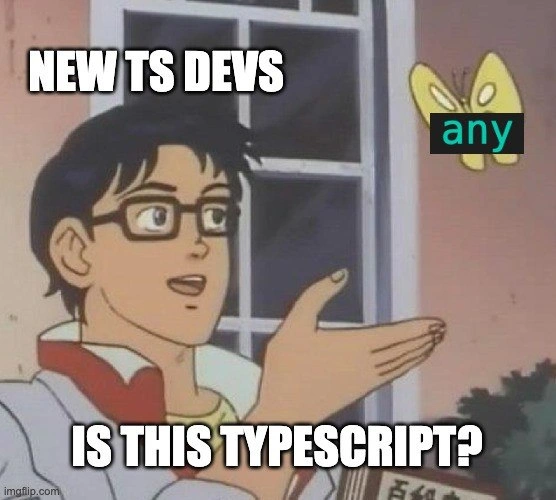
Now, back to the meme: The new TypeScript developer in the picture is using any everywhere, like our first example. The text “NEW TS DEVS” and the butterfly labeled “any” with the question “Is this TypeScript?” perfectly captures a common newbie misunderstanding. The dev sees that by using any, all those frustrating compiler errors disappear, and their code runs. They think, “Great, I’m writing in TypeScript now because it compiles!” But the joke is that, although the file says .ts, they aren’t getting the real benefits of TypeScript at all. It’s technically TypeScript, but with all the safety nets taken away.

For many beginners (especially those coming from a pure JavaScript background), strict type rules feel new and sometimes cumbersome. It’s tempting to use any as a quick fix whenever the compiler yells about a type mismatch. In the short term, this makes the error messages go away and the code compile. But in the long run, it can lead to the same problems JavaScript has – hidden bugs due to unexpected types. It’s a bit like turning off an alarm because the noise is annoying, even though the alarm was there to protect you. The meme highlights this learning-phase mistake in a funny way. New TypeScript devs ask “Is this TypeScript?” while holding up the any type, and experienced devs smile because the answer is: “Well, kind of... but not really!” The lesson for a junior developer is: using TypeScript effectively means actually specifying and respecting types. If you just make everything any, you’re back to square one (normal JavaScript) and missing out on the tool’s real power. Over time, as you learn, you start avoiding any unless absolutely necessary, and that’s when you’re truly “doing TypeScript right.” 😄

Level 3: Type Safety Mirage

Seasoned TypeScript developers often chuckle (or sigh) at this meme because it hits on a very real scenario. In the classic “Is this a pigeon?” anime scene, our eager newbie (labeled "NEW TS DEVS") is pointing at the any type and sincerely asking, “Is this TypeScript?” The humor comes from the irony: using any is essentially opting out of static typing entirely, making your code as loosely typed as plain JavaScript. It creates a type safety mirage – the code carries a .ts extension and passes the compiler, but it isn’t benefiting from TypeScript’s main perk: catching type errors at compile time.

Under the hood, any is a special top type in TypeScript’s type system. Think of it as a wildcard that says “I can be anything.” You can assign a string to it, then a number, or call any method on it – the TypeScript compiler won’t object. This is an intentional escape hatch for flexibility (for example, when migrating a large JavaScript codebase to TypeScript, any can fill in gaps where types are unknown). However, new devs often misuse it as a crutch: whenever the compiler complains “Type X is not assignable to Type Y,” the quick fix is to slap : any on that variable. Problem solved, right? Not really. They’ve basically told the compiler to ignore type mistakes, defeating the purpose of TypeScript in the first place.

Experienced engineers recognize this immediately as a common beginner mistake – a classic case of type safety confusion. The meme exaggerates that confusion: the newcomer genuinely believes using any everywhere means they're writing “proper” TypeScript. From a code quality standpoint, excessive any usage is often dubbed TypeScript in name only because it strips away the benefits of the language. It’s like painting over warning signs: the code compiles without errors, but you’ve lost all the safety warnings. If everything is typed as any, the compiler stops helping you catch bugs. A grumpy senior dev might quip, “If you’re going to use any for every variable, you might as well be writing plain JavaScript!” In other words, code full of any is basically JavaScript with extra steps – you run it through the TypeScript compiler, but you won’t get any of the usual guarantees.

This scenario is painfully relatable in the dev community – hence its popularity in developer humor circles. It pokes fun at the learning curve of TypeScript. Teams and mentors try to steer juniors away from this habit by enabling strict compiler settings (like noImplicitAny or the broader strict mode in tsconfig.json) which make it harder to accidentally use any. Newer TypeScript versions even introduced the unknown type as a safer alternative to any (you must check an unknown value’s type before using it, which keeps the safety intact). Seasoned devs know that mastering TypeScript means embracing its rich type system – using interfaces, union types, generics, etc. – rather than bypassing it. That’s why this meme strikes a chord: it’s a lighthearted reminder of the “awkward beginner phase” in learning TypeScript. We laugh because many of us have been that person asking “Is this TypeScript?” while unknowingly turning off the very feature that makes TypeScript so powerful. It’s funny, a tad cringe, but ultimately comforting – we all learn and grow past the any-everything stage!

Description

This image uses the popular 'Is this a pigeon?' meme format, taken from a scene in the anime series 'The Brave Fighter of Sun Fighbird'. It features the main character, an android, looking at a butterfly with a curious and naive expression. In this meme, the character is labeled 'NEW TS DEVS'. The yellow butterfly is labeled with the TypeScript keyword 'any'. The caption at the bottom of the image reads, 'IS THIS TYPESCRIPT?'. The meme humorously criticizes a common pitfall for developers new to TypeScript: overusing the 'any' type. The 'any' type is a powerful escape hatch that opts out of type-checking, effectively reverting a variable back to plain, dynamically-typed JavaScript. For experienced developers, this meme is a relatable jab at how newcomers often use 'any' as a crutch, thereby defeating the entire purpose of adopting TypeScript, which is to enforce type safety and improve code quality
Comments

21
Anonymous ★ Top Pick Using `any` in TypeScript is the grown-up developer equivalent of hiding your vegetables under the mashed potatoes. It feels like you're getting away with something, but you're only cheating your future self
  1. Anonymous ★ Top Pick

    Using `any` in TypeScript is the grown-up developer equivalent of hiding your vegetables under the mashed potatoes. It feels like you're getting away with something, but you're only cheating your future self

  2. Anonymous

    Annotating every variable with `any` and bragging about your TypeScript migration is the same energy as shipping Kubernetes YAML that just runs the monolith container

  3. Anonymous

    After 15 years of fighting production fires, I've seen this exact scenario play out: junior dev discovers TypeScript, sprinkles 'any' everywhere like syntactic sugar, then proudly announces they've 'migrated to TypeScript' - meanwhile the codebase has all the type safety of a JavaScript file with extra steps and a false sense of security

  4. Anonymous

    Ah yes, the 'any' type - TypeScript's official 'I give up' button. It's the equivalent of migrating from JavaScript to TypeScript by adding '.ts' to your filenames and calling it a day. Senior engineers know that liberal use of 'any' is just JavaScript with extra steps and a false sense of type safety. The real TypeScript journey begins when you realize 'any' is not a feature, it's a code smell - a temporary crutch that should trigger the same alarm bells as seeing 'TODO: fix this later' in production code from 2019

  5. Anonymous

    "any" is TypeScript’s panic button - press it enough and you’re just paying a compile-time tax for runtime bugs

  6. Anonymous

    In every JS→TS migration, “strict: true” survives until the first SLA breach - then comes noImplicitAny=false and a 2k‑line PR titled “unblock build.”

  7. Anonymous

    'any' in TypeScript: the escape hatch that turns type safety into a polite suggestion

  8. @pokadexr 5y

    yes

  9. @Kurikania 5y

    I was assigned to react +ts project and I hate it. I used to work with vue + js Maybe I should study more to understand what's the point.

    1. @romash1408 5y

      the point is when you get error on compile time instead of messages from users about not working production

      1. @Kurikania 5y

        I know it's cool and it's a step forward in dev, I just can't feel it yet.

  10. @yrurunnin 5y

    unknown > any change my mind

  11. @VolodymyrMeInyk 5y

    yes and no

  12. @clockware 5y

    I liked TS more when it was free from Node.js ecosystem

    1. @azizhakberdiev 5y

      maybe ts turned into node module because it is more comfortable to install it

  13. @clockware 5y

    Back in... 2015? I guess

  14. @clockware 5y

    You could just tsc.exe and nobody was shoving Node.js in your face

    1. @p4vook 5y

      what? that time should had been great

  15. @scout_ca11sign 5y

    transport?: Car | Bus | Horse | Cat | any ;

  16. @scout_ca11sign 5y

    lmao just look up React ts declarations

  17. @scout_ca11sign 5y

    Typescript declrations for React framework.

Use J and K for navigation