
Skip to content
DevMeme
2909 of 7435
The Agony of a Seemingly Innocent Three-Line Change
Bugs Post #3215, on Jun 11, 2021 in TG

The Agony of a Seemingly Innocent Three-Line Change

Why is this Bugs meme funny?

Level 1: Tiny Fix, Huge Mess

Imagine you have a big LEGO castle that you built, and it’s all working (standing up) just fine. One day, you decide to change just three bricks in the castle to make a little window look better. But uh-oh! 😮 The moment you swap those three bricks, the castle starts wobbling and then completely falls apart into a pile of pieces. Now it’s broken and you can’t remember how the pieces were originally placed to make it stand up again. You feel sad and a bit panicked because your nice castle (that you took care of and loved) is now ruined, and it’s kind of your own fault.

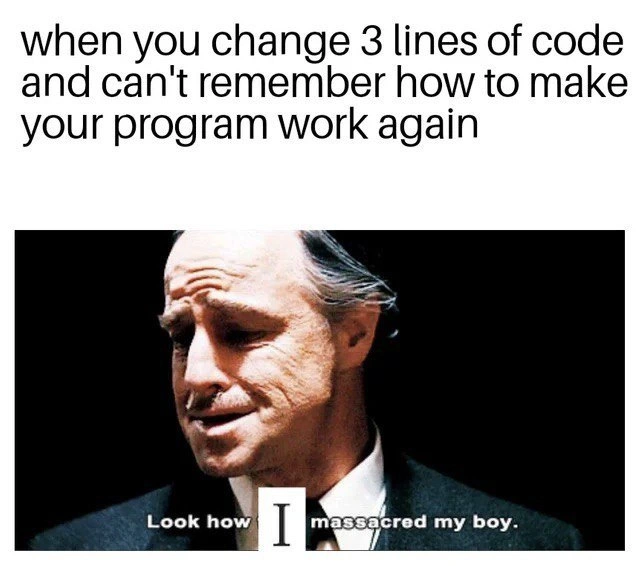
That’s exactly what this meme is saying, but about computer programs. The program was like the nice castle — it was working. The developer (the person who wrote the program) thought, “I’ll just make a tiny fix,” like you did with the bricks. But those small changes ended up breaking everything, like the castle collapsing. The line “Look how I massacred my boy” in the picture is a very dramatic way of saying “Oh no, look what I did to my poor little thing that I cared about.” It’s funny because the developer is comparing their broken program to something as precious as a child or a best friend that got hurt. We know a program isn’t alive, but when you work on something for a long time, you can feel very attached to it. So, when it breaks, you feel upset and guilty, just like accidentally breaking your own toy.

In simple words, the meme is joking that even a tiny change can create a huge mess, and the person who made the change is dramatically sad about it. Any kid who’s ever broken their favorite toy right after “fixing” it can understand that feeling. It’s a mix of “Oops!” and “Oh no, what have I done?” – and sometimes, all you can do is shake your head and maybe laugh a little at how changing one small thing went so wrong.

Level 2: Refactor Regrets

Now let’s dial it down a notch and break out what’s happening for a junior developer or someone newer to coding. The meme describes a classic Oops! moment in programming: you make a small change to your code – literally editing or adding just three lines – and suddenly nothing works anymore. The program that was running fine now crashes or throws errors, and you’re left scratching your head, thinking “It was just a tiny tweak! Why is everything broken?” To make it worse, you can’t remember how to make your program work again. This likely means you don’t recall exactly what the original code looked like, or what you tweaked in those lines, so you’re struggling to undo the damage. This is peak DebuggingFrustration: that feeling of “I swear it was working before... what changed?!”

Let’s unpack some terms and context:

  • Bug – This is any error or flaw in the software that makes it behave in a way it shouldn’t. Here, after the change, the program has one or more new bugs (because it’s not working anymore).
  • Debugging – The process of finding and fixing bugs. In our scenario, debugging means figuring out which of those 3 changed lines (or what about them) is causing the meltdown, and then fixing it so the program works again. Debugging can be tricky, especially when you’re not sure what you did wrong.
  • Code change – Literally any modification to the code. Even something as small as changing a + to a - can be a code change. The meme emphasizes 3 lines of code changed, which is tiny (maybe a few words or a new condition). It implies the person expected such a minor edit to be harmless.
  • Refactor – This means rewriting or reorganizing code without changing its external behavior, usually to improve clarity or structure. A “mini refactor” might be cleaning up a few lines to be more efficient or readable. The tag mini_refactor_regret suggests the person attempted a small cleanup or improvement, and regrets it because it backfired.

So why can a small change break everything? Here are some common reasons a junior might encounter:

  • Hidden Dependencies: Those 3 lines might interact with other parts of the code in ways you didn’t realize. For example, maybe you changed a function’s return value slightly, and now whatever code calls that function gets unexpected data and crashes.
  • Off-by-One Errors: You adjust a loop or an index by “just one,” and suddenly you’re reading one element past the end of a list (which causes an error). A tiny mathematical change can throw off the program’s logic.
  • Missing a Condition: Perhaps you removed what looked like an unnecessary if check or tweaked a condition. Turns out that condition was preventing a crash in a rare case. Now that it’s changed, the program hits that rare case and blows up.
  • Syntax Mistake: Sometimes a small edit can introduce a typo or syntax error (like forgetting a semicolon, a parenthesis, or using the wrong variable name). The whole program might fail to compile or run because of that little slip-up.

In the scenario of the meme, after making the change, the developer can’t remember how to make it work again. This likely implies they didn’t use any version control or backup. In professional development, tools like Git (git) are used for this exact reason: you commit (save) a working version of your code, so if a change breaks everything, you can compare (git diff) or revert back to the last good state. If our poor developer didn’t do that, they’re now stuck trying to recall what the original 3 lines were. That panic of “What exactly did I do?!” is very real. It’s a relatable rookie experience – trust me, every programmer has been there, learning the hard way to commit early and often, or at least to comment out code instead of deleting until you’re sure the change is good.

Now, the humor of the meme comes from how dramatic it feels. The bottom caption “Look how I massacred my boy” is a Godfather movie reference. In that film scene, a mafia boss is sorrowfully lamenting over his son’s dead body, saying “Look how they massacred my boy,” meaning someone killed his beloved son. The meme twists it to “Look how I massacred my boy,” meaning the developer accidentally “killed” their own beloved program. It’s an extreme, melodramatic way to describe a coding mishap, which is why it’s funny. Developers often joke that their code is their “baby” or “child” (we build it, we care about it). Here the code (the boy) was working fine (alive), and then the coder’s tiny changes massacred it (metaphorically killed it). That huge contrast – comparing a dead son in a crime drama to a broken program – is absurd, and that absurdity is what makes it DeveloperHumor. It’s an exaggerated expression of DeveloperFrustration that feels surprisingly accurate when you’re in that moment of despair. It’s like saying “I have no one to blame but myself, and oh what have I done to my precious project!” but in a tongue-in-cheek, cinematic way.

For a junior dev, the key lessons lurking behind this humor are:

  1. Even small code changes can have big consequences. Always test your changes. Don’t assume “only a few lines can’t hurt anything” – they absolutely can.
  2. Use version control (like git). It’s okay if you break something – it happens – but tools exist so you can retrace your steps. Commit when your program works, so you have a safe point to return to. If things go wrong, you won’t be stuck relying on memory.
  3. Understand the code around your change. Try to see the bigger picture of where those 3 lines fit in the program. If they call other functions or affect shared data, think about those interactions. This comes with experience, so don’t worry – each “massacre” is a learning opportunity.
  4. And of course, have a sense of humor. Bugs and breakages can be frustrating, but memes like this remind us all that feeling despair over a broken build is normal – and even a bit funny in hindsight. The meme is a virtual pat on the back saying, “Yep, we’ve all broken our code with a tiny change. You’re not alone.”

Level 3: Three-Line Tragedy

At the senior developer level, this meme hits on the chaotic fragility of complex software systems. It’s referencing that infamous scenario where a tiny code tweak — literally changing just 3 lines of code — triggers a cascade of failures. In theory, a small change should have a contained impact. In practice, those changed lines often lie at the heart of some tightly coupled logic or hidden dependency. The meme’s top text (“when you change 3 lines of code and can't remember how to make your program work again”) describes the gut-wrenching moment a developer realizes their seemingly innocent fix has massacred the entire application.

Why is this so relatable among experienced devs? Because it lampoons the Butterfly Effect in code: a minor edit in one part of the system can cause chaos in another. Perhaps those 3 lines touched a shared state or altered a critical if-condition that multiple modules rely on. Suddenly, unit tests are red, exceptions are flying, nothing works, and you’re staring at a broken build wondering “What on earth did I just do?” It’s a three-line tragedy unraveling your week’s work. The emotional pièce de résistance is the bottom caption “Look how I massacred my boy.” This is a direct reference to a famous scene from The Godfather (Don Corleone mourning his ruined son), repurposed here to dramatize the developer’s despair. In the meme, the quote is humorously changed to “I massacred my boy” – implying the developer has personally destroyed their beloved code (my boy being the codebase/project they nurtured). Seasoned engineers chuckle (a bit darkly) at this, having felt that same godfather-level heartbreak after a bad deploy: “I’ve ruined my beautiful code with my own hands.”

From a troubleshooting perspective (hello, Debugging_Troubleshooting category!), this scenario is a perfect storm of debugging frustration. It might start as a small bug fix or a tiny refactor intended to clean up code. But maybe that mini refactor removed a subtle workaround or changed a timing assumption, leading to new bugs that weren’t immediately obvious. We call these unintended consequences regressions – where a change introduces a failure in something that previously worked. Veteran developers have war stories of so-called “simple fixes” that ended up breaking the entire system. It’s a rite of passage in software development: the more relatable developer experiences you accumulate, the more you respect how even minor code changes can have massive side effects. This meme exaggerates it in a comical way, but it’s poking fun at a real phenomenon.

A senior dev also recognizes the subtext: “can't remember how to make your program work again”. This hints that the poor developer either didn’t use version control wisely or lost track of their changes. In a professional workflow, you’d have tools like Git to track each code change. Ideally, you could compare with the last working commit or do a quick rollback. If you can’t remember how it worked before, it suggests a lapse in process (no commit of the working state, perhaps editing directly in production, or just sheer panic erasing mental clarity). Pro tip from the battle-scarred veterans: always keep track of what you change, because debugging is twice as hard as coding. If you wrote code as cleverly as possible, by definition you might not be clever enough to debug it under stress. And nothing induces stress like a program that’s completely down after your “tiny tweak.”

The humor also stems from the absurd disproportion of cause and effect. Three lines of code causing hours (or days) of downtime? It sounds ridiculous to outsiders, but developers know it’s entirely plausible. Maybe one of those lines was a critical array index or a config flag. For example, changing == to === in JavaScript, or altering a loop boundary from <= to < can flip a program’s logic on its head. One famous real-world case: a single misused semicolon or an off-by-one error has brokenspacecraft launches and financial systems. Code is that sensitive. This meme nails that truth with gallows humor. It’s essentially saying: “I tried to make a tiny improvement, and I ended up breaking my own creation. Now I’m staring at the wreckage in disbelief and sorrow.”

Finally, the cinematic image choice (Marlon Brando as Don Vito Corleone) gives the meme an epic, operatic feel. It’s an inside joke: only devs would equate a failed build to a mafia tragedy. The Godfather reference elevates a mundane coding mishap into a Shakespearean moment of betrayal and loss. It’s funny because of that huge contrast in stakes. We know it’s “just code,” but when your app crashes and deadlines loom, it does feel like a tragedy. In summary, at the senior level this meme highlights the precarious nature of software maintenance, the unintended ripple effects of small code changes (a three_line_change_breakage in meme-speak), and the shared traumatic comedy of bug fixing gone wrong. It’s both a cautionary tale (“be careful with that mini refactor!") and a nod of solidarity to every developer who has whispered, exhausted: “Look what I did to my poor code...”

Description

This is a two-panel meme that captures the profound despair of breaking a working system. The top panel contains black text on a white background, stating, 'when you change 3 lines of code and can't remember how to make your program work again'. The bottom panel features a famous, somber still image of Vito Corleone (played by Marlon Brando) from the movie 'The Godfather,' looking down with sorrow. The original quote from the scene, 'Look how they massacred my boy,' has been cleverly edited. The word 'they' is replaced with a prominent 'I', changing the caption to 'Look how I massacred my boy.' This meme resonates deeply with developers because it illustrates how a seemingly minuscule and innocuous change can cause catastrophic, cascading failures in a complex codebase. The developer, like Vito, mourns the 'death' of their functioning program, taking personal responsibility for the destruction. It's a universal feeling of dread and self-blame that highlights the importance of version control to revert such changes

Comments

18
Anonymous ★ Top Pick This is precisely the moment you realize your last commit message was 'minor tweaks' and you've been working on a detached HEAD for the past hour
  1. Anonymous ★ Top Pick

    This is precisely the moment you realize your last commit message was 'minor tweaks' and you've been working on a detached HEAD for the past hour

  2. Anonymous

    Git diff says “+3 −3”, Grafana says “500s on three continents” - look how I massacred my boy

  3. Anonymous

    The real tragedy isn't that you broke production with three lines - it's that after 20 years in this industry, you still make changes without a feature branch, proper tests, or even a simple git stash. Don Corleone would've had better version control running his olive oil business

  4. Anonymous

    Every senior engineer knows this moment intimately: you refactor three lines for 'clarity,' the tests still pass, but somehow the application enters a quantum superposition where it both works and doesn't work until observed in production. The real massacre isn't the code - it's your confidence in understanding the system you've been maintaining for three years. Git blame reveals you wrote those three lines at 2 AM six months ago with the commit message 'fix stuff,' and now you're debugging your past self's crimes against future you

  5. Anonymous

    The three-line PR flipped a global, reordered init, and removed an undocumented export - turns out our architecture was tribal knowledge plus undefined behavior

  6. Anonymous

    Three-line diff and the whole stack dies; turns out our “architecture” was an undocumented init order, a race we were accidentally winning, and a ritual buried in my bash history

  7. Anonymous

    Senior dev special: tweak three lines in the hot path, spend the sprint exhuming the original from git bisect hell

  8. @Dobreposhka 5y

    Ctrl + Z...

    1. @sylfn 5y

      what if it works as in old TVs: Ctrl+Z undos only last action and another Ctrl+Z undos the undo?

      1. @Dobreposhka 5y

        install a new IDE then

      2. @ZgGPuo8dZef58K6hxxGVj3Z2 5y

        Guess what happens if you crash the IDE or reload the project because of some dependencies not updating lol

        1. @sylfn 5y

          in vim you can undo changes after exiting (if you can make it work properly)

          1. @ZgGPuo8dZef58K6hxxGVj3Z2 5y

            Oh okay I didn't know that. Thanks for the info

  9. @ZgGPuo8dZef58K6hxxGVj3Z2 5y

    Most common mistake ever

  10. @JoseAngelSanchez 5y

    git, motherfuckers

    1. @dugeru42 5y

      COMIT TO YOUR EVERY STEP

  11. @misesOnWheels 5y

    git reset

  12. @yaviyavi 5y

    Haha true, oh boy...

Use J and K for navigation
