
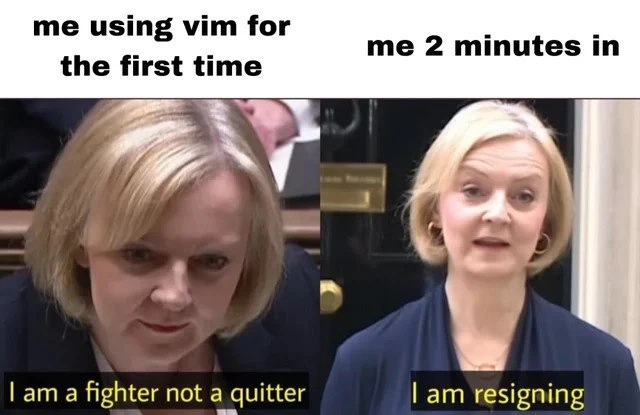
From Vim fighter to instant resignation in under two minutes
Why is this IDEs Editors meme funny?
Level 1: Brave to Baffled
Imagine you confidently start a really tricky puzzle game saying, “I’m not going to give up, I can solve this!” You feel like a brave warrior ready to win. But then, just a couple of minutes in, the game is so confusing that you can’t even find the exit button or figure out the basic controls. You get so frustrated that you suddenly say, “I’m done with this, I quit!” 😫 It’s like walking into a maze bragging you’ll find the way out easily, and five minutes later you’re totally lost and yelling, “Somebody get me out of here!” The meme is funny because the person who said they wouldn’t quit ends up quitting almost immediately. It’s showing how a big, confident promise can comically collapse when you face something unexpectedly complicated. In simple terms, it’s poking fun at that feeling when you go from “I got this!” to “Nope, this is too hard” in a very short time.
Level 2: Stuck in Vim
For those newer to the field, let’s break down why this meme’s scenario is so universally understood among developers. Vim (short for “Vi Improved”) is a text editor that runs in the command-line interface (CLI), meaning it’s all keyboard-driven with no graphical buttons. It’s incredibly powerful and efficient once you know how to use it, but the first encounter can be downright bewildering. Unlike a normal text editor or modern IDE (Integrated Development Environment) where you click around and start typing, Vim uses modes. When you first open Vim (e.g., by typing vim filename.txt in your terminal), you start in Normal mode. In Normal mode your keystrokes aren’t inserting text but are interpreted as commands. There’s also Insert mode where you can type text into the file. You switch to Insert mode by pressing the i key (or a few other keys like a or o depending on what you want to do). Pressing the Esc key takes you back to Normal mode where your keystrokes are again treated as commands, not text input.
Now, here’s where the fun (or frustration) begins for a newbie vs Vim situation: If you don’t know about the modes, you might open Vim and try to type a sentence, but nothing works as expected. For example, you press keys like H, J, K, L and instead of seeing those letters appear, the cursor starts dancing around the screen (because in Normal mode, h j k l are the arrow-key commands for left, down, up, right). You might hit the Enter key and see the cursor jump or new lines appear in weird ways. Essentially, the editor isn’t behaving like any text editor you’ve used before, which can be really confusing. This is the classic modal editor confusion – the user hasn’t switched to Insert mode, so Vim is still in command mode interpreting their keystrokes as navigation or operations rather than text input.
The vim learning curve becomes most apparent the moment our new user decides, “Okay, I’m clearly out of my depth – let’s just quit and try something else.” In a normal application, you’d perhaps hit a “Close” button, or in many GUIs you might press Ctrl+Q or Alt+F4, or at worst click the X on the window. In a terminal editor like Vim, none of those exist! If you press common shortcut combos like Ctrl+C or Ctrl+X, you might either get nothing or a literal break (Ctrl+C in Vim actually cancels an ongoing command, but it won’t exit the program). So how do you exit Vim? The trick (which isn’t obvious unless someone tells you or you read the manual) is: first hit Esc (to ensure you’re back in Normal mode), then type a colon :. The colon tells Vim you’re about to enter a command at the bottom of the screen. After the colon, you type q (for “quit”) and then hit Enter. That’s the basic command to quit Vim. If you’ve made edits to the file and Vim complains about unsaved changes, you can force it to quit without saving by typing :q! (the ! means “I really mean it, discard any changes!”). Or, if you want to save and quit in one go, you type :wq (write and quit). These commands feel cryptic to newcomers since modern software usually doesn’t make you type commands just to close a program.
This meme perfectly captures how a newcomer’s experience with Vim often goes:
- Minute 0: “Alright, I’m going to do this! People say Vim is great, and I’m a developer – I should learn it. I’m not a quitter!” 😊
- Minute 1: “Uhh, why can’t I type? What is this? Oh, maybe I press
i… okay typing now… Oops, now how do I save? Or exit? Wait, how do I stop editing?” 😕 - Minute 2: Smashes every key. “Escape, colon, Q, maybe… ahh nothing’s happening! How on earth do I quit this thing?!” 😣
- Minute 2 (a few seconds later): Closes the entire terminal window or computer. “I give up, I’m just going to use Nano or Notepad or anything else.” 😭
In the meme’s terms: the person went from “I am a fighter, not a quitter” to “I am resigning” almost instantly. The phrase "cannot exit Vim" has become a light-hearted shorthand for being stuck or feeling helpless with a tool. Even though the actual solution (like pressing :q) is short, it’s not discoverable by intuition alone – you have to know it or seek help. That’s why beginners often end up searching online for “how to exit Vim”. The humor is that needing to look up how to simply quit a text editor feels absurd – and yet it’s extremely common with Vim! This has turned into a bit of developer folklore: jokes, memes, even t-shirts that say “No ESC” or “I survived Vim”. So, if you’ve ever felt dumbfounded by Vim, don’t worry – you’re in very good company. Even experienced programmers vividly remember their first time. The good news is, once someone shows you the ropes (like the Esc then :q thing), you won’t be permanently stuck. Some people go on to love Vim for its efficiency. Others decide “hey, that’s enough” and happily switch back to more familiar editors. Both reactions are totally okay! The meme just humorously pinpoints that initial shock and defeat many of us experience when encountering Vim’s unique way of doing things.
Level 3: Modal Combat
At the highest level, this meme lands because it taps into a classic developer saga: the overconfidence of a newbie squaring off against the notoriously unforgiving Vim editor. On the left, we have a determined face (UK Prime Minister Liz Truss, humorously repurposed) declaring “I am a fighter, not a quitter,” which mirrors a developer’s initial bravado: “I can conquer this crazy text editor everyone talks about!” The right side – “I am resigning” – shows how rapidly that resolve crumbles. The joke is a one-two punch of EditorWars history and pure DeveloperExperience (DX) pain.
The technical humor here revolves around Vim’s steep learning curve, often joked about as a vertical wall. Vim is a modal editor, meaning it operates in different modes (like Normal mode for commands and Insert mode for typing text). This design is powerful for experienced users but utterly perplexing for first-timers. Newcomers jump in thinking, “I’ve used IDEs and other text editors, how hard could it be?” – only to find themselves completely disoriented. In Vim, pressing keys can unexpectedly move the cursor or delete lines because you might not be in the mode you think you are. The result? Modal editor confusion: you press “j” expecting to type a letter j, but instead the cursor moves down – wait, what just happened?! Before you know it, you’re fumbling to find the Esc key and questioning all your life choices.
A senior developer reading this meme immediately nods knowingly. We’ve all been that person who opened Vim with the best intentions and ended up trapped. In fact, “I can’t figure out how to exit Vim” is such a common scenario that it’s practically a programming rite-of-passage – and a running gag on Stack Overflow. (Fun fact: one of the most viewed Stack Overflow questions ever is “How to exit Vim?” – that’s how widespread this pain point is.) The humor is amplified by the double meaning of quitting: the newbie proclaims they’re not a quitter (won’t give up learning Vim), yet ironically their immediate problem is literally quitting the application. Everyone in tech knows the joke: the greatest battle is not writing code in Vim, it’s figuring out how to quit the editor without quitting your job. It’s a developer pain point so universal that even people who love Vim joke about it.
The reference to Liz Truss adds an extra layer for those in the know. Liz Truss famously said “I’m a fighter, not a quitter” shortly before force-quitting resigning as Prime Minister just weeks into the job. The meme cleverly maps this political drama onto the Vim learning experience. The left image (Truss resolute at a podium) is “me using Vim for the first time” – full of determination – and the right image (Truss announcing resignation) is “me 2 minutes in” – total surrender. It’s an exaggeration, of course, but only slightly: countless developers have gone from “Vim can’t be that hard, I got this” to “Oh no, how do I even exit?!” in mere minutes. That quick abandonment is the punchline. The meme also subtly nods to the culture of Editor Wars: Vim is legendary for turning initially confident users into humbled learners, while the true “fighters” are those who stick it out long enough to master it (and maybe even become Vim evangelists typing at the speed of thought). But for many of us, after a brief bout of confusion – just like Liz Truss – we’re ready to throw in the towel.
In short, this meme resonates on several levels of tech humor. It highlights the vim learning curve we’ve all struggled with, plays on the famous “cannot exit Vim” trope, and uses a bit of timely political irony to underscore the dramatic flip from confident to defeated. Seasoned devs laugh (perhaps a bit nervously) because they’ve been there – some might still remember their first battle with :q! – and they know that in the eternal newbie vs. Vim showdown, Vim often wins the first round. The smartest thing in that moment might indeed be to “resign” gracefully, reboot the terminal, or call for help, rather than continue mashing keys in vain. It’s always funny in hindsight, though… once you’ve finally escaped Vim’s clutches. 😅
Description
Two-panel meme: the left panel shows a blurred-out blond speaker at a podium. Top text says "me using vim for the first time" while the yellow subtitle at the bottom states "I am a fighter not a quitter." The right panel shows the same blurred figure outside a government doorway with the top text "me 2 minutes in" and the bottom subtitle "I am resigning." The juxtaposition humorously depicts a developer’s initial resolve to master the modal editor Vim and the almost immediate frustration that follows when they cannot figure out basic commands like quitting, a classic pain point for command-line text-editor novices
Comments
11Comment deleted
Tried to quick-patch a config with `kubectl exec vim`; two minutes later I just scaled the deployment to zero - killing the pod was the only exit command I could remember
After 20 years in tech, I've mastered distributed systems, led migrations from monoliths to microservices, and debugged race conditions in production at 3am. But explaining to a junior why I still can't exit Vim gracefully? That's when I schedule an urgent meeting conflict
Vim's learning curve is so steep that 'How to exit Vim' remains Stack Overflow's most viewed question - not because developers are lazy, but because Vim treats 'intuitive UX' as a feature request from a parallel universe where ESC, :wq, and ZZ are considered self-documenting
Vim: the only editor where the P95 session lasts two minutes and ends with :q! - basically a resignation letter
Vim's first two minutes: steeper curve than migrating a COBOL monolith to Kubernetes, but at least :wq! feels like a clean deploy
My Vim exit strategy mirrors prod incident playbooks: try :wq (graceful shutdown), escalate to :q!, and if it deadlocks, SIGKILL the terminal
You are not a quitter if you don't know how to quit Comment deleted
:q! Comment deleted
That too in British accent Comment deleted
wq Comment deleted
https://vim-adventures.com/ Comment deleted


