The Magic of Auto-Formatting
Why is this Tooling meme funny?
Level 1: Tidy Room Magic
Imagine you have a super messy bedroom with toys and clothes all over the floor. Now think of pressing a magic button, and poof! – everything jumps back into its neat place: toys in the toy box, clothes in the closet, bed perfectly made. You didn’t have to lift a finger, and your room is suddenly clean and organized. Feels great, right? That’s exactly how a programmer feels in this meme. The programmer’s code was a bit messy, and with one quick save (like a magic button), the computer automatically cleaned up the mess. It made the code neat and pretty in an instant. The grin on the person’s face in the picture is like how you’d smile seeing your room magically tidy itself. It’s a happy, almost amazed feeling because a chore was done for you, perfectly and immediately. That’s the funny and heartwarming idea here: wouldn’t it be nice if all our messy tasks could clean themselves up like that?
Level 2: Format-on-Save Magic
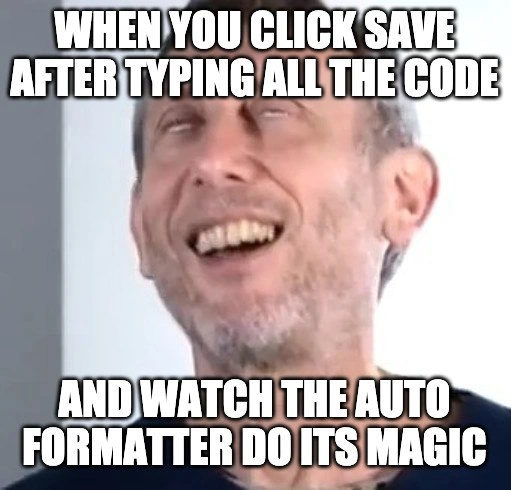
Let’s break this down in more straightforward terms. Modern programmers often use an IDE (Integrated Development Environment) or advanced text editor to write code. These environments come with superpowers, and one of those powers is an auto-formatter. An auto-formatter is a tool that automatically cleans up and organizes your code’s formatting—things like indenting lines properly, spacing things out consistently, breaking long lines, and even sorting or grouping your import statements. The meme joke is about the moment you hit the save button (or press Ctrl+S) after writing or rearranging some code, and then watch the auto-formatter instantly do housekeeping on your code. It’s like the editor says, “I see you made a mess, let me tidy that up for you,” and does it in the blink of an eye. The top text of the meme (“WHEN YOU CLICK SAVE AFTER TIDYING UP THE CODE”) and the bottom text (“AND WATCH THE AUTO FORMATTER DO ITS MAGIC”) describe that exact sequence. The developer has possibly made some manual edits to improve code structure, but as soon as they save, the tool goes even further—applying all the project’s formatting rules perfectly. The face in the image looks calm and satisfied, which is exactly how it feels to see the computer instantly polish your work.
To a newer developer, this might seem like a small thing, but it’s actually a big quality-of-life boost. Imagine you’ve written some JavaScript and your spacing and line breaks are a bit off. If you have Prettier (a popular JavaScript auto-formatter) set up in your editor with format-on-save, then every time you save the file, Prettier will reformat the code for you. For example:
// Before auto-formatting (messy spacing & style):
function add(a,b){return(a + b);}
// After auto-formatting (clean and consistent):
function add(a, b) {
return a + b;
}
In the “before” code above, the function was written in a cramped way with inconsistent spacing. After the auto-formatter runs on save, the function is neatly spaced out and indented on multiple lines. This happens automatically – you don’t have to manually move anything! Tools like Prettier for JavaScript/TypeScript, gofmt for Go, clang-format for C/C++, or Black for Python all do similar jobs for their respective languages. They enforce a consistent style, so all the code in a project looks like one person wrote it, even if many people are contributing. This consistency makes the code easier to read and maintain. It also prevents petty debates among team members about where to put commas or how to indent – the tool decides for everyone, following agreed rules.
The meme falls under IDEs_Editors and DeveloperExperience_DX because it’s highlighting a feature of development environments that greatly improves the developer’s day-to-day experience. Good developer experience is when your tools make you more productive and happy. Watching an auto-formatter clean up code on save is exactly that: it’s satisfying and saves you time (no more manually adding spaces or newlines one by one). As a junior coder, the first time you see this, you might actually smile or even laugh a bit in surprise – it feels like the computer is reading your mind or doing a neat trick. In reality, it’s just following predefined formatting rules, but the effect is that you get nicely formatted code with zero effort. That’s why the meme calls it “magic”. It’s a little celebration of how far our coding tools have come: something that used to be a boring task (formatting code) is now done automatically and instantly, letting you focus on the fun part – writing the actual code.
Level 3: Syntactic Serenity
At the highest technical level, this meme celebrates a triumph of modern tooling: the IDE auto-formatter turning chaos into order. The top caption sets the scene: a developer manually tidied up some code and hits save. The instant the file saves, an integrated formatter (like Prettier, gofmt, or clang-format) kicks in and magically refactors the code layout. To seasoned developers, this is syntactic serenity — the editor parses the code into an Abstract Syntax Tree (AST) and then pretty-prints it according to consistent style rules. All those tiny inconsistencies (misaligned indentations, wonky spacing, unordered imports) vanish in a flash. Everything gets normalized to a canonical style. This feels almost like the code is self-organizing, achieving a clean, deterministic structure no matter who wrote it.
Why is this so blissful? Consider the alternative: hours spent bikeshedding over brace placement or tabs vs spaces. In the bad old days, teams would debate formatting in code reviews or maintain rigid style guides that humans inevitably messed up. But with format-on-save tools, the Developer Experience (DX) leaps forward — one keystroke and the IDE/editor enforces the agreed style consistently and automatically. It’s an instant resolution to what used to be a tedious manual chore (or a heated argument!). The humor here leans on shared relief: anyone who’s wrestled with messy legacy code or diffs full of whitespace changes knows the almost zen-like calm that descends when the computer tidies it for you. The meme’s image (the blissful, almost enlightened expression) captures that senior-dev feeling of “yes… let the robots handle the mundane stuff!”. This is more than just aesthetic nitpicking. It reduces cognitive load and even prevents needless Git diffs – when everyone’s code is formatted the same way, code merges are cleaner and developer productivity improves. The auto-formatter becomes a silent but powerful team member, enforcing order and freeing humans to focus on logic instead of layout.
There’s also an implicit commentary on how far IDEs and editors have come. Modern environments like VS Code, IntelliJ, or Eclipse will seamlessly re-indent and reformat code on save, something unthinkable in the early days of plain text editors. Under the hood, these tools apply well-defined formatting rules (often configurable, but ideally project-standard) to the code’s parse tree. The result is idempotent: running the formatter twice yields the same output, meaning you can trust that once the “magic” runs, the code won’t keep shifting around. For experienced engineers, this reliability is deeply satisfying. It’s the culmination of years of DeveloperExperience_DX evolution — from manual formatting and endless diff churn to one-click (or rather one-save) perfection. The meme is funny because it recognizes a nearly universal developer “aaaah” moment: the pure relief and joy when a normally gritty task is effortlessly automated. Even the most cynical veteran might shed a tear of joy watching a tangled nest of code transform into neat, readable structure in milliseconds. In short, this meme hits on a core truth: in software, letting good tools handle the drudgery feels like magic, and we’re absolutely here for it.
Description
A meme featuring a still image of Michael Rosen, a British children's author, mid-expression with his eyes rolled back and a slight, pleased smile. This specific expression is popularly used to convey a feeling of immense satisfaction. The top text overlay reads, "WHEN YOU CLICK SAVE AFTER TYPING ALL THE CODE", and the bottom text says, "AND WATCH THE AUTO FORMATTER DO ITS MAGIC". The meme captures the deeply satisfying, almost magical feeling developers get when a tool like Prettier or an IDE's built-in formatter instantly cleans up their messy, unformatted code into a clean, readable, and consistently styled block. It's a celebration of modern development tooling that automates the tedious task of code formatting
Comments
15Comment deleted
The best part of auto-formatting is that it ends all the pointless team debates about tabs versus spaces. The machine has spoken, and it has chosen... whatever was in the config file
Nothing like saving a 10-year-old file and watching the formatter vaporize 400 lines - you call it “technical debt relief,” Git blame calls it witness protection
After 15 years, I've realized the real 10x developer isn't the one who writes perfect code the first time - it's the one who configured their formatter to fix everyone else's code before they have to review it. The true architectural decision isn't microservices vs monolith; it's whether to set max line length to 80 or 120 characters
The moment when you realize your auto-formatter is doing more architectural work than your 'Senior Architect' who still manually aligns their variable declarations with spaces. Bonus points if you've configured pre-commit hooks so your teammates can't escape the formatter's righteous judgment - because nothing says 'I care about this codebase' quite like forcing everyone to worship at the altar of consistent indentation
Format-on-save is the Raft leader of code style - your artisanal spacing is just a stale follower until Prettier commits the canonical log
Press Save, watch the auto-formatter run - same bug, just enterprise-grade indentation and a 2,000-line diff that obliterates git blame
Auto-formatters: the only 'magic' that refactors a monorepo without triggering a six-month style guide debate
What auto-formatting? Comment deleted
when you have auto save Comment deleted
lol eye orgasm Comment deleted
honestly I hate that. It destroys all of my hard work confusing future devs. Comment deleted
psycopath Comment deleted
VS users, who have autosave and autoformatter: 🗿🗿🗿 Comment deleted
Ikr Comment deleted
I use vim 😎 Comment deleted