IDE Over-Enthusiastic Linter
Why is this IDEs Editors meme funny?
Level 1: Let Me Finish
Imagine you are playing with building blocks and you pick up a blue block to add to your structure. The very instant you lift it, your friend beside you shouts, “Hey, you’re not using that block yet!” 🙄 But you literally just picked it up — of course you haven’t used it yet, you were about to! It’s a silly situation, right? Your friend is being a little too quick to point out the obvious.
That’s exactly what’s happening in this meme, but with coding. The computer is like that over-eager friend. You create a new piece (a variable) to use in your program, and immediately the computer says, “You haven’t used that!” It’s trying to be helpful (just like a friend who wants to keep things tidy), but it’s jumping in way too fast, not giving you a moment to actually use what you picked up. This ends up feeling funny – the computer is so fast and so far ahead of you that it’s almost like it can see the future. The humor comes from that feeling of being interrupted by a know-it-all helper who just needs to wait a second and let you finish what you’re doing. It’s like you want to tell the IDE, “Hold on, I’m not done yet!” 😅
Level 2: Lightning-Fast Linting
Let’s break down what’s happening in this meme in simpler terms. Modern IDEs (Integrated Development Environments) like VS Code, IntelliJ, or Visual Studio are more than just text editors – they’re smart assistants for coding. As you write code, they perform static analysis in the background. Static analysis means checking the code for certain errors or bad practices without actually running the program. A part of this static analysis is done by a linter (a tool or feature that enforces coding guidelines and finds issues). One common linting rule is to warn about an unused variable – that’s a variable you defined but haven’t used anywhere. It’s generally a good practice to remove unused variables because they clutter the code and might even indicate a mistake (maybe you meant to use it but forgot). So, many IDEs will gently warn you about it. Usually this warning appears as colored underline or a subtle highlight on the variable name, sometimes with a message like “Variable X is defined but never used.”
Now, the funny bit is how fast this warning shows up. The meme says “0.0001s after you defined it,” which is obviously an exaggeration for comedic effect – but it can feel almost immediate! 😀 The moment you finish typing var unused = 42;, you might see a little squiggly line or a pop-up hint saying, “Hey, you haven’t used unused anywhere yet.” The IDE is essentially instantaneously checking your whole file to see if that new variable is referenced. If not, it doesn’t wait around – it lets you know right away. This is what we mean by instant lint alerts or real-time feedback. It’s like the IDE is impatient, nudging you: “So... you created this thing, are you gonna use it or not?”
Why do we have such a feature? It comes back to CodeQuality and DevExperience. Warnings about unused variables (and other issues like unused imports, unreachable code, etc.) help keep your code tidy and error-free. By alerting you early, the IDE helps you catch minor issues before they become bigger problems or before you even run the code. This is generally great for developers, especially when working on large projects – you don’t want tons of forgotten variables lying around. It’s part of a good developer experience (DX) to have the editor act as a co-pilot, continuously reviewing your code.
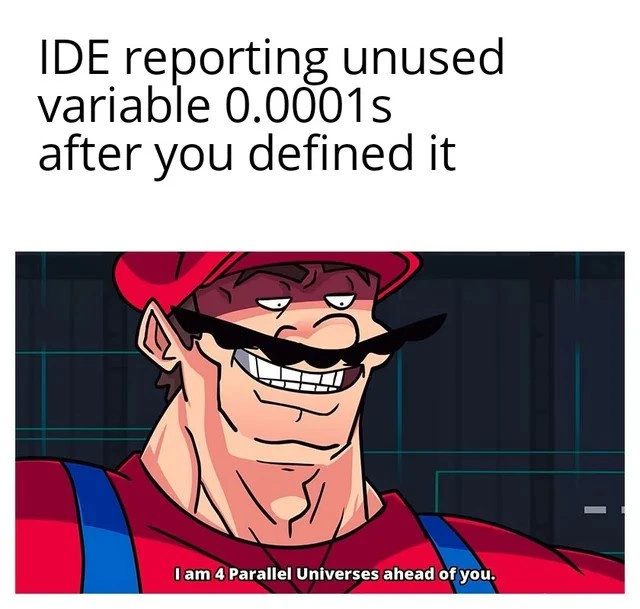
However, for someone new to coding or just experiencing this for the first time, it can be a mix of helpful and slightly annoying. You might think, “I just wrote that, of course it’s unused so far – I haven’t had a chance to use it yet!” The meme’s text “I am 4 Parallel Universes ahead of you” is a jokey way of saying the IDE is way ahead of the coder. It’s as if the software is boasting that it’s so advanced, it can warn you about what you haven’t even done yet. The image used (the buff plumber in overalls with a red cap) is a parody of Mario from Nintendo – depicted ultra-muscular and confident – paired with that caption. This buff Mario meme format is popular online to represent someone or something operating on a whole other level of speed or intelligence. So here, the IDE is portrayed as being super-speedy and smug, like “Mario with intelligence steroids,” already knowing the variable is unused before you’ve had a chance to do anything with it.
To visualize this, consider a quick example in code:
// Imagine this is our code editor and we just wrote:
let message = "Hello World!"; // <- Warning appears: 'message' is defined but never used.
// The IDE/linter instantly flags 'message' because it's not used yet.
console.log("Program is running...");
// (Now let's actually use the variable to satisfy the linter)
console.log(message); // We use 'message', now the warning disappears.
In the snippet above, as soon as we declared message, many IDEs would highlight it since, at that moment, it isn’t used anywhere else. The second we add console.log(message), the IDE sees that message is now used and the warning goes away. This cycle can happen in seconds or less! It demonstrates the real-time nature of these checks.
For a junior developer (or anyone learning), it might be surprising at first: “Wow, my editor already knows something’s up before I do!” But you quickly learn this is normal and even helpful. The unused_variable_warning is there to remind you either to use that variable or remove it if it ends up not needed. And if you’re in the middle of writing code, you usually just ignore the warning until you finish your thought (the IDE’s suggestion will still be there if you indeed forget to use the variable). Over time, you might even come to appreciate that your IDE is “watching your back” – it’s catching little mistakes early, almost like a spell-checker for code. Just sometimes it feels like a very eager spell-checker that can’t wait even a millisecond!
Level 3: Time-Traveling Linter
"I am 4 Parallel Universes ahead of you."
This meme pokes fun at how modern IDEs and their real-time static analysis can feel almost psychic. The moment you type a new variable, your IDE (Integrated Development Environment) immediately flags it as unused. It’s as if the editor is bragging that it’s several steps (or parallel universes) ahead of you in time. The muscular, mustachioed plumber (a buff Mario look-alike) grinning in the image perfectly personifies the IDE’s smug attitude: "I already know you haven’t used that variable, puny human." 😏
On a technical level, what’s happening is that your IDE has a built-in compiler or language server continuously analyzing your code in the background. It maintains an up-to-date Abstract Syntax Tree (AST) and symbol table as you write. The instant you declare a new variable, the tool cross-checks for any usages of that variable in your code. If it finds none (which is true immediately after you’ve typed the declaration), it triggers an unused_variable_warning via the linter. The speed here is blazing – often measured in milliseconds – hence the meme’s hyperbole of 0.0001 seconds. It genuinely feels like an instant lint alert, like the IDE is living a few seconds in the future.
From a senior developer’s perspective, this scenario is both hilariously relatable and technically interesting. We’ve all experienced writing code while an over-eager tool highlights issues in real-time. The humor comes from a mix of appreciation and mild annoyance: yes, it’s great that our tools catch mistakes early (improving code quality and overall Developer Experience (DX)), but sometimes the IDE seems overzealous. It’s as if the IDE is flexing its code-quality muscles (just like that buff plumber) to show how proactive it can be. You might think, “Alright, alright, I know it’s unused right now – give me a second, I’m about to use it!” 😅. This is a shared chuckle among developers because our fancy editors do feel “4 parallel universes ahead,” catching trivial issues before we’ve even finished our thought.
The meme resonates in the dev community because it satirizes a common experience in modern coding:
- Real-time static analysis – Today’s IDEs run compilers or linting rules continuously as you type. This yields immediate feedback on mistakes or unused code. No need to hit “build” or run a separate Lint tool; the warnings just pop up instantly.
- Unused variable warnings – An unused variable is usually harmless, but it often indicates leftover code or a missed usage. Teams enforce this rule to keep code clean. The IDE’s eagerness to highlight it right away is what’s funny here. It’s performing code hygiene policing in record time.
- The speed absurdity – The caption “0.0001s after you defined it” exaggerates how absurdly fast the warning appears. It really can feel instantaneous, as if the IDE has a time machine or is reading your mind.
- Developer reaction – There’s an unspoken developer thought: “Hold on, let me finish typing!”. The IDE’s helpfulness is just a tad too fast, creating a comic effect. It’s like a know-it-all friend finishing your sentences—useful, but you roll your eyes at the timing.
In essence, the meme is lovingly mocking our advanced tools. The buff Mario saying “I am 4 Parallel Universes ahead of you” is exactly how a super-smart IDE would sound if it could talk — way ahead of us, a little smug, but ultimately looking out for our code. The joke lands because behind the scenes, it’s kinda true: these tools do operate on our code almost in parallel to our own thinking, often surprising us with how fast they catch things. It’s a testament to how far developer tools have come, from the days of running a separate lint after writing code, to now having an IDE that’s effectively anticipating our next move (for better or for laughable worse).
Description
A two-panel meme. The top panel has black text on a white background that reads, "IDE reporting unused variable 0.0001s after you defined it". The bottom panel features a smug, muscular, and intimidating drawing of Mario, the video game character, with a shadowed face and a knowing grin. Subtitles at the bottom of this panel read, "I am 4 Parallel Universes ahead of you." This meme humorously depicts the hyper-efficient, almost prescient nature of modern IDE linters and static analysis tools, which can sometimes flag variables as unused the instant they are declared, before the developer has a chance to write the code that uses them. It's a relatable moment of feeling outpaced by one's own tools
Comments
9Comment deleted
My IDE's linter is so fast, it once suggested I refactor a function I was still just thinking about writing. I'm pretty sure it's read my mind and already found three edge cases I haven't considered
Modern IDE: four parallel universes ahead - flags your unused variable before the allocator finishes zeroing the page, yet somehow misses the circular dependency that’ll deadlock prod at 2 a.m
The real parallel universe is the one where you actually needed that variable you just declared, but the IDE's static analyzer has already quantum-tunneled through your entire codebase's future git history to determine it's dead code before your fingers leave the keyboard
The IDE's static analyzer operates on a different temporal plane than human developers - it exists in a quantum superposition where your variable is simultaneously declared and unused until you collapse the wavefunction by actually typing the usage statement. By then, it's already smugly highlighted the declaration in yellow, filed three JIRA tickets about code quality, and updated your tech debt metrics. It's the Heisenberg Uncertainty Principle of development tools: you cannot simultaneously know a variable's declaration and its usage without the IDE judging you for the Planck time in between
My IDE’s language server has negative latency - labels the variable “unused” before the semicolon. If prod alerts were that four-parallel-universes-ahead, I’d retire the pager
IDEs: preempting your tech debt faster than you rationalize 'I'll use it later'
My IDE does speculative execution: it flags no-unused-vars for variables I haven’t committed yet, then offers a quick-fix to delete the future
ide reporting int function without return after 0.0001s: Comment deleted
Сука, на сколько же примитивный юмор, опять. Отписка. Comment deleted