
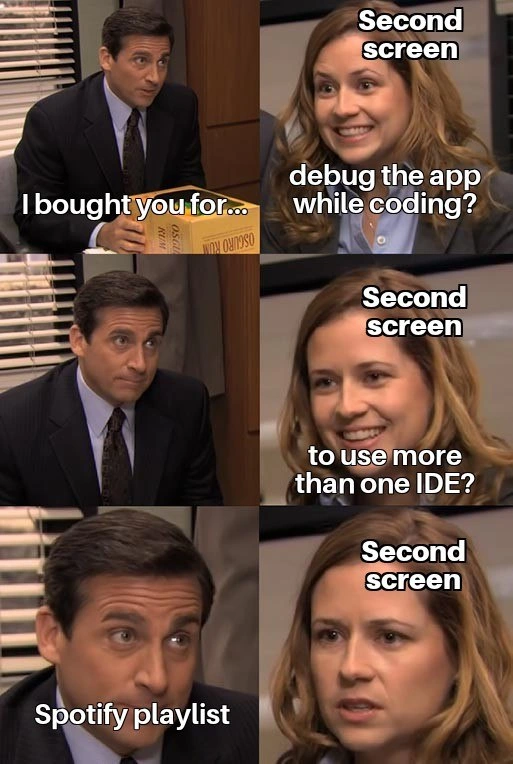
When the second monitor prefers Spotify over serious debugging duties
Why is this IDEs Editors meme funny?
Level 1: Work vs Play
Imagine you told your parents you absolutely needed a second desk in your room so you could do homework on one desk while drawing or writing an essay on the other at the same time. You convince them it will help you get so much more done. They get you that second desk, and at first you’re really excited to be super productive. But what happens? Instead of using the new desk for extra schoolwork, you end up using it to hold your music player and toys. So now one desk has your homework, and the other desk – the one that was supposed to help you do more work – is basically where you’re playing music and goofing off. It’s funny because you made a big deal about needing that extra space for serious reasons, but in reality it just became another spot for fun. The meme is joking about the same idea: a programmer got an extra computer screen to do more coding work, but really they just use it to listen to music. It’s a silly reminder that just because we get a new tool meant for work doesn’t mean we won’t use it to relax instead!
Level 2: Focus vs. Distraction
Let’s break down the technical (and not-so-technical) elements here in simpler terms. The meme is talking about using a second monitor in a programmer’s setup. A second monitor is literally an additional screen you plug into your computer, so you have two displays side by side. Many developers love a dual_screen_setup because it gives extra “screen real estate” – more space to spread out windows. The idea is that with two screens, you can multitask more effectively: for example, write code on your main monitor while on the second screen you might have something else useful open, like a debugging tool or documentation.
Now, what is debugging? Debugging is the process of finding and fixing errors or “bugs” in your code. Often, to debug an app, you run the program in a special mode where you can pause execution, inspect variables, and see step-by-step what the code is doing. This usually involves a debugger or the debugging features of an IDE. An IDE (Integrated Development Environment) is a software application that packages a bunch of developer tools together – typically a code editor, build tools, and a debugger all in one. Examples are Visual Studio Code, IntelliJ IDEA, or Eclipse. Developers use IDEs to write and test code because they provide useful features like syntax highlighting, autocompletion, and the ability to run or debug the program right there.
In the meme, the “woman” labeled Second screen excitedly asks if she’s there to “debug the app while coding” or “to use more than one IDE.” This highlights two typical reasons a programmer might want a second monitor:
- Debug the app while coding: Imagine on your main screen you have the code editor where you’re writing code, and on the second screen you have the program running in debug mode or showing logs (the output text that tells you what the program is doing). This way, you can simultaneously write and see the effect or catch errors in real time. It’s like having a live feed of the program’s brain activity while you work on its code.
- Use more than one IDE: Sometimes a developer works on multiple projects or components at once (for example, a front-end app and a back-end server). They might use one IDE for one project and another IDE for a different project (or perhaps two windows of the same IDE). A second monitor could let them have both IDEs visible together. This is handy if you need to copy something from one codebase to another or just monitor two things at once. Running more than one heavy IDE simultaneously is pretty demanding on a computer, but it’s something enthusiastic devs talk about when they dream of ultimate productivity.
So those are the productivity_expectations for the second monitor: more space for more coding, debugging, and multitasking. The meme’s joke is that, in reality, many developers don’t actually use the second screen for those lofty purposes. Instead, they use it for something like a Spotify playlist. Spotify is a popular music streaming service. Having a Spotify playlist open on the second monitor means the developer is basically using that screen to pick songs or watch the album art and song titles – which is not a development tool at all (unless you count boosting morale with music!). In other words, the second monitor becomes a fancy MP3 player display.
This contrast is common in real life: a lot of us say we need certain Tooling or equipment to be more productive – like an extra monitor, a faster laptop, or a particular editor – but once we get it, we might fall into old habits. The second monitor often ends up showing things that can actually distract you. Common examples are:
- Communication apps: Many people dedicate a screen to Slack, Discord, email, or other chat, so they don’t miss messages. But that can constantly pull your attention away from coding whenever a new message pops up.
- Web browsing or social media: It’s easy to keep a web browser tab open on screen two, maybe with Stack Overflow for help. But one tab can turn into another… and suddenly you have Twitter or Reddit idling there, begging for attention.
- Music or videos: As in the meme, a Spotify window, or maybe YouTube playing a music video or a Twitch stream, sits on the second monitor. It’s meant to be “just background music” or a quick glance now and then, but visually it’s something completely unrelated to coding.
For a junior developer or someone new to programming, all these terms might be new. Let’s clarify a bit:
- Second monitor: an extra screen to extend your desktop. Think of having two TVs next to each other displaying different channels – except in computing, you can move your mouse across both and open different programs on each.
- IDE (Integrated Development Environment): the program you write code in. It “integrates” editing, running, and debugging of code in one place. Examples: if you code in Java, you might use IntelliJ; for Python maybe PyCharm; for JavaScript maybe VS Code (which is technically a code editor but often acts like an IDE with plugins).
- Debugging: running your program in a controlled way to find bugs. This could involve breakpoints (pausing the program at a certain line of code), stepping through code line by line, and watching variables to see where things go wrong.
- Spotify playlist: a list of songs played via Spotify. Not a coding tool, but developers often listen to music to focus or relax while working. Some have special coding playlists or “lofi beats” running during work. The funny part is when that takes over the screen that was supposed to show something work-related.
The meme uses a scene from The Office (a famous TV comedy) to draw a parallel in a humorous way. In The Office, Michael Scott (the boss) often has misplaced expectations and Pam (the receptionist) tries to please but gets disappointed. Here the second monitor is like Pam, eager to help with serious tasks, and the developer (Michael) ends up not using her capabilities at all, which disappoints her. This analogy makes the meme extra funny for those who recognize the show, but even if you don’t, the labels and captions get the point across.
In essence, for a junior developer: the meme is saying “I got this cool new programming gadget (an extra screen) to help me be a better programmer (so I can code and debug at the same time, or use multiple coding programs at once). But actually… I just use it to play music.” It’s poking fun at how we sometimes justify new tools for productivity, but then use them in a very non-productive way. It’s like getting a new high-tech oven because you want to become a master chef, but you only ever use it to reheat pizza. 😅 The tags like DebuggingFrustration and DeveloperProductivity are basically the themes here: frustration with debugging that we try to solve with an extra screen, and our perennial struggle to stay productive versus giving in to little distractions.
Level 3: Dual-Screen Delusions
At first glance, this meme shows a classic case of developer productivity expectations crashing into reality. The scene (blurred images from The Office) is repurposed perfectly to illustrate how a fancy new tool – here a second monitor – often ends up misused. The man in the suit (Michael Scott’s character) holds a box labeled “Oscardo” as if it’s a brand-new monitor he just bought. He says, “I bought you for…” with an earnest look, implying some grand purpose for this device. The woman (Pam, labeled as “Second screen”) excitedly finishes his sentence with hopeful suggestions: “debug the app while coding? ...to use more than one IDE?” She’s basically voicing all the ambitious plans a developer has when justifying a dual-screen setup. In theory, a second monitor is the holy grail of DeveloperProductivity: you could run a live debugger on one screen while writing code on the other, or perhaps open two different IDEs (Integrated Development Environments) for different projects at once. It’s the ultimate Tooling dream for multitasking – no more ALT+Tabbing between windows, no more squinting at split panes. The promise is increased focus and smoother Debugging_Troubleshooting: one monitor shows the code, the other shows real-time logs or a second codebase.
But then comes the punchline: the next panel labels the man’s actual thought as "Spotify playlist". Ouch. The new monitor isn’t displaying a second IDE or a debugger after all – it’s just jamming out with Spotify. 🍿 The final panel shows the “Second screen” looking confused and disappointed, asking if it was bought to run more than one IDE, only to realize it’s been sidelined as a glorified music player. This disparity is the crux of the humor. It’s a productivity_expectations vs. distraction_vs_focus scenario every seasoned dev recognizes. We’ve all seen (or been) that developer who convinces their manager (or themselves) that a dual_screen_setup will double efficiency. “Think of all the microservices I can monitor at once!”, “I’ll have my code on one screen and live logs on the other, instant debugging!” – so the justification goes. And yet, once the shiny second display is plugged in, human nature kicks in. Instead of magically transforming into a bug-squashing, multitasking genius, the developer ends up using the extra screen real estate for comfort: maybe it’s a Spotify playlist for background music, a YouTube tutorial playing, or a Twitter feed scrolling – basically anything but serious work.
This meme nails an DeveloperHumor trope: the gap between what we tell ourselves when buying new gear versus how we actually behave. The comedic element is sharpened by using The Office characters – Michael’s overconfident yet clueless managerial style fits perfectly as the dev making an earnest but naive purchase, and Pam’s hopeful expressions mirror the second monitor’s “feelings”. By anthropomorphizing the second monitor (giving it a voice and feelings), the meme creates a mini-office scenario: the second monitor is like an eager employee who was promised challenging work (debugging, multi-IDE tasks) but instead gets stuck doing menial tasks (playing music). It’s a tech parody of expectation vs. reality. Michael saying “I bought you for…” with that serious look is every dev justifying tech expenses, while Pam’s excited “to debug the app while coding?” is the device being thrilled to help. Then Michael’s deadpan “Spotify playlist” reveal is the moment of truth: all those high-minded reasons were half-lies we told ourselves. And Pam’s final disappointed face (“to use more than one IDE?”) is the second monitor realizing it’s not going to fulfill its grand purpose today. This hits home because it’s painfully relatable – that $400 4K monitor ends up as a dedicated music player or Slack screen most of the day.
Why is this so real for developers? For one, multi-monitor setups are almost a rite of passage in programming. As soon as we can afford it or convince the boss, we add a second (or third) screen believing it will solve our DebuggingFrustration and make us ultra-productive. And to be fair, having more screen space can boost productivity – studies often claim dual monitors improve efficiency for tasks like referencing documentation or monitoring output while coding. In an ideal scenario, a developer might have their code editor on the main screen and use the second monitor for a real-time debugging dashboard, or a database query result, or running the app to test changes immediately. It’s like having a panoramic view of your work: one eye on code, one eye on what the code is doing.
However, the meme humorously reminds us of the hard truth: more space doesn’t equal more discipline. Instead of juggling two IDEs or debugging and coding simultaneously (which is already cognitively tricky), many of us end up using that second screen for non-critical things. It becomes the distraction display. Maybe you start with good intentions – open the Chrome dev tools or log tail on screen #2 – but then while waiting for a build or tests, you alt-tab to Spotify or a web browser and suddenly that becomes a permanent resident on your extra screen. The second monitor can ironically encourage context switching: you feel obliged to fill it with something, and that something is often not your IDE. 🙃 So rather than reducing alt-tab, you just permanently alt-tab in your peripheral vision.
This phenomenon is an open secret among developers. Everyone jokes about it because it’s a form of collective guilt/understanding. We advocate for top-notch Tooling – the best monitors, the best editors – to maximize flow, yet we’re also masters of procrastination and distraction. The second monitor often ends up as the YouTube machine playing coding tutorials (or cat videos), or a status board that we glance at only occasionally. Some even dedicate the extra screen to run constant build pipeline status or system metrics, but then ignore it until something blinks red. And yes, quite often it’s literally just Spotify with a huge playlist or album art, because who doesn’t like a little music while coding? The irony is rich: you have an expensive display whose sole job is to show the same info you’d get from a cheap smart speaker. It’s like using a high-end gaming PC to only check email.
The tags and categories hint at all these layers. This is about IDEs_Editors and DeveloperProductivity – the tools we use vs. how we actually use them. It’s about Debugging_Troubleshooting – the scenario where you’d think a second monitor shines, helping hunt bugs as you code – being upstaged by a DeveloperHumor reality: the second screen looping your favorite coding playlist or perhaps displaying the Spotify window just because it looks cool. The meme is gently poking fun at our lack of focus: the distraction_vs_focus battle that every coder faces daily. In the end, it’s a form of self-deprecating humor within the dev community: “Yeah, I totally got this second monitor to be a 10x engineer, but hey at least my music is 10x louder now.”
To put it in perspective, here’s a little breakdown of the expectations vs reality that this meme encapsulates:
| Second Monitor Intended For... | ...But Actually Used For |
|---|---|
| Realtime Debugging: watching logs or variable values while coding in another window. | Realtime Jams: watching the Spotify playlist progress bar and tapping along to music. |
| Multiple IDEs: running two code editors (say VS Code & IntelliJ) for different projects side by side. | Multiple Distractions: one screen for code, another for Reddit, Slack, or email (a different kind of multi-tasking!). |
| Reference & Docs: keeping documentation, Stack Overflow, or API docs open for quick lookup while coding. | Reference & GIFs: keeping a chat window or Twitter feed open, occasionally glancing at memes (oh the irony, a meme about not using the second screen right… on your second screen!). |
In short, the meme resonates because it’s true: We often invest in high-end tooling thinking it will automatically level up our workflow. But without self-discipline, the only thing that scales up is the number of screens showing non-work stuff. The The Office reference just amplifies the humor – Michael Scott’s obliviousness mirrors our own ability to fool ourselves, and Pam’s dashed enthusiasm is like the second monitor’s unused potential crying out. It’s a lighthearted roast of dev culture: we have all this great equipment and sophisticated IDEs, but at the end of the day, we’re still human – easily tempted to use that second monitor for anything but the tedious debugging session we should be focusing on.
Description
Four-panel meme using a blurred scene from The Office. Panel 1 shows a man in a suit at his desk holding a cardboard box labelled “Oscardo”, with white subtitle text that reads: “I bought you for…”. Panel 2 cuts to a woman, her face blurred, overlaid with stacked white text: “Second / screen / debug the app / while coding?”. Panel 3 returns to the man, now captioned “Spotify playlist”, implying the real (less productive) use-case. Panel 4 shows the woman again, still labelled “Second screen”, now with the caption “run more than one IDE?”, looking disappointed. The joke highlights a developer buying a dual-screen setup for productivity tasks like live debugging or multi-IDE workflows, only to have the extra display relegated to background distractions such as a Spotify playlist. It lampoons real-world gaps between intended productivity gains and actual developer behavior with tooling and IDEs

Comments
17Comment deleted
Architected a dual-monitor setup so I could tail -f prod logs while coding; six sprints later the right screen’s sole microservice is “Full-Screen Spotify” - still the most stable component in the stack
After 20 years in tech, I've learned the second monitor's primary purpose is to maintain the illusion of productivity while your actual productivity happens on a single screen with 47 browser tabs, three terminal windows tiled perfectly, and yes, Spotify taking up valuable real estate because the right playlist is worth at least two story points
The second monitor ROI deck promised parallel debugging; the post-mortem shows 8 hours/day of album art at 4K
Every senior engineer knows the second monitor journey: starts as a debugging companion for production incidents, evolves into an IDE multiplexer for microservices architecture, and inevitably settles into its final form as a dedicated Spotify/Slack/Twitter viewport. The third monitor? That's when you finally get serious about actually using two for code
Finance thinks a second monitor doubles throughput; seniors know it just halves alt‑tab latency so the IDE, debugger, and tail -f can finally coexist
Second screen for debugging, Spotify for flow - multiple IDEs? That's tmux's job, not your sanity's
Approved the second monitor for “debugging while coding”; it now runs a dedicated Grafana/Slack/Spotify cluster - achieving exactly-once delivery of distractions
Anime?) Comment deleted
first screen for it Comment deleted
Duuuuuude. You're good) Comment deleted
Lmao Comment deleted
No, it's for YouTube, lamers Comment deleted
+++ Comment deleted
I use PiP always Comment deleted
1) docs / web 2) code 3) IRC & XMPP clients 4) ncmpcpp Comment deleted
Still waiting for reactions to 👍 this Comment deleted
Third screen: "Hold my beer" Comment deleted

