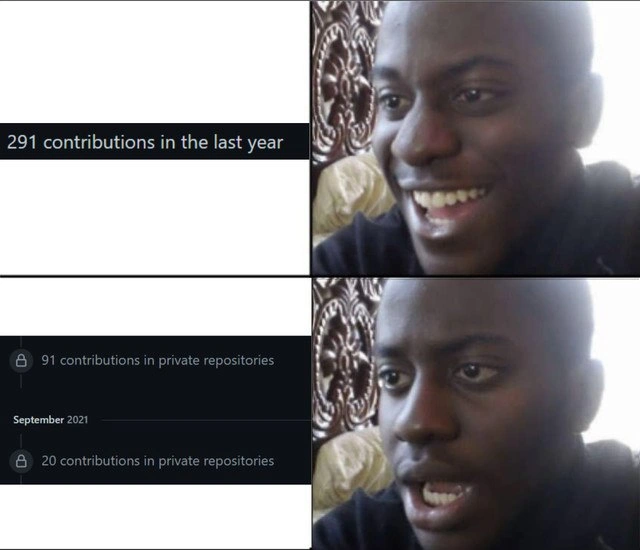
GitHub Contributions: The Agony of Private Repositories
Why is this Career HR meme funny?
Level 1: Invisible Ink Homework
Imagine you worked really hard on something, like you did a ton of homework, but you wrote it all in invisible ink. You know you filled page after page with answers, but when you show the paper to your teacher or friends, it looks blank because they can’t see the invisible ink. You’d feel pretty upset, right? You did all that work, but nobody else can tell. That’s exactly what’s happening in this meme! The computer programmer did a lot of coding (that’s their “homework”), but most of it was done in a secret place (like using invisible ink). So on their GitHub page – which is like their report card or sticker chart for coding – it doesn’t look like they did much at all. In the first picture, the person is happy because they think, “Wow, look at all the work I did!” But in the second picture, they realize “Oh no, most of that work is hidden and nobody can see it,” and they get sad. It’s funny in a kind of “oh man, that’s so true” way, because nobody likes it when their hard work disappears from view.
Level 2: Under Lock and Key
GitHub profiles have this neat visual called the contribution graph – basically a calendar grid that fills up with colored squares (or just different shades) to show how many contributions you made on each day. A contribution can be things like committing code to a repository, creating pull requests, or reviewing code. If you’re new to this, think of it like a little heatmap of how active you are on GitHub: each day you do something, you get a square (darker or greener for more activity). It’s a quick way for others (and yourself) to glance at your coding activity over the year. Many developers take pride in having a consistently filled-in graph, sometimes even aiming for a streak of daily contributions. It’s become a fun part of developer culture – almost like a game or a productivity badge.
Now, the joke in the meme revolves around contributions that are private. GitHub lets you have two kinds of repositories (basically projects or code storage areas): public repositories (which anyone can see, like open-source projects) and private repositories (which are hidden from the public, only you and invited collaborators can access these). Private repos are often used for proprietary work, like code at your job or personal projects you’re not ready to share. Sometimes developers have to keep code private due to company policies or NDA (Non-Disclosure Agreement) contracts – essentially promises not to share certain information or code publicly.
When you contribute to a private repo, GitHub still counts that contribution for you, but it’s marked with a little lock icon (🔒) on your profile and doesn’t show the details to others. By default, other people can’t see your private contributions at all on your profile – it would just look like you didn’t do those commits. However, GitHub has a setting that allows you to include private contributions in your graph in a limited way. If you turn that on, people can see that you did something on those days, but all they see is a lock icon and a number – no code, no project name. It’s like saying, “Trust me, I worked on stuff this day, but it’s secret!”
In the meme’s first panel, the developer sees the text “291 contributions in the last year” on their profile. This number is the total of all contributions – likely including both public and private – over the past 12 months. Seeing that can make you feel pretty good, especially if you weren’t tracking it actively. It’s like, “Hey, I made nearly 300 contributions, nice!” The person’s face is really happy in that panel. But in the second panel, the screenshot shows more specific info: out of those, “91 contributions” were in private repositories, and for a specific time (like “September 2021”), it notes “20 contributions in private repositories.” The person’s face in the meme turns to dismay or disappointment. This reaction is because they’ve just realized a big chunk of their work (91 contributions!) is essentially hidden behind that lock. To anyone else viewing their profile, those 91 contributions either won’t show up or will just show up as generic locked entries. The net effect: their public-facing GitHub profile probably looks like it only has 200 or so contributions, not 291, and maybe that in September it looked like they did nothing publicly. That can be a bummer if they were hoping to impress someone with their profile activity.
This scenario is very relatable for developers, especially those working in companies. Imagine you spend all year coding for a company project (which is in a private repo). You might be making commits every day at work, but when you look at your personal GitHub profile, it looks pale or empty – because none of that work shows up as public activity. A lot of new developers or students are encouraged to contribute to open source or have public side projects so their profile looks active to recruiters. When recruiters or other developers check out your GitHub, they often glance at this contributions graph and the numbers. If they see an almost blank graph or a low number of contributions, they might misinterpret it as “this person isn’t very active” or maybe lacks experience. That’s why the meme resonates: it’s pointing out how misleading those numbers can be. The guy’s happy face = “Cool, I’ve been super active this year!” and the shocked face = “Oh no, most of that activity is invisible to anyone else!”
Let’s break down a few terms from the meme:
- GitHub: A popular website and service for hosting Git repositories. Think of GitHub as a community where developers store and share code. It’s not only for open source; people also use it for private work.
- Git: The actual version control system underlying all this. Git tracks changes in code. GitHub is built on Git, adding a nice interface and social features (like the contribution graph, pull requests, issues, etc.).
- Repository (repo): A project space containing code and its history. Public repo means everyone can see it (like a public portfolio piece or collaborative project). Private repo means it’s hidden except to you and chosen team members.
- Contributions graph: That calendar-like graph on your profile that visually represents how many contributions (commits, etc.) you have made over time. More contributions on a day = a more filled-in square on that day.
- Private contributions on profile: A feature in GitHub settings. If turned on, your private repo work will count toward your graph and total count for others to see, but only as anonymized entries (they’ll see a lock icon and count, but not the specifics). If turned off (which is the default), those contributions don’t appear at all to other people – your graph would literally have blank spots where you did private work.
- NDA (Non-Disclosure Agreement): A legal agreement often used in jobs that deal with confidential information. If you sign an NDA, you’re agreeing not to share certain things publicly. For developers, that usually means code you write for that company can’t be put on public GitHub or talked about in detail. That’s why such code stays in private repos.
In the meme image, the left side is a screenshot of a GitHub profile using the dark theme (hence the black background). The right side is a reaction image: it’s the same person in two states. In the top-right, he’s grinning happily (looking at the “291 contributions” text). In the bottom-right, he looks shocked and let down (after reading the fine print about private contributions). This “happy-then-sad” reaction meme format is really common: it sets up an expectation and then shows the reality. Here the expectation was “I have a great contributions count!” and reality is “a lot of it is hidden from view.” The humor comes from how instantly his expression changes – just like a developer’s mood might change upon realizing their profile isn’t as shiny as that big number suggested. It’s a bit of developer humor that many find relatable. We chuckle at it because we either have felt that ourselves or can easily imagine the scenario.
For a junior developer or someone just starting out, the takeaway is: don’t panic if your GitHub graph looks emptier than your actual coding life. This meme is a lighthearted reminder that those profile metrics can be misleading. If you’re doing a lot of coding in places that aren’t public (like a company’s codebase), it doesn’t mean you’re not productive – it just means others can’t see it on GitHub. Conversely, someone might have a very green (active-looking) graph because they push tiny updates to public repos frequently, but that doesn’t automatically mean they’re a dramatically better coder. It’s just one visible metric. Developer communities often joke about this because we’ve come to realize that there’s a bit of a game to these graphs. Some people even contribute to open source or write scripts to make a pattern on their graph for fun! But ultimately, what matters is the actual skill and work, not just the green squares.
So, if you ever find yourself like the guy in the meme – excited by your commit count then groaning because most of it is locked away – know that you’re in good company. Plenty of developers have barren-looking GitHub profiles because their real work is hidden. It’s the classic case of “it’s all there, but you can’t see it.” The meme nails this situation in one glance, which is why it’s funny. It’s a nod and a wink to those of us who live in the world of code, reminding us not to take those contribution graphs at face value. And hey, next time you see someone’s profile with only a few contributions, now you know – they might be coding like crazy behind the scenes, just under lock and key!
Level 3: Cloaked Commits
This meme distills a painfully relatable developer truth: your real coding work can be completely invisible on your public profile. On GitHub (the popular platform for version control collaboration), there's a contribution graph – those little daily squares (green in light mode, teal/blue in dark mode) that track how many commits and contributions you make day by day. In the first panel of the meme, our developer is thrilled seeing "291 contributions in the last year" on their profile – a respectable flurry of activity. But then comes the gut punch: the second panel reveals lines like "🔒 91 contributions in private repositories" (with a lock icon) and a month label showing "🔒 20 contributions in private repositories" for September. The happy expression drains into shock and disappointment. Why? Because most of those commits are private – hidden behind the padlock of company or personal repos that aren’t publicly visible. The humor (tinged with frustration) comes from recognizing a classic scenario in developer communities: you’ve been coding your heart out all year, but because it's in private repos under NDAs, your GitHub profile looks almost empty to others. It’s like a magician realizing half his tricks were performed offstage – impressive in real life, but nonexistent in the public eye.
For experienced devs, this hits home as a satire of developer productivity metrics. The community often treats the GitHub contribution graph as a bragging scoreboard – some recruiters and peers look at those green squares as if more = better developer. Seeing “291 contributions” might initially feel like leveling up in the open-source arena. However, the lock icons yank that glory away: those contributions are essentially phantom commits to outsiders. They count for you (if you’re logged in and have the setting enabled to include private work) but appear as indistinct blocks or not at all to someone else viewing your profile. In other words, the graph is lying by omission – it’s a mirage of productivity. The developer’s excited face in panel one represents the fleeting pride (“Yeah, I pushed code 291 times this year!”). The immediate despair in panel two is the realization that “91 of those commits are locked away where no one can see them (or evaluate them)”. It’s the epitome of a developer’s humble pie: discovering your awesome commit streak is half made of invisible work.
This combination of elements is funny because it’s true and a bit absurd. Everyone in software knows that feeling when a metric doesn’t tell the whole story. The meme’s format (happy then shocked reaction) underscores the expectation vs. reality developers face with these profile stats. It pokes at industry culture: many hiring managers or recruiters do glace at your GitHub graph for proof of activity. A consistently green, active graph is sometimes over-hyped as a sign of passion or skill. But here’s the catch – if you’ve been toiling away on proprietary code at a full-time job (which is extremely common), you might have few public contributions. Your true effort is hidden behind Non-Disclosure Agreements (NDAs) and private repo settings. To an outsider, you might look like you’ve been slacking, even if you’re coding 40+ hours a week. This mismatch leads to that comedic “oh no” moment in the meme.
From a senior developer’s perspective, the meme highlights an open secret: GitHub contribution counts are a flawed proxy for talent or work. We’ve all seen candidates or colleagues worry that their profiles look barren despite being seasoned pros. In reality, they were just busy committing to company code that can’t be open-sourced. It’s an inside joke in developer circles that “my GitHub is empty, but I swear I code all day.” The locked padlock icon (🔒) in the screenshot is GitHub’s way of acknowledging the work without revealing anything sensitive. It maintains confidentiality but doesn’t help your dev community street cred. The face journey in the meme perfectly dramatizes that moment of realization: the initial dopamine hit from the big number (“Yes! I’ve been productive!”) immediately evaporates into "Oh... most of that is invisible to everyone else." You can almost hear the sad trombone sound effect as the second panel appears.
Technically, what’s happening is GitHub is distinguishing public vs private contributions on your profile. It will tally all your contributions (commits, merged pull requests, etc.) in the count, but it won’t show details of private ones to viewers. Depending on your privacy settings, it might not even count them publicly at all. In this meme’s case, the user likely enabled the setting that includes private contributions in their total count (hence seeing 291 instead of a smaller number). But those contributions still show up with a lock icon and no repository name or code attached. Here’s a conceptual peek at how GitHub treats contributions in code terms:
# Pseudocode for how GitHub handles contributions on your profile
for contribution in user.contributions:
if contribution.repo.is_private:
display_lock_icon() # Mark as private
hide_repository_name_and_details() # No sensitive info shown
else:
display_public_contribution(contribution.repo.name, contribution.message)
So, GitHub is effectively saying: “Yes, you did X number of things in private repos, but I can’t show you more than a 🔒 count.” The absurdity – and humor – is that a developer’s real work is acknowledged only as an abstract number with a little lock symbol. It’s as if half your GitHub activity is classified material in some spy agency vault. In the developer community, this is a common frustration: your contribution graph might look sparse or have weird gaps (days or months of “no activity”) simply because all that activity happened in private. September 2021 in the screenshot is a great example – it shows “20 contributions in private repositories” for that month. To anyone else, it might appear like nothing happened in September on that profile, even though the developer actually made 20 commits. That realization lands with a thud, just like the meme’s second panel face.
Beyond the personal let-down, there’s a subtle critique here of how DevCommunities value open-source visibility. It nudges us to remember that a GitHub graph can be deceiving. Some developers intentionally push dummy commits or start open-source side projects to keep their graph green, precisely because they fear the “empty graph” bias. Others just shrug and live with it, occasionally grumbling in memes like this. The comedic punch of the meme is how perfectly it captures that universal moment of developer disillusionment. It’s a mix of VersionControlHumor and a commentary on our social coding culture: the tools (Git and GitHub) let you track work, but the way we present that data can lead to misunderstandings. And nothing says misunderstanding like proudly thinking you have an impressive profile, only to find out the impressive parts are under lock and key. The veteran coders reading this might smirk knowingly – perhaps recalling their own profile check before a job hunt, when they realized “uh oh, 80% of my commits this year won’t show up to anyone else.” The meme rings true because it’s a mini-story many of us have lived: feeling productive, then feeling practically invisible.
Description
This is a two-panel meme using the 'Disappointed Black Guy' format to comment on the nature of GitHub contributions. The top panel shows a screenshot of a GitHub profile with the text '291 contributions in the last year,' paired with an image of a man smiling with delight. This represents the initial pride a developer might feel seeing their activity stats. The bottom panel reveals the disappointing truth with a more detailed screenshot showing '91 contributions in private repositories' and '20 contributions in private repositories,' indicated by padlock icons. The man's expression shifts dramatically to one of shock and dismay. The humor is aimed at developers who understand the distinction between public and private contributions. While private contributions represent real work, they are invisible to potential employers, recruiters, and the open-source community, making them less valuable for building a public portfolio or professional reputation. The meme captures the sinking feeling of realizing that one's hard work doesn't contribute to their public-facing professional image
Comments
15Comment deleted
My GitHub contribution graph looks amazing until you realize it's just my company's private repo. It's the software equivalent of having a great personality but only when you're alone
GitHub: “291 commits this year!” Fine print: “281 are under an NDA tighter than our SOC-2 controls.” Great - my public timeline now suggests I spent 2024 in a Zen monastery instead of refactoring the monorepo
After 15 years in tech, I've learned that your GitHub contribution graph is inversely proportional to your actual impact - the engineers maintaining critical banking infrastructure have pristine white grids while the person with 365 green squares is probably just updating their dotfiles daily
The eternal paradox of senior engineering: your GitHub contribution graph suggests you're a hobbyist with 291 commits, while your private enterprise repos contain the architectural decisions that keep a Fortune 500's infrastructure running - but good luck explaining that 20-commit September to recruiters who've never heard of IP protection or NDAs
Total commits: senior architect. Public repos: 'Can you implement fizzbuzz?'
GitHub says 291 last year; click “private repos” and you get 91 more - aka all the real work under NDA and Okta. My green squares are in witness protection; impact is measured in padlocks, not stars
Private repos are the dark matter of dev velocity - most of the mass, zero signal to the GitHub telescope
What’s the funny thing about September 2021?.. Shooting the flare fire to call the explanation squad. Comment deleted
i think its about private commits Comment deleted
Well, we have most of our work projects repos as private on GitLab, and (obviously) we commit there a lot.😅 Which means I’d get a similar report about many contributions, but into private repos. Or am I still missing something?)) Comment deleted
It's not that it's unreasonable. It think the meme is told from the perspective of an avid Open-Source enjoyer who expected those commits to be open source code but instead it's all private and now he's disappointed. Comment deleted
I subscribe to this comment Comment deleted
Thank you!:) Comment deleted
I don't get it hěľp Comment deleted
Haha yeah that's true Comment deleted