That stubborn bug that survives every fix and haunts production releases
Why is this Bugs meme funny?
Level 1: The Bug That Won’t Stay Gone
Imagine you’re playing a game of Whack-a-Mole at a carnival. You hit the mole once, you hit it twice, but somehow it keeps popping back up every time, grinning at you. It’s super frustrating, right? This meme is joking about that kind of feeling, but in the world of computer programming. The “bug” is like a pesky little mole or a fly that a programmer keeps swatting. They think they got it – not once, not twice, but three times! – and yet, it just won’t stay gone. The picture shows a huge gorilla (that’s the programmer, feeling big and powerful) staring down a tiny frog (that’s the problem, the “bug”). You’d think the big gorilla could easily squish the frog, but somehow the frog is still there, totally unbothered. This is funny because it’s a big exaggeration of how a programmer feels when a problem keeps coming back. It’s like saying: no matter how strong or smart the developer is, this silly little problem is magically tough and keeps surviving. Anyone who’s tried to fix something and had it break again can relate – like if you have a bike with a squeaky wheel that you oiled and it stopped squeaking for a day, but then the squeak came back the next morning. You’d be like, “Not again!” 🤦♂️. That’s exactly the mood here: “I thought I fixed this, why is it back?!” The meme makes us laugh because we’ve all had something tiny give us a giant headache, and sometimes all you can do is shake your head and laugh at how stubborn that little trouble can be.
Level 2: Third Time’s Not a Charm
Let’s break down the situation in a more straightforward way. In software development, a bug is a mistake or problem in the code that causes the program to behave in an unexpected or wrong way. Debugging is the process of finding and fixing those bugs. Now, ideally, when you find a bug, you fix it once and it’s gone for good. But as this meme highlights, that doesn’t always happen – sometimes a bug keeps coming back in the production environment (production = the live system where real users are affected, as opposed to your local or test environment). A bug reappearing after you thought it was fixed is called a regression (because the software has “regressed” to an earlier faulty state).
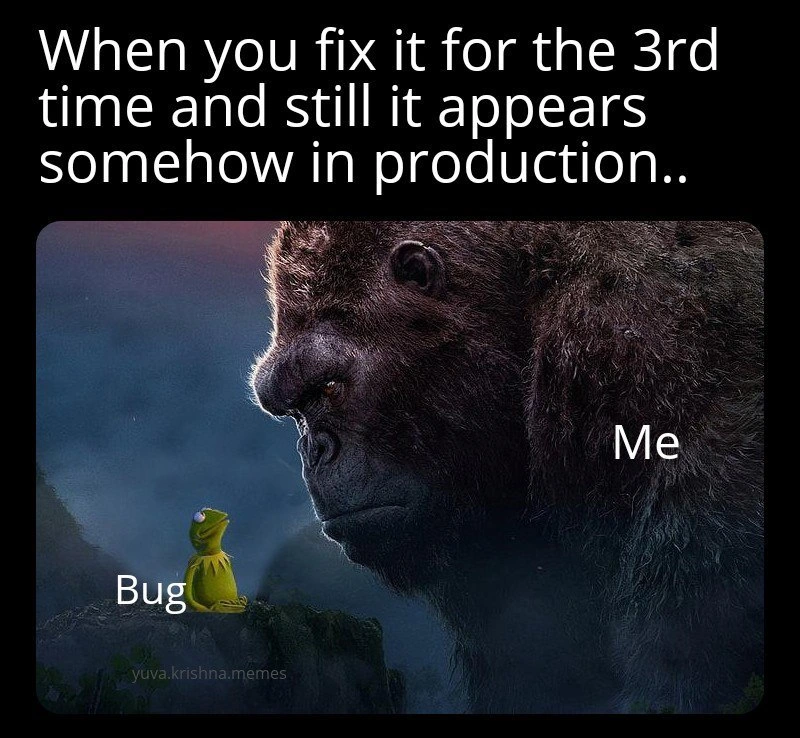
The top text of the meme says: “When you fix it for the 3rd time and still it appears somehow in production…” – so clearly, this is about a persistent bug that has required multiple fixes. By the third time, any developer (even a junior one) is feeling pretty frustrated and maybe a bit haunted 👻. It’s like, “Wait, didn’t we squash this already? Why is it back?!”
In the image, we have a huge gorilla facing a tiny frog. The gorilla is labeled “Me” (the developer), and the frog is labeled “Bug.” This visual is a metaphor: the developer is shown as this powerful giant (perhaps referencing King Kong, the famous giant gorilla from movies), and the bug is this small, seemingly weak creature (Kermit the Frog, a tiny puppet frog from the Muppets). Normally, you’d think the giant gorilla would have no trouble defeating a tiny frog, right? That’s how it should be when fixing a simple bug – a developer with their tools and knowledge should be able to easily squash a small glitch. But in the meme, despite the gorilla’s size and presumably its efforts, the frog (the bug) is still there, staring back. The frog doesn’t look scared at all! This illustrates the feeling that no matter what you do, this bug just won’t die. The scale difference (often tagged as the dev vs bug scale in meme context) emphasizes how ridiculous it feels: you (the developer) have thrown hours of debugging effort, patches, and tests at it (you’ve basically become a huge raging gorilla), yet that tiny bug still survives and even has the audacity to appear again in the next production release.
Let’s talk about why a bug might do this in real life. A few things a junior developer should know:
- Root Cause vs Superficial Fix: Sometimes the fix we implement isn’t addressing the actual root cause of the bug. For example, imagine a login bug where users get kicked out if their session data is handled a certain way. The first fix might be “If user data is missing, just reinitialize it” – it stops the immediate crash (good!) but doesn’t answer why the data was missing in the first place. If the real cause (say, a different part of the code erroneously clearing session data) isn’t fixed, the bug (users getting kicked out) can happen again via another path. So it “appears again in production” because our fix was like putting tape over a leaky pipe instead of replacing the broken section – it held for a while, but eventually water found another way out.
- Testing vs Real World: As a newer dev, you’ll learn that the testing environment can never be exactly the same as the real production environment. Maybe on your machine or in QA, you have debug mode on, or you don’t have as much traffic, or certain features are turned off. The bug might only show up when there’s a lot of users doing a specific thing at the same time, or when real data (which can be messy or unexpected) flows through. That’s why we have sayings like "Works on my machine!" – sometimes code seems fine in development, but once it hits real users, unforeseen problems emerge. This meme’s scenario is exactly that: it seemed fixed in test, but somehow in production it’s still happening. It implies our tests missed something.
- Regression Bug: This term means an old bug has returned. Often, development is iterative: you fix things, you add new features. Without careful regression testing (re-running old tests or scenarios), it’s easy to accidentally break something that was fixed. It’s like if you have a video game and patch a glitch in level 1, but later an update to level 3 accidentally brings that glitch back in level 1. Oops! Maybe a new code change overwritten the fix or introduced a similar flaw. That’s why teams maintain a suite of unit tests or integration tests – to catch regressions by automatically checking that previously fixed bugs remain fixed. If those tests are missing or not thorough, a bug can slip back in unnoticed until users encounter it again.
The categories given (Bugs, Debugging_Troubleshooting, Production) all point to the situation this meme jokes about. Bugs in software are normal – every developer deals with them. Debugging is often a big part of the job: tools like debuggers, logging, and test frameworks help, but it can still be tricky. And production is where you really don’t want to see a bug, because it affects real users or the business (and might wake you up at night if you’re on call!). The common tags like “DebuggingFrustration” and “BugsInSoftware” are exactly what’s happening here: it’s frustrating to fix a bug multiple times. “RegressionBugs” is a key term: a regression is exactly this scenario of a revival of an old issue.
To connect with the meme’s imagery one more time: think of the developer’s emotional journey. The first time you saw the bug, you were maybe a bit concerned (“A wild bug appeared!”). You fixed it, feeling victorious. The second time it showed up, you’re thinking “Huh, did I not fix that properly? Alright, round 2, let’s go.” By the third time… now you’re King Kong-level furious or desperate, maybe both. The huge gorilla labeled “Me” represents that escalated response – pulling out the big guns, maybe rewriting a whole module or adding lots of logging, determined to crush the bug once and for all. Meanwhile the bug sitting there as Kermit is almost mocking – Kermit has a somewhat neutral, innocent look, which makes it funnier: this tiny frog (the bug) is like “Oh, hello again!” The watermark “yuva.krishna.memes” tells us this is a meme image someone created or shared, combining these elements to get a laugh from developers who recognize themselves in this battle.
In summary, at Level 2 we understand that this meme is about that one bug that refuses to be fixed. It’s highlighting a common beginner-to-intermediate lesson in development: sometimes you have to dig deeper to truly solve a problem, and you need to test in conditions close to reality. And it’s okay – even experienced devs end up feeling like they’re going ape (pun intended 🦍) on a simple bug that just won’t go away. The key is to stay calm, systematically investigate, and maybe get a second pair of eyes on the code. But until it’s fixed for real, you might also cope like we do – by sharing a meme and having a little laugh (albeit a pained one) about the situation.
Level 3: Regression Resurrection
For seasoned developers, this image hits a nerve by illustrating a regression bug that just won’t stay dead. The caption "When you fix it for the 3rd time and still it appears somehow in production..." is basically every engineer’s recurring nightmare. You’ve deployed patch after patch, yet the issue keeps coming back like a zombie bug rising from the grave. Why is this so funny (and painful)? Because it’s too real. We’ve all encountered that one stubborn issue that survives multiple “fixes” and haunts release after release. The humor here comes from the absurd role reversal in the image: "Me" (the developer) is a giant, ferocious gorilla – presumably throwing the full weight of our expertise and code fixes at the problem – while the "Bug" is a tiny Kermit the Frog – seemingly meek and squishable. Yet, despite the size difference, Kermit-Bug is calmly perched on the ledge staring right back, unafraid. It’s an epic dev vs. bug showdown, and embarrassingly, the bug is holding its ground. The drastic scale contrast exaggerates how a tiny piece of bad code (or a small missing check) can tower over our peace of mind release after release. The developer feels like King Kong swatting at a fly, yet the fly just keeps coming back into production. 🐸👾
So, what systemic issues or shared experiences are at play? First, this is a textbook case of a regression: a bug that we thought was fixed but has reappeared (perhaps in a slightly new form). It highlights the gap between our development/testing environment and the wild world of production. In a controlled QA environment we often say “All tests passed, looks fixed,” but once deployed, boom, the error resurfaces. This could happen for a few reasons:
- Incomplete Fix: The initial fixes may have treated a symptom rather than the root cause. For instance, maybe the bug was that user data occasionally saved incorrectly. The first “fix” might have just added a null-check to prevent a crash, the second “fix” tweaked a configuration to handle a special case… but the real underlying bug (say, a deeper logic error or race condition in saving data) was never truly resolved. So the bug or its effects keep resurfacing in new ways.
- Environment Differences: Often Production issues only manifest under certain conditions (high load, specific data, real user behavior) that are hard to perfectly simulate in testing. The meme’s “somehow in production” hints at that almost supernatural way bugs only show their face when real users are around. A fix might appear to work on your machine or staging (hence that classic sarcastic excuse: “Well, it works on my machine.”), but in the production environment – with different timing, more threads, more data, or a slightly different config – the bug finds a way. It’s like the bug lies dormant until it hits real traffic, then says “Hello, remember me?”
- Merged or Versioning Mix-ups: A really cynical scenario (and oh boy, it happens): you fixed the bug in one branch or microservice, but somehow that fix never made it to the actual deployed version. Maybe there was a merge conflict and the fix got overwritten, or someone deployed an older build by mistake. So you think you fixed it thrice, but production is essentially running fix #1 or #0 still. (Cue the King Kong rage when you realize the build system or release process failed you.)
- New Code, Same Old Bug: The codebase evolves, and a well-intentioned refactor or a new feature might inadvertently reintroduce the exact same issue. Perhaps a colleague wasn’t aware of the original bug and wrote something that brings the old behavior back. In large teams, one developer’s “solved bug” is another developer’s “mysterious new bug” a few sprints later. It’s the circle of (dev) life: you kill the bug in one place, it respawns in another.
The meme resonates with the debugging frustration we feel in these scenarios. By the third fix, you’re not just fixing code – you’re questioning your sanity. You start doubting whether you really fixed it the last time or if gremlins are undoing your commits. This can seriously erode confidence in the release: both the developer’s confidence (“Did I actually understand what’s happening?”) and the team’s confidence in the product (“We told users it was fixed... now we look incompetent.”). Experienced devs know that a persistent bug like this often signals deeper problems: maybe inadequate testing (no proper regression tests were written after the first fix), or rushed deployment processes, or a brittle architecture where small changes have unpredictable side effects. It can also indicate technical debt – perhaps the code in question is so poorly structured (spaghetti code, global state, etc.) that patching one spot causes something else to break. This is where the cynical mantra “fixing one bug introduces two new bugs” comes from – a bitter nod to reality in messy codebases.
Notice how the meme’s text says “and still it appears somehow in production,” with an emphasis on somehow. That somehow is doing a lot of work – it captures the almost magical-seeming ability of certain issues to slip past every safeguard. Everyone deployed confident the bug was gone for good this time, and yet, here we are staring at the logs in disbelief as the same error pops up. The developer-as-King-Kong in the image looks exhausted and exasperated, which is exactly how it feels by round three of fighting the same fire. By then, you’re not just fixing code, you’re basically performing an exorcism on your application hoping this ghost doesn’t return. The humor is that any dev who has been on-call or responsible for production releases has lived this moment: deploying a third hotfix at some ungodly hour, muttering “Why… won’t… you… just… die?!” at the bug 🦟 (and possibly at your screen).
In essence, Level 3 reveals the industry in-joke: bugs in software can exhibit a horror-movie level of resiliency. The more times a bug comes back, the more it feels like you’re trapped in "Groundhog Day" debugging or a boss fight with multiple phases. The meme is funny because it’s a hyperbole of our pain – we’ve all been the giant gorilla raging at a tiny bug that just refuses to be squashed, and sometimes humor is the only coping mechanism when you’re deploying "Fix version 4.0" in as many weeks.
Level 4: The Immortal Heisenbug
At the most theoretical level, this meme hints at the insidious class of bugs that seem almost unkillable due to fundamental limits of software predictability. In computer science, there's the concept of a Heisenbug – named after the Heisenberg Uncertainty Principle – which is a bug that vanishes or alters its behavior when you try to study it (like adding logging or running a debugger). These are the quantum ghosts of software: the act of observing or attempting to fix them can change the timing or memory layout enough that the bug hides temporarily. It's as if the bug knows you're watching, so it behaves when under scrutiny, only to re-emerge in production when your guard is down. This meme’s giant gorilla (the developer) looming over the tiny frog (the bug) ironically captures that scenario: despite the developer’s massive interventions (the gorilla's size), the bug sits fearlessly in production like Kermit saying, "Is that all you got?"
On a deeper level, the meme evokes the undying nature of certain bugs, calling to mind the Halting Problem and other theoretical limits: it's mathematically impossible to perfectly analyze every path of a complex program for bugs (analogous to how you can't write a program to detect all infinite loops). Real-world systems have astronomical state spaces and unpredictable interactions, especially in distributed systems or multi-threaded environments. A fix that isn’t root-cause complete might only address one manifestation of the problem. For example, imagine a race condition in concurrent code: you might add a slight delay or a lock that fixes one timing scenario, but another subtle thread interleaving still breaks things. The bug persists like a hydra – cut off one head (one manifestation), and two more pop up elsewhere. Formal methods like model checking or formal verification could, in theory, prove a fix correct for all cases, but those are extremely hard to apply to full production code under real deadlines. So, from a hardcore systems perspective, the meme underlines a truth: some bugs achieve a kind of software immortality because our tools and tests can’t pin them down in all cases. Until we bring out the big theoretical guns (or rewrite the entire feature from scratch), these persistent bugs keep surviving every "fatal" blow. In other words, the meme isn’t just joking – it’s alluding to the almost mythical resilience of certain issues given the complexity and fundamental unpredictability in software systems.
Description
Meme with black borders shows white caption text at top: "When you fix it for the 3rd time and still it appears somehow in production..". Inside, a cinematic image depicts a huge, realistic gorilla (resembling King Kong) looming over a tiny Kermit-the-Frog figure on a rocky ledge at dusk. The gorilla is labeled "Me" in white text, while the frog is labeled "Bug"; a faint watermark reads "yuva.krishna.memes". The drastic size contrast humorously conveys a developer’s exasperation when a supposedly resolved defect keeps resurfacing in the live environment, highlighting real-world regression, production confidence erosion, and the never-ending debugging cycle
Comments
15Comment deleted
Turns out the bug isn’t resurrecting; our blue-green deploy just keeps politely sending half the traffic to a zombie container image that’s old enough to have its own pension plan
After 20 years in this industry, I've learned that some bugs aren't actually bugs - they're undocumented features that have achieved sentience and formed a union with excellent lawyers who specialize in edge case law
This is the software equivalent of quantum entanglement: the bug exists in a superposition of fixed and unfixed states until observed in production, where it collapses into 'definitely still broken.' After the third fix, you start suspecting it's not a bug anymore - it's a feature of your deployment pipeline's chaos engineering strategy
Not recurring - it's the prod-exclusive mutant thriving in eventual consistency's dark corners, mocking your strongly consistent dev env
You know it’s enterprise when you patch it thrice, but CI deploys the canary rollback while a stale cache and a missed forward-merge perform version-controlled necromancy
Third fix and it still shows up? That’s not a bug - it’s a distributed-systems feature: artifact promotion mismatch, sticky sessions, and a CDN that believes in eventual consistency more than your release notes
Just forgot to save. :) Comment deleted
Ctrl+S Ctrl+S Ctrl+S Ctrl+S Comment deleted
They asking everyone who got that to return it them. Somebody managed to cash it out before they told Comment deleted
They promised to give him $500 if he gives it back Comment deleted
Gives back about $28m Comment deleted
700 btc vs 500 usd Hmmm Tough choice Comment deleted
BlockFi threatened him by lawsuit if he rejects Comment deleted
They can't do shit about it (probably) Comment deleted
I would rather kill him in case Comment deleted