
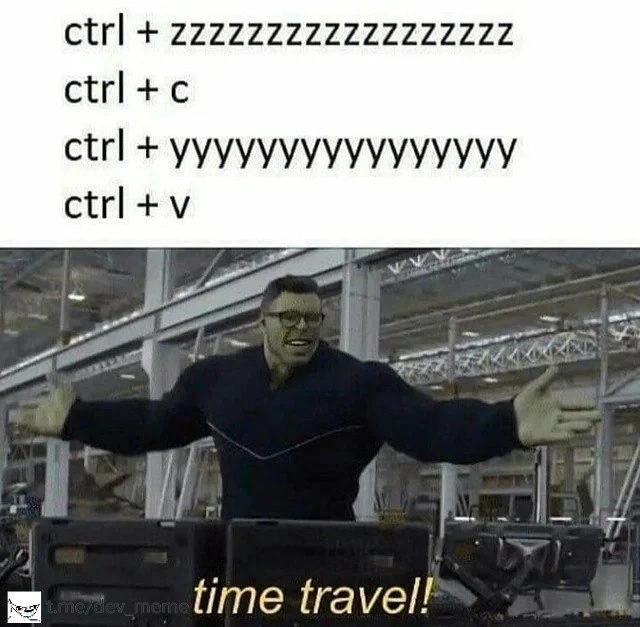
Ctrl+Z, Ctrl+Y: The Original Time Machine
Why is this VersionControl meme funny?
Level 1: Keyboard Time Travel
Imagine you’re drawing a big picture, and you make a mistake – you accidentally erased the sun in the corner of your drawing. Now, picture having a magic remote control that lets you go back to just before you made that mistake, so the sun is back in the picture. You grab a copy of that sun, then fast-forward to the present where the rest of your drawing is still there, and you stick the sun back on. That’s basically what programmers can do with special keys on the keyboard! Pressing undo (Ctrl+Z) is like rewinding time in a painting: the last thing you did goes away and things go back to how they were. Pressing redo (Ctrl+Y) is like fast-forwarding time again: if you went back and then decide to return things to the way they were, redo brings your work forward to the current moment. By using undo and redo, a coder can jump to an earlier version of their code and then back to the latest version, almost like a little time jump. When they copy something from that earlier moment and bring it back with them, it feels just like sneaking an object out of the past and placing it in the present. It’s a fun and happy feeling – kind of like a superhero shouting “Yes! I did time travel!” because they fixed a mistake by hopping through time. In simple terms, those keyboard shortcuts let developers fix accidents and retrieve what they need as if they had a tiny time machine for their work. It’s cool, it’s easy, and it makes us feel a bit like time-traveling heroes in our own coding story.
Level 2: Rewind and Replay
Let’s break down the magic step by step. Modern code editors and IDEs (Integrated Development Environments) keep track of every change you make to your code in a sort of timeline. Think of it as a list of your recent edits. The Ctrl+Z shortcut is the universal “undo” command – pressing it tells the editor to step back in time by one change. For example, if you deleted a line of code by mistake, hitting Ctrl+Z will undo that deletion and bring the line back. Most editors support multiple undos, so you can press Ctrl+Z over and over to keep walking backwards through your changes (hence the long string of “z” characters in the meme, implying the user is undoing many times in a row). Now, what about Ctrl+Y? That’s the standard “redo” command – it moves time forward again by re-applying an undone change. If you went back one too many steps with undo, Ctrl+Y lets you redo to step forward to the change you Undid. In the meme’s text, a bunch of “y” letters means the user is redoing repeatedly, essentially fast-forwarding the code back to its latest state.
We also see Ctrl+C and Ctrl+V in the meme’s sequence. Those are the beloved copy and paste shortcuts. Ctrl+C copies whatever text is currently selected into the clipboard (a special memory buffer that holds your copied data), and Ctrl+V inserts (pastes) that clipboard content at the cursor position. This copy-paste workflow is extremely common in development – whether it’s copying a code snippet from one part of your file to another, or indeed copying from an external source (hello Stack Overflow!). In this scenario, the developer is doing something clever:
- Undo a bunch (
Ctrl+Zmultiple times): They travel back through the code’s edit history to find an earlier state where something useful was present (perhaps a piece of code that was removed or changed). The editor is acting like an archive of recent moments, an editor time machine. - Copy (
Ctrl+C): Once they see the code they need from that past state, they highlight it and copy it. Now that code snippet is safely captured in the clipboard. - Redo back (
Ctrl+Ymultiple times): Having grabbed what they needed from the past, they now return to the present by redoing all the undone changes. The codebase is restored to the latest version, as if nothing happened. - Paste (
Ctrl+V): Finally, they paste the copied old snippet into the current code. Essentially, they’ve pulled something out of a past version and injected it into the present.
How cool is that? They didn’t need a separate backup or a time machine; the IDE’s undo/redo stack was the time machine! This is why the Hulk image at the bottom shouts “time travel!” – it comically likens the mundane act of hitting undo and redo to a grand sci-fi moment of actual time travel. In Marvel’s Avengers, the Hulk (Bruce Banner) is astonished and celebratory when they crack the problem of time travel. The meme creator borrowed that exact scene to dramatize how a developer feels triumphantly geeky doing this undo-redo copy-paste trick.
From a new developer’s perspective, it’s important to understand that this isn’t some exotic hack – it’s actually standard behavior of almost every text editor or IDE out there. The DeveloperExperience (DX) in good editors includes unlimited (or very deep) undo and redo history precisely because developers often experiment and need to roll back mistakes. These keyboard shortcuts are essential tools: they speed up your workflow immensely. Instead of manually retyping code you deleted or trying to remember what was there, you can trust Ctrl+Z to recover it instantly. And if you change your mind or overshoot how far you went back, Ctrl+Y puts you forward again. It’s like having a safety net while coding – you’re free to try things, because you can always rewind. Just remember: if you undo and then make new edits (without redoing), most editors will throw away the “future” changes from that point (since you’ve created a new timeline, the old redo path vanishes). That’s why in the meme the user copies the code before making any new change. It’s a nifty little developer productivity trick that we often learn by accident the first time we desperately dig through our undo history to rescue some lost text.
All the terms in the meme are really just shorthand for everyday editing actions: undo (Ctrl+Z), redo (Ctrl+Y), copy (Ctrl+C), and paste (Ctrl+V). They might seem basic, but when combined creatively, they let developers do things that feel borderline magical. The humor here comes from recognizing how something so ordinary – flipping an editor’s history back and forth – can feel empowering, almost like you temporarily turned your editor into a time travel device. It’s a lighthearted nod to how attached we developers are to these keys. We hit them without thinking, relying on muscle memory to fix mistakes or refactor code. When seen through a fun lens, using them in quick succession is like being a time traveler in your own code. And who doesn’t love the idea of a time-traveling coder, especially when a pop culture reference (like the Hulk joyously announcing success) perfectly captures that emotion?
Level 3: The Ctrl-Z Continuum
In a seasoned developer’s world, an editor’s undo history is basically a time machine for code. With a flurry of keystrokes, you can jump backward and forward in your file’s timeline as if warping through the space-time continuum of your project. The meme humorously illustrates the classic dev trick: mashing Ctrl+Z (undo) repeatedly to rewind changes, copying something from the past, then slamming Ctrl+Y (redo) to rocket back to the present and paste it in. It’s a tongue-in-cheek portrayal of how IDEs and text editors let us bend time (or at least our code’s history) to our will. We’ve all been there — accidentally deleting a block of code at 2 AM and instinctively hitting undo like a panic button until our lost code reappears. Then, like a stealthy time-traveler, we copy the resurrected snippet, redo the timeline to restore the latest state, and paste that snippet right where we need it. Voila, problem solved as if the mistake never happened! No wonder the Hulk in the lab is jubilant exclaiming “time travel!” – that triumphant stance perfectly captures a dev’s feeling after recovering code from the abyss of the undo stack. This meme resonates because it exaggerates a routine part of the developer experience into a superhero-level feat. It highlights how keyboard shortcuts like undo/redo empower our productivity and make us feel like we’re wielding cosmic powers in an otherwise ordinary code editor. In practice, the editor’s undo command and redo command maintain an internal log of changes (a history of insertions, deletions, tweaks). Each Ctrl+Z step moves one notch back in that history, and each Ctrl+Y step moves one forward. When you do this rapidly, the code on screen blinks between older and newer versions, practically teleporting between states. It’s a developer humor goldmine because it’s an everyday act (everyone uses Undo/Redo) framed as a grand sci-fi accomplishment. Behind the scenes, this time-warping is enabled by clever editor design: changes are stored in an undo stack, and redo is often just a forward pointer in that stack. As long as you don’t introduce new edits while “back in time,” you can safely return to the future state. We’ve effectively turned our editor into a mini editor_time_machine, retrieving pieces of code from earlier moments. It’s funny because it’s a mundane tool behaving like a flux capacitor for a moment. And it’s also a bit cathartic – in a world where we can’t literally undo life’s mistakes, at least in our code we can hit a key combo and pretend to be Masters of Time (and Code). Developer productivity hinges on these little superpowers we take for granted: the ability to iterate, experiment, and yes, occasionally perform a cheeky copy-paste from a prior state without missing a beat. The meme hyperbolizes this everyday workflow to remind us how magical it feels the first time you realize “Hey, I can just unwind time in my program!” and even as a veteran, that feeling never entirely goes away. After all, every developer secretly enjoys playing Time Lord with their code, even if just for a few keystrokes.
Description
A two-panel meme. The top panel has a white background with black text listing four keyboard commands: "ctrl + zzzzzzzzzzzzzzzzz", "ctrl + c", "ctrl + yyyyyyyyyyyyyyy", and "ctrl + v". The bottom panel features the 'Professor Hulk Time Travel' meme format, showing Professor Hulk from Avengers: Endgame with a cheerful expression and arms outstretched. A caption at the bottom reads "time travel!". A small watermark `t.me/dev_meme` is visible in the bottom-left corner. The meme humorously portrays a common developer workflow as a form of time travel. The sequence of commands - undoing multiple steps (`Ctrl+Z`), copying content (`Ctrl+C`), redoing those steps (`Ctrl+Y`), and finally pasting (`Ctrl+V`) - is a familiar, albeit clunky, method for retrieving a piece of code or text from a previous state without using formal version control like Git. For senior developers, it's a relatable nod to the micro-level history management that happens within an editor, distinct from the larger commits and branches managed by Git. It's the 'poor man's version control' that everyone has used at some point to fix a mistake or recover a lost snippet
Comments
7Comment deleted
The real developer time travel paradox is mashing Ctrl+Z to escape a bug, only to Ctrl+Y your way right back into the same broken timeline
Ctrl+Z ↔ Ctrl+Y: the IDE’s cut-rate event-sourcing - feels like time travel until the aggregate root is “unsaved file,” and then your only working flux capacitor is git reflog
When you're frantically undoing and redoing to find that one state where the race condition didn't manifest, knowing full well you're just postponing the inevitable conversation about why your distributed system relies on prayer-based eventual consistency
Every senior engineer has experienced this exact moment: you wake up at 3 AM with your face on the keyboard, only to discover you've ctrl+z'd your way back to last Tuesday's commit, then ctrl+y'd forward to a timeline where your refactor actually worked. It's not a bug, it's a feature of quantum version control - Schrödinger's codebase exists in all states until you git status
Who needs git reflog? Ctrl+Z to the pre-bug timeline, Ctrl+C the only good function, Ctrl+Y back to the cursed present, Ctrl+V the hotfix - enterprise-grade time travel
Ctrl+Z back to the pre‑regression epoch, copy, Ctrl+Y to HEAD, paste - poor man’s event sourcing for when you forgot to stash
Unlike Git's shallow reflog, IDE undo stacks let seniors casually hop timelines without force-push regrets

