
The Hidden Mess Behind a Clean `ls`
Description
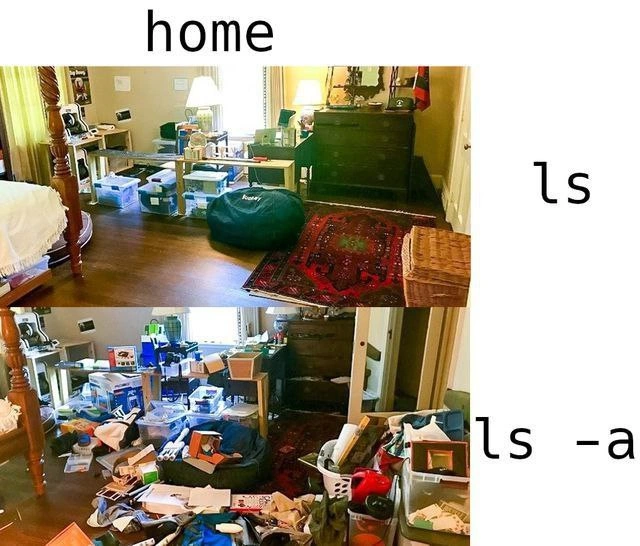
A two-panel meme that visually compares the output of the Unix `ls` and `ls -a` commands to the state of a room. The top panel, labeled 'home' and 'ls', shows a reasonably tidy and organized bedroom. This represents the standard `ls` command, which lists only the visible files in a directory. The bottom panel, labeled 'ls -a', depicts the same room in a state of extreme disarray, with clutter covering every surface. This hilariously illustrates the effect of the `-a` flag, which reveals all files, including the numerous hidden 'dotfiles' (configuration files) that accumulate in a user's home directory over time. The meme serves as a relatable analogy for developers and system administrators who know that a seemingly clean directory can hide a chaotic amount of configuration and temporary files just beneath the surface



Comments
25Comment deleted
I don't trust anyone whose `ls -a ~` output doesn't look like an explosion in a configuration factory. A clean home directory is a sign of a sociopath or someone who just installed Arch Linux last week
`ls -a $HOME` is a stratigraphic dig of my career: .cshrc from Solaris, .bashrc from the dot-com bust, .zshrc from the container craze - each one still trying to source the others’ aliases
Just like production systems where 'kubectl get pods' shows everything running fine, but 'kubectl describe' reveals 47 restart loops, 3 OOMKills, and that one init container that's been pulling an image for the last 6 hours
Every senior engineer knows that 'ls' is the polished demo you show stakeholders, while 'ls -a' is the actual state of your home directory at 2 AM during an incident - complete with .swp files, .DS_Store artifacts, and that embarrassing .bash_history you forgot to gitignore
ls: the architecture diagram; ls -a: the actual system - dotfiles, stale creds, and the “temporary” bash script quietly running prod since 2012
Home: the polished MVP demo. ls -a: production with a decade of unpruned .cache and tech debt sprawl
ls is the architecture diagram; ls -a is the actual call graph living in $HOME - ~/.aws, ~/.kube, ~/.config, and every POC a CLI ever smuggled in
speaking of ls -a lets play a 'how fucked-up your home folder is?' game ls -Al | wc -l i have 47 💀💀💀💀💀💀💀💀 Comment deleted
.sh ls -al ~ | wc -l TGPy> 35 Comment deleted
you loose ☠️ Comment deleted
guess what Comment deleted
cd /home/$USER/desktop for file in *; do if [ -f "$file" ]; then mv -- "$file" "$(mktemp -u)" fi done Comment deleted
@RiedleroD wanna try on your mainlydriver? Comment deleted
no Comment deleted
💀😂 Comment deleted
I have "exa: Unknown argument -A" Comment deleted
apart from exa requiring lowercase -a, 121 💀 Comment deleted
amateur Comment deleted
wtf is this? Comment deleted
sl Comment deleted
ls - lai Comment deleted
What will -a do? Comment deleted
Ah Comment deleted
Thx Comment deleted
170 now, and I have cleaned up a bit recently Comment deleted